When building production APIs on AWS, enterprise architects have long treated Amazon API Gateway as the default front door for serverless compute. For traditional CRUD microservices, its integration model is well understood. But as engineering teams transition from simple single-turn prompt completions to multi-turn autonomous agent loops, retrieval-augmented generation (RAG) pipelines, and reasoning models, they inevitably slam into an immovable operational constraint:
The Amazon API Gateway 29-second integration timeout.
API Gateway enforces a hard, non-configurable timeout of 29,000 milliseconds on all synchronous backend integrations across both REST APIs and HTTP APIs. AWS Support will not raise this limit under any enterprise support plan or service quota exception.
In the era of Generative AI, where multi-step agent reasoning, tool-use loops, code interpreters, and chain-of-thought token generation routinely take 45 to 120+ seconds, relying on standard API Gateway synchronous execution leads directly to production failures: HTTP 504 Gateway Timeouts, orphaned backend Lambda executions that burn compute budget, and degraded end-user experience.
This guide explores the engineering mechanics behind this bottleneck and delivers three battle-tested architectural patterns to break through the 29-second wall on AWS.
1. Anatomy of the 29-Second Wall
To understand why GenAI workloads fail, consider what happens under the hood during a complex agentic invocation:
1. Client Dispatches Request: The user submits a complex analytical query (e.g., “Analyze Q3 revenue anomalies against regional ERP databases, synthesize the findings, and generate a summary forecast chart”).
2. Agentic Reasoning Loop: The orchestrator invokes an LLM (such as Claude 3.7 Sonnet or Amazon Nova Pro via Amazon Bedrock) with an explicit thinking budget.
3. Multi-Hop Tool Execution: The LLM requests tool calls: querying Amazon OpenSearch Service for vector embeddings, executing SQL queries against Aurora PostgreSQL, and executing Python code in a sandbox.
4. Iterative Synthesis: Each tool result feeds back into the model context for reflection and final response generation.
Even with optimized models and parallel tool execution, this loop routinely takes 35 to 90 seconds.
The Silent Failure Mechanism
When you route this request through Amazon API Gateway to AWS Lambda, a dangerous disconnect occurs at the 29-second mark:
%%{init: {
  'theme': 'base',
  'themeVariables': {
    'actorBkg': '#FFF3E0',
    'actorBorder': '#FF9900',
    'actorTextColor': '#232F3E',
    'actorLineColor': '#FF9900',
    'signalColor': '#0073BB',
    'signalTextColor': '#0F172A',
    'labelBoxBkgColor': '#FFF3E0',
    'labelBoxBorderColor': '#FF9900',
    'labelTextColor': '#232F3E',
    'noteBkgColor': '#FFF8E7',
    'noteBorderColor': '#FF9900',
    'noteTextColor': '#232F3E',
    'sequenceNumberColor': '#FFFFFF'
  }
}}%%
sequenceDiagram
    autonumber
    participant Client as Web / Mobile Client
    participant APIGW as Amazon API Gateway
    participant Lambda as Worker Lambda (Agent)
    participant Bedrock as Amazon Bedrock (LLM)

    Client->>APIGW: POST /api/v1/agent/run (Sync HTTP)
    APIGW->>Lambda: Invoke Function (Sync)
    Lambda->>Bedrock: Multi-turn Reasoning & Tool Loop
    Note over Lambda,Bedrock: Agent reasoning underway (Elapsed: 15s... 25s...)

    Note over APIGW: 29.000s Hard Integration Timeout Reached!
    APIGW-->>Client: HTTP 504 Gateway Timeout
    Note over Client: User sees abrupt failure & error banner

    Note over Lambda,Bedrock: Lambda is UNAWARE of client disconnect!
    Bedrock-->>Lambda: Agent finishes final synthesis at t=52s
    Lambda-->>APIGW: Return 200 OK (Dropped by closed gateway socket)
    Note over Lambda: 52 seconds of billed compute completely wasted!
Because API Gateway terminates the downstream client socket without sending a cancellation signal to the execution environment, the Lambda worker continues running to completion, consuming concurrency slots and racking up compute charges for an answer that will never be delivered.
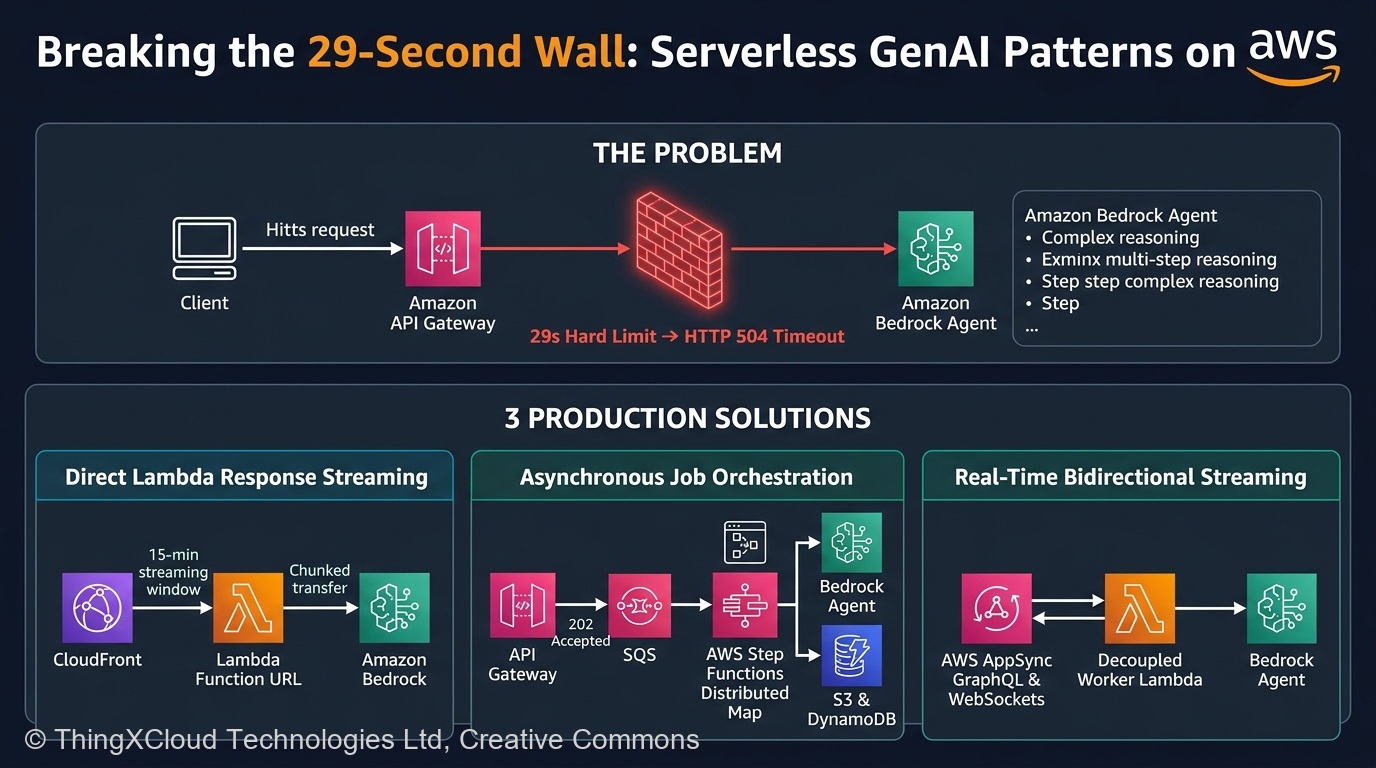
2. Pattern 1: Direct Lambda Response Streaming via Function URLs & CloudFront
If your workload is interactive (such as a conversational AI copilot or interactive coding assistant) where the user expects immediate visual feedback, streaming the response token-by-token is the gold standard.
The Architectural Breakthrough
AWS Lambda natively supports Response Streaming via Lambda Function URLs. Unlike API Gateway:
- 15-Minute Maximum Execution Window: Lambda Function URLs support the full 15-minute (900 seconds) Lambda invocation limit, completely eliminating the 29-second barrier.
- HTTP Chunked Transfer Encoding: Data is streamed incrementally using
Transfer-Encoding: chunked, allowing the browser to render tokens in real time via Server-Sent Events (SSE). - Sub-Second Time-to-First-Token (TTFT): The client receives the initial HTTP 200 headers within 500–800ms, keeping the network connection warm and engaged.
%%{init: {
  'theme': 'base',
  'themeVariables': {
    'primaryColor': '#FFF3E0',
    'primaryTextColor': '#232F3E',
    'primaryBorderColor': '#FF9900',
    'lineColor': '#232F3E',
    'clusterBkg': '#F8FAFC',
    'clusterBorder': '#CBD5E1',
    'edgeLabelBackground': '#FFFFFF',
    'nodeTextColor': '#232F3E'
  }
}}%%
flowchart TD
    Client["Client Browser / Mobile App"] -->|"HTTPS Request (Custom Domain)"| CF["Amazon CloudFront Distribution
(Origin Timeout: 180s)"]
    CF -->|"IAM SigV4 Signed / OAC"| FURL["AWS Lambda Function URL
(InvokeMode: RESPONSE_STREAM)"]
    FURL -->|"Chunked SSE Stream (0 - 15 mins)"| Worker["Lambda Streaming Handler
(Python / Node.js)"]
    Worker -->|"invoke_model_with_response_stream"| Bedrock["Amazon Bedrock
(Claude 3.7 / Nova Pro)"]

    classDef awsCompute fill:#FFF3E0,stroke:#FF9900,stroke-width:2px,color:#232F3E;
    classDef awsEdge fill:#EBF8FF,stroke:#0073BB,stroke-width:2px,color:#004C74;
    classDef awsAI fill:#F0FFF4,stroke:#1D8102,stroke-width:2px,color:#145202;

    class Client,CF awsEdge;
    class FURL,Worker awsCompute;
    class Bedrock awsAI;
Production Implementation: Python Streaming with Amazon Bedrock
Below is a production-grade Python implementation utilizing AWS Lambda’s response streaming interface with Amazon Bedrock:
"""
streaming_agent_handler.py
AWS Lambda Response Streaming handler consuming Bedrock Converse / InvokeModel streams.
"""
import json
import os
import boto3
from botocore.exceptions import ClientError

bedrock_runtime = boto3.client("bedrock-runtime", region_name=os.environ.get("AWS_REGION", "us-east-1"))

def lambda_handler(event, response_stream, context):
    """
    AWS Lambda Response Streaming Entrypoint.
    Configured with InvokeMode: RESPONSE_STREAM in Function URL settings.
    """
    body = json.loads(event.get("body", "{}"))
    prompt = body.get("prompt", "Analyze the architecture trade-offs.")
    model_id = os.environ.get("BEDROCK_MODEL_ID", "anthropic.claude-3-7-sonnet-20250219-v1:0")

    # Write initial HTTP response metadata
    metadata = {
        "statusCode": 200,
        "headers": {
            "Content-Type": "text/event-stream",
            "Cache-Control": "no-cache, no-transform",
            "Connection": "keep-alive",
            "X-Accel-Buffering": "no"
        }
    }
    response_stream.write_metadata(metadata)

    try:
        # Request inference stream from Amazon Bedrock
        payload = {
            "anthropic_version": "bedrock-2023-05-31",
            "max_tokens": 4096,
            "messages": [
                {"role": "user", "content": prompt}
            ]
        }

        bedrock_response = bedrock_runtime.invoke_model_with_response_stream(
            modelId=model_id,
            body=json.dumps(payload),
            contentType="application/json",
            accept="application/json"
        )

        stream = bedrock_response.get("body")
        if stream:
            for event_chunk in stream:
                chunk = event_chunk.get("chunk")
                if chunk:
                    chunk_json = json.loads(chunk.get("bytes").decode("utf-8"))
                    chunk_type = chunk_json.get("type")

                    if chunk_type == "content_block_delta":
                        delta_text = chunk_json.get("delta", {}).get("text", "")
                        if delta_text:
                            # Format as Server-Sent Event (SSE)
                            sse_message = f"data: {json.dumps({'text': delta_text})}

"
                            response_stream.write(sse_message.encode("utf-8"))

        # Send terminal SSE event
        response_stream.write(b"data: [DONE]

")

    except ClientError as e:
        err_msg = json.dumps({"error": str(e.response["Error"]["Message"])})
        response_stream.write(f"event: error
data: {err_msg}

".encode("utf-8"))
    finally:
        response_stream.close()
Production Hardening Considerations
1. Origin Response Timeout on CloudFront: CloudFront defaults to a 30-second origin timeout. When fronting a streaming Function URL with CloudFront, you must increase OriginResponseTimeout in your Cache Behavior Origin Settings to 180 seconds (or request an increase up to the maximum permitted).
2. Buffer Disabling: Intermediate CDNs, proxies, or reverse proxies may buffer chunked data. Always send Cache-Control: no-cache, no-transform and X-Accel-Buffering: no to force immediate TCP frame flushing.
3. Authentication: Function URLs support AWS_IAM auth. For public clients, route through CloudFront with AWS WAF and validate JWTs at the edge using CloudFront Functions or Lambda@Edge.
3. Pattern 2: Asynchronous Job Orchestration with AWS Step Functions
For long-running tasks that run from 2 minutes to hours—such as multi-document summarization, automated codebase auditing, deep research agents, or synthetic data generation—streaming is the wrong pattern. Browsers drop long-lived connections, Wi-Fi networks switch, and mobile devices sleep.
The correct architectural pattern is Asynchronous Job Orchestration leveraging AWS Step Functions Distributed Map and Amazon SQS.
%%{init: {
  'theme': 'base',
  'themeVariables': {
    'primaryColor': '#FFF3E0',
    'primaryTextColor': '#232F3E',
    'primaryBorderColor': '#FF9900',
    'lineColor': '#232F3E',
    'clusterBkg': '#F8FAFC',
    'clusterBorder': '#CBD5E1',
    'edgeLabelBackground': '#FFFFFF',
    'nodeTextColor': '#232F3E'
  }
}}%%
flowchart TD
    Client["Client Application"] -->|"1. POST /api/v1/jobs (Submit)"| APIGW["Amazon API Gateway"]
    APIGW -->|"2. Return 202 Accepted (jobId)"| Client
    APIGW -->|"3. Enqueue Message"| SQS["Amazon SQS FIFO Queue"]

    SQS -->|"4. Trigger Execution"| SFN["AWS Step Functions
(State Machine / Distributed Map)"]

    subgraph AgentLoop ["Step Functions Autonomous Execution"]
        Step1["Plan Strategy & Sub-tasks"] --> Step2["Execute Parallel Tool Calls (Distributed Map)"]
        Step2 --> Step3["Synthesize Findings via Bedrock"]
        Step3 --> Step4["Validate Schema & Quality Gate"]
    end
    SFN --> AgentLoop

    Step4 -->|"5. Store Results"| S3[("Amazon S3 (Artifacts)")]
    Step4 -->|"6. Update Status: COMPLETED"| DDB[("Amazon DynamoDB (Job State)")]

    Client -->|"7. GET /api/v1/jobs/{id} (Poll / Webhook)"| APIGW

    classDef awsCompute fill:#FFF3E0,stroke:#FF9900,stroke-width:2px,color:#232F3E;
    classDef awsStorage fill:#F0FFF4,stroke:#1D8102,stroke-width:2px,color:#145202;
    classDef awsStep fill:#EBF8FF,stroke:#0073BB,stroke-width:2px,color:#004C74;

    class Client,APIGW,SQS awsCompute;
    class SFN,Step1,Step2,Step3,Step4 awsStep;
    class S3,DDB awsStorage;
Why Step Functions Distributed Map is Essential for Agents
Autonomous agents routinely execute parallel tools: fetching 50 documents from an S3 bucket, computing embeddings, querying web search APIs, and evaluating compliance rules.
Running this inside a single Lambda function risks running into Lambda’s 15-minute memory and execution bounds. With Step Functions Distributed Map:
- Each sub-task runs as an isolated Lambda execution.
- The orchestrator can scale up to 10,000 concurrent parallel iterations.
- Transient API throttling from LLM providers (e.g., Bedrock
ThrottlingException) is managed declaratively via state machine retry backoffs without writing bespoke retry code.
Sample ASL State Machine Definition: Resilient Agent Loop
{
  "Comment": "Serverless GenAI Agent Workflow with Bedrock Retry Logic",
  "StartAt": "InitializeJobState",
  "States": {
    "InitializeJobState": {
      "Type": "Task",
      "Resource": "arn:aws:states:::dynamodb:putItem",
      "Parameters": {
        "TableName": "AgentJobs",
        "Item": {
          "JobId": { "S.$": "$.jobId" },
          "Status": { "S": "PROCESSING" },
          "CreatedAt": { "S.$": "$$.Execution.StartTime" }
        }
      },
      "ResultPath": null,
      "Next": "ExecuteAgentReasoning"
    },
    "ExecuteAgentReasoning": {
      "Type": "Task",
      "Resource": "arn:aws:states:::bedrock:invokeModel",
      "Parameters": {
        "ModelId": "anthropic.claude-3-7-sonnet-20250219-v1:0",
        "Body": {
          "anthropic_version": "bedrock-2023-05-31",
          "max_tokens": 4096,
          "messages": [
            { "role": "user", "content.$": "$.prompt" }
          ]
        }
      },
      "ResultSelector": {
        "response.$": "States.StringToJson($.Body)"
      },
      "ResultPath": "$.llmOutput",
      "Retry": [
        {
          "ErrorEquals": [
            "Bedrock.ThrottlingException",
            "Bedrock.ModelTimeoutException"
          ],
          "IntervalSeconds": 2,
          "MaxAttempts": 5,
          "BackoffRate": 2.0
        }
      ],
      "Catch": [
        {
          "ErrorEquals": ["States.ALL"],
          "ResultPath": "$.errorInfo",
          "Next": "HandleFailure"
        }
      ],
      "Next": "PersistResults"
    },
    "PersistResults": {
      "Type": "Task",
      "Resource": "arn:aws:states:::dynamodb:updateItem",
      "Parameters": {
        "TableName": "AgentJobs",
        "Key": { "JobId": { "S.$": "$.jobId" } },
        "UpdateExpression": "SET #s = :status, #r = :result, #t = :completedAt",
        "ExpressionAttributeNames": {
          "#s": "Status",
          "#r": "Result",
          "#t": "CompletedAt"
        },
        "ExpressionAttributeValues": {
          ":status": { "S": "COMPLETED" },
          ":result": { "S.$": "States.JsonToString($.llmOutput.response)" },
          ":completedAt": { "S.$": "$$.State.EnteredTime" }
        }
      },
      "End": true
    },
    "HandleFailure": {
      "Type": "Task",
      "Resource": "arn:aws:states:::dynamodb:updateItem",
      "Parameters": {
        "TableName": "AgentJobs",
        "Key": { "JobId": { "S.$": "$.jobId" } },
        "UpdateExpression": "SET #s = :status, #e = :err",
        "ExpressionAttributeNames": { "#s": "Status", "#e": "Error" },
        "ExpressionAttributeValues": {
          ":status": { "S": "FAILED" },
          ":err": { "S.$": "States.JsonToString($.errorInfo)" }
        }
      },
      "End": true
    }
  }
}
4. Pattern 3: Real-Time Bidirectional Event Streaming via AWS AppSync
While polling works reliably for background batch tasks, it introduces unnecessary HTTP latency overhead and database read pressure when users are watching an active dashboard.
For rich collaborative workspaces, coding assistants, or multi-agent canvases where the user wants to see granular agent progress (e.g., “Searching Vector Index” → “Executing SQL Query” → “Synthesizing” → “Complete”), AWS AppSync GraphQL Subscriptions or API Gateway WebSocket APIs provide the premier architecture.
%%{init: {
  'theme': 'base',
  'themeVariables': {
    'actorBkg': '#FFF3E0',
    'actorBorder': '#FF9900',
    'actorTextColor': '#232F3E',
    'actorLineColor': '#FF9900',
    'signalColor': '#0073BB',
    'signalTextColor': '#0F172A',
    'labelBoxBkgColor': '#FFF3E0',
    'labelBoxBorderColor': '#FF9900',
    'labelTextColor': '#232F3E',
    'noteBkgColor': '#FFF8E7',
    'noteBorderColor': '#FF9900',
    'noteTextColor': '#232F3E',
    'sequenceNumberColor': '#FFFFFF'
  }
}}%%
sequenceDiagram
    autonumber
    participant Client as React / Vue Frontend
    participant AppSync as AWS AppSync (GraphQL)
    participant Worker as Background Agent Worker
    participant Bedrock as Amazon Bedrock

    Client->>AppSync: 1. Subscribe to onAgentEvent(sessionId) (WebSocket)
    AppSync-->>Client: 2. Subscription Acknowledged & Active

    Client->>AppSync: 3. Mutation: startAgent(sessionId, prompt)
    AppSync->>Worker: 4. Async EventBridge Dispatch
    Worker-->>AppSync: 5. Return Ack (Client HTTP request terminates immediately)

    Note over Worker,Bedrock: Autonomous Agent Workflow Executes
    Worker->>Bedrock: Request Reasoning Plan
    Worker->>AppSync: 6. Mutation: publishEvent(status: "PLANNING")
    AppSync--)Client: Push Event: "Planning subtasks..." (via WebSocket)

    Worker->>Bedrock: Execute Code Tool
    Worker->>AppSync: 7. Mutation: publishEvent(status: "EXECUTING_TOOL")
    AppSync--)Client: Push Event: "Running Python sandbox..." (via WebSocket)

    Worker->>AppSync: 8. Mutation: publishEvent(status: "COMPLETE", data: result)
    AppSync--)Client: Push Event: Final Agent Payload Rendered!
The Reconnection Advantage
Unlike a synchronous HTTP stream that aborts permanently when a network drops, the AppSync / WebSocket architecture is network-drop resilient:
1. If the user’s mobile device loses connectivity or switches cell towers, the agent worker in AWS continues executing without interruption.
2. When the client reconnects, it establishes a fresh subscription and queries the current session state from DynamoDB using a timestamp or sequence cursor (lastEventId).
3. No duplicate LLM invocations occur, preventing wasted token costs and duplicate billing.
5. Operational Realities: Memory, Concurrency, and Cost Traps
Breaking the 29-second barrier introduces new operational vectors that architects must monitor and mitigate.
The Streaming Concurrency Trap
In traditional REST APIs with a 150ms P99 latency, a single AWS Lambda provisioned concurrency slot can handle approximately 6.6 requests per second.
When Lambda functions remain active for 60 to 120 seconds streaming tokens from an LLM, Little’s Law dictates concurrency requirements:
$$\text{Concurrency} = \text{Requests Per Second (RPS)} \times \text{Average Duration (Seconds)}$$
For a modest workload of 50 RPS where each agent task runs for 60 seconds:
$$\text{Concurrency} = 50 \times 60 = 3,000 \text{ Concurrent Executions}$$
If your default AWS account regional concurrency limit is 1,000, your application will immediately start returning HTTP 429 Too Many Requests to other microservices in the same account!
Mitigation Strategies:
1. Dedicated Account Separation: Deploy GenAI streaming workloads in a dedicated AWS account within your AWS Organizations structure.
2. Account Concurrency Quota Increases: Request quota increases up to 10,000+ well ahead of production launch.
3. Queue-Based Throttling: For non-interactive workloads, enforce strict concurrency ceilings using Amazon SQS maximum concurrency limits on Lambda event source mappings.
6. Cost Economics: Streaming vs. Polling vs. Subscriptions
Cost structures vary dramatically depending on invocation volume and task duration:
| Cost Dimension | Pattern 1: Lambda Streaming | Pattern 2: Step Functions + SQS | Pattern 3: AppSync Subscriptions |
|---|---|---|---|
| Compute Billing | Billed for every millisecond the stream stays open ($0.0000166667 / GB-s). | Lambda only billed for discrete tool execution time. SFN states billed per transition. | Lambda billed during execution; AppSync billed per million real-time updates ($2.00 / M). |
| API Gateway Ingestion | Free ($0.00) — Function URLs have zero per-request gateway fee. | $1.00 / M (HTTP API) or $3.50 / M (REST API). | $4.00 / M GraphQL operations + $0.08 / M connection minutes. |
| Idle Wait Costs | High: Billed for waiting on LLM token generation across 60 seconds. | Zero: State machine waits or pauses cost nothing in Standard Workflows. | Zero: WebSocket connection idle time is negligible ($0.08 / million mins). |
| Cost at 100k Executions (60s duration, 1GB RAM) | ~$100.00 (Lambda compute) | ~$15.00 (SFN states) + ~$25.00 (Lambda tool time) = ~$40.00 | ~$100.00 (Lambda) + ~$4.00 (AppSync) = ~$104.00 |
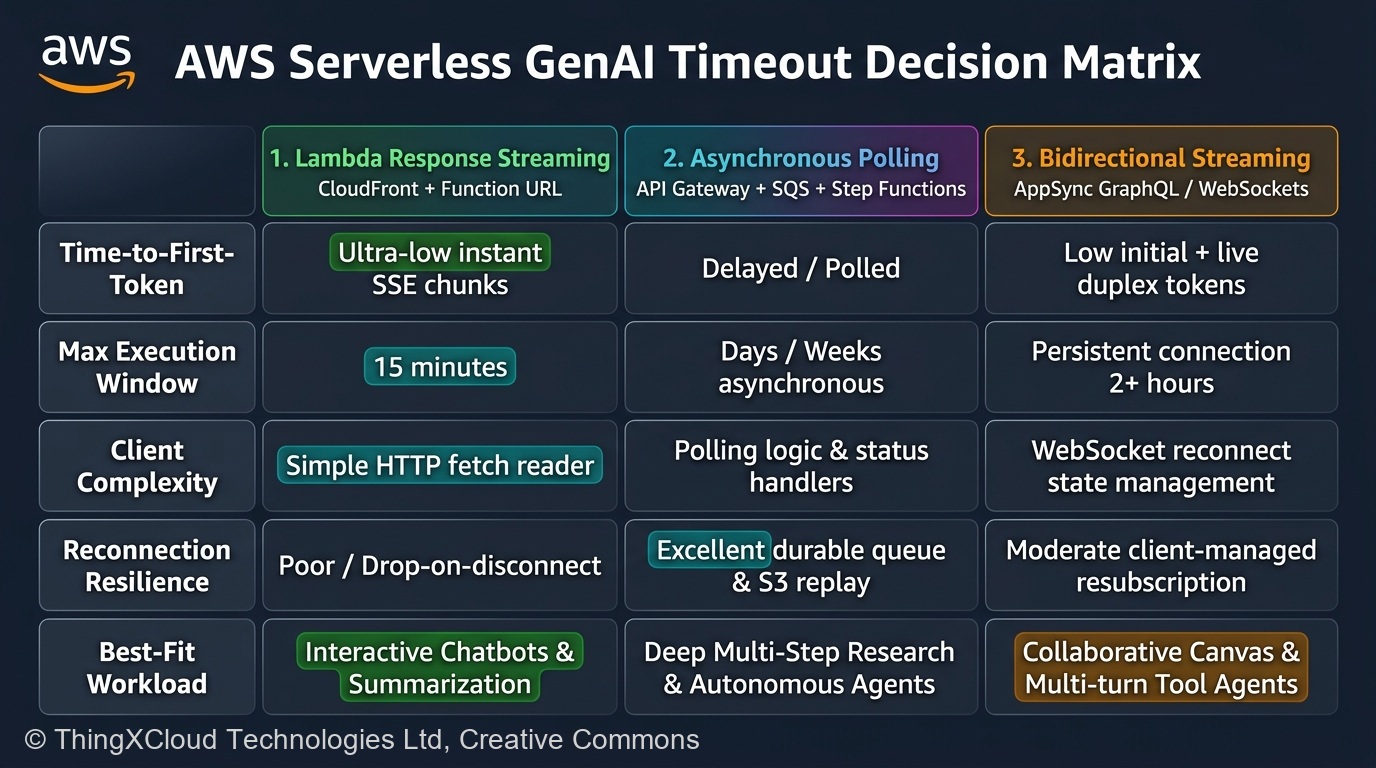
7. The 2026 Production Decision Matrix
Use this strategic decision matrix to select the right pattern for your AWS GenAI workload:
| Evaluation Dimension | Pattern 1: Lambda Response Streaming | Pattern 2: Step Functions Orchestration | Pattern 3: AppSync Subscriptions |
|---|---|---|---|
| Target User Experience | Interactive Conversational Chat / Copilot | Batch Processing / Deep Research / Reports | Collaborative Real-Time Multi-Agent Canvases |
| Max Execution Window | Up to 15 Minutes (900 seconds) | Up to 1 Year (Standard State Machines) | Indefinite (Decoupled background workers) |
| Time-to-First-Token (TTFT) | Ultra-Fast (< 800ms) | N/A (Immediate 202 Ack, delayed output) | Fast initial UI ack; events stream as generated |
| Client Implementation | Native browser EventSource or fetch() SSE | Standard HTTP polling or webhook receiver | Apollo Client / Amplify GraphQL SDK (WebSockets) |
| Network Drop Resilience | Low: Client disconnect terminates stream | High: Workflow persists on AWS independently | High: Client reconnects and retrieves missed events |
| Failure Recovery & Retries | Manual client-side retry required | Built-in: Declarative exponential backoff in ASL | Worker handles internal retries; publishes status |
Summary: Production Rules for GenAI Backends
1. Never place synchronous API Gateway endpoints in front of multi-turn agents: Any agent task capable of exceeding 29 seconds will eventually fail in production.
2. Use Lambda Function URLs with CloudFront for interactive chat: Take advantage of the 15-minute execution limit and SSE chunked streaming for sub-second TTFT.
3. Use Step Functions Distributed Map for complex workflows: Offload multi-tool execution, document parsing, and batch Bedrock calls to Step Functions for automatic retries and state resilience.
4. Decouple state from client connections: Persist all agent intermediate thought chains to Amazon DynamoDB and final artifacts to Amazon S3. Treat client connections as ephemeral windows into durable server-side state.
5. Monitor concurrency exhaustion rigorously: Long-lived streaming executions consume concurrency slots rapidly. Isolate GenAI streaming workloads into dedicated AWS accounts or enforce strict concurrency limits.
References & Further Reading
- → AWS Lambda Response Streaming Developer Guide— Official architectural reference for configuring InvokeMode: RESPONSE_STREAM with Function URLs.
- → Amazon API Gateway Quotas and Constraints— Official documentation detailing the non-configurable 29,000ms integration timeout limit.
- → AWS Step Functions Distributed Map Documentation— High-throughput serverless orchestration for parallel AI tasks, tool execution, and document processing.
- → AWS Compute Blog: Building Resilient Serverless Agentic Workflows on AWS— Architectural best practices for integrating Amazon Bedrock with event-driven architectures and WebSockets.
Discover more from C4: Container, Code, Cloud & Context
Subscribe to get the latest posts sent to your email.