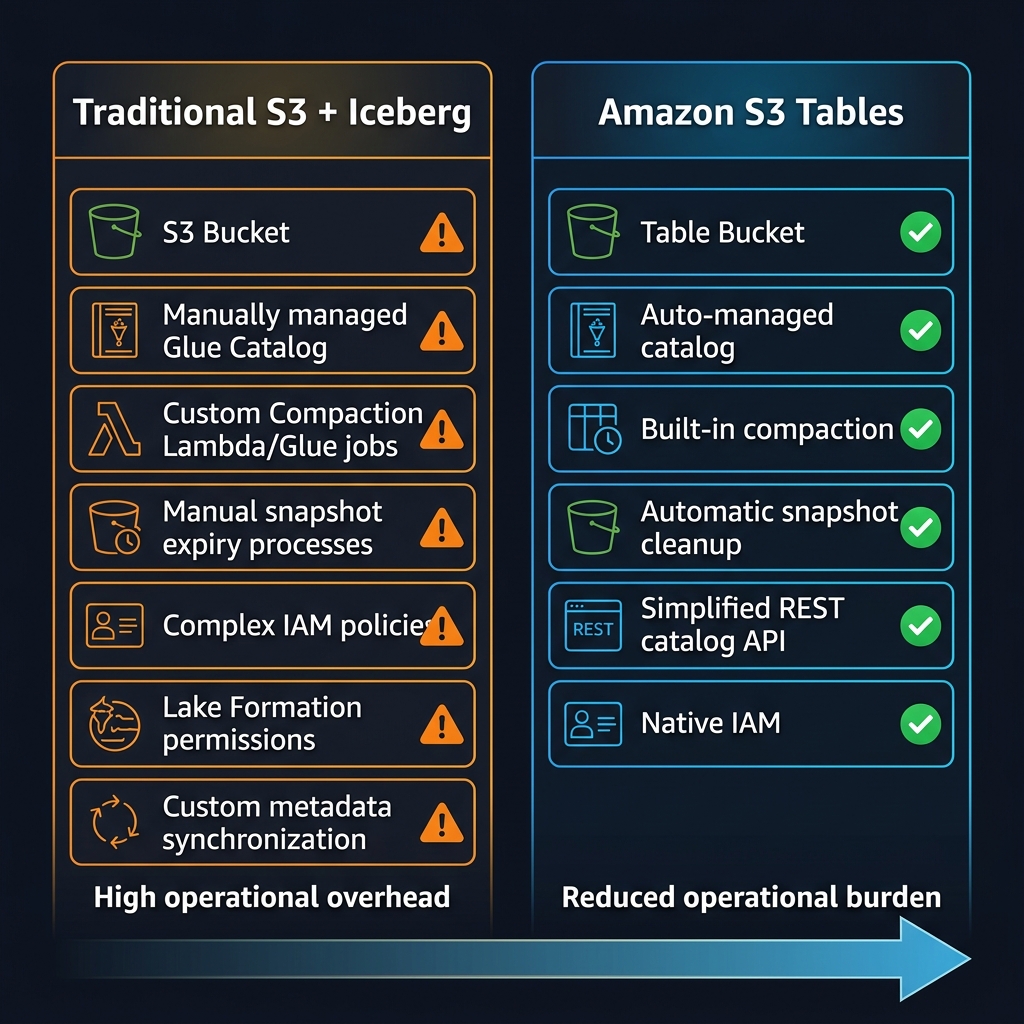
Following the AWS re:Invent 2024 announcements online, Amazon S3 Tables was the data engineering announcement that generated the most genuine excitement among architects I follow — and the most scepticism in equal measure. The claim: native Apache Iceberg table management built directly into Amazon S3, with automatic compaction, snapshot cleanup, and a REST catalog API, eliminating the operational scaffolding that every serious lakehouse team had been building and maintaining by hand for years. Fourteen months after that announcement, with general availability behind us and enterprise adoptions accumulating, the picture is clearer. This article is the practitioner assessment: what S3 Tables actually delivers, where the traditional S3 + Glue Catalog + custom compaction pipeline still wins, and the migration decision framework for data engineering teams evaluating the switch.
The short answer: S3 Tables is a genuine reduction in operational burden for teams whose primary value output is data analysis rather than data platform engineering. For teams with heavily customised Iceberg configurations, specific Hudi or Delta Lake dependencies, or complex Lake Formation security models, the migration calculus is more nuanced and the timeline should be longer.
What Amazon S3 Tables Actually Is
S3 Tables introduces a new primitive alongside the existing S3 bucket: the table bucket. A table bucket is an S3 namespace purpose-built for Apache Iceberg tables. It exposes an Iceberg REST catalog API endpoint, manages table metadata natively within S3’s control plane (rather than requiring an external catalog like AWS Glue), and runs compaction and snapshot lifecycle maintenance automatically without requiring separate Glue jobs, Lambda triggers, or EMR steps.
The key architectural distinction from traditional Iceberg on S3 is where the catalog lives. Traditional Iceberg requires an external catalog — Glue Data Catalog, AWS Glue, Hive Metastore, or a self-managed Nessie or Project Nessie instance — to store table metadata (schema, partition spec, snapshot log, manifest files). S3 Tables moves catalog management into the S3 service itself. The table bucket exposes a standard Iceberg REST catalog endpoint that any Iceberg-compatible engine can connect to directly, including Spark, Flink, Trino, Athena, and Redshift Spectrum.
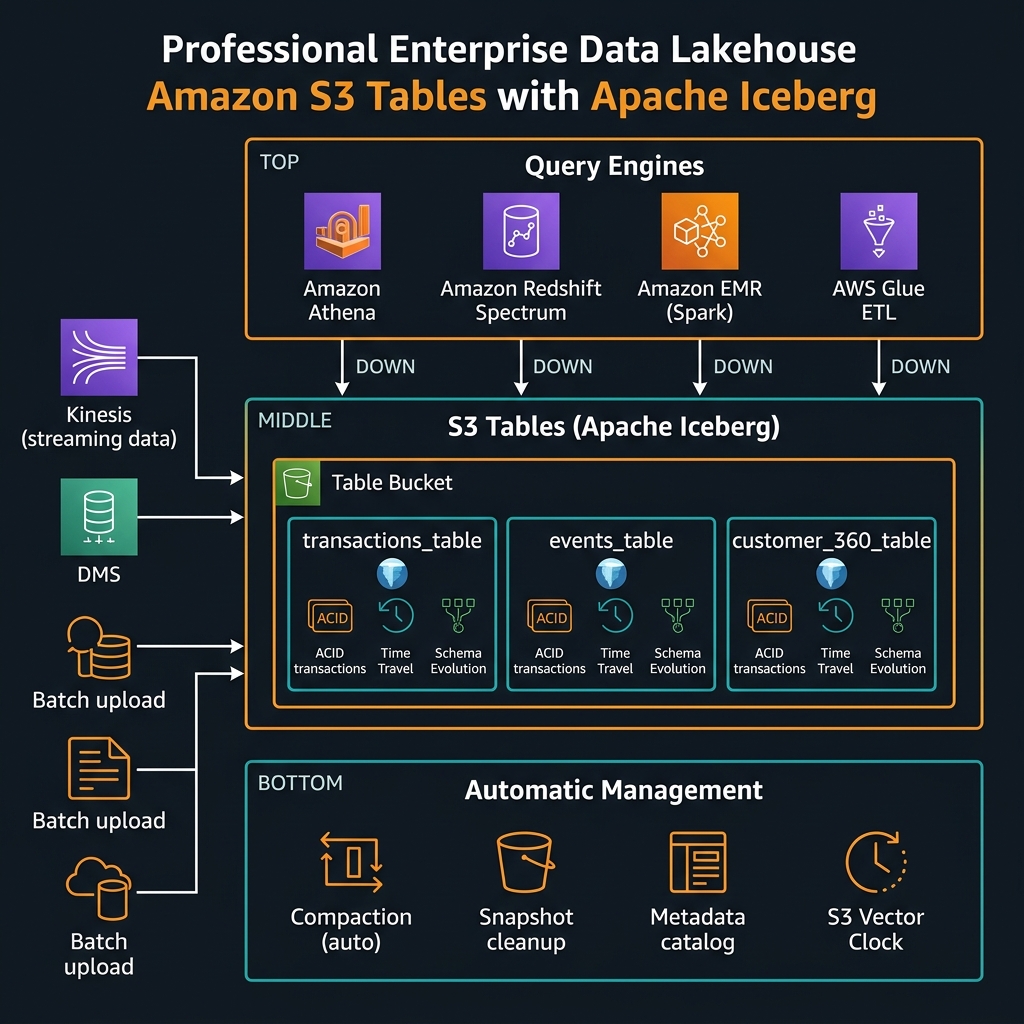
PUT Object directly, no console file browser in the traditional sense — tables are the access unit, not objects). Plan your lakehouse architecture with table buckets as a dedicated resource from the start rather than retrofitting.Automatic Compaction: The Operational Win That Actually Matters
Compaction is the single most operationally demanding aspect of running Apache Iceberg at scale. Small files accumulate from streaming ingestion. Large files fragment from partial updates. Without regular compaction, query performance degrades and storage costs increase as metadata overhead grows. Historically, every Apache Iceberg deployment required scheduled compaction jobs — Spark jobs on EMR or Glue, Lambda triggers on a cron schedule, or a third-party lakehouse platform (Databricks, Snowflake) that handled it internally.
S3 Tables runs compaction automatically within the table bucket, managed by AWS as a background service. You do not write or maintain compaction jobs. You configure the compaction behaviour through table properties — target file size, minimum file count before compaction triggers, whether compaction runs continuously or on a schedule — but the execution infrastructure is invisible. For teams spending material engineering time on compaction job failures, this operational elimination is the primary justification for migration.
import boto3

s3tables = boto3.client("s3tables", region_name="us-east-1")

# ── Create a Table Bucket ─────────────────────────────────────────────────
def create_table_bucket(name: str) -> str:
    """
    Table buckets are a distinct resource from regular S3 buckets.
    Name must be globally unique within the region.
    Returns the table bucket ARN.
    """
    resp = s3tables.create_table_bucket(name=name)
    print(f"Table bucket ARN: {resp['arn']}")
    return resp["arn"]

# ── Create a Namespace (schema grouping) ──────────────────────────────────
def create_namespace(bucket_arn: str, namespace: str) -> None:
    """
    Namespaces organise tables within a bucket (equivalent to a database/schema).
    """
    s3tables.create_namespace(
        tableBucketARN=bucket_arn,
        namespace=[namespace],
        openTableFormatConfiguration={
            "iceberg": {}  # S3 Tables currently supports Apache Iceberg format
        }
    )
    print(f"Namespace '{namespace}' created")

# ── Create a Table ────────────────────────────────────────────────────────
def create_iceberg_table(bucket_arn: str, namespace: str, table_name: str) -> dict:
    """
    Creates an Iceberg table in the table bucket.
    AWS manages metadata, compaction, and snapshot lifecycle automatically.
    """
    resp = s3tables.create_table(
        tableBucketARN=bucket_arn,
        namespace=namespace,
        name=table_name,
        format="ICEBERG",
        maintenanceConfig={
            "iceberg": {
                "compaction": {
                    "status": "enabled",
                    "settings": {
                        "targetFileSizeMB": 512   # compact to ~512 MB files
                    }
                },
                "snapshotManagement": {
                    "status": "enabled",
                    "settings": {
                        "minSnapshotsToKeep": 5,
                        "maxSnapshotAgeHours": 120   # retain 5 days of snapshots for time travel
                    }
                }
            }
        }
    )
    table = resp["tableARN"]
    print(f"Table ARN: {table}")
    return resp

# ── Get the Iceberg REST Catalog endpoint for query engines ───────────────
def get_catalog_endpoint(bucket_arn: str) -> str:
    """
    Returns the Iceberg REST catalog URL for this table bucket.
    Use this endpoint in Spark, Athena, EMR, or any Iceberg-compatible engine.
    Format: https://s3tables.<region>.amazonaws.com/iceberg
    """
    resp = s3tables.get_table_bucket(tableBucketARN=bucket_arn)
    # REST catalog base URL is derived from the bucket region + ARN
    region = bucket_arn.split(":")[3]
    account = bucket_arn.split(":")[4]
    bucket_name = bucket_arn.split("/")[-1]
    return f"https://s3tables.{region}.amazonaws.com/iceberg"

# ── Example: Full setup ───────────────────────────────────────────────────
BUCKET_ARN = create_table_bucket("enterprise-lakehouse-prod")
create_namespace(BUCKET_ARN, "finance")
create_iceberg_table(BUCKET_ARN, "finance", "transactions")
create_iceberg_table(BUCKET_ARN, "finance", "account_snapshots")
print(f"REST catalog endpoint: {get_catalog_endpoint(BUCKET_ARN)}")
Connecting Query Engines to S3 Tables
Amazon Athena
Athena integrates natively with S3 Tables through the AWS Glue Data Catalog when the table bucket is registered as a catalog in Glue. Once registered, tables appear in Athena’s query editor the same as traditional Glue catalog tables. No additional configuration is required for standard SQL queries, time travel, or schema inspection.
-- Query current data (standard)
SELECT account_id, SUM(amount) as total_spend
FROM finance.transactions
WHERE transaction_date >= DATE '2026-01-01'
  AND status = 'COMPLETED'
GROUP BY account_id
ORDER BY total_spend DESC
LIMIT 100;

-- Time travel: query data as it existed at a specific timestamp
-- (Iceberg snapshot history preserved by S3 Tables automatically)
SELECT account_id, amount, transaction_date
FROM finance.transactions
FOR TIMESTAMP AS OF TIMESTAMP '2026-01-15 00:00:00 UTC'
WHERE transaction_date = DATE '2026-01-14';

-- Inspect snapshot history (time travel points available)
SELECT snapshot_id, committed_at, operation, summary
FROM finance.transactions.$snapshots
ORDER BY committed_at DESC;

-- Schema evolution: add a column without rewriting data
ALTER TABLE finance.transactions
ADD COLUMNS (fraud_score DOUBLE, review_flag BOOLEAN);

-- View table properties including compaction status
SHOW TBLPROPERTIES finance.transactions;
Apache Spark on EMR / Glue
Spark connects to S3 Tables through the Iceberg REST catalog. Configure the catalog in your SparkSession using the standard Iceberg catalog configuration with the S3 Tables REST endpoint as the catalog URI and AWS SigV4 authentication.
from pyspark.sql import SparkSession

def create_spark_session_with_s3tables(
    region: str,
    account_id: str,
    bucket_name: str
) -> SparkSession:
    """
    Configure PySpark to use S3 Tables as an Iceberg REST catalog.
    Works on Amazon EMR 6.15+, AWS Glue 4.0+.
    """
    catalog_url = f"https://s3tables.{region}.amazonaws.com/iceberg"
    catalog_name = "s3tablesbucket"

    spark = (SparkSession.builder
        .appName("S3TablesLakehouse")
        .config("spark.sql.extensions",
                "org.apache.iceberg.spark.extensions.IcebergSparkSessionExtensions")
        .config("spark.sql.catalog.s3tablesbucket",
                "org.apache.iceberg.spark.SparkCatalog")
        .config("spark.sql.catalog.s3tablesbucket.catalog-impl",
                "software.amazon.s3tables.iceberg.S3TablesCatalog")
        .config("spark.sql.catalog.s3tablesbucket.warehouse",
                f"arn:aws:s3tables:{region}:{account_id}:bucket/{bucket_name}")
        .config("spark.sql.catalog.s3tablesbucket.uri", catalog_url)
        .config("spark.sql.defaultCatalog", catalog_name)
        .getOrCreate())
    return spark

spark = create_spark_session_with_s3tables("us-east-1", "123456789012", "enterprise-lakehouse-prod")

# ── ACID write with automatic schema evolution ────────────────────────────
from pyspark.sql.functions import current_timestamp, col

# Upsert (MERGE INTO) — full ACID semantics with Iceberg
spark.sql("""
    MERGE INTO s3tablesbucket.finance.transactions AS target
    USING staging_transactions AS source
    ON target.transaction_id = source.transaction_id
    WHEN MATCHED AND source.status != target.status THEN
        UPDATE SET
            status = source.status,
            updated_at = current_timestamp()
    WHEN NOT MATCHED THEN
        INSERT (transaction_id, account_id, amount, status, transaction_date, created_at)
        VALUES (source.transaction_id, source.account_id, source.amount,
                source.status, source.transaction_date, current_timestamp())
""")

# ── Partition evolution (no data rewrite required) ────────────────────────
spark.sql("""
    ALTER TABLE s3tablesbucket.finance.transactions
    ADD PARTITION FIELD days(transaction_date)
""")

# ── Time travel query ─────────────────────────────────────────────────────
df_yesterday = spark.read.format("iceberg")     .option("as-of-timestamp", "2026-02-20 00:00:00")     .load("s3tablesbucket.finance.transactions")

print(f"Record count at midnight yesterday: {df_yesterday.count():,}")
Honest Constraints: Where Traditional Iceberg on S3 Still Wins
After fourteen months of adoption, the community has mapped the boundaries of where S3 Tables delivers and where its constraints create genuine friction. These are not edge cases — they affect significant portions of enterprise data workloads.
Delta Lake and Apache Hudi Workloads
S3 Tables is Apache Iceberg exclusively. Table buckets do not support Delta Lake or Apache Hudi table formats. Teams with significant existing Delta Lake investments (common in organisations that adopted Databricks before AWS Lake Formation matured) or Hudi CDC pipelines face format migration as a prerequisite to S3 Tables adoption. Delta-to-Iceberg migration is possible with Apache Spark’s convert utilities, but it is a non-trivial engineering effort for large tables with complex partition evolution histories.
Lake Formation Column-Level Security
AWS Lake Formation’s column-level and row-level security features do not currently integrate fully with S3 Tables. Lake Formation can govern access to table buckets at the table level, but column masking and row filter policies — which are widely used in healthcare (PHI column masking) and financial services (PCI cardholder data) — have limited support. Teams relying heavily on Lake Formation data masking for compliance must evaluate whether column-level security gaps in S3 Tables are acceptable before migrating regulated data.
Cross-Account Data Sharing
Cross-account Iceberg table sharing — where a central data platform team exposes tables to analytics teams in separate AWS accounts — requires Lake Formation integration or explicit resource-based policies on the table bucket. The S3 Tables cross-account sharing model is less mature than traditional Glue Catalog sharing via Lake Formation RAM (Resource Access Manager) integration. Teams with federated multi-account data mesh architectures should test cross-account query patterns thoroughly before committing to S3 Tables as their catalog layer.
Migration Decision Framework
flowchart TD
    A["Evaluating S3 Tables migration"] --> B{"Current table format?"}
    B -->|"Delta Lake or Hudi"| C["Format migration required
(Delta→Iceberg or Hudi→Iceberg)
High effort — evaluate carefully"]
    B -->|"Apache Iceberg already"| D{"Using Lake Formation
column/row masking
for compliance?"}
    D -->|"Yes — PHI/PCI columns masked"| E["Wait for Lake Formation
S3 Tables integration maturity
or use KMS encryption pattern"]
    D -->|"No or minimal"| F{"Cross-account
data sharing required?"}
    F -->|"Yes — multi-account mesh"| G["Pilot cross-account access first
before full migration"]
    F -->|"No — single account"| H{"Running custom
compaction jobs?"}
    H -->|"Yes — significant ops burden"| I["Strong migration candidate
Automatic compaction is
the primary win"]
    H -->|"No — managed by platform"| J{"Using Databricks
or Snowflake catalog?"}
    J -->|"Yes"| K["Evaluate REST catalog
compatibility with
your platform version"]
    J -->|"No — AWS-native only"| I
Migration Pattern: Iceberg on S3 to S3 Tables
For teams currently running Apache Iceberg tables in regular S3 buckets with Glue Catalog, the migration path uses Spark to rewrite tables into a new table bucket. This is a full data copy — table buckets are a separate namespace and data cannot be moved by pointer. For large tables, this means planning for the migration window, cost of the rewrite job, and a parallel running period.
from pyspark.sql import SparkSession
import boto3

def migrate_iceberg_table_to_s3tables(
    spark: SparkSession,
    source_glue_db: str,
    source_table: str,
    target_bucket_arn: str,
    target_namespace: str,
    target_table: str,
    partition_cols: list[str] | None = None
) -> None:
    """
    Migrate an existing Glue Catalog Iceberg table to an S3 Table bucket.

    Strategy: full read → write (no in-place conversion supported).
    For large tables (>1 TB), use incremental approach:
      1. Write historical partition (e.g., date < today)
      2. Set up parallel streaming write to S3 Tables
      3. Cut over once streams are in sync
    """
    # Step 1: Read source table (Glue Catalog)
    source_df = spark.table(f"glue.{source_glue_db}.{source_table}")

    print(f"Source record count: {source_df.count():,}")
    print(f"Source schema: {source_df.schema.simpleString()}")

    # Step 2: Write to S3 Tables target
    writer = (source_df.writeTo(f"s3tablesbucket.{target_namespace}.{target_table}")
              .tableProperty("write.target-file-size-bytes", str(512 * 1024 * 1024))
              .tableProperty("write.parquet.compression-codec", "zstd"))

    if partition_cols:
        writer = writer.partitionedBy(*partition_cols)

    writer.createOrReplace()

    # Step 3: Verify row counts match
    target_count = spark.table(f"s3tablesbucket.{target_namespace}.{target_table}").count()
    source_count = source_df.count()

    assert target_count == source_count,         f"Row count mismatch: source={source_count:,}, target={target_count:,}"

    print(f"Migration complete: {target_count:,} rows verified")
    print(f"Compaction and snapshot management now handled automatically by S3 Tables")

# Example: migrate transactions table with date partitioning
migrate_iceberg_table_to_s3tables(
    spark=spark,
    source_glue_db="finance_prod",
    source_table="transactions",
    target_bucket_arn="arn:aws:s3tables:us-east-1:123456789012:bucket/enterprise-lakehouse-prod",
    target_namespace="finance",
    target_table="transactions",
    partition_cols=["years(transaction_date)", "months(transaction_date)"]
)
Cost Model: S3 Tables vs Traditional Iceberg on S3
S3 Tables introduces a separate pricing dimension beyond standard S3 storage costs. You pay for: storage (per GB-month, similar to S3 Standard but with a table management overhead), PUT/GET requests to table objects (standard S3 request pricing applies), and a per-compaction-unit charge when AWS runs automatic compaction on your behalf.
The cost comparison with traditional Iceberg on S3 must account for the elimination of compaction infrastructure: Glue compaction jobs (per DPU-hour), EMR cluster time for compaction runs, and the Lambda/EventBridge costs of scheduling and triggering them. For tables actively ingesting streaming data — where compaction runs frequently to consolidate small files — teams have reported compaction infrastructure cost reductions of 40-65% after migrating to S3 Tables, with the S3 Tables compaction charge being lower than equivalent self-managed Glue/EMR costs at scale.
Key Takeaways
- S3 Tables is Iceberg-exclusive — table buckets only support Apache Iceberg format; Delta Lake and Hudi teams face format migration as a prerequisite and should evaluate effort carefully
- Automatic compaction is the primary operational win — teams running scheduled Glue or EMR compaction jobs see the biggest benefit; the compaction cost charge is typically lower than self-managed infrastructure at scale
- Lake Formation column masking support is the primary compliance gap — regulated workloads relying on PHI/PCI column-level masking should verify current support status before migrating and consider KMS column encryption as an interim control
- The REST catalog API enables any Iceberg engine — Athena, EMR Spark, Redshift Spectrum, and Trino all connect via standard Iceberg REST catalog, giving you engine flexibility without catalog lock-in
- Cross-account sharing patterns need careful testing — multi-account data mesh architectures should pilot S3 Tables cross-account access patterns before migration due to differences from traditional Glue Catalog RAM sharing
- Table buckets are separate from regular S3 buckets — plan your lakehouse architecture with table buckets as a dedicated resource from the outset; migration between bucket types requires a full data copy
- Time travel and schema evolution work out of the box — Iceberg features including time travel, partition evolution, and schema evolution are fully supported with snapshot lifecycle managed automatically by S3 Tables
Glossary
- S3 Tables
- An Amazon S3 capability that provides Apache Iceberg table management natively within S3. Uses a new bucket type (table bucket) that exposes an Iceberg REST catalog API and manages compaction, snapshot lifecycle, and metadata automatically.
- Table Bucket
- A distinct S3 resource type (different from regular object buckets) designed to contain Apache Iceberg tables. Exposes a REST catalog endpoint and does not support standard S3 object operations — tables are the access unit.
- Apache Iceberg
- An open table format for large analytic datasets that adds ACID transactions, schema evolution, partition evolution, and time travel to files stored on object storage. Supported by Spark, Flink, Trino, Athena, and other query engines.
- Compaction
- The process of merging many small Iceberg data files into fewer, larger files to reduce query overhead and storage metadata size. In S3 Tables, compaction runs automatically as a managed background service.
- Iceberg REST Catalog
- A standardised HTTP API specification for Iceberg catalog operations (create table, list tables, load table metadata). S3 Tables exposes this API endpoint for the table bucket, enabling any Iceberg-compatible engine to connect.
- Snapshot
- An Iceberg mechanism that captures the state of a table at a specific point in time, enabling time travel queries (reading historical data) and data rollback. S3 Tables manages snapshot retention automatically.
- Time Travel
- The ability to query a table as it existed at a past timestamp or snapshot ID. Enabled by Iceberg’s snapshot log. Available in S3 Tables via standard Iceberg SQL syntax in Athena and Spark.
- Schema Evolution
- The ability to add, rename, or reorder columns in an Iceberg table without rewriting all existing data files. S3 Tables supports full Iceberg schema evolution through ALTER TABLE statements.
- Lake Formation
- An AWS service for managing access control to data lakes. Provides table-level, column-level, and row-level permissions. Column masking and row filter integration with S3 Tables is limited as of early 2026.
- Partition Evolution
- An Iceberg feature allowing the partitioning strategy of a table to change over time without rewriting historical data. Old files retain their original partition layout; new files use the updated scheme.
- ACID Transactions
- Atomicity, Consistency, Isolation, Durability — database transaction guarantees applied to data lake writes. Iceberg (and S3 Tables) supports ACID-compliant writes including INSERT, DELETE, UPDATE, and MERGE operations.
References & Further Reading
- → Amazon S3 Tables — User Guide— Official documentation covering table bucket creation, namespace management, and query engine integration
- → S3 Tables — Automatic Maintenance (Compaction)— Configuring automatic compaction settings, snapshot retention, and maintenance policies
- → S3 Tables — Amazon Athena Integration— Registering table buckets with Glue Catalog and querying via Athena including time travel syntax
- → S3 Tables — EMR and Apache Spark Integration— SparkSession configuration for S3 Tables REST catalog, MERGE INTO, and schema evolution
- → S3 Tables — Pricing Model— Storage, request, and compaction unit pricing for table buckets vs traditional S3 Iceberg
- → Apache Iceberg Table Format Specification— The open Iceberg table format spec — foundational context for understanding S3 Tables behaviour
- → S3 Tables — IAM Security and Access Control— Bucket policies, IAM permissions, and cross-account access configuration for table buckets
- → AWS Blog — Introducing Amazon S3 Tables— AWS engineering blog covering the architecture decisions and use cases for S3 Tables
Discover more from C4: Container, Code, Cloud & Context
Subscribe to get the latest posts sent to your email.