If you have run Kubernetes on AWS at any meaningful scale, you know the real cost of Kubernetes is not the compute — it is the platform engineering time spent keeping nodes healthy. Watching the AWS re:Invent 2024 announcements online, EKS Auto Mode stood out not because of a novel API, but because it went after the right problem: the operational overhead that accumulates below the control plane and consumes engineering capacity that should be spent on application delivery. Announced in December 2024 and reaching general availability in January 2025, Auto Mode has now been in production use for over a year. This is the assessment that matters — not what the launch demo showed, but what teams who migrated from Managed Node Groups and self-managed Karpenter actually experienced, what they gave up, and the decision framework for whether your cluster belongs in Auto Mode today.
The concise verdict: EKS Auto Mode is the correct default for new EKS clusters and for teams whose core competency is not Kubernetes platform engineering. It is not the right choice if you need custom CNI plugins, full DaemonSet flexibility, or the last 15% of cost optimisation that a hand-tuned Karpenter configuration delivers. That distinction — and the specific patterns that bridge the gap — is what this article is about.
What EKS Auto Mode Actually Takes Off Your Plate
The phrase “zero-ops Kubernetes” is marketing shorthand. Understanding precisely what Auto Mode manages — and what it does not — is the prerequisite for any honest architectural evaluation.
Auto Mode takes full ownership of the data plane: node provisioning and deprovisioning, instance type selection (using Karpenter under the hood), node scaling in response to pending pods, OS-level patching and Kubernetes version upgrades on worker nodes, the VPC CNI plugin (aws-node DaemonSet), the EBS CSI driver, and the AWS Load Balancer Controller. These are the components that have historically required the most active maintenance in EKS clusters — version skew between cluster and node Kubernetes versions, CNI plugin compatibility issues after cluster upgrades, EBS CSI driver CRD changes — all of this is now AWS’s operational responsibility.
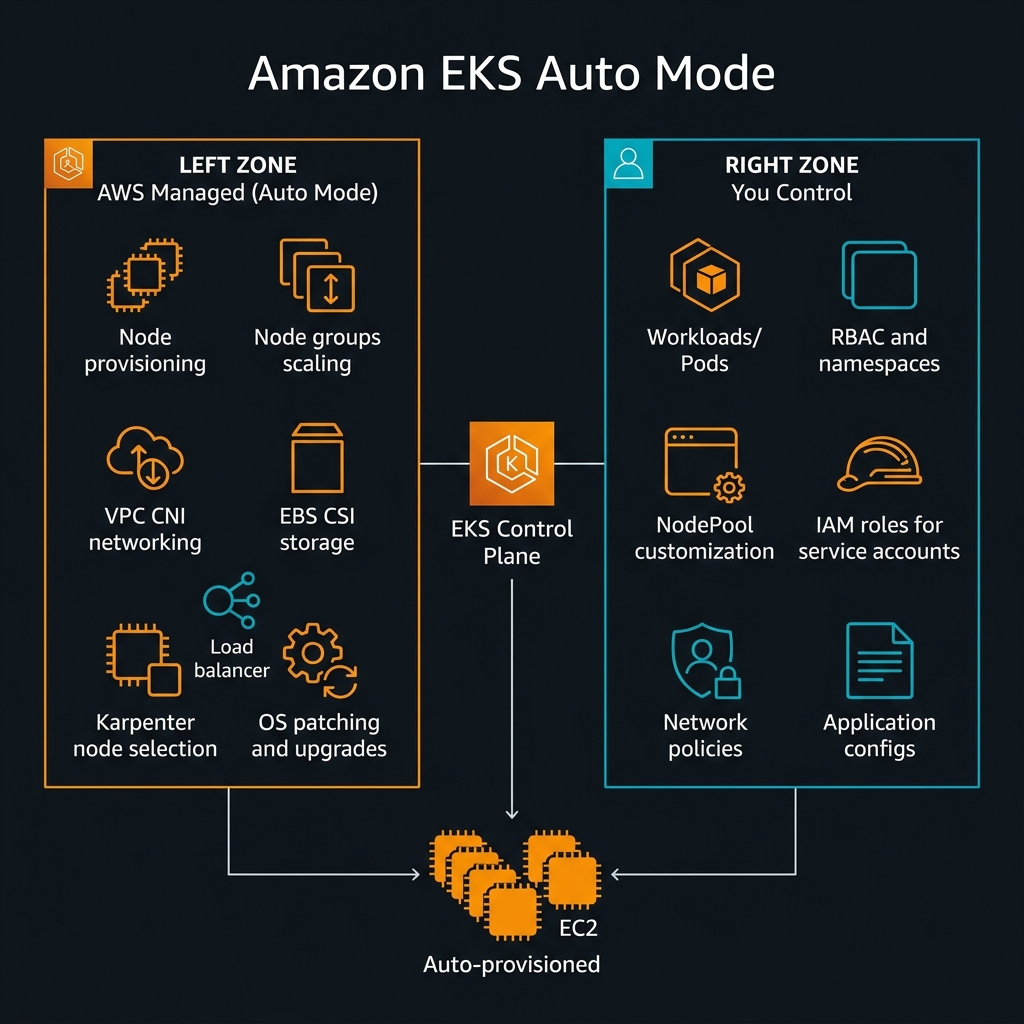
nodeSelector, affinity, and tolerations. What you give up is responsibility for the nodes themselves — their lifecycle, patching, scaling, and plugin management.NodePool and EC2NodeClass: Your Customisation Surface
Auto Mode is not a black box. Two custom resources — NodePool and EC2NodeClass — provide the customisation surface for node characteristics. NodePool defines the scheduling constraints: which instance families are eligible, what CPU/memory range to provision, whether spot instances are used, and what taints to apply. EC2NodeClass specifies the AWS-specific attributes: AMI family (Amazon Linux 2023 is the default and currently only supported OS), subnet selectors, security group selectors, IAM instance profile, and block device mappings.
This combination means you can create specialised pools — a GPU NodePool for ML inference workloads, a high-memory NodePool for data processing, a spot-only NodePool for batch jobs — while still having AWS manage the lifecycle of every node in every pool. This is meaningfully more flexible than it might appear from the marketing description.
# EC2NodeClass: defines the AWS infrastructure properties
# Applied once per cluster or per environment tier
apiVersion: eks.amazonaws.com/v1
kind: EC2NodeClass
metadata:
  name: default
spec:
  amiFamily: AL2023      # Amazon Linux 2023 — only option in Auto Mode currently
  role: "KarpenterNodeRole-${CLUSTER_NAME}"
  subnetSelectorTerms:
    - tags:
        karpenter.sh/discovery: "${CLUSTER_NAME}"
  securityGroupSelectorTerms:
    - tags:
        karpenter.sh/discovery: "${CLUSTER_NAME}"
  blockDeviceMappings:
    - deviceName: /dev/xvda
      ebs:
        volumeSize: 100Gi
        volumeType: gp3
        iops: 3000
        throughput: 125
        encrypted: true
        kmsKeyID: "arn:aws:kms:us-east-1:123456789012:key/your-key-id"
---
# NodePool: defines scheduling constraints and instance selection
apiVersion: karpenter.sh/v1
kind: NodePool
metadata:
  name: general-purpose
spec:
  template:
    metadata:
      labels:
        node-type: general-purpose
    spec:
      nodeClassRef:
        group: eks.amazonaws.com
        kind: EC2NodeClass
        name: default
      requirements:
        - key: karpenter.sh/capacity-type
          operator: In
          values: ["on-demand"]
        - key: kubernetes.io/arch
          operator: In
          values: ["amd64", "arm64"]
        - key: karpenter.k8s.aws/instance-category
          operator: In
          values: ["c", "m", "r"]    # Compute, Memory, General — exclude specialty instances
        - key: karpenter.k8s.aws/instance-generation
          operator: Gt
          values: ["4"]              # 5th gen and newer only — better price/performance
  limits:
    cpu: "1000"
    memory: 4000Gi
  disruption:
    consolidationPolicy: WhenUnderutilized
    consolidateAfter: 30s
---
# Separate NodePool for GPU workloads (ML inference)
apiVersion: karpenter.sh/v1
kind: NodePool
metadata:
  name: gpu-inference
spec:
  template:
    metadata:
      labels:
        node-type: gpu-inference
    spec:
      nodeClassRef:
        group: eks.amazonaws.com
        kind: EC2NodeClass
        name: default
      taints:
        - key: nvidia.com/gpu
          effect: NoSchedule
      requirements:
        - key: karpenter.k8s.aws/instance-family
          operator: In
          values: ["g5", "p4d", "inf2"]
        - key: karpenter.sh/capacity-type
          operator: In
          values: ["on-demand"]   # GPU spot availability is limited
  limits:
    cpu: "200"
    memory: 800Gi
The Karpenter Question: What Changed and What Did Not
The most common question from teams evaluating Auto Mode migration is: “We already have Karpenter. Why would we switch?” It is a fair question, and the honest answer is more nuanced than either “Auto Mode replaces Karpenter” or “they are completely different.”
EKS Auto Mode uses Karpenter internally for node selection and provisioning. The NodePool and EC2NodeClass CRDs that Auto Mode exposes are the same Karpenter v1 API surface. The difference is operational: when you self-manage Karpenter, you own the Karpenter controller deployment, its upgrades, its IAM permissions, its interaction with the EKS version upgrade cycle, and its compatibility with the other add-ons in your cluster (aws-node, ebs-csi-driver, load-balancer-controller). With Auto Mode, AWS owns all of that.
The concrete case for staying on self-managed Karpenter: if you have invested significant engineering effort in advanced Karpenter configurations — multi-architecture spot diversification strategies, custom consolidation policies tied to your business cycle, or integration with Karpenter’s Budget API for disruption rate limiting — you retain more direct control outside Auto Mode. The Karpenter version AWS runs under Auto Mode lags slightly behind the open-source release cadence, which occasionally means new Karpenter features are not immediately available in Auto Mode.
flowchart TD
    A["New or existing EKS cluster?"] --> B{"New cluster"}
    A --> C{"Existing cluster"}
    B --> D{"Team has dedicated
platform engineering?"}
    D -->|"No / Small team"| E["EKS Auto Mode
Best default choice"]
    D -->|"Yes, K8s experts"| F{"Need custom CNI
or privileged DaemonSets?"}
    F -->|"Yes"| G["Self-managed Karpenter
+ Managed Node Groups"]
    F -->|"No"| E
    C --> H{"Currently using?"}
    H -->|"Managed Node Groups
no Karpenter"| I["Migrate to Auto Mode
High value, low risk"]
    H -->|"Self-managed Karpenter
(working well)"| J{"Advanced config
or custom CNI?"}
    J -->|"Yes"| K["Stay on Karpenter
Auto Mode not worth migration cost"]
    J -->|"No"| L["Migrate to Auto Mode
Reduce operational burden"]
    H -->|"Self-managed nodes
(kops, Terraform)"| M["Migrate to Auto Mode
Significant operational gain"]kubectl get pods -n kube-system -l app.kubernetes.io/name=karpenter -o jsonpath='{.items[0].spec.containers[0].image}'. AWS typically runs one to two minor versions behind the open-source release. If your team relies on a Karpenter feature released in the last 60 days, verify its availability in the Auto Mode-managed version before planning a dependency on it.The Honest Assessment: What Auto Mode Takes Away
Every architectural trade-off deserves explicit treatment of the downside. EKS Auto Mode’s abstractions involve genuine constraints that affect specific workload categories.
Custom CNI Plugins Are Not Supported
Auto Mode uses the AWS VPC CNI plugin exclusively. If your workload requires Cilium for eBPF-based network policy, Calico for non-overlay routing, or Multus for multiple network interface attachment (common in telco and network function workloads), you cannot use Auto Mode today. This is the single most significant architectural constraint and the blocker for the largest category of teams that cannot migrate.
Teams using Cilium primarily for its network policy capabilities (rather than its eBPF observability or BGP routing features) can often migrate by replacing Cilium network policies with AWS VPC CNI-compatible Kubernetes NetworkPolicy resources. The EKS VPC CNI has supported Kubernetes NetworkPolicy natively since EKS 1.29. Evaluate your Cilium policy footprint before ruling out Auto Mode on CNI grounds alone.
Privileged DaemonSets Have Constraints
DaemonSets that require privileged container access at the node level — custom monitoring agents that mount host filesystems, eBPF programs, SR-IOV device plugins, custom log collectors with host PID namespace access — may not function correctly under Auto Mode’s managed node lifecycle. Auto Mode nodes use an immutable-ish OS configuration and AWS manages the node user data. DaemonSets that attempt to install kernel modules or modify host networking at boot are particularly affected.
Standard monitoring DaemonSets (Datadog Agent, Prometheus Node Exporter, AWS CloudWatch Agent, Fluent Bit for log forwarding) work correctly under Auto Mode. The constraint applies to DaemonSets that require kernel-level access or modify the host OS at runtime.
Custom AMIs Are Not Available
Auto Mode nodes run Amazon Linux 2023 exclusively, managed by AWS. If your security or compliance posture requires CIS-hardened custom AMIs, FIPS-validated OS builds, or custom node initialisation scripts baked into an AMI, those requirements cannot be met with Auto Mode. For these environments, Managed Node Groups with custom launch templates remain the correct choice.
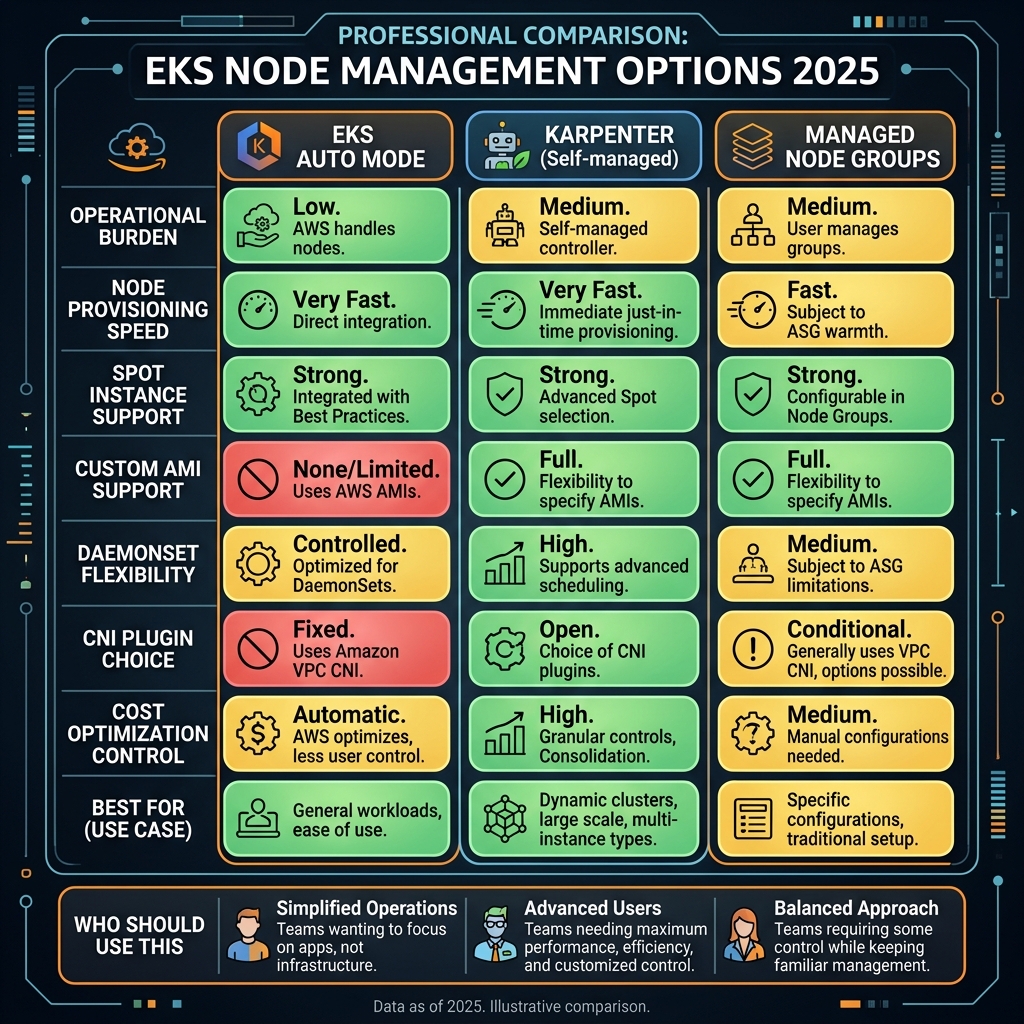
Migration Patterns: Moving Existing Clusters to Auto Mode
Auto Mode can be enabled on existing EKS clusters without cluster replacement. The migration path depends on your current node provisioning strategy.
From Managed Node Groups
This is the lowest-risk migration. Enable Auto Mode on the cluster, which creates the default NodePool and EC2NodeClass. Then cordon and drain nodes in your existing Managed Node Groups one at a time — Auto Mode provisions replacement nodes to accommodate the workload. Once all Managed Node Group nodes are drained, delete the node groups. The cluster continues serving traffic throughout.
#!/usr/bin/env bash
# Migration script: Managed Node Groups -> EKS Auto Mode
# Prerequisites: eksctl >= 0.170.0, kubectl >= 1.29, aws-cli >= 2.15

CLUSTER_NAME="my-production-cluster"
REGION="us-east-1"

# Step 1: Enable Auto Mode on existing cluster
# This does NOT immediately replace nodes - it adds Auto Mode alongside existing MNGs
aws eks update-cluster-config   --name "$CLUSTER_NAME"   --region "$REGION"   --compute-config '{"enabled": true, "nodePools": ["general-purpose", "system"]}'

# Wait for cluster update to complete
aws eks wait cluster-active --name "$CLUSTER_NAME" --region "$REGION"
echo "Auto Mode enabled. Proceeding with node migration..."

# Step 2: Cordon all nodes in existing Managed Node Groups
# This prevents new pods from scheduling onto old MNG nodes
MNG_NAMES=$(aws eks list-nodegroups   --cluster-name "$CLUSTER_NAME"   --region "$REGION"   --query "nodegroups[]"   --output text)

for MNG in $MNG_NAMES; do
  echo "Processing node group: $MNG"

  # Get node names in this group
  NODE_NAMES=$(kubectl get nodes     -l "eks.amazonaws.com/nodegroup=$MNG"     -o jsonpath="{.items[*].metadata.name}")

  # Cordon all nodes in group
  for NODE in $NODE_NAMES; do
    kubectl cordon "$NODE"
    echo "  Cordoned: $NODE"
  done
done

# Step 3: Drain nodes one at a time (Auto Mode provisions replacements as pods evict)
for MNG in $MNG_NAMES; do
  NODE_NAMES=$(kubectl get nodes     -l "eks.amazonaws.com/nodegroup=$MNG"     -o jsonpath="{.items[*].metadata.name}")

  for NODE in $NODE_NAMES; do
    echo "Draining $NODE - Auto Mode will provision replacement..."
    kubectl drain "$NODE"       --ignore-daemonsets       --delete-emptydir-data       --force       --timeout=300s

    # Wait for drain to complete before proceeding
    sleep 30
  done

  # Step 4: Delete empty Managed Node Group
  echo "Deleting node group: $MNG"
  aws eks delete-nodegroup     --cluster-name "$CLUSTER_NAME"     --nodegroup-name "$MNG"     --region "$REGION"
done

echo "Migration complete. Verify with:"
echo "  kubectl get nodes -o wide"
echo "  kubectl get nodepools"
From Self-Managed Karpenter
Migration from self-managed Karpenter to Auto Mode is more nuanced because your existing NodePool and EC2NodeClass resources are directly compatible — Auto Mode uses the same CRD API. The migration involves: enabling Auto Mode, verifying that your existing NodePool and EC2NodeClass configurations are valid under Auto Mode’s constraints (particularly checking for OS-specific settings that only apply to Bottlerocket or custom AMIs), then removing the self-managed Karpenter controller deployment.
The key risk in this migration is the Karpenter controller upgrade path. When you enable Auto Mode, AWS deploys its managed Karpenter version. If the self-managed Karpenter version you were running used pre-v1 CRD schemas (beta NodeClaim, v1alpha5 Provisioner), you must first upgrade to Karpenter v1 CRDs before enabling Auto Mode, as Auto Mode only supports the v1 API surface.
Cost Analysis: Is Auto Mode Cheaper?
The cost question is more complex than it appears. Auto Mode itself does not add a per-node management fee — you pay standard EC2 pricing for the nodes it provisions, the same as with Managed Node Groups or self-managed Karpenter. The cost difference is indirect.
Auto Mode’s consolidation policy (WhenUnderutilized) continuously bin-packs pods onto fewer nodes and terminates underutilised instances. In practice, teams migrating from Managed Node Groups with static node counts see 20-35% EC2 cost reduction from consolidation alone, because Auto Mode removes nodes that human operators hesitate to terminate out of caution. Teams migrating from self-managed Karpenter with well-tuned consolidation see minimal cost difference on the compute side.
The real cost argument is engineering time. Maintaining a self-managed Karpenter deployment — controller upgrades, IAM permission management, compatibility testing after EKS version upgrades — consumes platform engineering hours. At typical enterprise engineering fully-loaded costs, three to five hours per month of saved Karpenter maintenance per cluster justifies Auto Mode economically for clusters that do not require its excluded features.
capacity-type: spot. The interruption handling is built-in — Auto Mode registers for EC2 Spot interruption notices through the Node Termination Handler pattern and coordinates graceful pod eviction before the 2-minute interruption window expires. For batch workloads, create a spot-only NodePool and label jobs to target it: this delivers 60-70% EC2 cost reduction vs on-demand for fault-tolerant workloads without the operational burden of managing the interruption handler yourself.Observability and Debugging Auto Mode Clusters
A common concern when adopting Auto Mode is the loss of direct node access for debugging. This is real but manageable with the right observability tooling in place before migration.
Auto Mode nodes do not allow SSH access by default. Debugging workload issues requires shifting entirely to pod-level observability: container logs via CloudWatch Container Insights, distributed traces via AWS X-Ray or OpenTelemetry, pod-level metrics via Prometheus + Grafana or Amazon Managed Prometheus. If your team currently relies on kubectl debug node/ or SSH to diagnose node-level issues (OOM events, disk pressure, CPU throttling), establish pod-level equivalents before migrating.
# Deploying AWS CloudWatch Container Insights for Auto Mode clusters
# This DaemonSet pattern works correctly under Auto Mode (standard privileged level)
apiVersion: apps/v1
kind: DaemonSet
metadata:
  name: cloudwatch-agent
  namespace: amazon-cloudwatch
spec:
  selector:
    matchLabels:
      name: cloudwatch-agent
  template:
    metadata:
      labels:
        name: cloudwatch-agent
    spec:
      # Auto Mode: no nodeSelector needed — schedules on all nodes automatically
      serviceAccountName: cloudwatch-agent
      containers:
        - name: cloudwatch-agent
          image: amazon/cloudwatch-agent:1.300037.1b432
          env:
            - name: HOST_IP
              valueFrom:
                fieldRef:
                  fieldPath: status.hostIP
            - name: HOST_NAME
              valueFrom:
                fieldRef:
                  fieldPath: spec.nodeName
            - name: K8S_NAMESPACE
              valueFrom:
                fieldRef:
                  fieldPath: metadata.namespace
          resources:
            limits:
              cpu: 200m
              memory: 200Mi
          volumeMounts:
            - name: cwagentconfig
              mountPath: /etc/cwagentconfig
            - name: rootfs
              mountPath: /rootfs
              readOnly: true
            - name: dockersock
              mountPath: /var/run/docker.sock
              readOnly: true
            - name: varlibdocker
              mountPath: /var/lib/docker
              readOnly: true
            - name: containerdsock
              mountPath: /run/containerd/containerd.sock
              readOnly: true
      volumes:
        - name: cwagentconfig
          configMap:
            name: cwagentconfig
        - name: rootfs
          hostPath:
            path: /
        - name: dockersock
          hostPath:
            path: /var/run/docker.sock
        - name: varlibdocker
          hostPath:
            path: /var/lib/docker
        - name: containerdsock
          hostPath:
            path: /run/containerd/containerd.sock
      terminationGracePeriodSeconds: 60
baseline Pod Security Admission enforcement. For regulated workloads requiring PCI-DSS or HIPAA compliance, enforce restricted mode on production namespaces: kubectl label namespace production pod-security.kubernetes.io/enforce=restricted. Auto Mode’s managed nodes automatically support IRSA (IAM Roles for Service Accounts) via OIDC — ensure every service account that needs AWS API access uses IRSA rather than node-level IAM instance profile permissions, which grants all pods on a node the same AWS permissions.Kubernetes Version Upgrade Lifecycle Under Auto Mode
Kubernetes version upgrades have historically been the most anxiety-inducing EKS maintenance activity. The typical concern: upgrading the control plane is straightforward, but worker node upgrades require cordoning nodes, draining workloads, and updating launch templates — a process that can take hours for large clusters and risks disrupting in-flight requests if not executed carefully.
Under Auto Mode, control plane and worker node upgrades are decoupled but coordinated. When you initiate a cluster version upgrade, Auto Mode upgrades the control plane first (standard EKS behaviour), then automatically begins replacing worker nodes with nodes running the new Kubernetes version. Node replacement follows the same consolidation mechanism: new nodes are provisioned, pods migrate, old nodes are terminated. The entire process is observable through the EKS console upgrade insights dashboard and via CloudWatch alarms on the eks.auto-mode.node-replacement-rate metric.
The upgrade pace is configurable through NodePool disruption budgets — you can limit how many nodes are replaced simultaneously to control the disruption rate for latency-sensitive workloads. This is the same disruption.budgets API from Karpenter v1, now accessible through Auto Mode.
Key Takeaways
- EKS Auto Mode is the correct default for new clusters — unless you specifically need a custom CNI plugin, privileged DaemonSets requiring kernel-level access, or a custom OS image, Auto Mode reduces platform engineering overhead without meaningful capability loss for most application workloads
- Auto Mode uses Karpenter internally — NodePool and EC2NodeClass are the same Karpenter v1 CRDs; teams migrating from self-managed Karpenter retain their existing configuration and give up only controller management responsibility
- The custom CNI constraint is the real blocker — teams using Cilium for features beyond standard NetworkPolicy, or telco workloads requiring Multus, cannot use Auto Mode; evaluate your CNI requirements precisely before ruling it in or out
- Migration from Managed Node Groups is low-risk and high-value — cordon/drain workflow keeps clusters live throughout; expect 20-35% EC2 cost reduction from automatic consolidation replacing static node sizing
- Spot instances are fully supported with built-in interruption handling — create a spot NodePool for batch and fault-tolerant workloads and target it via pod labels for 60-70% compute cost reduction
- Node-level SSH is gone — establish pod-level observability (CloudWatch Container Insights, Prometheus, OpenTelemetry) before migrating; debugging philosophy must shift from host-level to application-level instrumentation
- Kubernetes version upgrades become substantially less painful — Auto Mode coordinates control plane and node upgrades automatically with configurable disruption budgets, eliminating the manual node drain/update cycle
Glossary
- EKS Auto Mode
- An Amazon EKS capability where AWS fully manages the worker node lifecycle — provisioning, scaling, patching, upgrading, and common add-ons — using Karpenter internally. Customers retain control of workloads and NodePool customisation.
- NodePool
- A Karpenter v1 custom resource defining node scheduling constraints: eligible instance families, capacity type (spot/on-demand), architecture, resource limits, and disruption policy. Used by both self-managed Karpenter and EKS Auto Mode.
- EC2NodeClass
- A Karpenter v1 custom resource defining AWS-specific node properties: AMI family, subnets, security groups, IAM instance profile, and block device mapping. The AWS counterpart to the platform-agnostic NodePool.
- Karpenter
- An open-source Kubernetes node provisioner that selects CPU/memory-optimal EC2 instances in response to pending pod requirements. EKS Auto Mode embeds a managed version of Karpenter for node selection and lifecycle management.
- Consolidation Policy
- A Karpenter/Auto Mode behaviour that continuously replaces underutilised nodes with fewer, more densely packed nodes to reduce EC2 costs. Configurable via
disruption.consolidationPolicyin NodePool. - VPC CNI (Container Network Interface)
- The AWS network plugin that assigns IP addresses from the VPC CIDR to Kubernetes pods, enabling direct pod-to-pod communication without overlay networks. EKS Auto Mode uses VPC CNI exclusively.
- IRSA (IAM Roles for Service Accounts)
- A mechanism that assigns specific IAM roles to Kubernetes service accounts via OIDC federation, enabling pods to access AWS APIs with least-privilege permissions without sharing node-level IAM instance profile credentials.
- Disruption Budget
- A Karpenter v1 NodePool configuration that limits how many nodes can be simultaneously replaced during consolidation or upgrades, preventing excessive workload disruption during automated maintenance.
- Pod Security Admission (PSA)
- A built-in Kubernetes admission controller that enforces security policies at the namespace level. EKS Auto Mode defaults to
baselineenforcement; production namespaces should be labelledrestrictedfor regulated workloads. - Spot Interruption Handling
- The process of gracefully evicting pods from EC2 Spot instances before the 2-minute termination window expires. Auto Mode integrates this automatically, eliminating the need to deploy the AWS Node Termination Handler separately.
- Managed Node Group
- An EKS-managed group of EC2 instances serving as Kubernetes worker nodes. Unlike Auto Mode, customers retain OS-level control but must manually manage scaling, updates, and add-on compatibility.
References & Further Reading
- → Amazon EKS Auto Mode — User Guide— Official documentation covering enablement, NodePool configuration, and operational patterns
- → Getting Started with EKS Auto Mode using eksctl— Step-by-step guide for creating and configuring Auto Mode clusters with eksctl
- → Karpenter — NodePool Reference— Official Karpenter NodePool API documentation covering all scheduling constraint options
- → Karpenter — EC2NodeClass Reference— EC2NodeClass API specification including AMI configuration, subnet selectors, and storage
- → Migrating to EKS Auto Mode— Official migration guide for moving from Managed Node Groups and self-managed Karpenter
- → EKS Auto Mode — Spot Instance Configuration— Configuring spot NodePools and disruption handling for cost-optimised batch workloads
- → AWS Containers Blog — EKS Auto Mode Deep Dive— AWS engineering blog covering Auto Mode architecture decisions and Karpenter integration
- → EKS — Pod Security Admission— Configuring namespace-level pod security standards for compliance in EKS clusters
- → EKS Optimised AMIs — Amazon Linux 2023— AMI configuration details for nodes running under EKS Auto Mode
Discover more from C4: Container, Code, Cloud & Context
Subscribe to get the latest posts sent to your email.