Expert Guide to Choosing and Implementing State Management for AI-Powered Frontends
I’ve built AI applications with Redux, Zustand, Jotai, Context API, and even plain React state. Each has its place, but for AI applications—with their streaming updates, complex conversation state, and real-time interactions—the choice of state management can make or break the user experience.
In this guide, I’ll share what I’ve learned about state management for AI applications. You’ll learn when to use each library, how to structure state for AI workflows, and the patterns that work best for streaming, conversations, and real-time updates.
What You’ll Learn
- When to use Redux, Zustand, or Jotai for AI applications
- State patterns for streaming AI responses
- Managing conversation history and context
- Handling optimistic updates and error states
- Performance optimizations for high-frequency updates
- Real-world examples from production applications
- Common mistakes and how to avoid them
Introduction: The State Management Challenge in AI Apps
AI applications have unique state management challenges. Unlike traditional apps, you’re dealing with:
- Streaming updates: State changes on every token arrival
- Complex conversation state: Messages, context, metadata
- Optimistic updates: Show expected results immediately
- Error recovery: Handle failures gracefully
- High-frequency updates: Performance matters
I’ve tried every major state management solution for AI apps. Here’s what I’ve learned.
1. Understanding AI Application State
1.1 What Makes AI State Different
Traditional applications have predictable state: user actions trigger updates, data flows one way. AI applications are different:
// Traditional app state
interface TraditionalState {
  user: User;
  items: Item[];
  cart: CartItem[];
}

// AI app state (much more complex)
interface AIAppState {
  // Conversation state
  messages: Message[];
  currentStream: string;
  isStreaming: boolean;

  // Context and metadata
  conversationContext: ConversationContext;
  agentState: AgentState;

  // UI state
  input: string;
  error: Error | null;
  retryCount: number;

  // Performance state
  lastUpdate: number;
  updateQueue: Update[];
}
Key differences:
- State updates are high-frequency (every token)
- State is interdependent (messages affect context, context affects responses)
- State needs to be serializable (for persistence)
- State needs optimistic updates (show expected results)
1.2 State Structure Patterns
After building multiple AI apps, I’ve settled on this structure:
interface AIApplicationState {
  // Core conversation
  conversation: {
    messages: Message[];
    currentStream: string | null;
    isStreaming: boolean;
  };

  // Agent state (if using agents)
  agent: {
    currentTask: string | null;
    steps: AgentStep[];
    status: 'idle' | 'thinking' | 'executing' | 'complete';
  };

  // UI state
  ui: {
    input: string;
    sidebarOpen: boolean;
    selectedMessage: string | null;
  };

  // Error and retry state
  errors: {
    lastError: Error | null;
    retryCount: number;
    retryDelay: number;
  };

  // Performance tracking
  performance: {
    averageResponseTime: number;
    tokenRate: number;
    lastUpdate: number;
  };
}
2. Redux for AI Applications
2.1 When to Use Redux
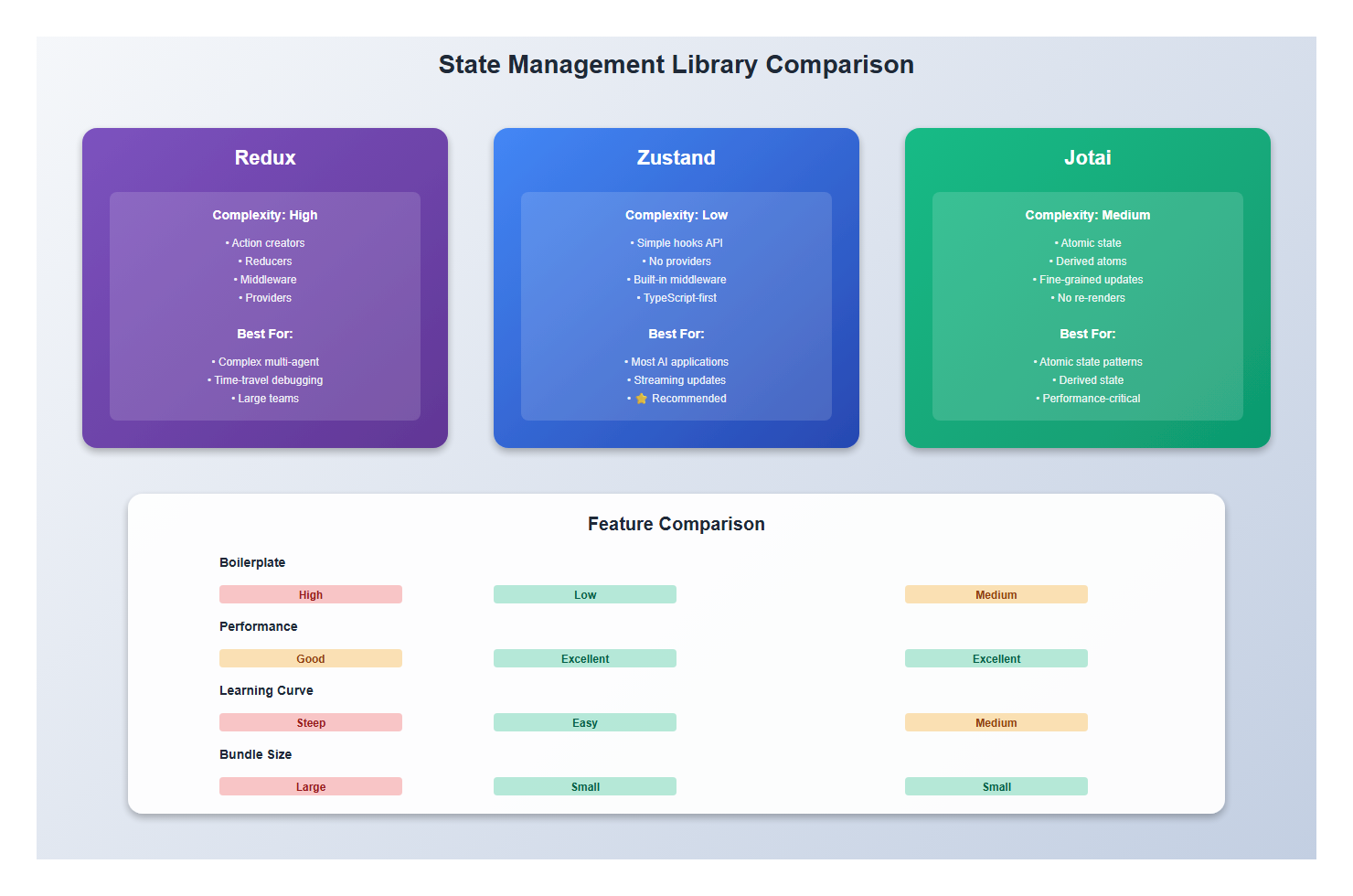
Redux is powerful but heavy. I use it when:
- Complex state with many interdependent pieces
- Need time-travel debugging
- Large team with established Redux patterns
- Need middleware for complex async flows
For AI apps, Redux is overkill unless you have specific needs. The boilerplate isn’t worth it for most AI applications.
2.2 Redux Pattern for Streaming
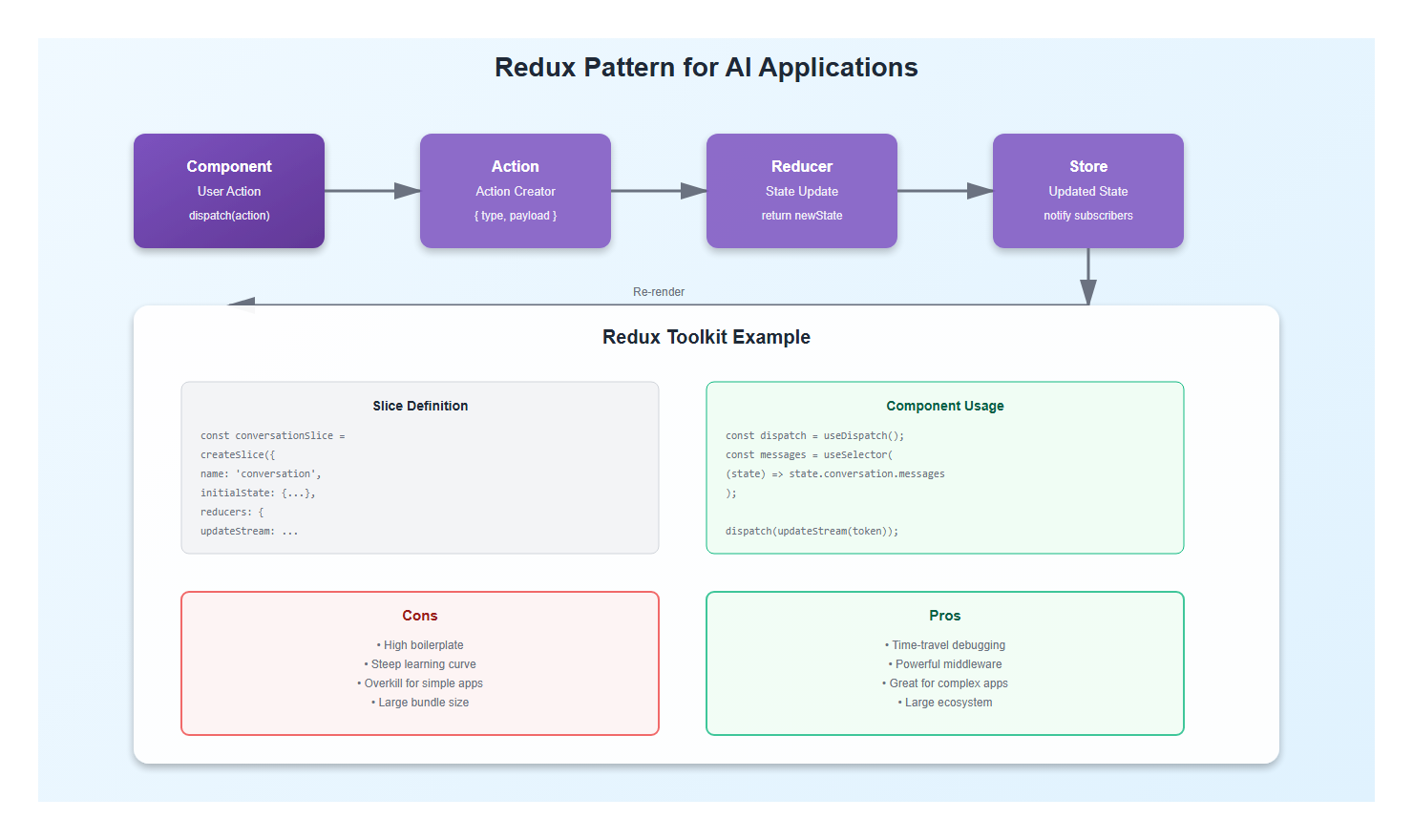
If you do use Redux, here’s the pattern I recommend:
import { createSlice, PayloadAction } from '@reduxjs/toolkit';

interface ConversationState {
  messages: Message[];
  currentStream: string | null;
  isStreaming: boolean;
}

const conversationSlice = createSlice({
  name: 'conversation',
  initialState: {
    messages: [],
    currentStream: null,
    isStreaming: false,
  } as ConversationState,
  reducers: {
    addMessage: (state, action: PayloadAction<Message>) => {
      state.messages.push(action.payload);
    },
    updateStream: (state, action: PayloadAction<string>) => {
      state.currentStream = action.payload;
      // Update last message if streaming
      const lastMessage = state.messages[state.messages.length - 1];
      if (lastMessage && lastMessage.isStreaming) {
        lastMessage.content = action.payload;
      }
    },
    startStreaming: (state) => {
      state.isStreaming = true;
      state.currentStream = '';
    },
    completeStreaming: (state) => {
      state.isStreaming = false;
      state.currentStream = null;
      const lastMessage = state.messages[state.messages.length - 1];
      if (lastMessage) {
        lastMessage.isStreaming = false;
      }
    },
  },
});

export const { addMessage, updateStream, startStreaming, completeStreaming } = conversationSlice.actions;
export default conversationSlice.reducer;
Redux Toolkit makes this manageable, but it’s still more boilerplate than needed for most AI apps.
3. Zustand: My Go-To for AI Apps
3.1 Why Zustand Works Well
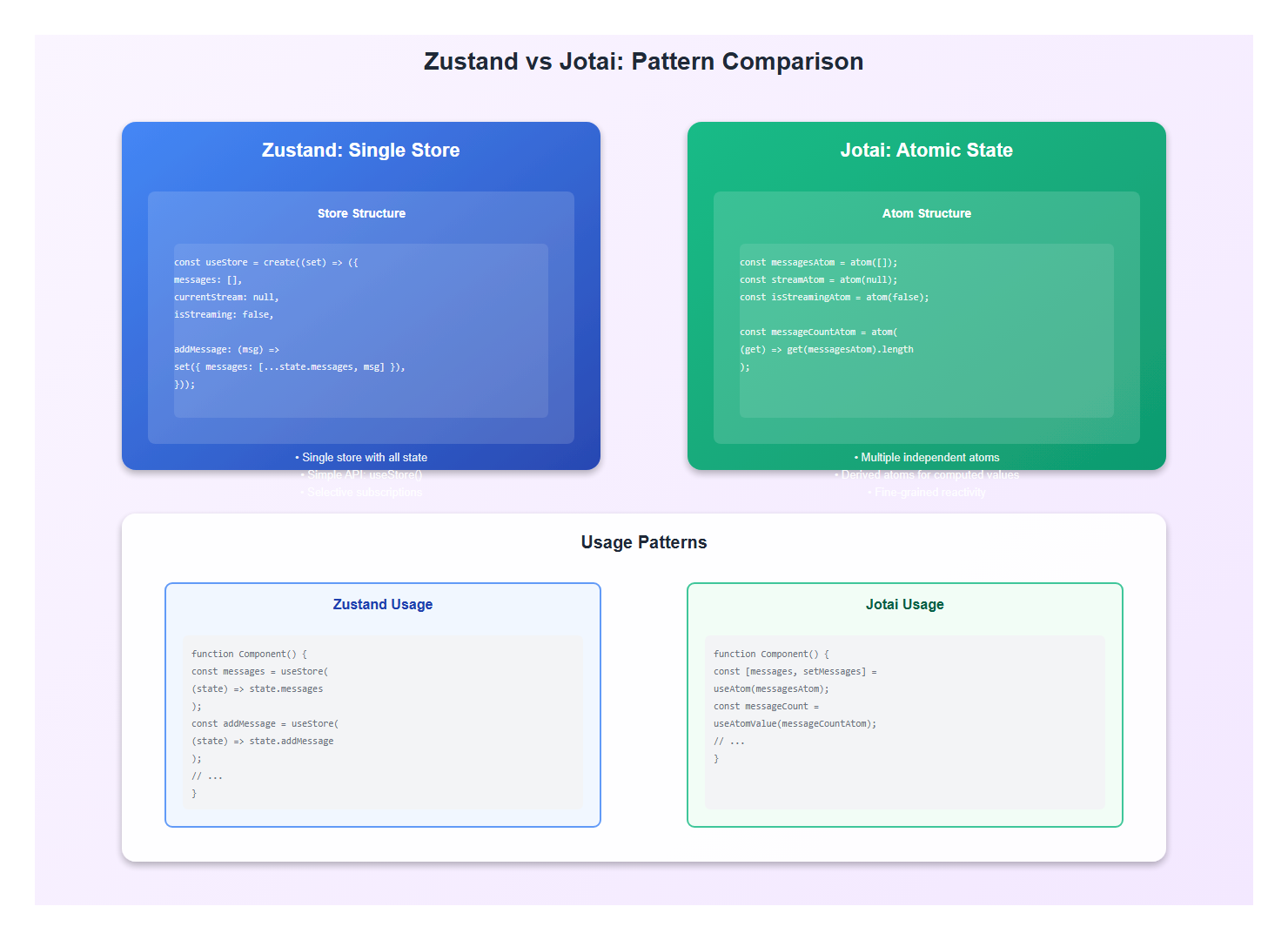
After trying everything, Zustand has become my default for AI applications. Here’s why:
- Minimal boilerplate: No providers, no action creators
- Simple API: Just hooks and setters
- Good performance: Selective subscriptions
- TypeScript-friendly: Excellent type inference
- Flexible: Easy to add middleware
3.2 Zustand Pattern for AI
Here’s the pattern I use in production:
import { create } from 'zustand';
import { devtools, persist } from 'zustand/middleware';

interface ConversationStore {
  // State
  messages: Message[];
  currentStream: string | null;
  isStreaming: boolean;
  error: Error | null;

  // Actions
  addMessage: (message: Message) => void;
  updateStream: (content: string) => void;
  startStream: () => void;
  completeStream: () => void;
  setError: (error: Error | null) => void;
  clearConversation: () => void;
}

export const useConversationStore = create<ConversationStore>()(
  devtools(
    persist(
      (set) => ({
        // Initial state
        messages: [],
        currentStream: null,
        isStreaming: false,
        error: null,

        // Actions
        addMessage: (message) =>
          set(
            (state) => ({
              messages: [...state.messages, message],
            }),
            false,
            'addMessage'
          ),

        updateStream: (content) =>
          set(
            (state) => {
              const lastMessage = state.messages[state.messages.length - 1];
              if (lastMessage && lastMessage.isStreaming) {
                return {
                  messages: state.messages.map((msg, idx) =>
                    idx === state.messages.length - 1
                      ? { ...msg, content }
                      : msg
                  ),
                  currentStream: content,
                };
              }
              return { currentStream: content };
            },
            false,
            'updateStream'
          ),

        startStream: () =>
          set(
            (state) => ({
              isStreaming: true,
              currentStream: '',
              messages: [
                ...state.messages,
                {
                  id: Date.now().toString(),
                  role: 'assistant',
                  content: '',
                  timestamp: new Date(),
                  isStreaming: true,
                },
              ],
            }),
            false,
            'startStream'
          ),

        completeStream: () =>
          set(
            (state) => ({
              isStreaming: false,
              currentStream: null,
              messages: state.messages.map((msg) =>
                msg.isStreaming ? { ...msg, isStreaming: false } : msg
              ),
            }),
            false,
            'completeStream'
          ),

        setError: (error) =>
          set({ error, isStreaming: false }, false, 'setError'),

        clearConversation: () =>
          set(
            {
              messages: [],
              currentStream: null,
              isStreaming: false,
              error: null,
            },
            false,
            'clearConversation'
          ),
      }),
      {
        name: 'conversation-storage',
        partialize: (state) => ({
          messages: state.messages.filter((msg) => !msg.isStreaming),
        }),
      }
    ),
    { name: 'Conversation Store' }
  )
);
This gives me everything I need with minimal boilerplate. The persist middleware saves conversation history, and devtools gives me debugging.
4. Jotai: Atomic State for AI
4.1 When Jotai Shines
Jotai uses atomic state—small, independent pieces. It’s great when:
- You want fine-grained reactivity
- State is naturally atomic (messages, streams, errors)
- You need derived state
- You want to avoid re-renders
4.2 Jotai Pattern for AI
Here’s how I structure Jotai for AI apps:
import { atom, useAtom, useAtomValue, useSetAtom } from 'jotai';
import { atomWithStorage } from 'jotai/utils';

// Base atoms
const messagesAtom = atomWithStorage<Message[]>('messages', []);
const currentStreamAtom = atom<string | null>(null);
const isStreamingAtom = atom(false);
const errorAtom = atom<Error | null>(null);

// Derived atoms
const lastMessageAtom = atom((get) => {
  const messages = get(messagesAtom);
  return messages[messages.length - 1] || null;
});

const messageCountAtom = atom((get) => get(messagesAtom).length);

const conversationContextAtom = atom((get) => {
  const messages = get(messagesAtom);
  return messages
    .filter((msg) => !msg.isStreaming)
    .map((msg) => ({
      role: msg.role,
      content: msg.content,
    }));
});

// Action atoms
const addMessageAtom = atom(null, (get, set, message: Message) => {
  set(messagesAtom, [...get(messagesAtom), message]);
});

const updateStreamAtom = atom(null, (get, set, content: string) => {
  set(currentStreamAtom, content);
  const messages = get(messagesAtom);
  const lastMessage = messages[messages.length - 1];
  if (lastMessage && lastMessage.isStreaming) {
    set(messagesAtom, [
      ...messages.slice(0, -1),
      { ...lastMessage, content },
    ]);
  }
});

// Usage in components
function ChatInterface() {
  const [messages, setMessages] = useAtom(messagesAtom);
  const [currentStream, setCurrentStream] = useAtom(currentStreamAtom);
  const [isStreaming, setIsStreaming] = useAtom(isStreamingAtom);
  const addMessage = useSetAtom(addMessageAtom);
  const updateStream = useSetAtom(updateStreamAtom);
  const messageCount = useAtomValue(messageCountAtom);

  // Component implementation...
}
Jotai’s atomic approach is elegant, but it can be harder to reason about for complex state. I use it when state is naturally atomic.
5. Performance Considerations
5.1 High-Frequency Updates
AI applications update state on every token. This can cause performance issues:
// Problem: Updates on every token (100+ times per second)
eventSource.onmessage = (event) => {
  updateStream(event.data); // Triggers re-render every time
};

// Solution: Throttle updates
import { throttle } from 'lodash-es';

const throttledUpdate = throttle((content: string) => {
  updateStream(content);
}, 50); // Update max 20 times per second

eventSource.onmessage = (event) => {
  throttledUpdate(event.data);
};
5.2 Selective Subscriptions
Only subscribe to the state you need:
// Bad: Subscribes to entire store
function MessageList() {
  const store = useConversationStore(); // Re-renders on any change
  return <div>{store.messages.map(...)}</div>;
}

// Good: Selective subscription
function MessageList() {
  const messages = useConversationStore((state) => state.messages);
  // Only re-renders when messages change
  return <div>{messages.map(...)}</div>;
}

// Even better with Jotai: Only subscribe to messages
function MessageList() {
  const messages = useAtomValue(messagesAtom);
  // Only re-renders when messagesAtom changes
  return <div>{messages.map(...)}</div>;
}
5.3 Memoization
Memoize expensive computations:
// Zustand with computed values
const useMessageCount = () =>
  useConversationStore((state) => state.messages.length);

// Jotai with derived atoms
const messageCountAtom = atom((get) => get(messagesAtom).length);

// React with useMemo
const messageCount = useMemo(
  () => messages.length,
  [messages]
);
6. Real-World Example: Complete Implementation
Here’s a complete, production-ready example using Zustand:
import { create } from 'zustand';
import { devtools, persist } from 'zustand/middleware';

interface Message {
  id: string;
  role: 'user' | 'assistant';
  content: string;
  timestamp: Date;
  isStreaming?: boolean;
}

interface ConversationStore {
  messages: Message[];
  currentStream: string | null;
  isStreaming: boolean;
  error: Error | null;
  input: string;

  // Actions
  setInput: (input: string) => void;
  addMessage: (message: Message) => void;
  startStream: () => void;
  updateStream: (content: string) => void;
  completeStream: () => void;
  setError: (error: Error | null) => void;
  clearConversation: () => void;
  retryLastMessage: () => void;
}

export const useConversationStore = create<ConversationStore>()(
  devtools(
    persist(
      (set, get) => ({
        messages: [],
        currentStream: null,
        isStreaming: false,
        error: null,
        input: '',

        setInput: (input) => set({ input }),

        addMessage: (message) =>
          set((state) => ({
            messages: [...state.messages, message],
            input: '',
          })),

        startStream: () =>
          set((state) => ({
            isStreaming: true,
            currentStream: '',
            messages: [
              ...state.messages,
              {
                id: Date.now().toString(),
                role: 'assistant',
                content: '',
                timestamp: new Date(),
                isStreaming: true,
              },
            ],
          })),

        updateStream: (content) =>
          set((state) => {
            const updatedMessages = state.messages.map((msg, idx) =>
              idx === state.messages.length - 1 && msg.isStreaming
                ? { ...msg, content }
                : msg
            );
            return {
              messages: updatedMessages,
              currentStream: content,
            };
          }),

        completeStream: () =>
          set((state) => ({
            isStreaming: false,
            currentStream: null,
            messages: state.messages.map((msg) =>
              msg.isStreaming ? { ...msg, isStreaming: false } : msg
            ),
          })),

        setError: (error) =>
          set((state) => ({
            error,
            isStreaming: false,
            messages: state.messages.filter((msg) => !msg.isStreaming),
          })),

        clearConversation: () =>
          set({
            messages: [],
            currentStream: null,
            isStreaming: false,
            error: null,
            input: '',
          }),

        retryLastMessage: () => {
          const state = get();
          const lastUserMessage = [...state.messages]
            .reverse()
            .find((msg) => msg.role === 'user');

          if (lastUserMessage) {
            set({
              messages: state.messages.filter(
                (msg) => msg.timestamp < lastUserMessage.timestamp
              ),
              error: null,
            });
            // Trigger retry (implementation depends on your API)
          }
        },
      }),
      {
        name: 'ai-conversation-storage',
        partialize: (state) => ({
          messages: state.messages.filter((msg) => !msg.isStreaming),
        }),
      }
    ),
    { name: 'Conversation Store' }
  )
);

// Usage in component
function AIChat() {
  const {
    messages,
    input,
    isStreaming,
    error,
    setInput,
    addMessage,
    startStream,
    updateStream,
    completeStream,
  } = useConversationStore();

  const handleSend = async () => {
    const userMessage: Message = {
      id: Date.now().toString(),
      role: 'user',
      content: input,
      timestamp: new Date(),
    };

    addMessage(userMessage);
    startStream();

    try {
      // Stream response
      const response = await fetch('/api/chat/stream', {
        method: 'POST',
        body: JSON.stringify({ message: input }),
      });

      const reader = response.body?.getReader();
      const decoder = new TextDecoder();

      while (true) {
        const { done, value } = await reader!.read();
        if (done) break;

        const chunk = decoder.decode(value);
        updateStream(chunk);
      }

      completeStream();
    } catch (err) {
      setError(err as Error);
    }
  };

  return (
    <div>
      <MessageList messages={messages} />
      <ChatInput
        value={input}
        onChange={setInput}
        onSend={handleSend}
        disabled={isStreaming}
      />
    </div>
  );
}

7. Best Practices: Lessons from Production
After building AI applications with different state management solutions, here are the practices I follow:
- Choose based on complexity: Simple apps don’t need Redux
- Zustand for most AI apps: Best balance of simplicity and power
- Jotai for atomic state: When state is naturally atomic
- Throttle high-frequency updates: Don’t update on every token
- Use selective subscriptions: Only subscribe to what you need
- Persist conversation state: Users expect history to persist
- Handle streaming state separately: Don’t persist streaming messages
- Memoize expensive computations: Derived state should be memoized
- Use TypeScript: Type safety prevents bugs
- Test state updates: State logic needs tests
8. Common Mistakes to Avoid
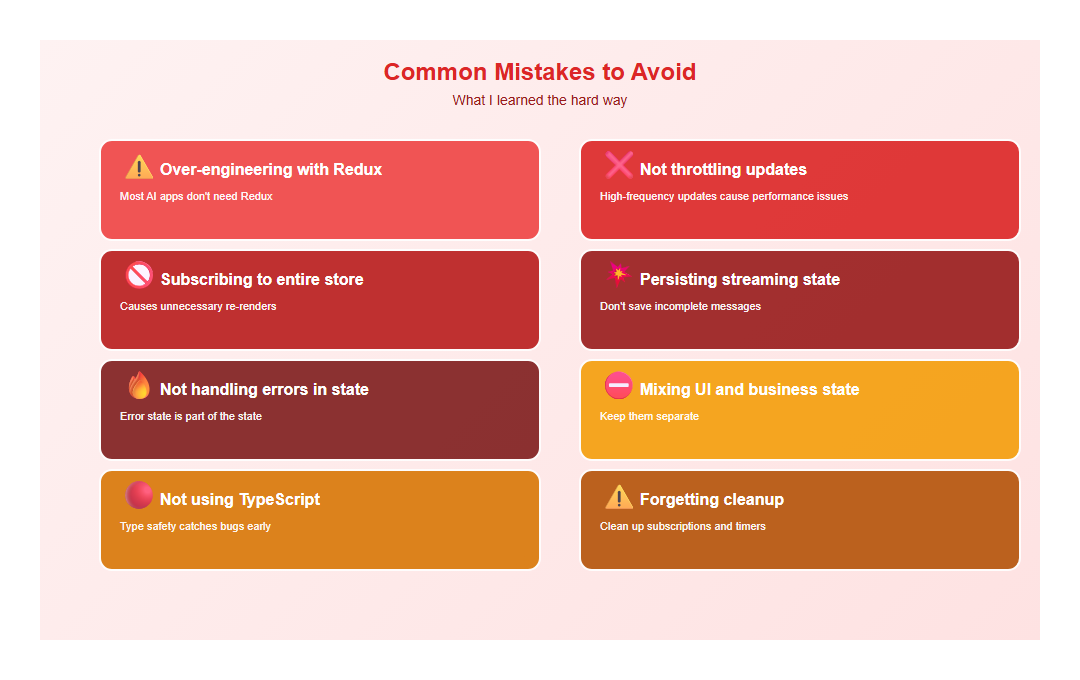
I’ve made these mistakes so you don’t have to:
- Over-engineering with Redux: Most AI apps don’t need Redux
- Not throttling updates: High-frequency updates cause performance issues
- Subscribing to entire store: Causes unnecessary re-renders
- Persisting streaming state: Don’t save incomplete messages
- Not handling errors in state: Error state is part of the state
- Mixing UI and business state: Keep them separate
- Not using TypeScript: Type safety catches bugs early
- Forgetting cleanup: Clean up subscriptions and timers
9. Decision Framework
Here’s how I decide which state management to use:
| Use Case | Recommended | Why |
|---|---|---|
| Simple AI chat | Zustand | Minimal boilerplate, perfect for streaming |
| Complex multi-agent system | Redux | Time-travel debugging, middleware |
| Atomic state updates | Jotai | Fine-grained reactivity |
| Small prototype | Context API | Built-in, no dependencies |
10. Conclusion
State management for AI applications is about choosing the right tool for the job. Redux is powerful but heavy. Zustand is my go-to for most AI apps—it’s simple, performant, and flexible. Jotai is great when state is naturally atomic.
The key is understanding your needs: complexity, update frequency, team size, and debugging requirements. Choose accordingly, and you’ll build maintainable, performant AI applications.
🎯 Key Takeaway
For most AI applications, Zustand is the sweet spot: minimal boilerplate, excellent performance, and perfect for streaming updates. Redux is overkill unless you need time-travel debugging or complex middleware. Jotai shines when state is naturally atomic. Choose based on your needs, not trends.
Discover more from C4: Container, Code, Cloud & Context
Subscribe to get the latest posts sent to your email.