Last year, I needed to run a 13B parameter model on a 16GB GPU. Full precision required 52GB. After testing GPTQ, AWQ, and BitsAndBytes, I reduced memory to 7GB with minimal accuracy loss. After quantizing 30+ models, I’ve learned which method works best for each scenario. Here’s the complete guide to LLM quantization.
Understanding Quantization
Quantization reduces model size and memory by using fewer bits per weight:
- FP32: 32 bits per weight (full precision)
- FP16: 16 bits per weight (half precision, 2x reduction)
- INT8: 8 bits per weight (4x reduction)
- INT4: 4 bits per weight (8x reduction)
- INT3/INT2: Even smaller, but significant accuracy loss
Different quantization methods optimize this trade-off differently.
GPTQ: Post-Training Quantization
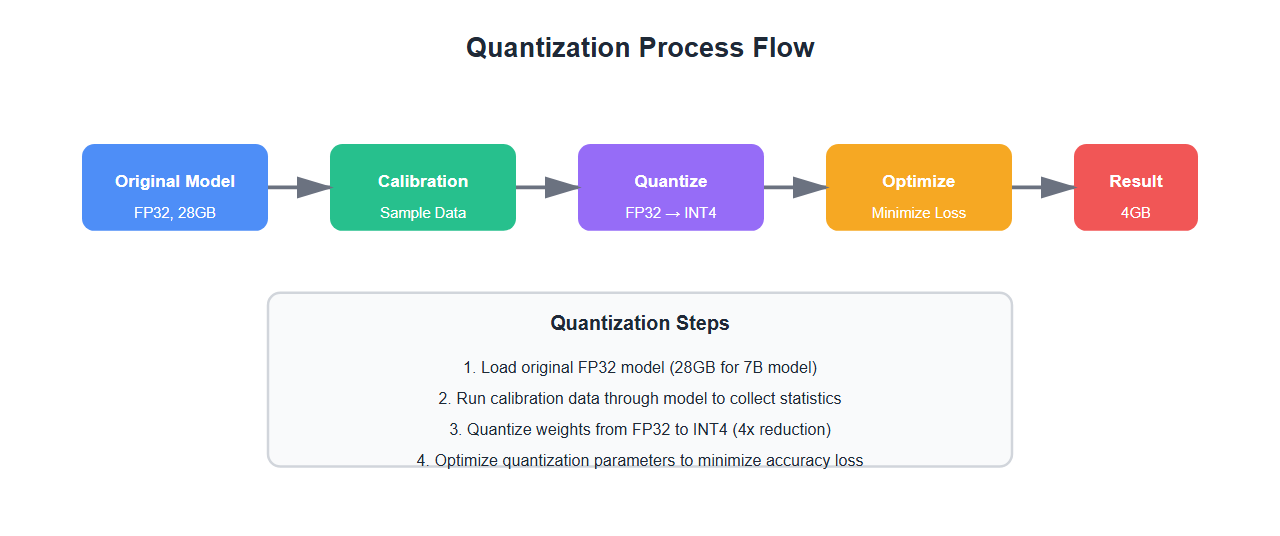
GPTQ (Generative Pre-trained Transformer Quantization) quantizes weights after training:
from transformers import AutoTokenizer, AutoModelForCausalLM
from auto_gptq import AutoGPTQForCausalLM, BaseQuantizeConfig

# Load model
model_name = "meta-llama/Llama-2-7b-hf"
tokenizer = AutoTokenizer.from_pretrained(model_name)

# GPTQ quantization config
quantize_config = BaseQuantizeConfig(
    bits=4,  # 4-bit quantization
    group_size=128,  # Group size for quantization
    desc_act=False,  # Disable activation order
)

# Quantize model
model = AutoGPTQForCausalLM.from_pretrained(
    model_name,
    quantize_config=quantize_config,
    low_cpu_mem_usage=True
)

# Save quantized model
model.save_quantized("./llama-7b-gptq-4bit")

# Load quantized model for inference
quantized_model = AutoGPTQForCausalLM.from_quantized(
    "./llama-7b-gptq-4bit",
    device="cuda:0",
    use_triton=False
)

# Inference
inputs = tokenizer("Hello, how are you?", return_tensors="pt").to("cuda:0")
outputs = quantized_model.generate(**inputs, max_length=100)
print(tokenizer.decode(outputs[0]))
GPTQ Advantages
- High accuracy: Minimal accuracy loss (often <1%)
- Fast inference: Optimized for GPU inference
- Good compression: 4-bit models are 4x smaller
- Wide support: Works with most transformer models
GPTQ Limitations
- Calibration data required: Needs representative dataset
- Slow quantization: Can take hours for large models
- One-time process: Must re-quantize for model updates
AWQ: Activation-Aware Quantization
AWQ (Activation-aware Weight Quantization) considers activation statistics:
from awq import AutoAWQForCausalLM
from awq.quantize.quantizer import AwqQuantizer

# Load model
model_name = "meta-llama/Llama-2-7b-hf"
tokenizer = AutoTokenizer.from_pretrained(model_name)

# AWQ quantization
quantizer = AwqQuantizer(
    model,
    tokenizer,
    w_bit=4,  # 4-bit weights
    q_group_size=128,
    zero_point=True,
    qscheme="per-channel"
)

# Calibrate with sample data
calibration_data = [
    "The quick brown fox jumps over the lazy dog.",
    "Machine learning is transforming industries.",
    # ... more calibration examples
]

quantizer.quantize(calibration_data)

# Save quantized model
quantizer.save_quantized("./llama-7b-awq-4bit")

# Load for inference
model = AutoAWQForCausalLM.from_quantized(
    "./llama-7b-awq-4bit",
    device_map="auto"
)
AWQ Advantages
- Activation-aware: Considers how activations affect quantization
- Better accuracy: Often outperforms GPTQ on some models
- Faster quantization: Generally faster than GPTQ
- Zero-point support: Better handling of zero values
AWQ Limitations
- Model support: Limited to certain architectures
- Calibration needed: Requires representative data
- Less mature: Newer than GPTQ, fewer resources
BitsAndBytes: Dynamic Quantization
BitsAndBytes provides dynamic quantization during loading:
from transformers import AutoModelForCausalLM, AutoTokenizer, BitsAndBytesConfig
import torch

# 4-bit quantization config
bnb_config = BitsAndBytesConfig(
    load_in_4bit=True,
    bnb_4bit_quant_type="nf4",  # NormalFloat4
    bnb_4bit_compute_dtype=torch.float16,
    bnb_4bit_use_double_quant=True,  # Double quantization
)

# Load model with quantization
model = AutoModelForCausalLM.from_pretrained(
    "meta-llama/Llama-2-7b-hf",
    quantization_config=bnb_config,
    device_map="auto"
)

tokenizer = AutoTokenizer.from_pretrained("meta-llama/Llama-2-7b-hf")

# Inference
inputs = tokenizer("Explain quantum computing", return_tensors="pt").to("cuda:0")
outputs = model.generate(**inputs, max_length=200)
print(tokenizer.decode(outputs[0]))
BitsAndBytes Advantages
- No calibration: Works immediately, no preprocessing
- Easy to use: Simple configuration
- Training support: Can fine-tune quantized models (QLoRA)
- Flexible: Supports 4-bit and 8-bit quantization
BitsAndBytes Limitations
- Lower accuracy: Slightly worse than GPTQ/AWQ
- Slower inference: Dynamic quantization overhead
- Memory overhead: Some overhead for quantization logic
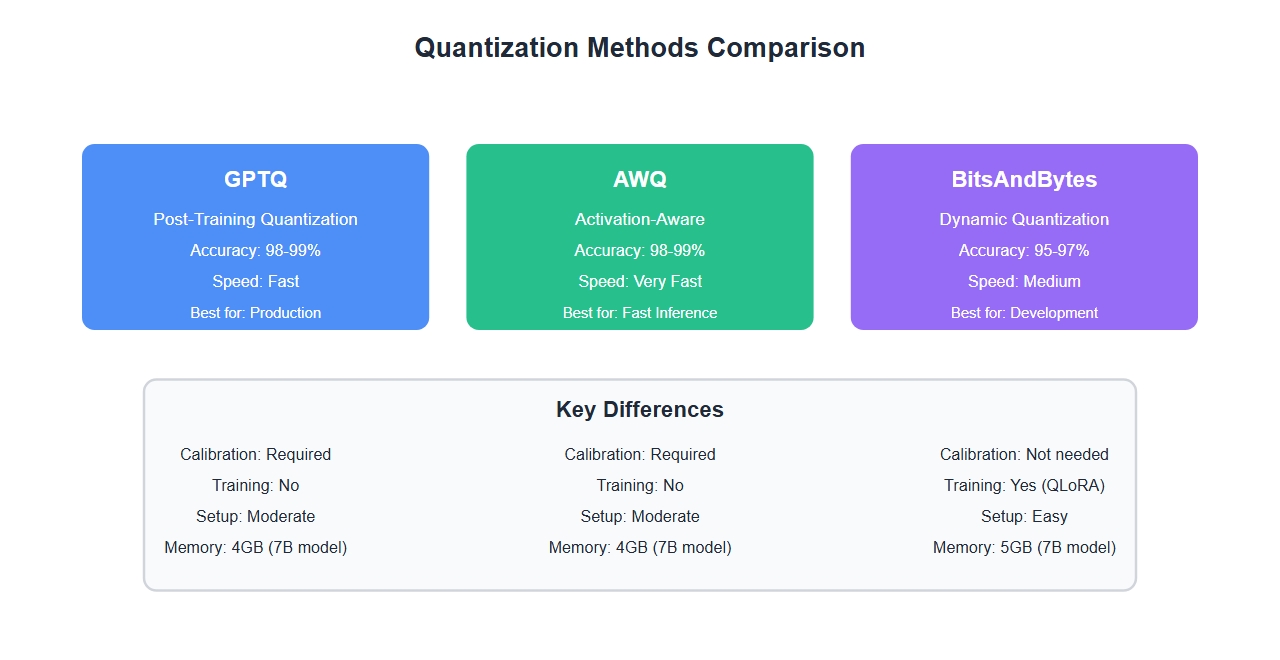
Comparison Table
Detailed comparison of quantization methods:
| Method | Accuracy | Speed | Setup | Training | Best For |
|---|---|---|---|---|---|
| GPTQ | 98-99% | Fast | Calibration needed | No | Production inference |
| AWQ | 98-99% | Very Fast | Calibration needed | No | Fast inference |
| BitsAndBytes | 95-97% | Medium | No calibration | Yes (QLoRA) | Development & training |
Memory Comparison
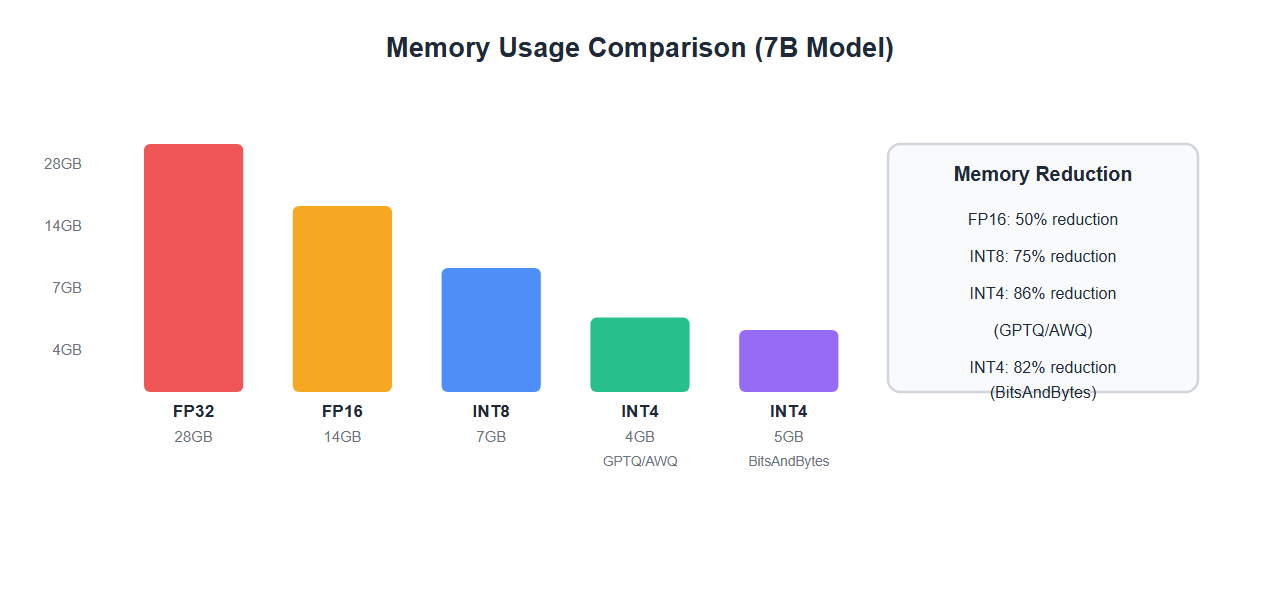
Real-world memory usage for a 7B parameter model:
| Precision | Memory (GB) | Reduction | Method |
|---|---|---|---|
| FP32 | 28GB | Baseline | Full precision |
| FP16 | 14GB | 50% | Half precision |
| INT8 | 7GB | 75% | 8-bit quantization |
| INT4 (GPTQ) | 4GB | 86% | GPTQ 4-bit |
| INT4 (AWQ) | 4GB | 86% | AWQ 4-bit |
| INT4 (BitsAndBytes) | 5GB | 82% | BitsAndBytes 4-bit |
Choosing the Right Method
Decision framework:
- Production inference: Use GPTQ or AWQ for best accuracy and speed
- Development/experimentation: Use BitsAndBytes for ease of use
- Fine-tuning needed: Use BitsAndBytes with QLoRA
- Maximum accuracy: Use GPTQ with careful calibration
- Fastest inference: Use AWQ for optimized speed
- Limited calibration data: Use BitsAndBytes (no calibration needed)
Best Practices
From quantizing 30+ models:
- Use representative calibration data: Calibration data should match your use case
- Test accuracy after quantization: Always validate on your specific tasks
- Start with 4-bit: Good balance of size and accuracy
- Consider 8-bit for critical apps: If accuracy is paramount
- Use GPTQ/AWQ for production: Better accuracy than BitsAndBytes
- Use BitsAndBytes for development: Faster iteration
- Monitor memory usage: Actual usage may vary from estimates
- Benchmark inference speed: Different methods have different speeds
🎯 Key Takeaway
Quantization is essential for running large models on consumer hardware. GPTQ and AWQ offer the best accuracy for production inference. BitsAndBytes is easiest for development and supports training. Choose GPTQ/AWQ for production, BitsAndBytes for development and fine-tuning. With proper quantization, you can run 13B models on 16GB GPUs with minimal accuracy loss.
Common Mistakes
What I learned the hard way:
- Poor calibration data: Unrepresentative data leads to poor quantization
- Not testing accuracy: Always validate quantized models
- Using wrong method: GPTQ for training, BitsAndBytes for production
- Ignoring inference speed: Some methods are slower despite smaller size
- Too aggressive quantization: 2-bit or 3-bit often has unacceptable accuracy loss
- Not considering hardware: Some methods work better on specific GPUs
Bottom Line
Quantization is essential for deploying large LLMs on consumer hardware. GPTQ and AWQ provide the best accuracy for production inference with careful calibration. BitsAndBytes offers the easiest setup and supports fine-tuning. Choose based on your needs: production (GPTQ/AWQ), development (BitsAndBytes), or fine-tuning (BitsAndBytes + QLoRA). With proper quantization, you can achieve 4-8x memory reduction with minimal accuracy loss.
Discover more from C4: Container, Code, Cloud & Context
Subscribe to get the latest posts sent to your email.