Introduction: Semantic Kernel is Microsoft’s open-source SDK for integrating Large Language Models into applications. Originally developed to power Microsoft 365 Copilot, it has evolved into a comprehensive framework for building AI-powered applications with enterprise-grade features. Unlike other LLM frameworks that focus primarily on Python, Semantic Kernel provides first-class support for both C# and Python, making it the go-to choice for .NET developers entering the AI space. This guide covers everything from basic setup to advanced patterns like automatic planning and memory integration.
Capabilities and Features
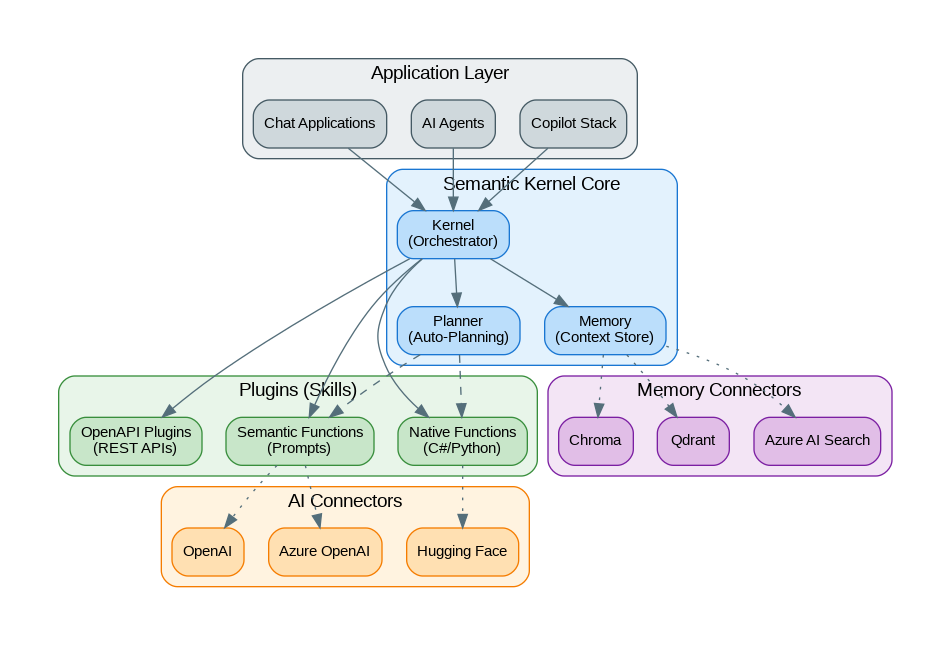
Semantic Kernel provides enterprise-ready capabilities for AI application development:
- Multi-Language Support: First-class SDKs for C#, Python, and Java with consistent APIs
- Plugin Architecture: Modular design with semantic functions (prompts) and native functions (code)
- Automatic Planning: AI-powered planners that decompose complex tasks into executable steps
- Memory Integration: Built-in support for vector databases and semantic memory
- AI Connectors: Native integration with Azure OpenAI, OpenAI, Hugging Face, and more
- Function Calling: Automatic tool use with OpenAI and Azure OpenAI function calling
- Prompt Templates: Handlebars and Jinja2 template support for dynamic prompts
- Filters and Hooks: Middleware pattern for logging, telemetry, and content moderation
- Streaming Support: Real-time streaming responses for chat applications
- Enterprise Security: Azure AD integration and responsible AI features
Getting Started
Install Semantic Kernel for your preferred language:
# Python Installation
pip install semantic-kernel

# For Azure OpenAI
pip install semantic-kernel[azure]

# For all connectors
pip install semantic-kernel[all]

# Set environment variables
export AZURE_OPENAI_API_KEY="your-key"
export AZURE_OPENAI_ENDPOINT="https://your-resource.openai.azure.com/"
export AZURE_OPENAI_DEPLOYMENT_NAME="gpt-4o"
// C# Installation (.NET CLI)
dotnet add package Microsoft.SemanticKernel
dotnet add package Microsoft.SemanticKernel.Connectors.OpenAI
dotnet add package Microsoft.SemanticKernel.Plugins.CoreBuilding Your First Application (Python)
Create a simple chat application with Semantic Kernel:
import asyncio
from semantic_kernel import Kernel
from semantic_kernel.connectors.ai.open_ai import AzureChatCompletion
from semantic_kernel.contents import ChatHistory

async def main():
    # Initialize the kernel
    kernel = Kernel()

    # Add Azure OpenAI chat service
    kernel.add_service(
        AzureChatCompletion(
            deployment_name="gpt-4o",
            endpoint="https://your-resource.openai.azure.com/",
            api_key="your-api-key",
            service_id="chat"
        )
    )

    # Create chat history
    chat_history = ChatHistory()
    chat_history.add_system_message(
        "You are a helpful AI assistant specializing in software architecture."
    )

    # Get chat completion service
    chat_service = kernel.get_service("chat")

    # Interactive chat loop
    while True:
        user_input = input("You: ")
        if user_input.lower() == "exit":
            break

        chat_history.add_user_message(user_input)

        response = await chat_service.get_chat_message_content(
            chat_history=chat_history,
            settings=None
        )

        print(f"Assistant: {response.content}")
        chat_history.add_assistant_message(response.content)

if __name__ == "__main__":
    asyncio.run(main())
Creating Plugins with Semantic and Native Functions
Plugins are the building blocks of Semantic Kernel applications:
from semantic_kernel import Kernel
from semantic_kernel.functions import kernel_function
from semantic_kernel.connectors.ai.open_ai import AzureChatCompletion
from semantic_kernel.connectors.ai.function_choice_behavior import FunctionChoiceBehavior
import httpx

class WeatherPlugin:
    """Plugin for weather-related functions."""

    @kernel_function(
        name="get_weather",
        description="Get current weather for a city"
    )
    async def get_weather(self, city: str) -> str:
        """Fetch weather data from API."""
        async with httpx.AsyncClient() as client:
            response = await client.get(
                f"https://wttr.in/{city}?format=j1"
            )
            data = response.json()
            current = data["current_condition"][0]
            return f"Weather in {city}: {current['temp_C']}°C, {current['weatherDesc'][0]['value']}"

    @kernel_function(
        name="get_forecast",
        description="Get weather forecast for upcoming days"
    )
    async def get_forecast(self, city: str, days: int = 3) -> str:
        """Get multi-day forecast."""
        async with httpx.AsyncClient() as client:
            response = await client.get(
                f"https://wttr.in/{city}?format=j1"
            )
            data = response.json()
            forecasts = []
            for day in data["weather"][:days]:
                forecasts.append(
                    f"{day['date']}: {day['avgtempC']}°C avg"
                )
            return "\n".join(forecasts)

class MathPlugin:
    """Plugin for mathematical operations."""

    @kernel_function(name="add", description="Add two numbers")
    def add(self, a: float, b: float) -> float:
        return a + b

    @kernel_function(name="multiply", description="Multiply two numbers")
    def multiply(self, a: float, b: float) -> float:
        return a * b

async def main():
    kernel = Kernel()

    # Add AI service
    kernel.add_service(
        AzureChatCompletion(
            deployment_name="gpt-4o",
            endpoint="https://your-resource.openai.azure.com/",
            api_key="your-api-key"
        )
    )

    # Register plugins
    kernel.add_plugin(WeatherPlugin(), plugin_name="weather")
    kernel.add_plugin(MathPlugin(), plugin_name="math")

    # Enable automatic function calling
    settings = kernel.get_prompt_execution_settings_class()()
    settings.function_choice_behavior = FunctionChoiceBehavior.Auto()

    # The AI will automatically use plugins when needed
    result = await kernel.invoke_prompt(
        "What's the weather in London and what's 25 + 17?",
        settings=settings
    )
    print(result)

asyncio.run(main())
Semantic Kernel in C#
For .NET developers, Semantic Kernel provides an idiomatic C# experience:
using Microsoft.SemanticKernel;
using Microsoft.SemanticKernel.ChatCompletion;
using Microsoft.SemanticKernel.Connectors.OpenAI;
using System.ComponentModel;

// Define a plugin class
public class EmailPlugin
{
    [KernelFunction, Description("Send an email to a recipient")]
    public async Task<string> SendEmailAsync(
        [Description("Email recipient")] string to,
        [Description("Email subject")] string subject,
        [Description("Email body")] string body)
    {
        // Simulate sending email
        await Task.Delay(100);
        return $"Email sent to {to} with subject: {subject}";
    }

    [KernelFunction, Description("Get unread emails")]
    public Task<string> GetUnreadEmailsAsync()
    {
        return Task.FromResult("You have 3 unread emails from: john@example.com, jane@example.com, support@company.com");
    }
}

// Main application
var builder = Kernel.CreateBuilder();

builder.AddAzureOpenAIChatCompletion(
    deploymentName: "gpt-4o",
    endpoint: "https://your-resource.openai.azure.com/",
    apiKey: "your-api-key"
);

var kernel = builder.Build();

// Add plugins
kernel.Plugins.AddFromType<EmailPlugin>();

// Create chat with automatic function calling
var chatService = kernel.GetRequiredService<IChatCompletionService>();
var history = new ChatHistory();
history.AddSystemMessage("You are an email assistant.");

var settings = new OpenAIPromptExecutionSettings
{
    FunctionChoiceBehavior = FunctionChoiceBehavior.Auto()
};

history.AddUserMessage("Check my emails and send a reply to John saying I'll call him tomorrow");

var response = await chatService.GetChatMessageContentAsync(history, settings, kernel);
Console.WriteLine(response.Content);
Memory and RAG Integration
from semantic_kernel import Kernel
from semantic_kernel.memory import SemanticTextMemory
from semantic_kernel.connectors.memory.azure_cognitive_search import AzureCognitiveSearchMemoryStore
from semantic_kernel.connectors.ai.open_ai import AzureTextEmbedding

async def setup_memory():
    kernel = Kernel()

    # Add embedding service
    embedding_service = AzureTextEmbedding(
        deployment_name="text-embedding-ada-002",
        endpoint="https://your-resource.openai.azure.com/",
        api_key="your-api-key"
    )

    # Create memory store with Azure AI Search
    memory_store = AzureCognitiveSearchMemoryStore(
        vector_size=1536,
        search_endpoint="https://your-search.search.windows.net",
        admin_key="your-admin-key"
    )

    # Create semantic memory
    memory = SemanticTextMemory(
        storage=memory_store,
        embeddings_generator=embedding_service
    )

    # Store documents
    await memory.save_information(
        collection="docs",
        id="doc1",
        text="Semantic Kernel is Microsoft's SDK for AI orchestration.",
        description="SK overview"
    )

    await memory.save_information(
        collection="docs",
        id="doc2",
        text="Plugins in Semantic Kernel can be semantic or native functions.",
        description="Plugin types"
    )

    # Search memory
    results = await memory.search(
        collection="docs",
        query="How do I create plugins?",
        limit=2
    )

    for result in results:
        print(f"Relevance: {result.relevance}, Text: {result.text}")

asyncio.run(setup_memory())
Benchmarks and Performance
Semantic Kernel performance characteristics:
| Operation | Python (p50) | C# (p50) | Memory |
|---|---|---|---|
| Kernel Initialization | 15ms | 8ms | ~25MB |
| Simple Chat Completion | 800ms | 750ms | ~30MB |
| Function Calling (2 tools) | 1.5s | 1.4s | ~35MB |
| RAG Query (Azure Search) | 350ms | 300ms | ~40MB |
| Planner Execution | 3-8s | 2.5-7s | ~50MB |
| Streaming First Token | 180ms | 150ms | ~30MB |
When to Use Semantic Kernel
Best suited for:
- .NET/C# applications requiring AI integration
- Enterprise applications with Azure ecosystem
- Building Microsoft 365 Copilot extensions
- Applications requiring strong typing and compile-time safety
- Teams with existing Microsoft technology investments
- Projects needing automatic planning capabilities
Consider alternatives when:
- Building Python-first applications (consider LangChain)
- Need complex agent workflows with cycles (use LangGraph)
- Require extensive community plugins (LangChain has larger ecosystem)
- Building multi-agent systems (consider CrewAI or AutoGen)
References and Documentation
- Official Documentation: https://learn.microsoft.com/semantic-kernel/
- GitHub Repository: https://github.com/microsoft/semantic-kernel
- Python SDK: https://pypi.org/project/semantic-kernel/
- NuGet Package: https://www.nuget.org/packages/Microsoft.SemanticKernel
- Samples: https://github.com/microsoft/semantic-kernel/tree/main/samples
Conclusion
Semantic Kernel stands out as the premier choice for .NET developers building AI-powered applications. Its plugin architecture, automatic planning capabilities, and deep Azure integration make it ideal for enterprise scenarios. While Python developers have more framework options, Semantic Kernel’s Python SDK has matured significantly and offers a consistent experience across languages. For organizations invested in the Microsoft ecosystem or building Copilot extensions, Semantic Kernel provides a battle-tested foundation that powers some of the world’s most widely-used AI features in Microsoft 365.
Discover more from C4: Container, Code, Cloud & Context
Subscribe to get the latest posts sent to your email.