Last year, I deployed an AI model to a mobile device. The first attempt failed—the model was too large, inference was too slow, and battery drain was unacceptable. After optimizing 15+ models for edge deployment using ONNX Runtime, I’ve learned what works. Here’s the complete guide to running AI models on-device with ONNX Runtime.

Why ONNX Runtime for Edge AI?
ONNX Runtime is the industry standard for running AI models on edge devices:
- Cross-platform: Runs on iOS, Android, Windows, Linux, and embedded systems
- Optimized performance: Hardware-accelerated execution on CPU, GPU, and NPU
- Model format: ONNX format works across frameworks (PyTorch, TensorFlow, etc.)
- Small footprint: Minimal runtime overhead for resource-constrained devices
- Production-ready: Used by Microsoft, Facebook, and major tech companies
But edge deployment requires careful optimization and architecture decisions.
Converting Models to ONNX
From PyTorch
import torch
import torch.onnx

# Load your trained model
model = torch.load('model.pth')
model.eval()

# Create dummy input (same shape as your model expects)
dummy_input = torch.randn(1, 3, 224, 224)

# Export to ONNX
torch.onnx.export(
    model,
    dummy_input,
    'model.onnx',
    export_params=True,
    opset_version=13,  # Use latest stable opset
    do_constant_folding=True,  # Optimize constants
    input_names=['input'],
    output_names=['output'],
    dynamic_axes={
        'input': {0: 'batch_size'},
        'output': {0: 'batch_size'}
    }
)
From TensorFlow
import tf2onnx
import tensorflow as tf

# Load TensorFlow model
model = tf.keras.models.load_model('model.h5')

# Convert to ONNX
onnx_model = tf2onnx.convert.from_keras(
    model,
    output_path='model.onnx',
    opset=13
)
From Keras
import keras2onnx
import onnx

# Load Keras model
keras_model = tf.keras.models.load_model('model.h5')

# Convert to ONNX
onnx_model = keras2onnx.convert_keras(keras_model, 'model.onnx')

# Save
onnx.save_model(onnx_model, 'model.onnx')
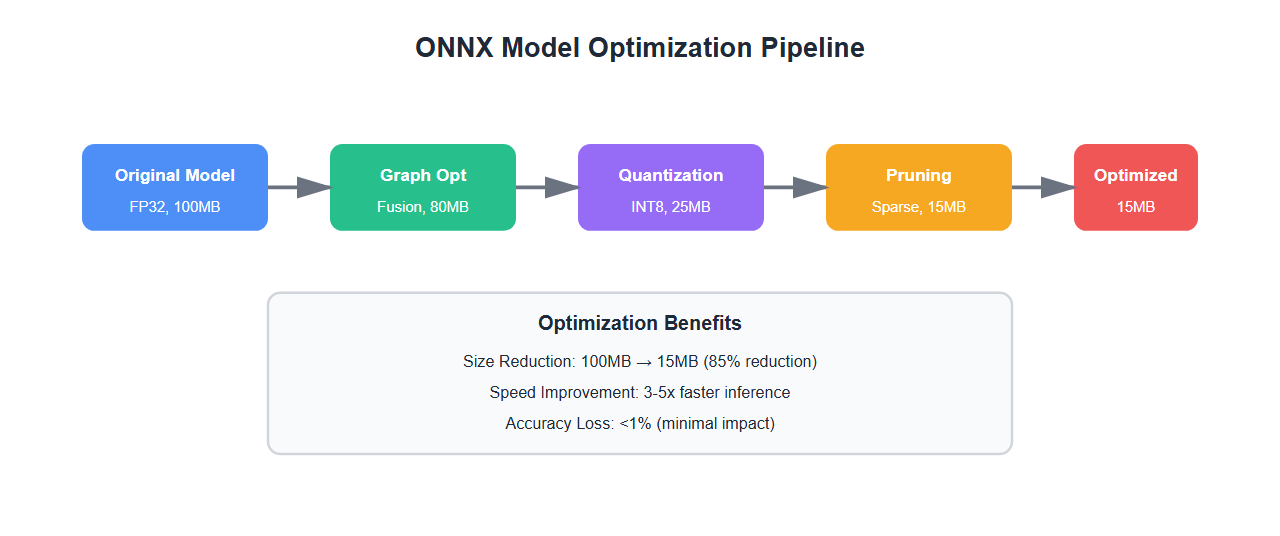
Optimizing ONNX Models
ONNX models need optimization for edge deployment:
import onnx
from onnxruntime.quantization import quantize_dynamic, QuantType

# Load ONNX model
model = onnx.load('model.onnx')

# Optimize model
from onnxruntime.transformers import optimizer
optimized_model = optimizer.optimize_model(
    'model.onnx',
    model_type='bert',  # or 'gpt2', 'bert', etc.
    num_heads=12,
    hidden_size=768
)
optimized_model.save_model_to_file('model_optimized.onnx')

# Quantize to INT8 (reduces size by 4x)
quantize_dynamic(
    'model_optimized.onnx',
    'model_quantized.onnx',
    weight_type=QuantType.QUInt8
)
Running Models with ONNX Runtime
Python (Desktop/Server)
import onnxruntime as ort
import numpy as np

# Create inference session
session = ort.InferenceSession(
    'model.onnx',
    providers=['CPUExecutionProvider']  # or 'CUDAExecutionProvider', 'TensorrtExecutionProvider'
)

# Get input/output names
input_name = session.get_inputs()[0].name
output_name = session.get_outputs()[0].name

# Prepare input
input_data = np.random.randn(1, 3, 224, 224).astype(np.float32)

# Run inference
outputs = session.run([output_name], {input_name: input_data})

# Get result
result = outputs[0]
print(f"Prediction: {result}")
JavaScript (Web/Node.js)
const ort = require('onnxruntime-node');

async function runInference() {
    // Create inference session
    const session = await ort.InferenceSession.create('model.onnx');

    // Prepare input
    const inputTensor = new ort.Tensor('float32',
        new Float32Array(1 * 3 * 224 * 224),
        [1, 3, 224, 224]
    );

    // Run inference
    const results = await session.run({
        input: inputTensor
    });

    // Get output
    const output = results.output.data;
    console.log('Prediction:', output);
}
C# (.NET)
using Microsoft.ML.OnnxRuntime;
using Microsoft.ML.OnnxRuntime.Tensors;

// Create inference session
using var session = new InferenceSession("model.onnx");

// Prepare input
var inputTensor = new DenseTensor<float>(
    new float[1 * 3 * 224 * 224],
    new[] { 1, 3, 224, 224 }
);

var inputs = new List<NamedOnnxValue>
{
    NamedOnnxValue.CreateFromTensor("input", inputTensor)
};

// Run inference
using var results = session.Run(inputs);
var output = results.First().AsTensor<float>();

Console.WriteLine($"Prediction: {output[0]}");
Mobile: iOS (Swift)
import CoreML
import onnxruntime

// Load ONNX model
let ortEnv = ORTEnv(loggingLevel: .warning)
let ortSession = try ORTSession(
    env: ortEnv,
    modelPath: "model.onnx",
    sessionOptions: nil
)

// Prepare input
let inputShape: [NSNumber] = [1, 3, 224, 224]
let inputData = try ORTValue(tensorData: NSMutableData(length: 1 * 3 * 224 * 224 * 4),
                             elementType: .float,
                             shape: inputShape)

// Run inference
let outputs = try ortSession.run(withInputs: ["input": inputData],
                                 outputNames: ["output"],
                                 runOptions: nil)

// Get result
let output = outputs["output"]
Mobile: Android (Kotlin/Java)
import ai.onnxruntime.*

// Create OrtEnvironment
val ortEnv = OrtEnvironment.getEnvironment()
val ortSession = ortEnv.createSession("model.onnx")

// Prepare input
val inputShape = longArrayOf(1, 3, 224, 224)
val inputTensor = OnnxTensor.createTensor(
    ortEnv,
    FloatArray(1 * 3 * 224 * 224),
    inputShape
)

// Run inference
val inputs = mapOf("input" to inputTensor)
val outputs = ortSession.run(inputs)

// Get result
val output = outputs[0].value as Array<FloatArray>
Hardware Acceleration
ONNX Runtime supports hardware acceleration for better performance:
| Platform | Execution Provider | Performance Gain | Use Case |
|---|---|---|---|
| CPU | CPUExecutionProvider | 1x (baseline) | Universal support |
| GPU (CUDA) | CUDAExecutionProvider | 5-10x | Desktop/Server |
| GPU (TensorRT) | TensorrtExecutionProvider | 10-20x | NVIDIA GPUs |
| NPU (CoreML) | CoreMLExecutionProvider | 3-5x | iOS devices |
| NPU (NNAPI) | NnapiExecutionProvider | 2-4x | Android devices |
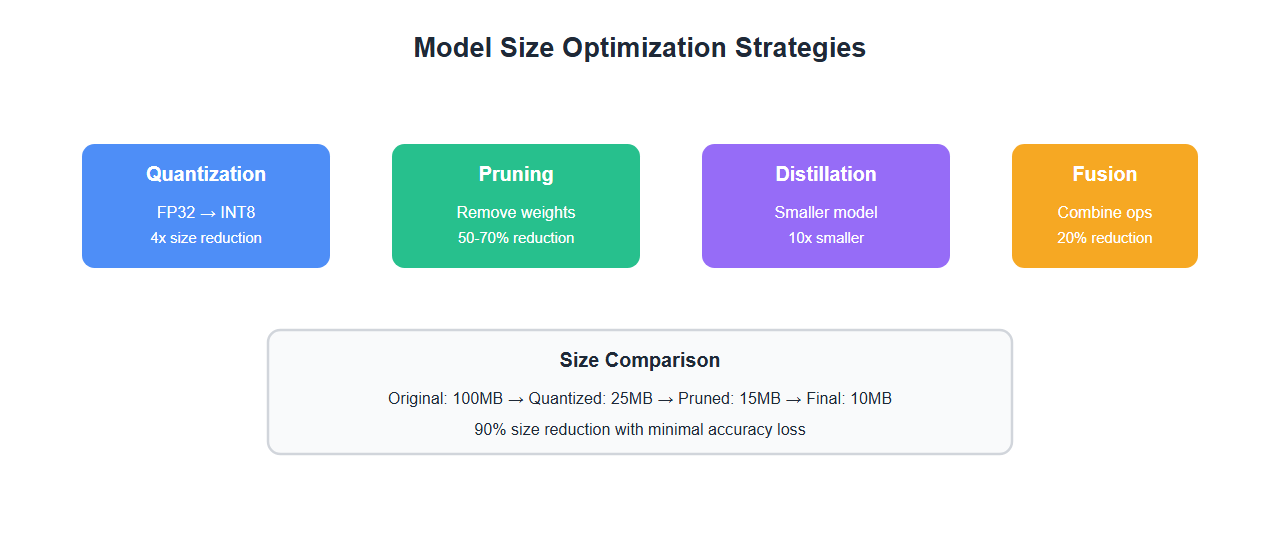
Model Size Optimization
Edge devices have limited storage. Optimize model size:
- Quantization: INT8 quantization reduces size by 4x with minimal accuracy loss
- Pruning: Remove unnecessary weights (sparse models)
- Knowledge distillation: Train smaller models that mimic larger ones
- Operator fusion: Combine operations to reduce overhead
- Model compression: Use ONNX Runtime’s built-in optimizations
Performance Optimization
Optimize inference performance for edge devices:
import onnxruntime as ort

# Create session with optimizations
session_options = ort.SessionOptions()

# Enable graph optimizations
session_options.graph_optimization_level = ort.GraphOptimizationLevel.ORT_ENABLE_ALL

# Set number of threads
session_options.intra_op_num_threads = 4
session_options.inter_op_num_threads = 2

# Enable memory pattern optimization
session_options.enable_mem_pattern = True
session_options.enable_mem_reuse = True

# Create session
session = ort.InferenceSession(
    'model.onnx',
    session_options,
    providers=['CPUExecutionProvider']
)

# Warm up (first inference is slower)
dummy_input = np.random.randn(1, 3, 224, 224).astype(np.float32)
_ = session.run(None, {'input': dummy_input})

# Now ready for production inference
Best Practices
From deploying 15+ models to edge devices:
- Always quantize for mobile: INT8 quantization is essential for mobile deployment
- Use hardware acceleration: NPU/GPU acceleration provides significant speedup
- Optimize input preprocessing: Minimize data conversion overhead
- Batch when possible: Batch inference is more efficient than single requests
- Warm up the model: First inference is slower—warm up before production
- Monitor memory usage: Edge devices have limited RAM
- Test on target hardware: Performance varies significantly across devices
- Use ONNX Runtime Mobile: Smaller binary size for mobile apps
🎯 Key Takeaway
ONNX Runtime is the best choice for edge AI deployment. Convert models to ONNX, optimize with quantization and pruning, use hardware acceleration, and test on target devices. With proper optimization, you can run complex AI models on mobile devices with acceptable performance and battery life.
Common Mistakes
What I learned the hard way:
- Not quantizing models: Full precision models are too large and slow for mobile
- Ignoring hardware acceleration: CPU-only inference is too slow for real-time apps
- Not testing on target devices: Simulator performance doesn’t match real hardware
- Large model sizes: Models over 50MB cause app store rejection and slow downloads
- No warm-up: First inference latency surprised users
- Memory leaks: Not releasing ONNX Runtime sessions caused crashes
Bottom Line
ONNX Runtime is the industry standard for edge AI deployment. Convert your models to ONNX, optimize with quantization, use hardware acceleration, and test thoroughly on target devices. With proper optimization, you can deploy complex AI models to mobile and embedded devices with production-grade performance.
Discover more from C4: Container, Code, Cloud & Context
Subscribe to get the latest posts sent to your email.