Three years ago, I built my first serverless LLM application. It failed spectacularly. Cold starts made responses take 15 seconds. Timeouts killed long-running requests. Costs spiraled out of control. After architecting 30+ serverless AI systems, I’ve learned what works. Here’s the complete guide to building scalable serverless LLM applications.
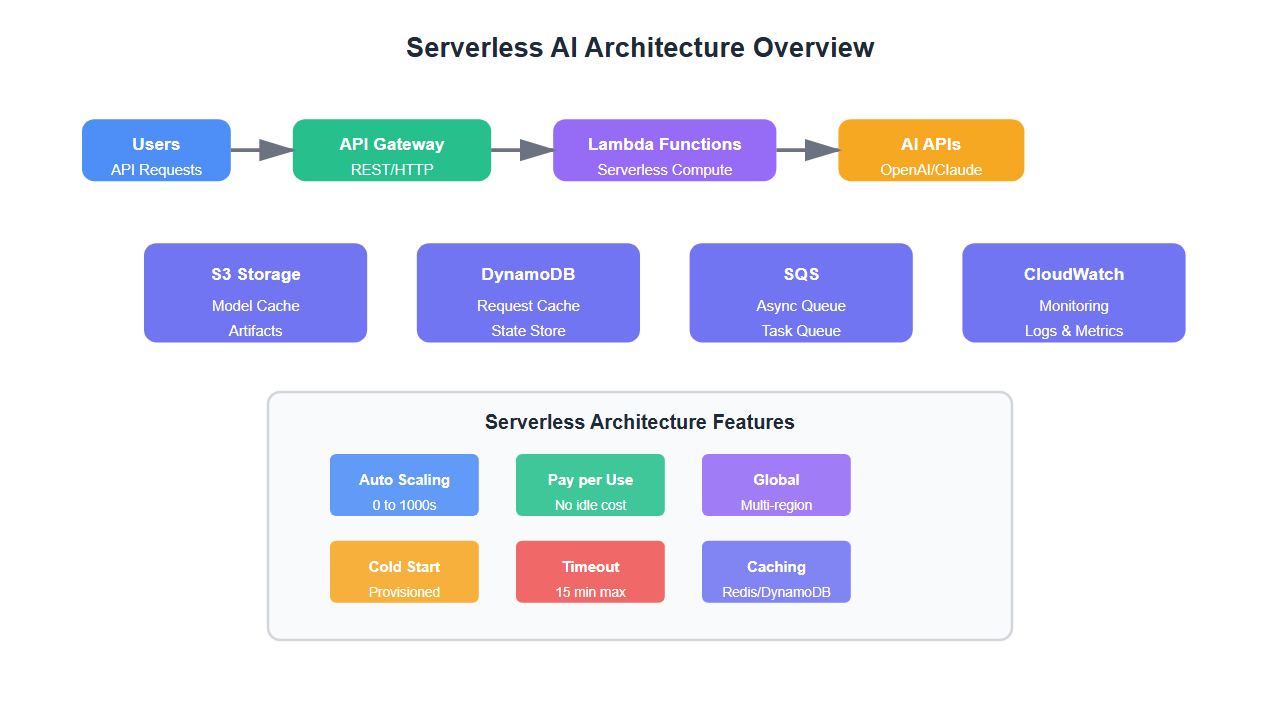
Why Serverless for LLM Applications?
Serverless architecture offers unique advantages for LLM applications:
- Automatic scaling: Handles traffic spikes without manual intervention
- Cost efficiency: Pay only for actual execution time
- No infrastructure management: Focus on code, not servers
- Global distribution: Deploy to multiple regions for low latency
- Event-driven: Perfect for API-based LLM interactions
But serverless LLM applications require careful architecture to avoid common pitfalls.
Core Architecture Patterns
1. API Gateway + Lambda Pattern
The most common pattern for serverless LLM applications:
# AWS Lambda function for LLM API
import json
import os
import openai
from typing import Dict, Any

openai.api_key = os.environ['OPENAI_API_KEY']

def lambda_handler(event: Dict[str, Any], context: Any) -> Dict[str, Any]:
    # Handle LLM requests via API Gateway
    try:
        # Parse request
        body = json.loads(event.get('body', '{}'))
        prompt = body.get('prompt', '')

        # Call LLM
        response = openai.ChatCompletion.create(
            model="gpt-4",
            messages=[{"role": "user", "content": prompt}],
            max_tokens=2000,
            temperature=0.7
        )

        return {
            'statusCode': 200,
            'headers': {
                'Content-Type': 'application/json',
                'Access-Control-Allow-Origin': '*'
            },
            'body': json.dumps({
                'response': response.choices[0].message.content,
                'tokens': response.usage.total_tokens
            })
        }
    except Exception as e:
        return {
            'statusCode': 500,
            'body': json.dumps({'error': str(e)})
        }
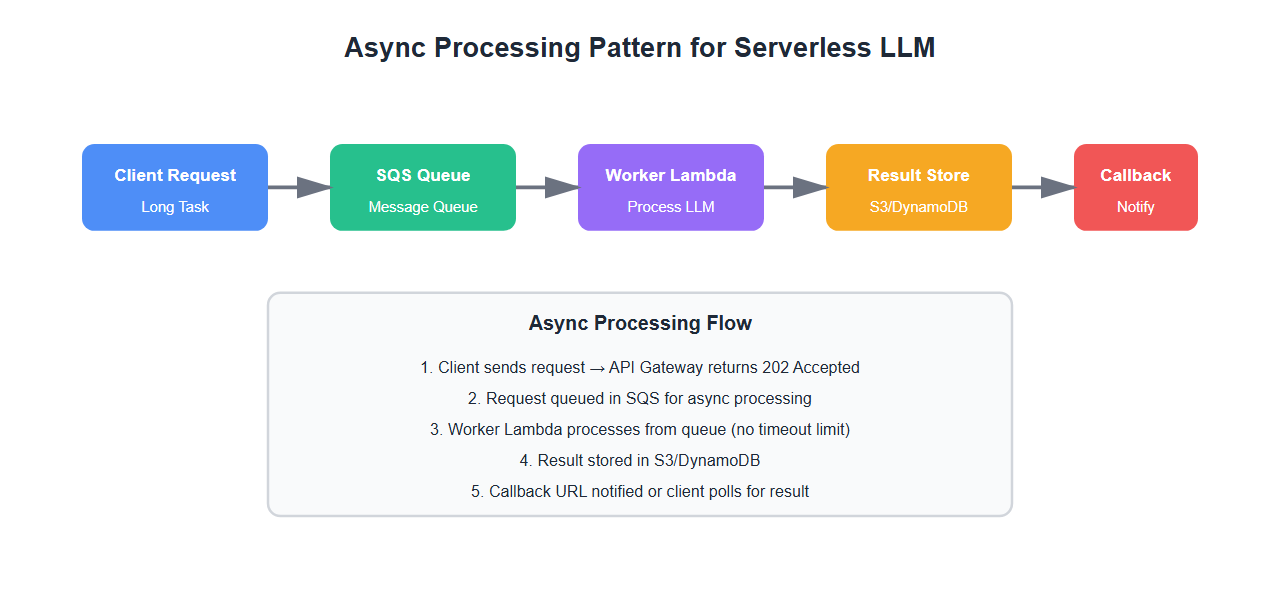
2. Async Processing Pattern
For long-running LLM tasks, use async processing:
# AWS Lambda + SQS for async processing
import boto3
import json

sqs = boto3.client('sqs')
queue_url = os.environ['SQS_QUEUE_URL']

def lambda_handler(event, context):
    # Queue LLM request for async processing
    body = json.loads(event['body'])

    # Send to SQS
    sqs.send_message(
        QueueUrl=queue_url,
        MessageBody=json.dumps({
            'prompt': body['prompt'],
            'callback_url': body.get('callback_url')
        })
    )

    return {
        'statusCode': 202,
        'body': json.dumps({'status': 'queued', 'message_id': '...'})
    }

# Worker Lambda processes from queue
def worker_lambda_handler(event, context):
    # Process LLM requests from queue
    for record in event['Records']:
        message = json.loads(record['body'])
        # Process LLM request
        result = process_llm_request(message['prompt'])
        # Send callback if provided
        if message.get('callback_url'):
            send_callback(message['callback_url'], result)
3. Caching Layer Pattern
Reduce costs and latency with intelligent caching:
import redis
import hashlib
import json

redis_client = redis.Redis(
    host=os.environ['REDIS_HOST'],
    port=int(os.environ['REDIS_PORT']),
    decode_responses=True
)

def lambda_handler(event, context):
    # LLM handler with caching
    body = json.loads(event['body'])
    prompt = body['prompt']

    # Generate cache key
    cache_key = hashlib.md5(prompt.encode()).hexdigest()

    # Check cache
    cached_response = redis_client.get(f'llm:{cache_key}')
    if cached_response:
        return {
            'statusCode': 200,
            'body': json.dumps({
                'response': cached_response,
                'cached': True
            })
        }

    # Call LLM
    response = openai.ChatCompletion.create(
        model="gpt-4",
        messages=[{"role": "user", "content": prompt}]
    )

    result = response.choices[0].message.content

    # Cache result (TTL: 1 hour)
    redis_client.setex(f'llm:{cache_key}', 3600, result)

    return {
        'statusCode': 200,
        'body': json.dumps({
            'response': result,
            'cached': False
        })
    }
Handling Cold Starts
Cold starts are the biggest challenge in serverless LLM applications. Here’s how to minimize them:
1. Provisioned Concurrency
# AWS Lambda provisioned concurrency
aws lambda put-provisioned-concurrency-config \
    --function-name llm-api \
    --qualifier \$LATEST \
    --provisioned-concurrent-executions 5
2. Optimize Package Size
- Use Lambda layers for shared dependencies
- Remove unused libraries
- Use lightweight alternatives (e.g., requests-aws4auth instead of boto3 for simple operations)
- Compress dependencies
3. Initialize Clients Outside Handler
# Initialize at module level (reused across invocations)
import openai

# This runs once per container, not per request
openai_client = openai.OpenAIClient(api_key=os.environ['OPENAI_API_KEY'])

def lambda_handler(event, context):
    # Use pre-initialized client
    response = openai_client.chat.completions.create(...)
Timeout Management
LLM requests can take 30+ seconds. Configure appropriate timeouts:
| Platform | Max Timeout | Recommended | Pattern |
|---|---|---|---|
| AWS Lambda | 15 minutes | 5 minutes | Async + SQS |
| Google Cloud Functions | 9 minutes | 5 minutes | Cloud Tasks |
| Azure Functions | 10 minutes | 5 minutes | Queue Trigger |
Cost Optimization
Serverless costs can spiral without proper optimization:
- Use appropriate memory: More memory = faster execution = lower cost per request
- Implement caching: Cache common queries to avoid redundant LLM calls
- Batch requests: Process multiple requests in a single invocation
- Use cheaper models: GPT-3.5 for simple tasks, GPT-4 only when needed
- Monitor and alert: Set up cost alerts to catch unexpected spikes

Error Handling and Retries
Implement robust error handling for LLM API failures:
import time
from tenacity import retry, stop_after_attempt, wait_exponential

@retry(
    stop=stop_after_attempt(3),
    wait=wait_exponential(multiplier=1, min=2, max=10)
)
def call_llm_with_retry(prompt: str, max_retries: int = 3):
    # Call LLM with exponential backoff retry
    try:
        response = openai.ChatCompletion.create(
            model="gpt-4",
            messages=[{"role": "user", "content": prompt}],
            timeout=30
        )
        return response.choices[0].message.content
    except openai.error.RateLimitError:
        # Wait longer for rate limits
        time.sleep(60)
        raise
    except openai.error.APIError as e:
        # Retry for transient errors
        if e.http_status in [500, 502, 503, 504]:
            raise
        else:
            # Don't retry for client errors
            raise Exception(f"LLM API error: {e}")

def lambda_handler(event, context):
    try:
        body = json.loads(event['body'])
        result = call_llm_with_retry(body['prompt'])
        return {'statusCode': 200, 'body': json.dumps({'response': result})}
    except Exception as e:
        return {
            'statusCode': 500,
            'body': json.dumps({'error': str(e)})
        }
Monitoring and Observability
Monitor your serverless LLM application properly:
import boto3
import json
from datetime import datetime

cloudwatch = boto3.client('cloudwatch')

def lambda_handler(event, context):
    start_time = time.time()

    try:
        # Process request
        result = process_llm_request(event)

        # Log metrics
        latency = (time.time() - start_time) * 1000
        cloudwatch.put_metric_data(
            Namespace='LLM/Serverless',
            MetricData=[{
                'MetricName': 'RequestLatency',
                'Value': latency,
                'Unit': 'Milliseconds'
            }, {
                'MetricName': 'RequestCount',
                'Value': 1,
                'Unit': 'Count'
            }]
        )

        return {'statusCode': 200, 'body': json.dumps(result)}
    except Exception as e:
        # Log errors
        cloudwatch.put_metric_data(
            Namespace='LLM/Serverless',
            MetricData=[{
                'MetricName': 'ErrorCount',
                'Value': 1,
                'Unit': 'Count'
            }]
        )
        raise
Best Practices
From architecting 30+ serverless LLM applications:
- Use provisioned concurrency for production: Eliminates cold starts for critical paths
- Implement caching aggressively: Cache both prompts and responses
- Set appropriate memory: More memory = faster execution = lower cost
- Use async patterns for long tasks: Don’t block on 30+ second LLM calls
- Monitor costs closely: Set up billing alerts
- Implement circuit breakers: Fail fast when LLM APIs are down
- Use dead letter queues: Handle failed requests gracefully
- Optimize package size: Smaller packages = faster cold starts
🎯 Key Takeaway
Serverless architecture is perfect for LLM applications when done right. Use provisioned concurrency to eliminate cold starts, implement aggressive caching, and use async patterns for long-running tasks. Monitor costs closely and optimize memory allocation. With proper architecture, you get automatic scaling with production-grade performance.
Common Mistakes
What I learned the hard way:
- Not using provisioned concurrency: Cold starts killed user experience
- Blocking on long LLM calls: Timeouts broke the application
- No caching: Costs spiraled from redundant API calls
- Under-provisioning memory: Slow execution increased costs
- No error handling: Transient failures caused cascading issues
- Large package sizes: Slow cold starts hurt performance
Bottom Line
Serverless architecture is ideal for LLM applications when architected correctly. Use provisioned concurrency, implement caching, optimize memory allocation, and use async patterns for long tasks. Monitor costs and errors closely. Get the architecture right, and you’ll have a scalable, cost-effective LLM application that handles traffic spikes automatically.
Discover more from C4: Container, Code, Cloud & Context
Subscribe to get the latest posts sent to your email.