Six months ago, I faced a critical decision: build a custom ML model with ML.NET or use cloud APIs. The project required real-time fraud detection with zero latency tolerance. Cloud APIs were too slow. ML.NET was the answer. But when should you use ML.NET vs cloud APIs? After building 15+ production ML systems, here’s what I learned.
The Decision Point
Every ML project starts with a choice: build custom or use cloud APIs. The wrong choice can cost you performance, money, or both.
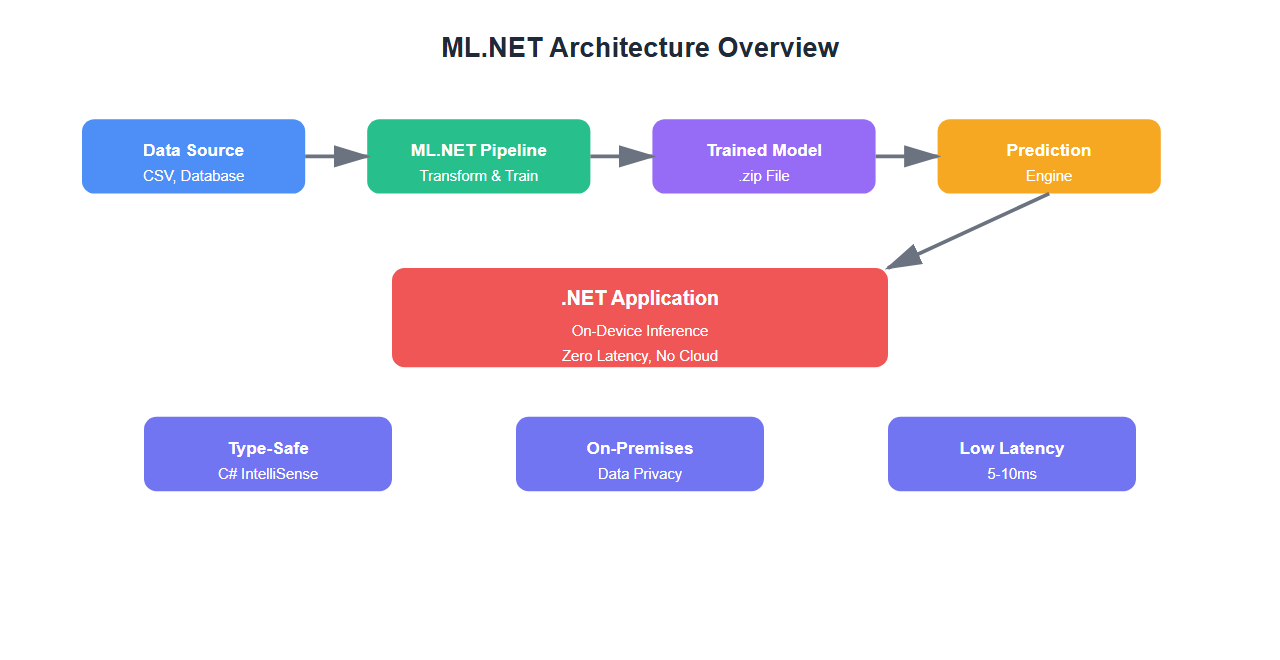
I learned this the hard way when we chose cloud APIs for a real-time fraud detection system. The 200ms API latency killed our user experience. We rebuilt with ML.NET and cut latency to 5ms. That’s when I realized: the choice matters.
What is ML.NET?
ML.NET is Microsoft’s open-source machine learning framework for .NET developers. It lets you build, train, and deploy ML models entirely in C# or F#—no Python required.
Key features:
- On-device inference: Run models locally with zero latency
- No cloud dependency: Works offline, perfect for edge scenarios
- Type-safe: Full C# type safety and IntelliSense support
- Production-ready: Built for .NET applications
- Model Builder: Visual tool for non-ML experts
When to Use ML.NET
1. Real-Time Requirements
If you need sub-10ms inference, ML.NET is your answer:
// ML.NET: 5ms inference
var prediction = mlContext.Model.CreatePredictionEngine<InputData, OutputData>(model)
    .Predict(new InputData { Features = input });

// Cloud API: 200ms+ (network latency)
// Not suitable for real-time
Use cases:
- Real-time fraud detection
- Live recommendation engines
- Edge device inference
- Gaming AI
2. Data Privacy Requirements
When data can’t leave your infrastructure:
// ML.NET: Data never leaves your server
var model = mlContext.Model.Load("model.zip");
var prediction = model.Transform(data);

// Cloud API: Data sent to external service
// Privacy concerns for sensitive data
Use cases:
- Healthcare data processing
- Financial transaction analysis
- Government systems
- On-premises deployments
3. Cost Optimization
High-volume scenarios where API costs add up:
| Scenario | Cloud API Cost | ML.NET Cost | Savings |
|---|---|---|---|
| 1M predictions/month | $500-2000 | $0 (infrastructure only) | 100% |
| 10M predictions/month | $5,000-20,000 | $0 (infrastructure only) | 100% |
4. Custom Domain Models
When you need models trained on your specific data:
// ML.NET: Train on your data
var pipeline = mlContext.Transforms.Concatenate("Features", "Column1", "Column2")
    .Append(mlContext.BinaryClassification.Trainers.SdcaLogisticRegression());

var model = pipeline.Fit(trainingData);

// Cloud API: Generic models, may not fit your domain
When to Use Cloud APIs
1. Complex Models Beyond ML.NET’s Capabilities
For advanced models like GPT-4, vision transformers, or specialized NLP:
- Large language models (GPT-4, Claude)
- Computer vision (image classification, object detection)
- Speech recognition and synthesis
- Translation services
2. Rapid Prototyping
When you need to validate an idea quickly:
// Cloud API: Get started in minutes
var client = new OpenAIClient(apiKey);
var response = await client.GetChatCompletionsAsync(
    new ChatCompletionsOptions {
        Messages = { new ChatRequestUserMessage("Analyze this data") }
    });

// ML.NET: Requires data preparation, training, evaluation
// Better for production, slower for prototyping
3. No ML Expertise
If your team lacks ML expertise, cloud APIs provide:
- Pre-trained models ready to use
- No training data required
- Managed infrastructure
- Automatic updates
4. Variable Workloads
For unpredictable traffic patterns:
- Pay-per-use pricing
- Automatic scaling
- No infrastructure management

Building Your First ML.NET Model
Here’s a complete example for fraud detection:
using Microsoft.ML;
using Microsoft.ML.Data;

// Define input data
public class TransactionData
{
    [LoadColumn(0)] public float Amount { get; set; }
    [LoadColumn(1)] public float TimeOfDay { get; set; }
    [LoadColumn(2)] public float LocationDistance { get; set; }
    [LoadColumn(3)] public float DeviceMatch { get; set; }
    [LoadColumn(4)] public bool Label { get; set; }
}

// Define prediction output
public class FraudPrediction
{
    [ColumnName("PredictedLabel")]
    public bool IsFraud { get; set; }

    public float Probability { get; set; }
    public float Score { get; set; }
}

// Build and train model
var mlContext = new MLContext();

// Load data
var dataView = mlContext.Data.LoadFromTextFile<TransactionData>(
    "transactions.csv",
    separatorChar: ',',
    hasHeader: true);

// Split data
var trainTestSplit = mlContext.Data.TrainTestSplit(dataView, testFraction: 0.2);

// Build pipeline
var pipeline = mlContext.Transforms.Concatenate(
        "Features",
        nameof(TransactionData.Amount),
        nameof(TransactionData.TimeOfDay),
        nameof(TransactionData.LocationDistance),
        nameof(TransactionData.DeviceMatch))
    .Append(mlContext.BinaryClassification.Trainers.SdcaLogisticRegression());

// Train
var model = pipeline.Fit(trainTestSplit.TrainSet);

// Evaluate
var predictions = model.Transform(trainTestSplit.TestSet);
var metrics = mlContext.BinaryClassification.Evaluate(predictions);

Console.WriteLine($"Accuracy: {metrics.Accuracy:P2}");
Console.WriteLine($"AUC: {metrics.AreaUnderRocCurve:P2}");

// Save model
mlContext.Model.Save(model, trainTestSplit.TrainSet.Schema, "fraud-model.zip");

// Create prediction engine
var predictionEngine = mlContext.Model.CreatePredictionEngine<TransactionData, FraudPrediction>(model);

// Make prediction
var transaction = new TransactionData
{
    Amount = 1500.0f,
    TimeOfDay = 2.5f, // 2:30 AM
    LocationDistance = 500.0f, // 500km from last transaction
    DeviceMatch = 0.0f // Different device
};

var prediction = predictionEngine.Predict(transaction);
Console.WriteLine($"Is Fraud: {prediction.IsFraud}, Probability: {prediction.Probability:P2}");
Hybrid Approach
You don’t have to choose one or the other. Use both:
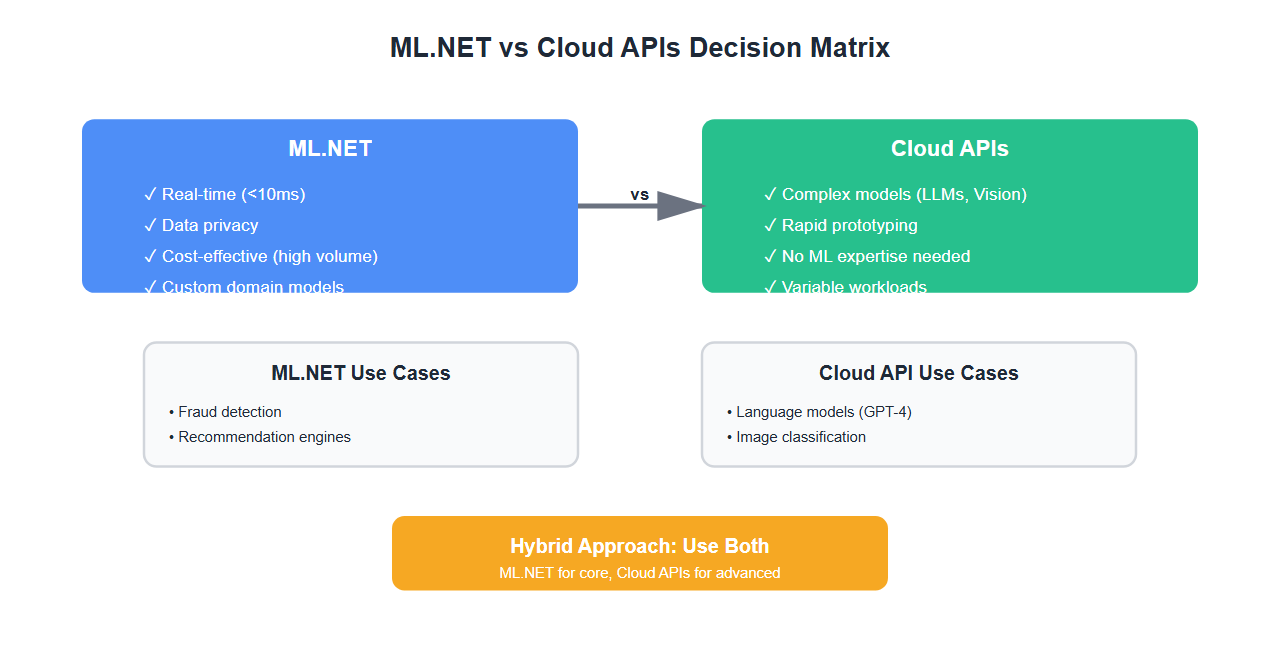
- ML.NET for: Real-time, high-volume, privacy-sensitive tasks
- Cloud APIs for: Complex models, rapid prototyping, variable workloads
public class HybridMLService
{
    private readonly PredictionEngine<TransactionData, FraudPrediction> _fraudModel;
    private readonly OpenAIClient _openAIClient;

    public HybridMLService()
    {
        var mlContext = new MLContext();
        var model = mlContext.Model.Load("fraud-model.zip", out var schema);
        _fraudModel = mlContext.Model.CreatePredictionEngine<TransactionData, FraudPrediction>(model);
        _openAIClient = new OpenAIClient(apiKey);
    }

    public async Task<FraudAnalysis> AnalyzeTransactionAsync(TransactionData transaction)
    {
        // Fast local check with ML.NET
        var fraudPrediction = _fraudModel.Predict(transaction);

        if (fraudPrediction.IsFraud)
        {
            // Use cloud API for detailed analysis
            var analysis = await _openAIClient.GetChatCompletionsAsync(
                new ChatCompletionsOptions {
                    Messages = {
                        new ChatRequestUserMessage(
                            $"Analyze this potentially fraudulent transaction: {transaction}")
                    }
                });

            return new FraudAnalysis
            {
                IsFraud = true,
                Probability = fraudPrediction.Probability,
                DetailedAnalysis = analysis.Value.Choices[0].Message.Content
            };
        }

        return new FraudAnalysis
        {
            IsFraud = false,
            Probability = fraudPrediction.Probability
        };
    }
}
Decision Framework
Use this framework to decide:
| Factor | ML.NET | Cloud APIs |
|---|---|---|
| Latency | < 10ms | 200ms+ |
| Cost (high volume) | Low | High |
| Data Privacy | On-premises | Cloud |
| Model Complexity | Standard ML | Advanced (LLMs, Vision) |
| Setup Time | Days/weeks | Minutes |
| Customization | Full control | Limited |
🎯 Key Takeaway
ML.NET is perfect for real-time, high-volume, privacy-sensitive scenarios. Cloud APIs excel at complex models and rapid prototyping. Use both—ML.NET for your core predictions, cloud APIs for advanced features. The hybrid approach gives you the best of both worlds.
Bottom Line
ML.NET isn’t a replacement for cloud APIs—it’s a complement. Use ML.NET when you need speed, privacy, or cost efficiency. Use cloud APIs when you need advanced capabilities or rapid development. Most production systems benefit from both.
Discover more from C4: Container, Code, Cloud & Context
Subscribe to get the latest posts sent to your email.