Introduction: After more than two decades working with Microsoft’s flagship IDE, I’ve witnessed Visual Studio evolve from a Windows-centric development tool into a comprehensive, AI-powered development platform. Visual Studio 2026, released alongside .NET 10, represents the most significant leap forward in the IDE’s history. This isn’t merely an incremental update—it’s a fundamental reimagining of how developers interact with their code, leveraging artificial intelligence to amplify productivity while maintaining the precision and control that professional developers demand.
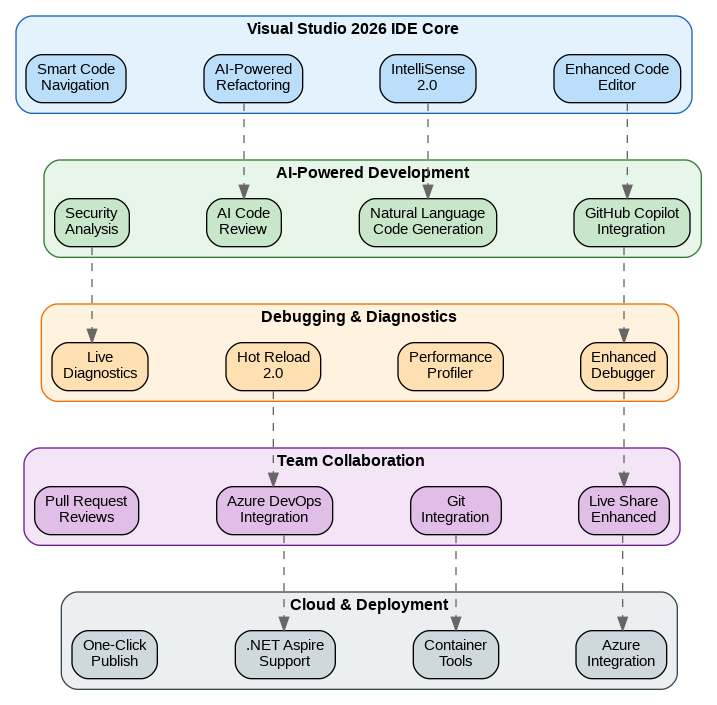
GitHub Copilot: From Assistant to Development Partner
The integration of GitHub Copilot in Visual Studio 2026 transcends simple code completion. The new “Copilot for .NET” features understand the entire context of your solution—project references, NuGet packages, coding conventions, and even your team’s historical patterns. When I describe a feature in natural language, Copilot generates not just the implementation but also the corresponding unit tests, documentation, and even suggests appropriate design patterns based on the codebase’s existing architecture.
The AI-powered code review feature has become indispensable in my workflow. Before committing changes, Copilot analyzes the diff for potential bugs, security vulnerabilities, performance issues, and deviations from established patterns. It’s caught subtle issues that would have slipped past traditional code review—null reference exceptions in edge cases, potential SQL injection vectors, and inefficient LINQ queries that would have caused N+1 problems in production.
IntelliSense 2.0: Context-Aware Intelligence
IntelliSense has been completely rebuilt for Visual Studio 2026. The new engine uses a large language model trained specifically on .NET codebases, providing suggestions that understand not just syntax but semantics. When working with Entity Framework, it suggests queries based on the actual database schema. When implementing interfaces, it proposes implementations based on similar patterns elsewhere in the codebase. The suggestions are ranked by relevance to the current context, dramatically reducing the time spent scrolling through irrelevant options.
The “Explain Code” feature has transformed how I onboard to unfamiliar codebases. Selecting any block of code and pressing a keyboard shortcut generates a detailed explanation of what the code does, why it might have been written that way, and potential improvements. For complex algorithms or legacy code, this capability alone has saved hours of reverse-engineering effort.
Enhanced Debugging: Time-Travel and AI Assistance
The debugging experience in Visual Studio 2026 introduces capabilities that seemed like science fiction just a few years ago. Time-travel debugging, previously available only for specific scenarios, now works across all .NET applications. When a bug occurs, I can step backward through execution to understand exactly how the application reached that state. Combined with the new “AI Debugger Assistant,” which can analyze stack traces and suggest likely root causes, debugging complex issues has become significantly more efficient.
Hot Reload 2.0 supports a dramatically expanded set of code changes. Method signature changes, new class additions, and even some structural modifications can now be applied without restarting the application. For UI development with Blazor or MAUI, this means seeing changes reflected instantly, maintaining application state throughout the development session. The productivity impact is substantial—what previously required a full rebuild and navigation back to the relevant state now happens in milliseconds.
Performance Profiler: Deep Insights Made Accessible
The Performance Profiler has been enhanced with AI-powered analysis that identifies not just what’s slow, but why it’s slow and how to fix it. After a profiling session, the tool generates a prioritized list of optimization opportunities with specific code suggestions. It understands common .NET performance patterns—unnecessary allocations, inefficient string concatenation, suboptimal LINQ usage—and provides actionable recommendations with estimated impact.
Memory analysis has been similarly enhanced. The tool can now identify memory leaks in real-time during debugging sessions, highlighting objects that are being retained longer than expected. For applications dealing with large datasets or long-running processes, this capability has proven invaluable in maintaining healthy memory profiles.
Live Share: Collaboration Without Compromise
Live Share in Visual Studio 2026 has evolved into a comprehensive collaboration platform. Multiple developers can now work on the same codebase simultaneously with real-time synchronization, shared debugging sessions, and integrated voice and video communication. The new “Mob Programming” mode optimizes the experience for driver-navigator workflows, with seamless handoff of control and shared terminals.
The integration with pull request reviews brings the code review experience directly into the IDE. Reviewers can navigate through changes, leave comments, and even make suggested edits that authors can accept with a single click. The AI assistant can summarize changes, highlight potential issues, and suggest reviewers based on code ownership patterns.
.NET Aspire Integration: Cloud-Native Development Simplified
Visual Studio 2026 provides first-class support for .NET Aspire, Microsoft’s opinionated framework for cloud-native development. The new Aspire project templates and tooling make it trivial to create distributed applications with proper service discovery, configuration management, and observability built in from the start. The integrated dashboard provides real-time visibility into all services, their health, logs, and traces.
Container development has been streamlined with improved Docker and Kubernetes tooling. The IDE can generate optimized Dockerfiles, manage container orchestration, and deploy directly to Azure Kubernetes Service or any compatible cluster. For teams adopting microservices architectures, these capabilities eliminate significant infrastructure complexity.
Azure Integration: Seamless Cloud Development
The Azure integration in Visual Studio 2026 provides a unified experience for cloud development. From the IDE, I can provision resources, configure services, deploy applications, and monitor production systems. The new “Azure Workload Identity” support simplifies authentication, eliminating the need to manage connection strings and secrets during development. The integrated cost estimator helps teams understand the financial implications of architectural decisions before deployment.
Performance and Reliability
Visual Studio 2026 is noticeably faster than its predecessors. Solution load times have been reduced by 40% through improved caching and lazy loading of project data. The 64-bit architecture, now fully mature, handles large solutions with thousands of projects without the memory constraints that plagued earlier versions. Background operations—indexing, analysis, compilation—are better parallelized and less intrusive to the foreground editing experience.
Reliability has also improved significantly. The IDE recovers gracefully from extension crashes, preserving unsaved work and editor state. The new diagnostic system proactively identifies and resolves common issues, often fixing problems before they impact the developer experience.
Looking Forward
Visual Studio 2026 represents Microsoft’s vision for the future of software development—a future where AI augments human creativity rather than replacing it. The tools understand context, anticipate needs, and handle routine tasks, freeing developers to focus on the creative and strategic aspects of software engineering. For teams invested in the Microsoft ecosystem, Visual Studio 2026 is not just an upgrade—it’s a transformation of the development experience.
The IDE continues to evolve with monthly feature updates and quarterly quality releases. Microsoft’s commitment to developer productivity is evident in every aspect of Visual Studio 2026, from the AI-powered features to the refined user experience. Whether you’re building web applications, desktop software, mobile apps, or cloud services, Visual Studio 2026 provides the tools to build better software faster.
Discover more from C4: Container, Code, Cloud & Context
Subscribe to get the latest posts sent to your email.