Expert Guide to Building Scalable, Resilient AI Applications in the Cloud
I’ve architected AI systems that handle millions of requests per day, scale from zero to thousands of concurrent users, and maintain 99.99% uptime. Cloud-native architecture isn’t just about deploying to the cloud—it’s about designing systems that leverage cloud capabilities: auto-scaling, managed services, and global distribution.
In this guide, I’ll share the cloud-native patterns I’ve used to build production AI applications. You’ll learn microservices architecture, containerization strategies, auto-scaling patterns, and how to design for scale from day one.
What You’ll Learn
- Microservices architecture for AI applications
- Containerization and orchestration strategies
- Auto-scaling patterns for LLM workloads
- API gateway and service mesh patterns
- Event-driven architecture for AI systems
- Multi-region deployment strategies
- Observability and monitoring patterns
- Real-world examples from production systems
- Common architectural pitfalls and how to avoid them
Introduction: Why Cloud-Native for AI?
Traditional monolithic AI applications don’t scale. They can’t handle traffic spikes, they waste resources during low usage, and they’re hard to maintain. Cloud-native architecture solves these problems:
- Auto-scaling: Scale up during traffic spikes, scale down during low usage
- Resilience: Self-healing systems that recover from failures
- Global distribution: Deploy closer to users for lower latency
- Cost efficiency: Pay only for what you use
- Rapid deployment: Deploy updates without downtime
I’ve seen AI applications that cost 10x more than they should because they weren’t cloud-native. I’ve also seen applications that handle 100x more traffic with the same infrastructure because they were designed for the cloud.
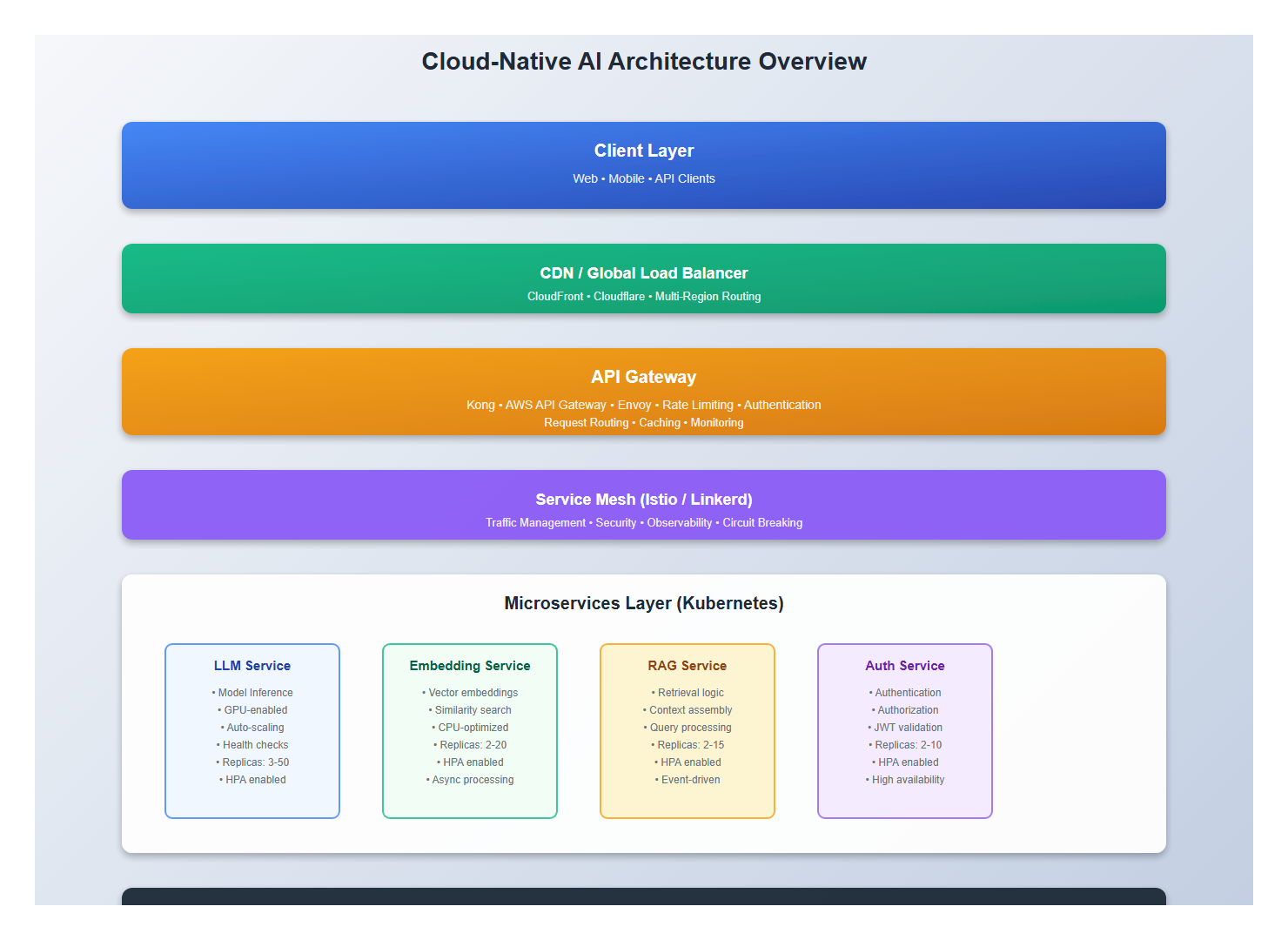
1. Microservices Architecture for AI
1.1 Service Decomposition
Break your AI application into independent, scalable services:
# Service Architecture
services:
  # API Gateway
  api-gateway:
    purpose: "Single entry point, routing, authentication"
    scaling: "Horizontal, based on request rate"

  # LLM Service
  llm-service:
    purpose: "LLM inference, model serving"
    scaling: "Horizontal, based on queue depth"
    resources: "GPU-enabled nodes"

  # Embedding Service
  embedding-service:
    purpose: "Vector embeddings, similarity search"
    scaling: "Horizontal, based on request rate"

  # RAG Service
  rag-service:
    purpose: "Retrieval-augmented generation"
    scaling: "Horizontal, based on query rate"

  # Vector Database
  vector-db:
    purpose: "Vector storage and search"
    scaling: "Vertical + horizontal sharding"

  # Message Queue
  message-queue:
    purpose: "Async processing, request queuing"
    scaling: "Managed service (SQS, RabbitMQ)"

  # Cache Layer
  cache:
    purpose: "Response caching, session storage"
    scaling: "Managed service (Redis, ElastiCache)"
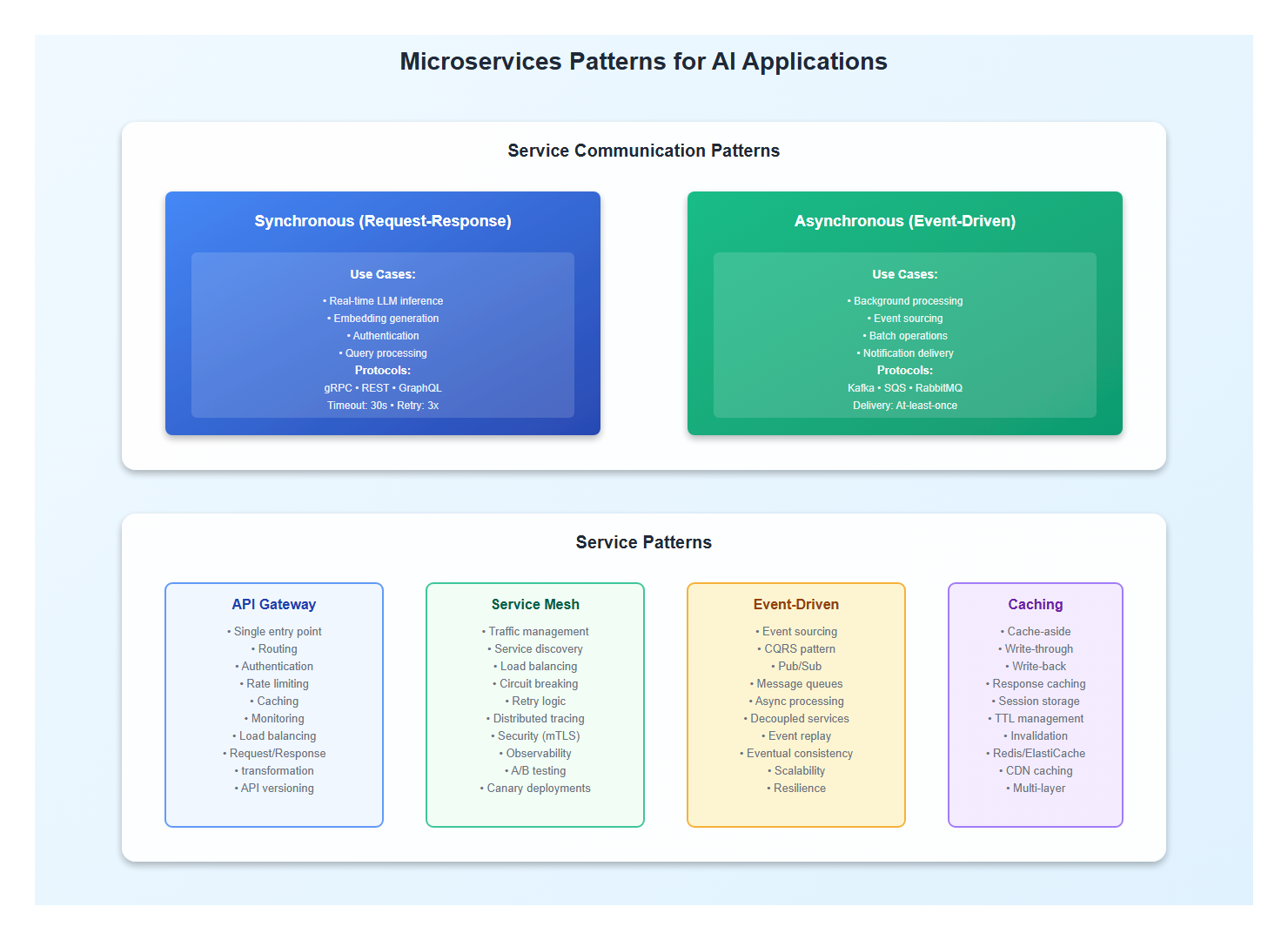
1.2 Service Communication Patterns
Use appropriate communication patterns for each service:
# Synchronous Communication (REST/gRPC)
api-gateway -> llm-service:
  pattern: "Request-Response"
  protocol: "gRPC"
  timeout: "30s"
  retry: "3 attempts with exponential backoff"

# Asynchronous Communication (Message Queue)
llm-service -> embedding-service:
  pattern: "Event-Driven"
  protocol: "Message Queue (SQS/Kafka)"
  delivery: "At-least-once"

# Caching Pattern
api-gateway -> cache:
  pattern: "Cache-Aside"
  ttl: "5 minutes"
  invalidation: "On write"
2. Containerization and Orchestration
2.1 Container Strategy
Containerize each service with optimized Docker images:
# LLM Service Dockerfile
FROM nvidia/cuda:12.0.0-runtime-ubuntu22.04

# Install Python and dependencies
RUN apt-get update && apt-get install -y python3.10 python3-pip

# Copy application
WORKDIR /app
COPY requirements.txt .
RUN pip install --no-cache-dir -r requirements.txt

COPY . .

# Use non-root user
USER appuser

# Health check
HEALTHCHECK --interval=30s --timeout=10s --start-period=60s \
  CMD curl -f http://localhost:8080/health || exit 1

# Run service
CMD ["python", "llm_service.py"]
2.2 Kubernetes Deployment
Deploy services to Kubernetes with proper resource management:
apiVersion: apps/v1
kind: Deployment
metadata:
  name: llm-service
spec:
  replicas: 3
  selector:
    matchLabels:
      app: llm-service
  template:
    metadata:
      labels:
        app: llm-service
    spec:
      containers:
      - name: llm-service
        image: llm-service:latest
        resources:
          requests:
            memory: "8Gi"
            cpu: "4"
            nvidia.com/gpu: 1
          limits:
            memory: "16Gi"
            cpu: "8"
            nvidia.com/gpu: 1
        env:
        - name: MODEL_PATH
          value: "/models/llm"
        - name: MAX_CONCURRENT_REQUESTS
          value: "10"
        livenessProbe:
          httpGet:
            path: /health
            port: 8080
          initialDelaySeconds: 60
          periodSeconds: 30
        readinessProbe:
          httpGet:
            path: /ready
            port: 8080
          initialDelaySeconds: 30
          periodSeconds: 10
---
apiVersion: v1
kind: Service
metadata:
  name: llm-service
spec:
  selector:
    app: llm-service
  ports:
  - port: 80
    targetPort: 8080
  type: ClusterIP
3. Auto-Scaling Patterns
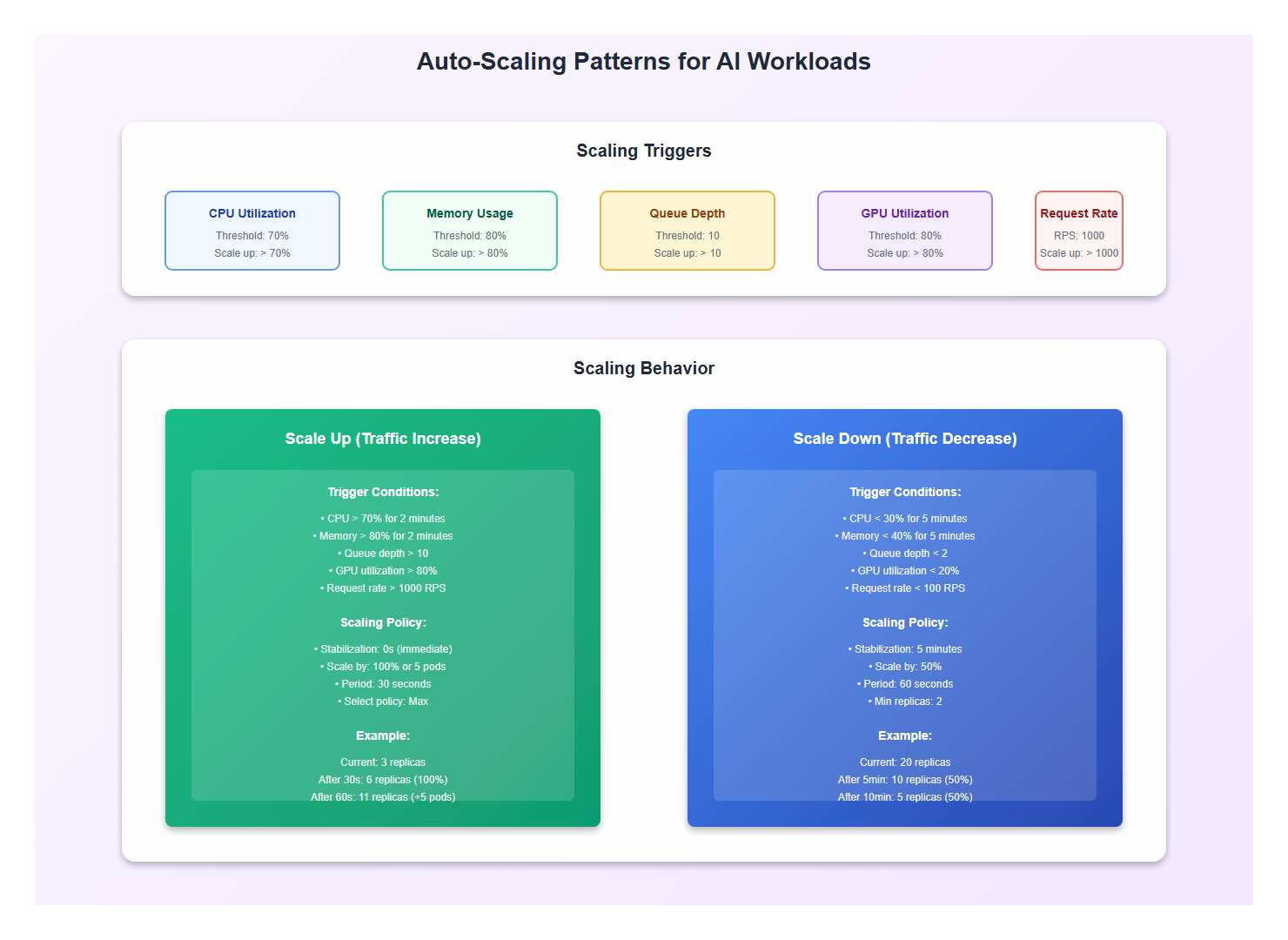
3.1 Horizontal Pod Autoscaler
Configure HPA for automatic scaling based on metrics:
apiVersion: autoscaling/v2
kind: HorizontalPodAutoscaler
metadata:
  name: llm-service-hpa
spec:
  scaleTargetRef:
    apiVersion: apps/v1
    kind: Deployment
    name: llm-service
  minReplicas: 2
  maxReplicas: 50
  metrics:
  - type: Resource
    resource:
      name: cpu
      target:
        type: Utilization
        averageUtilization: 70
  - type: Resource
    resource:
      name: memory
      target:
        type: Utilization
        averageUtilization: 80
  - type: Pods
    pods:
      metric:
        name: request_queue_depth
      target:
        type: AverageValue
        averageValue: "10"
  behavior:
    scaleDown:
      stabilizationWindowSeconds: 300
      policies:
      - type: Percent
        value: 50
        periodSeconds: 60
    scaleUp:
      stabilizationWindowSeconds: 0
      policies:
      - type: Percent
        value: 100
        periodSeconds: 30
      - type: Pods
        value: 5
        periodSeconds: 30
      selectPolicy: Max
3.2 Custom Metrics for AI Workloads
Scale based on AI-specific metrics:
# Custom metrics exporter
from prometheus_client import Gauge, Counter
import time

# Metrics
active_requests = Gauge('llm_active_requests', 'Active LLM requests')
queue_depth = Gauge('llm_queue_depth', 'Request queue depth')
avg_response_time = Gauge('llm_avg_response_time', 'Average response time')
gpu_utilization = Gauge('llm_gpu_utilization', 'GPU utilization percentage')

def update_metrics():
    while True:
        # Collect metrics
        active_requests.set(get_active_request_count())
        queue_depth.set(get_queue_depth())
        avg_response_time.set(get_avg_response_time())
        gpu_utilization.set(get_gpu_utilization())

        time.sleep(10)

# HPA using custom metrics
apiVersion: autoscaling/v2
kind: HorizontalPodAutoscaler
metadata:
  name: llm-service-hpa-custom
spec:
  metrics:
  - type: Pods
    pods:
      metric:
        name: llm_queue_depth
      target:
        type: AverageValue
        averageValue: "5"
  - type: Pods
    pods:
      metric:
        name: llm_gpu_utilization
      target:
        type: AverageValue
        averageValue: "80"
4. API Gateway and Service Mesh
4.1 API Gateway Pattern
Use an API gateway for routing, authentication, and rate limiting:
# API Gateway Configuration (Kong/Envoy)
routes:
  - name: llm-api
    path: /api/v1/chat
    service: llm-service
    plugins:
      - name: rate-limiting
        config:
          minute: 100
          hour: 1000
      - name: authentication
        config:
          type: jwt
      - name: request-transformer
        config:
          add:
            headers:
              - "X-Request-ID:$(uuidgen)"
      - name: response-caching
        config:
          ttl: 300
          cache_control: true
    timeout: 30s
    retries: 3
4.2 Service Mesh for Observability
Use a service mesh (Istio/Linkerd) for traffic management and observability:
# Istio VirtualService
apiVersion: networking.istio.io/v1beta1
kind: VirtualService
metadata:
  name: llm-service
spec:
  hosts:
  - llm-service
  http:
  - match:
    - headers:
        priority:
          exact: high
    route:
    - destination:
        host: llm-service
        subset: gpu-accelerated
      weight: 100
  - route:
    - destination:
        host: llm-service
        subset: standard
      weight: 100
    timeout: 30s
    retries:
      attempts: 3
      perTryTimeout: 10s
    fault:
      delay:
        percentage:
          value: 0.1
        fixedDelay: 1s
---
apiVersion: networking.istio.io/v1beta1
kind: DestinationRule
metadata:
  name: llm-service
spec:
  host: llm-service
  subsets:
  - name: gpu-accelerated
    labels:
      accelerator: gpu
  - name: standard
    labels:
      accelerator: cpu
  trafficPolicy:
    loadBalancer:
      simple: LEAST_CONN
    connectionPool:
      tcp:
        maxConnections: 100
      http:
        http1MaxPendingRequests: 50
        http2MaxRequests: 100
        maxRequestsPerConnection: 10
5. Event-Driven Architecture
5.1 Event Sourcing for AI Requests
Use event sourcing for auditability and replay:
# Event Store
from dataclasses import dataclass
from datetime import datetime
from typing import List

@dataclass
class AIRequestEvent:
    event_id: str
    request_id: str
    event_type: str  # 'request_received', 'processing_started', 'response_generated'
    timestamp: datetime
    payload: dict

class EventStore:
    def append(self, event: AIRequestEvent):
        # Store event (Kafka, EventStore, etc.)
        pass

    def get_events(self, request_id: str) -> List[AIRequestEvent]:
        # Retrieve all events for a request
        pass

    def replay(self, request_id: str):
        # Replay events to reconstruct state
        events = self.get_events(request_id)
        state = {}
        for event in events:
            state = self.apply_event(state, event)
        return state
5.2 CQRS Pattern for AI Systems
Separate read and write operations for better scalability:
# Command Side (Write)
class ChatCommandHandler:
    def handle(self, command: SendChatCommand):
        # Process command
        event = ChatRequestReceivedEvent(
            request_id=command.request_id,
            message=command.message,
            timestamp=datetime.now()
        )
        event_store.append(event)
        message_queue.publish(event)

# Query Side (Read)
class ChatQueryHandler:
    def get_conversation(self, conversation_id: str) -> Conversation:
        # Read from optimized read model
        return read_model.get_conversation(conversation_id)

    def get_conversation_history(self, user_id: str) -> List[Conversation]:
        # Read from read model optimized for queries
        return read_model.get_user_conversations(user_id)
6. Multi-Region Deployment
6.1 Global Load Balancing
Distribute traffic across regions for low latency:
# CloudFront / Cloudflare Configuration
distribution:
  origins:
    - id: us-east-1
      domain: api-us-east.example.com
      region: us-east-1
    - id: eu-west-1
      domain: api-eu-west.example.com
      region: eu-west-1
    - id: ap-southeast-1
      domain: api-ap-southeast.example.com
      region: ap-southeast-1

  default_cache_behavior:
    target_origin_id: us-east-1
    viewer_protocol_policy: redirect-to-https
    cache_policy_id: managed-caching-optimized

  price_class: PriceClass_All

  # Route based on latency
  routing:
    strategy: latency-based
    health_check:
      enabled: true
      interval: 30s
6.2 Data Replication Strategy
Replicate data across regions for availability:
# Multi-Region Database Configuration
database:
  primary_region: us-east-1
  replica_regions:
    - eu-west-1
    - ap-southeast-1

  replication:
    strategy: async-replication
    lag_threshold: 1s
    failover: automatic

  consistency:
    read: eventual-consistency
    write: strong-consistency

  # Vector database replication
  vector_db:
    sharding:
      strategy: region-based
      shards:
        - region: us-east-1
          range: [0, 0.33]
        - region: eu-west-1
          range: [0.33, 0.66]
        - region: ap-southeast-1
          range: [0.66, 1.0]
7. Observability and Monitoring
7.1 Distributed Tracing
Trace requests across services for debugging:
# OpenTelemetry instrumentation
from opentelemetry import trace
from opentelemetry.exporter.jaeger import JaegerExporter
from opentelemetry.sdk.trace import TracerProvider
from opentelemetry.sdk.trace.export import BatchSpanProcessor

trace.set_tracer_provider(TracerProvider())
tracer = trace.get_tracer(__name__)

jaeger_exporter = JaegerExporter(
    agent_host_name="jaeger",
    agent_port=6831,
)

span_processor = BatchSpanProcessor(jaeger_exporter)
trace.get_tracer_provider().add_span_processor(span_processor)

# Instrument service
@app.route("/api/v1/chat", methods=["POST"])
def chat():
    with tracer.start_as_current_span("chat_request") as span:
        span.set_attribute("user_id", request.json["user_id"])
        span.set_attribute("message_length", len(request.json["message"]))

        # Call LLM service
        with tracer.start_as_current_span("llm_inference") as llm_span:
            response = llm_service.generate(request.json["message"])
            llm_span.set_attribute("response_length", len(response))

        return jsonify({"response": response})
7.2 Metrics and Alerting
Monitor key metrics and set up alerts:
# Prometheus Alerting Rules
groups:
- name: ai_application
  interval: 30s
  rules:
  - alert: HighErrorRate
    expr: rate(http_requests_total{status=~"5.."}[5m]) > 0.05
    for: 5m
    annotations:
      summary: "High error rate detected"
      description: "Error rate is {{ $value }} requests/sec"

  - alert: HighLatency
    expr: histogram_quantile(0.99, rate(http_request_duration_seconds_bucket[5m])) > 5
    for: 5m
    annotations:
      summary: "High latency detected"
      description: "P99 latency is {{ $value }}s"

  - alert: QueueDepthHigh
    expr: llm_queue_depth > 100
    for: 2m
    annotations:
      summary: "High queue depth"
      description: "Queue depth is {{ $value }}"

  - alert: GPULowUtilization
    expr: llm_gpu_utilization < 20
    for: 10m
    annotations:
      summary: "Low GPU utilization"
      description: "GPU utilization is {{ $value }}%"
8. Best Practices: Lessons from Production
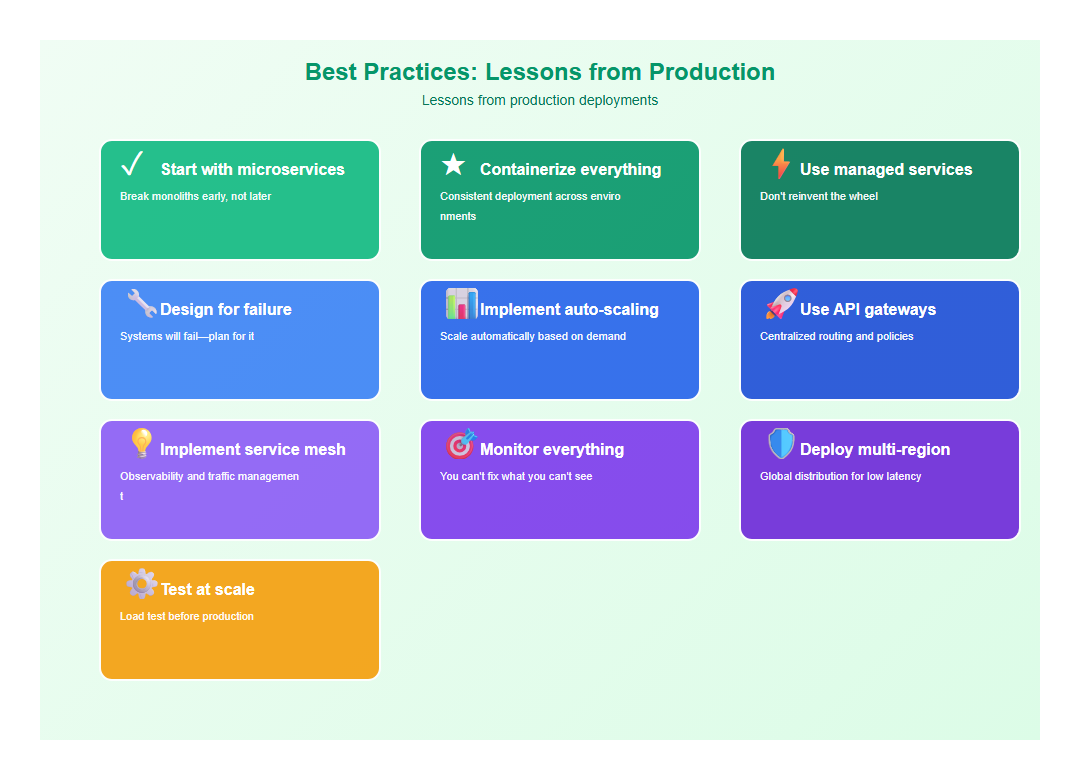
After architecting multiple cloud-native AI systems, here are the practices I follow:
- Start with microservices: Break monoliths early, not later
- Containerize everything: Consistent deployment across environments
- Use managed services: Don’t reinvent the wheel
- Design for failure: Systems will fail—plan for it
- Implement auto-scaling: Scale automatically based on demand
- Use API gateways: Centralized routing and policies
- Implement service mesh: Observability and traffic management
- Monitor everything: You can’t fix what you can’t see
- Deploy multi-region: Global distribution for low latency
- Test at scale: Load test before production
9. Common Mistakes to Avoid
I’ve made these mistakes so you don’t have to:
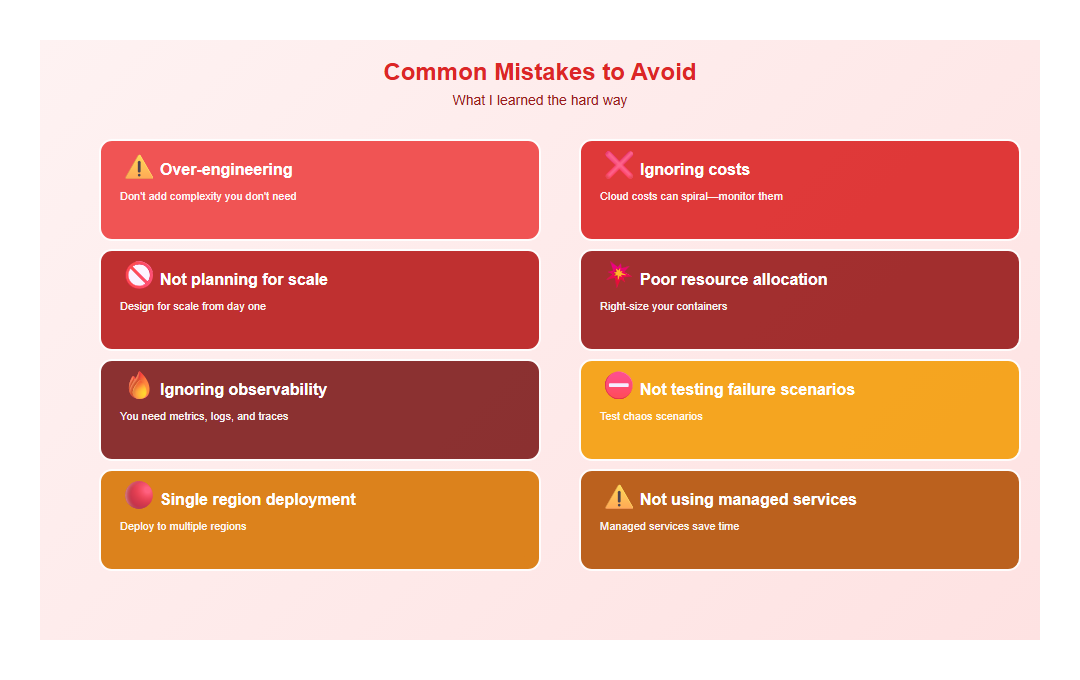
- Over-engineering: Don’t add complexity you don’t need
- Ignoring costs: Cloud costs can spiral—monitor them
- Not planning for scale: Design for scale from day one
- Poor resource allocation: Right-size your containers
- Ignoring observability: You need metrics, logs, and traces
- Not testing failure scenarios: Test chaos scenarios
- Single region deployment: Deploy to multiple regions
- Not using managed services: Managed services save time
10. Conclusion
Cloud-native architecture enables AI applications to scale, remain resilient, and reduce costs. The key is microservices, containerization, auto-scaling, and observability. Get these right, and your AI application will handle traffic spikes, recover from failures, and scale globally.
🎯 Key Takeaway
Cloud-native AI architecture is about leveraging cloud capabilities: microservices for modularity, containers for consistency, auto-scaling for efficiency, and observability for reliability. Design for scale from day one, use managed services, and monitor everything. The result: scalable, resilient, cost-effective AI applications.
Discover more from C4: Container, Code, Cloud & Context
Subscribe to get the latest posts sent to your email.