Expert Guide to Building Real-Time Streaming Interfaces with Server-Sent Events
I’ve built streaming interfaces for dozens of AI applications, and I can tell you: Server-Sent Events (SSE) is the unsung hero of real-time AI frontends. While WebSockets get all the attention, SSE is simpler, more reliable, and perfect for one-way streaming from server to client—which is exactly what AI applications need.
In this guide, I’ll show you how to implement SSE in your frontend, handle edge cases, manage reconnections, and create a seamless streaming experience that makes AI responses feel instant—even when they take time to generate.
What You’ll Learn
- SSE client implementation patterns that work in production
- React hooks for managing streaming connections
- Error handling and automatic reconnection strategies
- Progress indicators and UX patterns for streaming
- Performance optimizations for high-frequency updates
- Common pitfalls I’ve encountered (and how to avoid them)
Introduction: Why SSE for AI Frontends?
When I first started building AI applications, I tried WebSockets. They worked, but they were overkill. I needed one-way streaming from server to client, and WebSockets added unnecessary complexity: connection management, heartbeat pings, bidirectional protocol overhead.
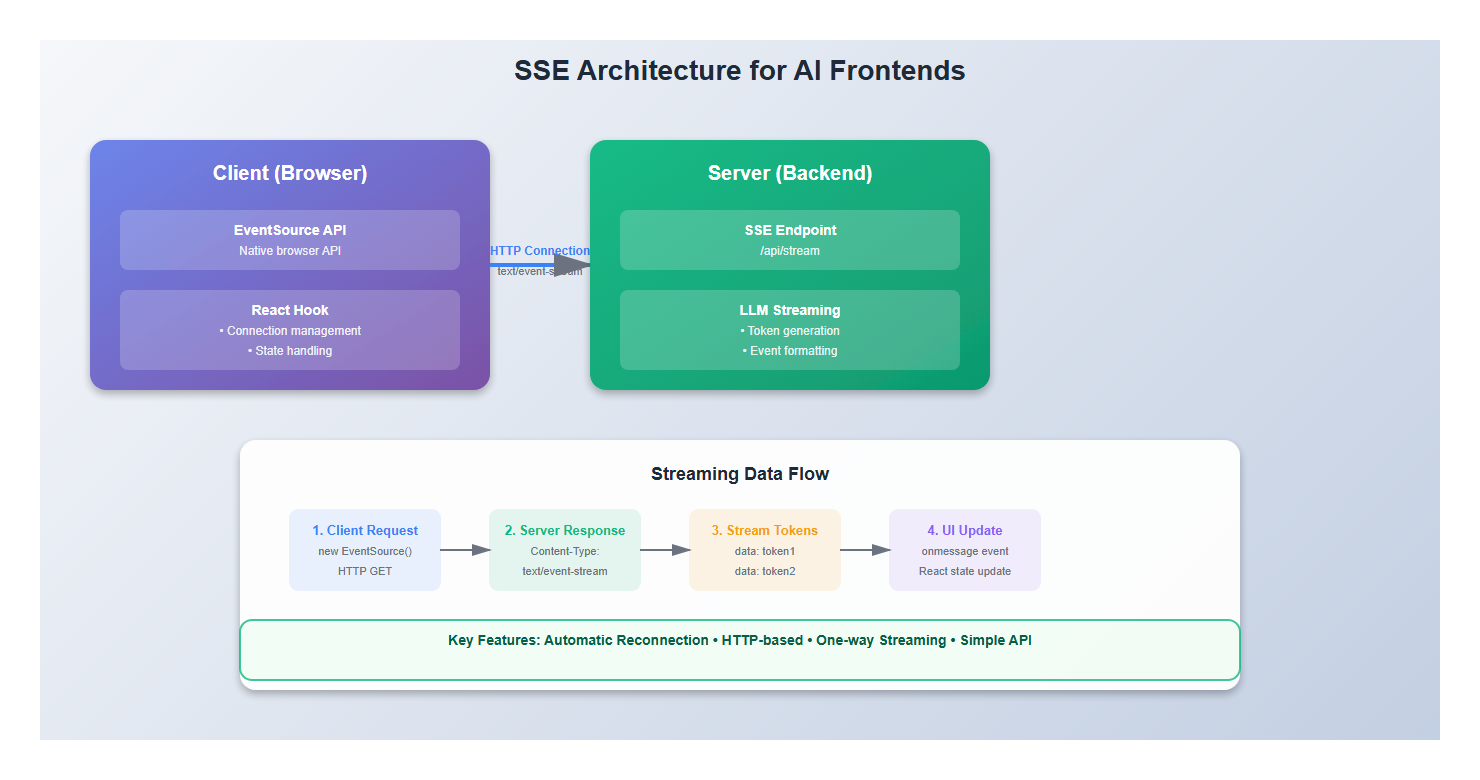
Then I discovered Server-Sent Events. SSE is built for exactly this use case: streaming data from server to client. It’s simpler, more reliable, and has automatic reconnection built-in. After switching to SSE, my streaming implementations became cleaner, more maintainable, and more robust.
Here’s why SSE is perfect for AI frontends:
- Simplicity: No protocol negotiation, just HTTP with a special content type
- Automatic reconnection: Browsers handle reconnection automatically
- Built-in event parsing: Native EventSource API handles message parsing
- HTTP-based: Works through firewalls and proxies that block WebSockets
- One-way streaming: Perfect for AI responses that flow server → client
1. Understanding Server-Sent Events
1.1 How SSE Works
SSE is deceptively simple. The server sends a stream of text data with a special MIME type (text/event-stream), and the browser’s EventSource API parses it automatically.
Here’s what happens:
- Client opens an HTTP connection to the server
- Server keeps the connection open and sends events
- Each event is a text block with optional fields: `data`, `event`, `id`
- Browser parses events and fires JavaScript events
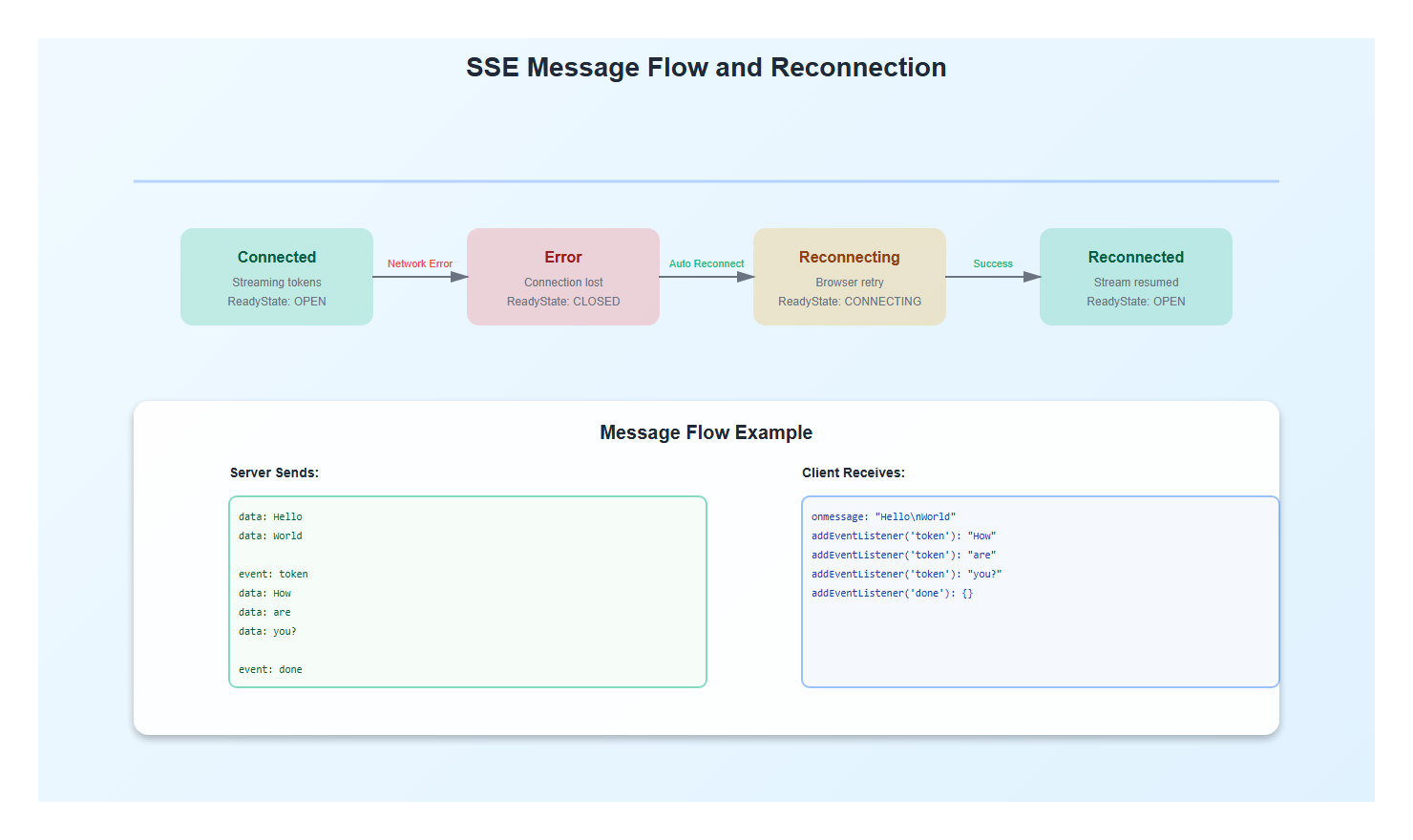
- If connection drops, browser automatically reconnects
// Server sends this:
data: Hello
data: World

// Browser receives it as:
eventSource.onmessage = (event) => {
  console.log(event.data); // "Hello\nWorld"
};
1.2 SSE vs WebSockets vs Polling
I’ve used all three approaches. Here’s my take:
| Feature | SSE | WebSockets | Polling |
|---|---|---|---|
| Complexity | Low | High | Very Low |
| Reconnection | Automatic | Manual | N/A |
| Bidirectional | No | Yes | Yes |
| Overhead | Low | Low | High |
| Best For | AI streaming | Chat, games | Simple updates |
For AI applications, SSE is the clear winner. You’re streaming tokens one way, and you don’t need bidirectional communication during the stream.
2. Basic SSE Implementation
2.1 The EventSource API
The browser’s EventSource API is straightforward, but there are nuances I’ve learned the hard way:
// Basic usage
const eventSource = new EventSource('/api/stream');

eventSource.onmessage = (event) => {
  console.log('Received:', event.data);
};

eventSource.onerror = (error) => {
  console.error('SSE error:', error);
  // Browser will automatically try to reconnect
};

// Clean up when done
eventSource.close();
Key insight: The browser automatically reconnects on error, but you need to handle the reconnection state in your UI. Users should know when the connection is reconnecting.
2.2 React Hook for SSE
Here’s a production-ready React hook I’ve refined over multiple projects:
import { useState, useEffect, useRef } from 'react';

interface UseSSEOptions {
  url: string;
  onMessage?: (data: string) => void;
  onError?: (error: Event) => void;
  onOpen?: () => void;
  autoConnect?: boolean;
}

interface UseSSEReturn {
  data: string;
  isConnected: boolean;
  isConnecting: boolean;
  error: Error | null;
  connect: () => void;
  disconnect: () => void;
}

export function useSSE(options: UseSSEOptions): UseSSEReturn {
  const {
    url,
    onMessage,
    onError,
    onOpen,
    autoConnect = true,
  } = options;

  const [data, setData] = useState('');
  const [isConnected, setIsConnected] = useState(false);
  const [isConnecting, setIsConnecting] = useState(false);
  const [error, setError] = useState<Error | null>(null);

  const eventSourceRef = useRef<EventSource | null>(null);
  const reconnectTimeoutRef = useRef<NodeJS.Timeout | null>(null);

  const connect = () => {
    if (eventSourceRef.current) {
      return; // Already connected
    }

    setIsConnecting(true);
    setError(null);

    try {
      const eventSource = new EventSource(url);
      eventSourceRef.current = eventSource;

      eventSource.onopen = () => {
        setIsConnected(true);
        setIsConnecting(false);
        onOpen?.();
      };

      eventSource.onmessage = (event) => {
        const newData = event.data;
        setData(prev => prev + newData);
        onMessage?.(newData);
      };

      eventSource.onerror = (err) => {
        setIsConnected(false);
        setIsConnecting(false);
        setError(new Error('SSE connection error'));
        onError?.(err);

        // Clean up
        eventSource.close();
        eventSourceRef.current = null;
      };
    } catch (err) {
      setError(err as Error);
      setIsConnecting(false);
    }
  };

  const disconnect = () => {
    if (eventSourceRef.current) {
      eventSourceRef.current.close();
      eventSourceRef.current = null;
    }
    if (reconnectTimeoutRef.current) {
      clearTimeout(reconnectTimeoutRef.current);
    }
    setIsConnected(false);
    setIsConnecting(false);
    setData('');
  };

  useEffect(() => {
    if (autoConnect) {
      connect();
    }

    return () => {
      disconnect();
    };
  }, [url, autoConnect]);

  return {
    data,
    isConnected,
    isConnecting,
    error,
    connect,
    disconnect,
  };
}
This hook gives you full control over the connection lifecycle and handles cleanup properly—something I learned is critical for production apps.
3. Advanced SSE Patterns
3.1 Handling Different Event Types
SSE supports custom event types, which is perfect for AI applications where you might send different types of data:
// Server sends:
event: token
data: Hello

event: metadata
data: {"timestamp": 1234567890}

event: done
data: {"total_tokens": 150}

// Client handles:
eventSource.addEventListener('token', (event) => {
  updateUI(event.data);
});

eventSource.addEventListener('metadata', (event) => {
  const metadata = JSON.parse(event.data);
  updateProgress(metadata);
});

eventSource.addEventListener('done', (event) => {
  const result = JSON.parse(event.data);
  onComplete(result);
});
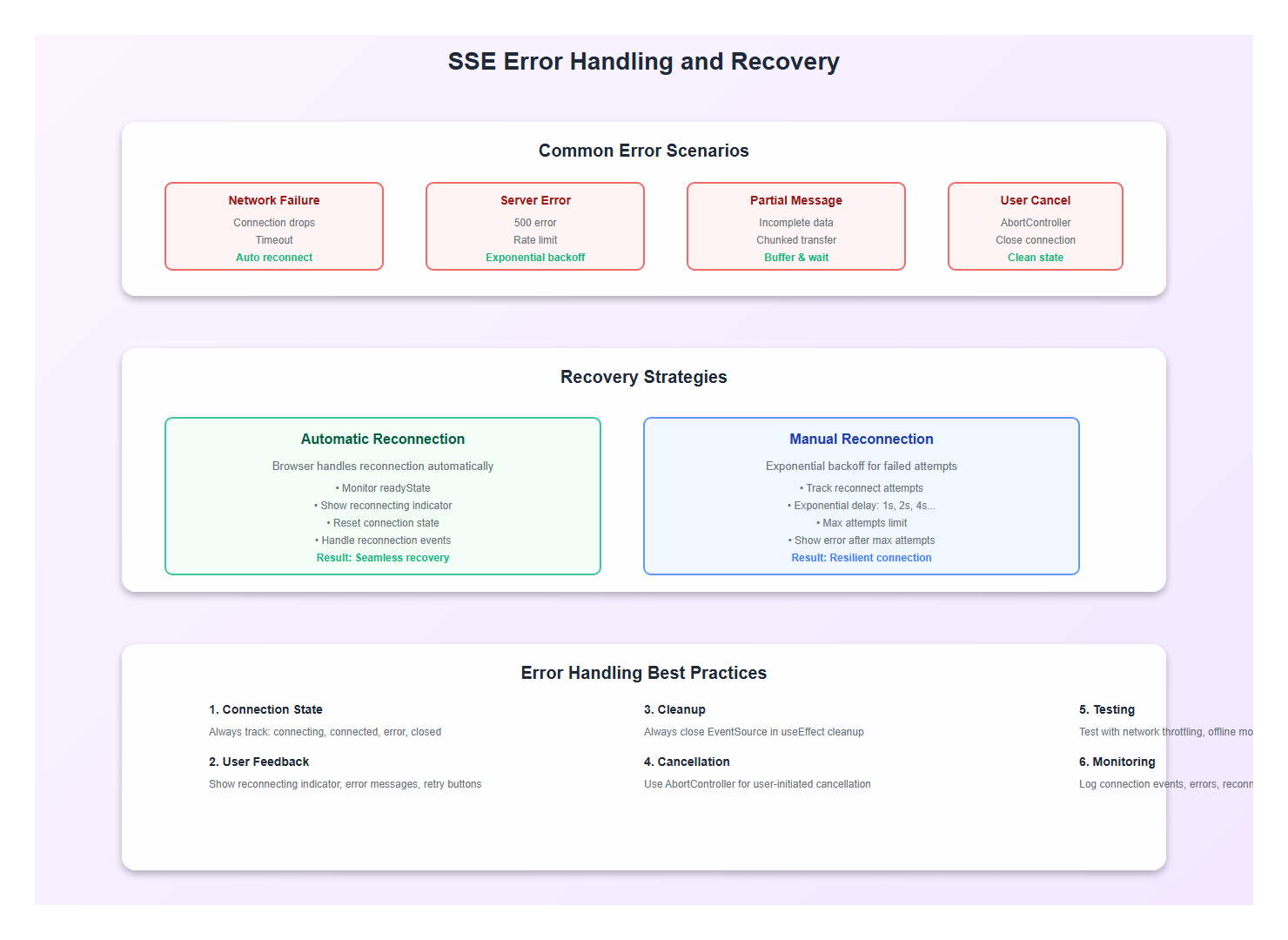
3.2 Reconnection Strategies
The browser automatically reconnects, but you need to handle the reconnection state. Here’s what I do:
function useSSEWithReconnect(url: string) {
  const [reconnectAttempts, setReconnectAttempts] = useState(0);
  const maxReconnectAttempts = 5;
  const reconnectDelay = 1000;

  const eventSourceRef = useRef<EventSource | null>(null);

  const connect = useCallback(() => {
    if (reconnectAttempts >= maxReconnectAttempts) {
      console.error('Max reconnection attempts reached');
      return;
    }

    const eventSource = new EventSource(url);
    eventSourceRef.current = eventSource;

    eventSource.onopen = () => {
      setReconnectAttempts(0); // Reset on successful connection
    };

    eventSource.onerror = () => {
      eventSource.close();
      eventSourceRef.current = null;

      // Exponential backoff
      const delay = reconnectDelay * Math.pow(2, reconnectAttempts);
      setTimeout(() => {
        setReconnectAttempts(prev => prev + 1);
        connect();
      }, delay);
    };
  }, [url, reconnectAttempts]);

  useEffect(() => {
    connect();
    return () => {
      eventSourceRef.current?.close();
    };
  }, [connect]);
}
3.3 Abort Controller for Cancellation
One thing I learned: you need a way to cancel streams. Here’s how I handle it:
function useCancellableSSE(url: string) {
  const abortControllerRef = useRef<AbortController | null>(null);
  const eventSourceRef = useRef<EventSource | null>(null);

  const connect = () => {
    // Cancel previous connection if exists
    if (abortControllerRef.current) {
      abortControllerRef.current.abort();
    }

    abortControllerRef.current = new AbortController();

    // Use fetch with AbortController for SSE
    fetch(url, {
      signal: abortControllerRef.current.signal,
      headers: {
        'Accept': 'text/event-stream',
      },
    }).then(response => {
      const reader = response.body?.getReader();
      // Handle streaming manually...
    });
  };

  const cancel = () => {
    abortControllerRef.current?.abort();
    eventSourceRef.current?.close();
  };

  return { connect, cancel };
}
4. Error Handling and Edge Cases
4.1 Network Failures
Network failures are inevitable. Here’s how I handle them gracefully:
function useRobustSSE(url: string) {
  const [connectionState, setConnectionState] = useState<'connecting' | 'connected' | 'error' | 'closed'>('closed');
  const [lastError, setLastError] = useState<Error | null>(null);

  useEffect(() => {
    const eventSource = new EventSource(url);

    eventSource.onopen = () => {
      setConnectionState('connected');
      setLastError(null);
    };

    eventSource.onerror = (error) => {
      setConnectionState('error');
      setLastError(new Error('Connection lost'));

      // The browser will try to reconnect automatically
      // But we can show a reconnecting indicator
    };

    // Monitor connection state
    const checkConnection = setInterval(() => {
      if (eventSource.readyState === EventSource.CLOSED) {
        setConnectionState('closed');
      } else if (eventSource.readyState === EventSource.CONNECTING) {
        setConnectionState('connecting');
      } else if (eventSource.readyState === EventSource.OPEN) {
        setConnectionState('connected');
      }
    }, 1000);

    return () => {
      eventSource.close();
      clearInterval(checkConnection);
    };
  }, [url]);

  return { connectionState, lastError };
}
4.2 Handling Partial Messages
Sometimes messages arrive in chunks. Here’s how I handle that:
function useBufferedSSE(url: string) {
  const [buffer, setBuffer] = useState('');
  const [messages, setMessages] = useState<string[]>([]);

  useEffect(() => {
    const eventSource = new EventSource(url);

    eventSource.onmessage = (event) => {
      const newData = event.data;

      // Check if this is a complete message
      if (newData.endsWith('\n\n')) {
        // Complete message
        setMessages(prev => [...prev, buffer + newData.trim()]);
        setBuffer('');
      } else {
        // Partial message, buffer it
        setBuffer(prev => prev + newData);
      }
    };

    return () => eventSource.close();
  }, [url]);

  return { messages, buffer };
}
5. Performance Optimizations
5.1 Throttling Updates
High-frequency updates can cause performance issues. Here’s how I throttle them:
import { useMemo } from 'react';
import { throttle } from 'lodash-es';

function useThrottledSSE(url: string, throttleMs: number = 100) {
  const [data, setData] = useState('');

  useEffect(() => {
    const eventSource = new EventSource(url);

    // Throttle updates to prevent excessive re-renders
    const throttledUpdate = throttle((newData: string) => {
      setData(prev => prev + newData);
    }, throttleMs);

    eventSource.onmessage = (event) => {
      throttledUpdate(event.data);
    };

    return () => {
      eventSource.close();
      throttledUpdate.cancel();
    };
  }, [url, throttleMs]);

  return data;
}
5.2 Debouncing for Search
For search-as-you-type with SSE, debounce the connection:
function useDebouncedSSE(query: string, delay: number = 500) {
  const [results, setResults] = useState('');

  useEffect(() => {
    if (!query.trim()) {
      setResults('');
      return;
    }

    const timeoutId = setTimeout(() => {
      const eventSource = new EventSource(`/api/search?q=${encodeURIComponent(query)}`);

      eventSource.onmessage = (event) => {
        setResults(prev => prev + event.data);
      };

      return () => eventSource.close();
    }, delay);

    return () => clearTimeout(timeoutId);
  }, [query, delay]);

  return results;
}
6. Real-World Example: Complete Implementation
Here’s a complete, production-ready example that combines all these patterns:
import React, { useState, useEffect, useRef } from 'react';

interface StreamingChatProps {
  apiUrl: string;
  onComplete?: (fullResponse: string) => void;
}

export function StreamingChat({ apiUrl, onComplete }: StreamingChatProps) {
  const [messages, setMessages] = useState<Array<{ role: 'user' | 'assistant'; content: string }>>([]);
  const [currentStream, setCurrentStream] = useState('');
  const [isStreaming, setIsStreaming] = useState(false);
  const [connectionState, setConnectionState] = useState<'idle' | 'connecting' | 'streaming' | 'error'>('idle');
  const [error, setError] = useState<string | null>(null);

  const eventSourceRef = useRef<EventSource | null>(null);
  const abortControllerRef = useRef<AbortController | null>(null);

  const startStream = async (prompt: string) => {
    // Cancel any existing stream
    if (eventSourceRef.current) {
      eventSourceRef.current.close();
    }
    if (abortControllerRef.current) {
      abortControllerRef.current.abort();
    }

    // Add user message
    setMessages(prev => [...prev, { role: 'user', content: prompt }]);
    setCurrentStream('');
    setIsStreaming(true);
    setConnectionState('connecting');
    setError(null);

    try {
      abortControllerRef.current = new AbortController();

      // Use fetch for better control
      const response = await fetch(`${apiUrl}?prompt=${encodeURIComponent(prompt)}`, {
        signal: abortControllerRef.current.signal,
        headers: {
          'Accept': 'text/event-stream',
        },
      });

      if (!response.ok) {
        throw new Error(`HTTP ${response.status}`);
      }

      const reader = response.body?.getReader();
      const decoder = new TextDecoder();

      if (!reader) {
        throw new Error('No reader available');
      }

      setConnectionState('streaming');

      while (true) {
        const { done, value } = await reader.read();

        if (done) {
          break;
        }

        const chunk = decoder.decode(value, { stream: true });
        const lines = chunk.split('\n');

        for (const line of lines) {
          if (line.startsWith('data: ')) {
            const data = line.slice(6);

            if (data === '[DONE]') {
              // Stream complete
              setIsStreaming(false);
              setConnectionState('idle');

              // Add complete message
              setMessages(prev => [...prev, { role: 'assistant', content: currentStream }]);
              setCurrentStream('');

              onComplete?.(currentStream);
              return;
            } else {
              // Append token
              setCurrentStream(prev => prev + data);
            }
          }
        }
      }
    } catch (err) {
      if (err instanceof Error && err.name === 'AbortError') {
        // User cancelled, ignore
        return;
      }

      setError(err instanceof Error ? err.message : 'Stream failed');
      setConnectionState('error');
      setIsStreaming(false);
    }
  };

  const cancelStream = () => {
    abortControllerRef.current?.abort();
    eventSourceRef.current?.close();
    setIsStreaming(false);
    setConnectionState('idle');
  };

  return (
    <div className="streaming-chat">
      <div className="messages">
        {messages.map((msg, idx) => (
          <div key={idx} className={`message ${msg.role}`}>
            {msg.content}
          </div>
        ))}
        {isStreaming && (
          <div className="message assistant streaming">
            {currentStream}
            <span className="cursor">▋</span>
          </div>
        )}
      </div>

      {connectionState === 'error' && (
        <div className="error-banner">
          {error} — <button onClick={() => startStream(messages[messages.length - 1]?.content || '')}>Retry</button>
        </div>
      )}

      <ChatInput
        onSend={startStream}
        onCancel={cancelStream}
        disabled={isStreaming}
      />
    </div>
  );
}
7. Best Practices: Lessons from Production
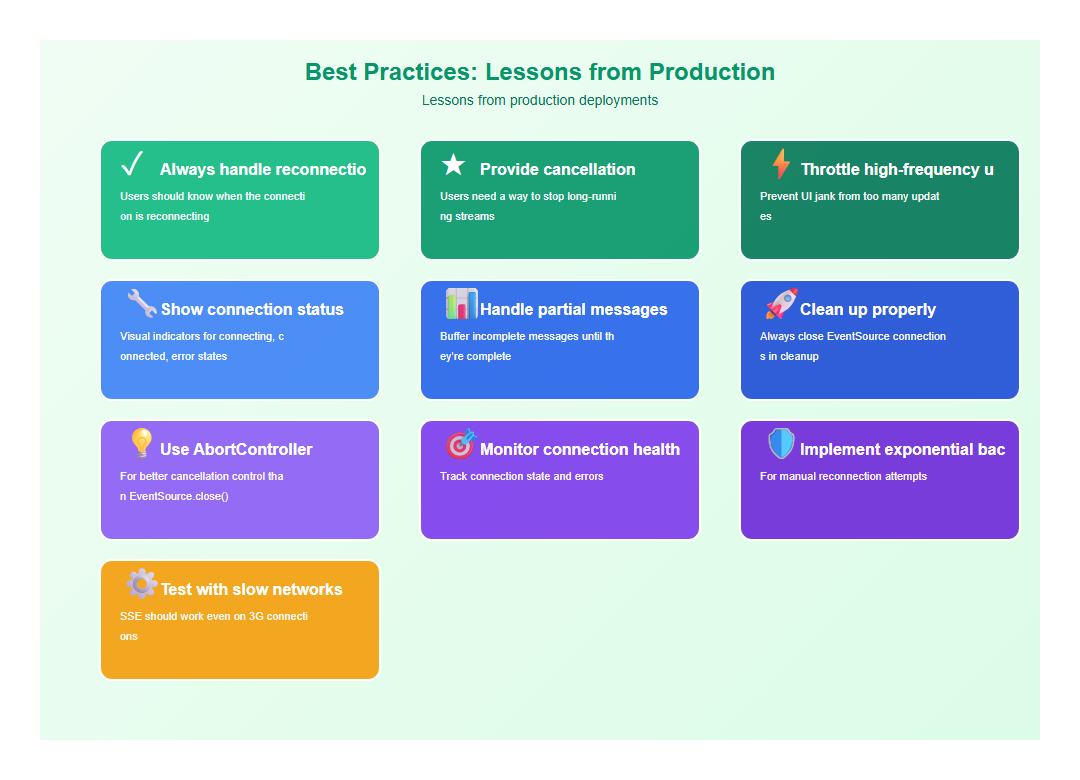
After implementing SSE in multiple production applications, here are the practices I follow:
- Always handle reconnection state: Users should know when the connection is reconnecting
- Provide cancellation: Users need a way to stop long-running streams
- Throttle high-frequency updates: Prevent UI jank from too many updates
- Show connection status: Visual indicators for connecting, connected, error states
- Handle partial messages: Buffer incomplete messages until they’re complete
- Clean up properly: Always close EventSource connections in cleanup
- Use AbortController: For better cancellation control than EventSource.close()
- Monitor connection health: Track connection state and errors
- Implement exponential backoff: For manual reconnection attempts
- Test with slow networks: SSE should work even on 3G connections

8. Common Mistakes to Avoid
I’ve made these mistakes so you don’t have to:
- Not cleaning up EventSource: Always close connections in useEffect cleanup
- Ignoring reconnection state: Users need feedback when connection is lost
- Not handling cancellation: Long streams need a cancel button
- Updating state too frequently: Throttle updates to prevent performance issues
- Not buffering partial messages: Messages can arrive in chunks
- Forgetting error boundaries: Wrap SSE components in error boundaries
- Not testing network failures: Test with network throttling
- Ignoring browser limits: Browsers limit concurrent SSE connections (usually 6)
9. Conclusion
Server-Sent Events are perfect for AI frontends. They’re simpler than WebSockets, more efficient than polling, and have automatic reconnection built-in. With proper error handling, reconnection strategies, and performance optimizations, SSE can provide a seamless streaming experience that makes AI applications feel responsive and reliable.
The key is handling edge cases gracefully: network failures, partial messages, cancellation, and reconnection. Get these right, and your streaming interface will feel magical to users.
🎯 Key Takeaway
SSE is the perfect fit for AI streaming. It’s simpler than WebSockets, more efficient than polling, and has automatic reconnection. The secret to great SSE implementations is handling edge cases: reconnection states, cancellation, throttling, and error recovery. Get these right, and your streaming interface will feel seamless.
Discover more from C4: Container, Code, Cloud & Context
Subscribe to get the latest posts sent to your email.