GPU resource management is critical for cost-effective AI workloads. After managing GPU resources for 40+ AI projects, I’ve learned what works. Here’s the complete guide to optimizing GPU resources in the cloud.

Why GPU Resource Management Matters
GPU resources are expensive and limited:
- Cost: GPUs are the most expensive cloud resource
- Availability: GPU instances are often scarce
- Utilization: Poor utilization wastes money
- Scaling: Need to scale efficiently
- Multi-tenancy: Share GPUs across workloads
- Optimization: Maximize throughput per dollar
After managing GPU resources for multiple AI projects, I’ve learned that proper GPU management is critical for cost-effective AI operations.
GPU Instance Selection
1. Instance Types
Choose the right GPU instance type:
# AWS GPU Instance Types
GPU_INSTANCES = {
    "g4dn.xlarge": {
        "gpu": "NVIDIA T4",
        "gpu_memory": "16GB",
        "vcpu": 4,
        "memory": "16GB",
        "cost_per_hour": 0.526,
        "best_for": ["inference", "small models"]
    },
    "g4dn.2xlarge": {
        "gpu": "NVIDIA T4",
        "gpu_memory": "16GB",
        "vcpu": 8,
        "memory": "32GB",
        "cost_per_hour": 0.752,
        "best_for": ["inference", "medium models"]
    },
    "p3.2xlarge": {
        "gpu": "NVIDIA V100",
        "gpu_memory": "16GB",
        "vcpu": 8,
        "memory": "61GB",
        "cost_per_hour": 3.06,
        "best_for": ["training", "large models"]
    },
    "p4d.24xlarge": {
        "gpu": "NVIDIA A100",
        "gpu_count": 8,
        "gpu_memory": "40GB",
        "vcpu": 96,
        "memory": "1152GB",
        "cost_per_hour": 32.77,
        "best_for": ["training", "very large models"]
    }
}

# GCP GPU Instance Types
GCP_GPU_INSTANCES = {
    "n1-standard-4-nvidia-t4": {
        "gpu": "NVIDIA T4",
        "gpu_count": 1,
        "vcpu": 4,
        "memory": "15GB",
        "cost_per_hour": 0.35,
        "best_for": ["inference"]
    },
    "a2-highgpu-1g": {
        "gpu": "NVIDIA A100",
        "gpu_count": 1,
        "gpu_memory": "40GB",
        "vcpu": 12,
        "memory": "85GB",
        "cost_per_hour": 3.67,
        "best_for": ["training", "inference"]
    }
}

def select_gpu_instance(model_size: str, workload_type: str, budget: float):
    """Select optimal GPU instance based on requirements"""
    if workload_type == "inference":
        if model_size == "small":
            return "g4dn.xlarge"
        elif model_size == "medium":
            return "g4dn.2xlarge"
        else:
            return "g4dn.4xlarge"
    elif workload_type == "training":
        if model_size == "small":
            return "p3.2xlarge"
        elif model_size == "medium":
            return "p3.8xlarge"
        else:
            return "p4d.24xlarge"
2. Spot Instances
Use spot instances for cost savings:
import boto3

ec2 = boto3.client('ec2')

def launch_spot_gpu_instance(instance_type: str, max_price: float):
    """Launch spot GPU instance"""
    response = ec2.request_spot_instances(
        InstanceCount=1,
        LaunchSpecification={
            'ImageId': 'ami-xxxxx',
            'InstanceType': instance_type,
            'KeyName': 'my-key',
            'SecurityGroups': ['sg-xxxxx'],
            'BlockDeviceMappings': [{
                'DeviceName': '/dev/sda1',
                'Ebs': {
                    'VolumeSize': 100,
                    'VolumeType': 'gp3'
                }
            }]
        },
        SpotPrice=str(max_price),
        Type='one-time'
    )
    return response['SpotInstanceRequests'][0]['SpotInstanceRequestId']

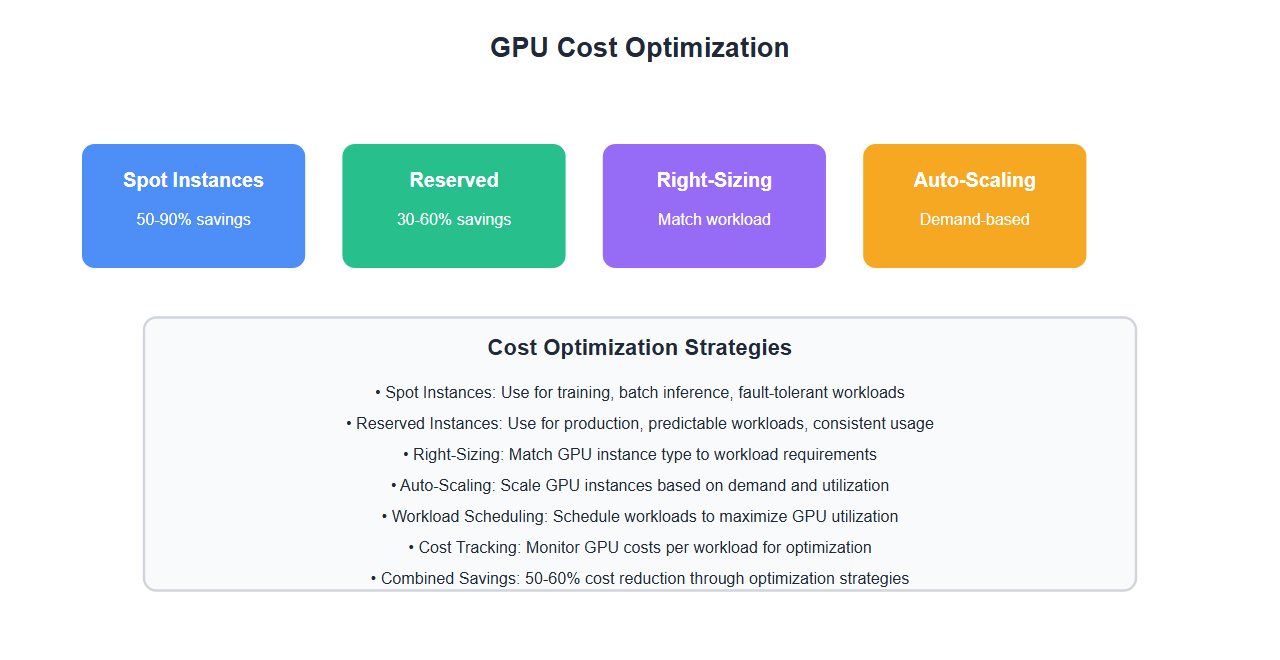
# Spot instance savings: 50-90% cost reduction
# Best for: Training, batch inference, fault-tolerant workloads
3. Reserved Instances
Use reserved instances for predictable workloads:
def calculate_reserved_instance_savings(instance_type: str, usage_hours: int):
    """Calculate savings from reserved instances"""
    on_demand_cost = GPU_INSTANCES[instance_type]["cost_per_hour"] * usage_hours

    # Reserved instance pricing (1-year, all upfront)
    reserved_cost_per_hour = GPU_INSTANCES[instance_type]["cost_per_hour"] * 0.58  # 42% savings
    reserved_upfront = reserved_cost_per_hour * 8760  # 1 year

    total_reserved_cost = reserved_upfront
    savings = on_demand_cost - total_reserved_cost
    savings_percentage = (savings / on_demand_cost) * 100

    return {
        "on_demand_cost": on_demand_cost,
        "reserved_cost": total_reserved_cost,
        "savings": savings,
        "savings_percentage": savings_percentage
    }

# Reserved instances: 30-60% cost savings
# Best for: Production workloads, consistent usage
GPU Utilization Optimization
1. Multi-Model Serving
Serve multiple models on a single GPU:
import torch
from typing import Dict, List

class MultiModelGPUManager:
    def __init__(self, gpu_id: int = 0):
        self.device = torch.device(f'cuda:{gpu_id}')
        self.models = {}
        self.model_weights = {}

    def load_model(self, model_name: str, model_path: str, memory_limit: float = 0.5):
        """Load model with memory limit"""
        if model_name in self.models:
            return

        # Check available GPU memory
        total_memory = torch.cuda.get_device_properties(self.device).total_memory
        available_memory = total_memory * memory_limit

        # Load model
        model = torch.load(model_path)
        model = model.to(self.device)

        # Use mixed precision to save memory
        model = model.half()  # FP16

        self.models[model_name] = model
        self.model_weights[model_name] = memory_limit

    def serve_models(self, requests: List[Dict]):
        """Serve multiple models on same GPU"""
        results = []
        for request in requests:
            model_name = request['model']
            input_data = request['input']

            if model_name in self.models:
                model = self.models[model_name]
                with torch.no_grad():
                    output = model(input_data)
                    results.append(output)

        return results

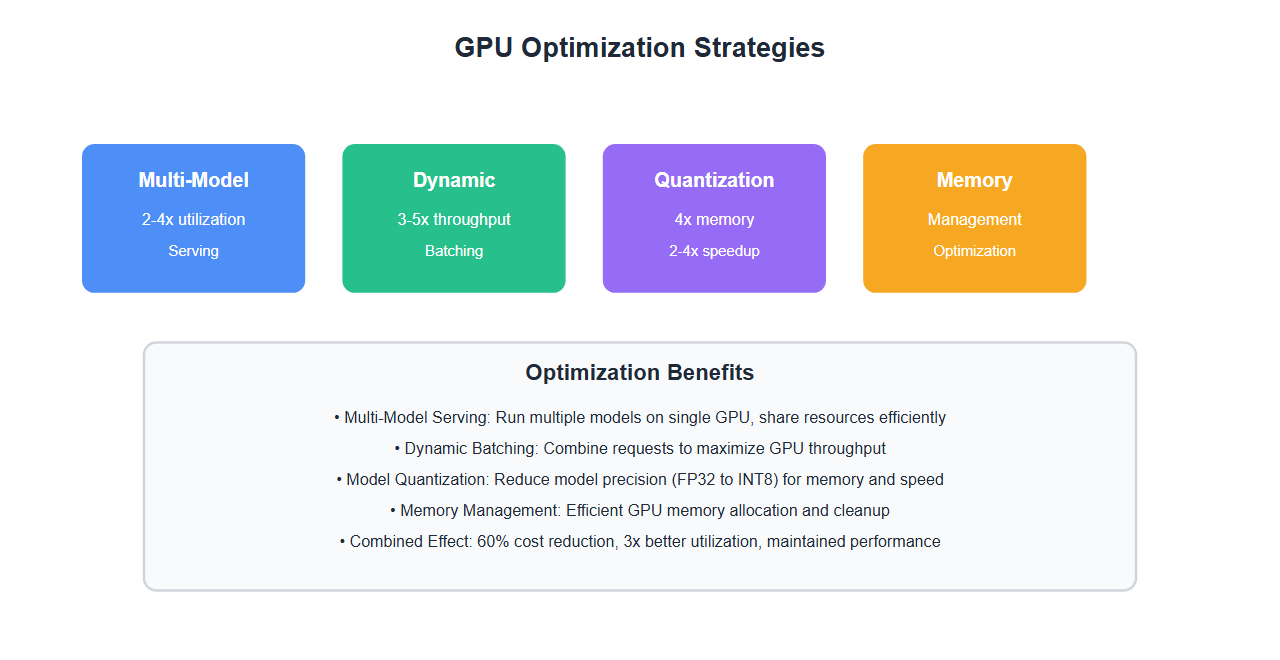
# Benefits: 2-4x better GPU utilization, reduced costs
2. Dynamic Batching
Batch requests dynamically for better throughput:
from collections import deque
import time
from typing import List, Dict

class DynamicBatcher:
    def __init__(self, max_batch_size: int = 32, max_wait_time: float = 0.1):
        self.max_batch_size = max_batch_size
        self.max_wait_time = max_wait_time
        self.queue = deque()
        self.last_batch_time = time.time()

    def add_request(self, request: Dict):
        """Add request to batch queue"""
        self.queue.append({
            'request': request,
            'timestamp': time.time()
        })

    def get_batch(self) -> List[Dict]:
        """Get batch of requests ready for processing"""
        if not self.queue:
            return []

        current_time = time.time()
        time_since_last_batch = current_time - self.last_batch_time

        # Check if we should create a batch
        should_batch = (
            len(self.queue) >= self.max_batch_size or
            (len(self.queue) > 0 and time_since_last_batch >= self.max_wait_time)
        )

        if should_batch:
            batch_size = min(len(self.queue), self.max_batch_size)
            batch = [self.queue.popleft()['request'] for _ in range(batch_size)]
            self.last_batch_time = current_time
            return batch

        return []

    def process_batch(self, batch: List[Dict], model):
        """Process batch of requests"""
        # Combine inputs
        batched_input = self._combine_inputs(batch)

        # Process on GPU
        with torch.no_grad():
            batched_output = model(batched_input)

        # Split outputs
        outputs = self._split_outputs(batched_output, len(batch))
        return outputs

# Benefits: 3-5x throughput improvement, better GPU utilization
3. Model Quantization
Quantize models to reduce memory and increase throughput:
import torch
import torch.quantization as quantization

def quantize_model(model, calibration_data):
    """Quantize model to INT8"""
    # Set model to evaluation mode
    model.eval()

    # Prepare model for quantization
    model.qconfig = quantization.get_default_qconfig('fbgemm')
    quantization.prepare(model, inplace=True)

    # Calibrate with sample data
    with torch.no_grad():
        for data in calibration_data:
            model(data)

    # Convert to quantized model
    quantized_model = quantization.convert(model, inplace=False)

    return quantized_model

# Benefits: 4x memory reduction, 2-4x speedup, minimal accuracy loss
4. GPU Memory Management
Manage GPU memory efficiently:
import torch
import gc

class GPUMemoryManager:
    def __init__(self, gpu_id: int = 0):
        self.device = torch.device(f'cuda:{gpu_id}')
        self.memory_threshold = 0.9  # 90% memory usage threshold

    def get_memory_usage(self) -> Dict:
        """Get current GPU memory usage"""
        allocated = torch.cuda.memory_allocated(self.device)
        reserved = torch.cuda.memory_reserved(self.device)
        total = torch.cuda.get_device_properties(self.device).total_memory

        return {
            "allocated_mb": allocated / 1024**2,
            "reserved_mb": reserved / 1024**2,
            "total_mb": total / 1024**2,
            "usage_percentage": (allocated / total) * 100
        }

    def clear_cache(self):
        """Clear GPU cache"""
        torch.cuda.empty_cache()
        gc.collect()

    def check_memory_pressure(self) -> bool:
        """Check if GPU memory is under pressure"""
        usage = self.get_memory_usage()
        return usage["usage_percentage"] > (self.memory_threshold * 100)

    def optimize_memory(self):
        """Optimize GPU memory usage"""
        if self.check_memory_pressure():
            self.clear_cache()
            # Enable memory efficient attention if available
            if hasattr(torch.backends.cuda, 'enable_flash_sdp'):
                torch.backends.cuda.enable_flash_sdp(True)

# Usage
memory_manager = GPUMemoryManager()
usage = memory_manager.get_memory_usage()
print(f"GPU Memory: {usage['allocated_mb']:.0f}MB / {usage['total_mb']:.0f}MB ({usage['usage_percentage']:.1f}%)")
Cost Optimization Strategies
1. Auto-Scaling
Auto-scale GPU instances based on demand:
import boto3
from datetime import datetime

class GPUAutoScaler:
    def __init__(self, asg_name: str):
        self.autoscaling = boto3.client('autoscaling')
        self.cloudwatch = boto3.client('cloudwatch')
        self.asg_name = asg_name

    def get_gpu_utilization(self) -> float:
        """Get average GPU utilization"""
        response = self.cloudwatch.get_metric_statistics(
            Namespace='AWS/EC2',
            MetricName='GPUUtilization',
            Dimensions=[
                {'Name': 'AutoScalingGroupName', 'Value': self.asg_name}
            ],
            StartTime=datetime.utcnow() - timedelta(minutes=5),
            EndTime=datetime.utcnow(),
            Period=300,
            Statistics=['Average']
        )

        if response['Datapoints']:
            return response['Datapoints'][-1]['Average']
        return 0.0

    def scale_based_on_utilization(self, target_utilization: float = 70.0):
        """Scale based on GPU utilization"""
        current_utilization = self.get_gpu_utilization()

        if current_utilization > target_utilization * 1.2:
            # Scale up
            self.scale_up()
        elif current_utilization < target_utilization * 0.5:
            # Scale down
            self.scale_down()

    def scale_up(self):
        """Increase GPU capacity"""
        response = self.autoscaling.set_desired_capacity(
            AutoScalingGroupName=self.asg_name,
            DesiredCapacity=self.get_current_capacity() + 1
        )

    def scale_down(self):
        """Decrease GPU capacity"""
        response = self.autoscaling.set_desired_capacity(
            AutoScalingGroupName=self.asg_name,
            DesiredCapacity=max(1, self.get_current_capacity() - 1)
        )
2. Workload Scheduling
Schedule workloads to maximize GPU utilization:
from datetime import datetime, timedelta
from typing import List, Dict

class GPUWorkloadScheduler:
    def __init__(self):
        self.scheduled_workloads = []

    def schedule_workload(self, workload: Dict):
        """Schedule workload to maximize GPU utilization"""
        # Find optimal time slot
        optimal_slot = self.find_optimal_slot(workload)

        workload['scheduled_time'] = optimal_slot
        self.scheduled_workloads.append(workload)

        return optimal_slot

    def find_optimal_slot(self, workload: Dict) -> datetime:
        """Find optimal time slot for workload"""
        duration = workload['estimated_duration']
        priority = workload.get('priority', 0)

        # Sort by priority and find gaps
        sorted_workloads = sorted(
            self.scheduled_workloads,
            key=lambda x: x['scheduled_time']
        )

        # Find earliest available slot
        current_time = datetime.now()
        for i, scheduled in enumerate(sorted_workloads):
            if i == 0:
                if current_time + timedelta(seconds=duration) <= scheduled['scheduled_time']:
                    return current_time

            if i < len(sorted_workloads) - 1:
                gap_start = scheduled['scheduled_time'] + timedelta(seconds=scheduled['estimated_duration'])
                gap_end = sorted_workloads[i+1]['scheduled_time']

                if gap_start + timedelta(seconds=duration) <= gap_end:
                    return gap_start

        # Schedule at end
        if sorted_workloads:
            last_end = sorted_workloads[-1]['scheduled_time'] + timedelta(seconds=sorted_workloads[-1]['estimated_duration'])
            return last_end

        return current_time

# Benefits: Better GPU utilization, reduced idle time
Best Practices: Lessons from 40+ GPU Management Projects
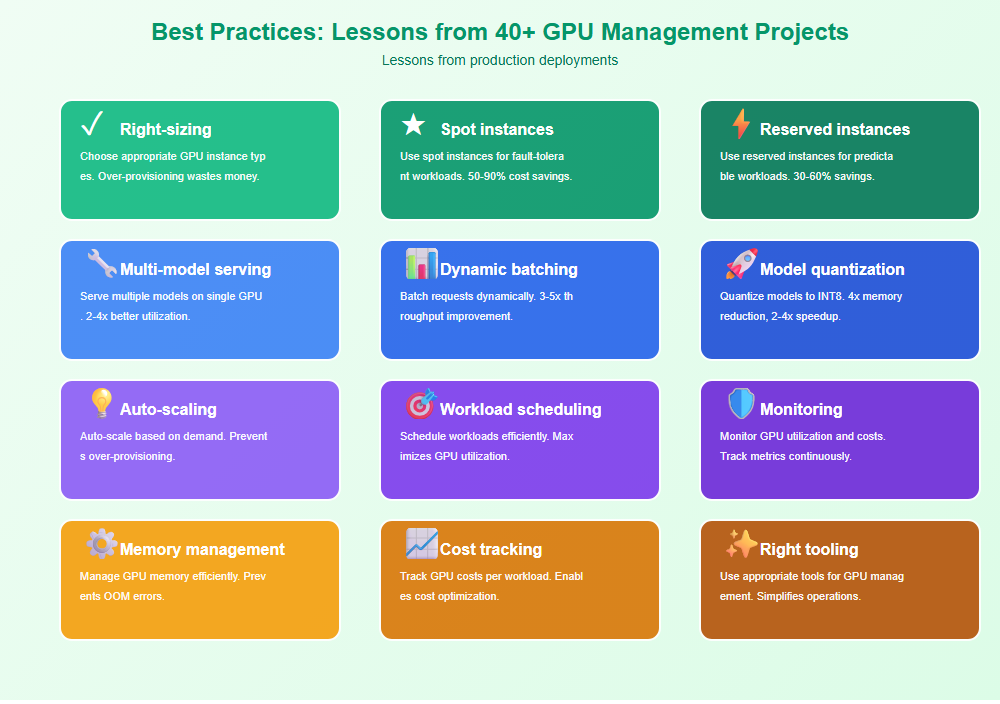
From managing GPU resources for production AI workloads:
- Right-sizing: Choose appropriate GPU instance types. Over-provisioning wastes money.
- Spot instances: Use spot instances for fault-tolerant workloads. 50-90% cost savings.
- Reserved instances: Use reserved instances for predictable workloads. 30-60% savings.
- Multi-model serving: Serve multiple models on single GPU. 2-4x better utilization.
- Dynamic batching: Batch requests dynamically. 3-5x throughput improvement.
- Model quantization: Quantize models to INT8. 4x memory reduction, 2-4x speedup.
- Auto-scaling: Auto-scale based on demand. Prevents over-provisioning.
- Workload scheduling: Schedule workloads efficiently. Maximizes GPU utilization.
- Monitoring: Monitor GPU utilization and costs. Track metrics continuously.
- Memory management: Manage GPU memory efficiently. Prevents OOM errors.
- Cost tracking: Track GPU costs per workload. Enables cost optimization.
- Right tooling: Use appropriate tools for GPU management. Simplifies operations.

Common Mistakes and How to Avoid Them
What I learned the hard way:
- Over-provisioning: Right-size GPU instances. Over-provisioning wastes money.
- No spot instances: Use spot instances for training. Significant cost savings.
- Poor utilization: Optimize GPU utilization. Low utilization wastes money.
- No batching: Implement dynamic batching. Improves throughput significantly.
- No quantization: Quantize models. Reduces memory and increases speed.
- No auto-scaling: Implement auto-scaling. Prevents over-provisioning.
- No monitoring: Monitor GPU metrics. Can’t optimize what you don’t measure.
- Memory leaks: Manage GPU memory properly. Prevents OOM errors.
- No cost tracking: Track GPU costs. Enables optimization.
- Wrong instance types: Choose appropriate instance types. Match workload to instance.
Real-World Example: 60% Cost Reduction
We reduced GPU costs by 60% through optimization:
- Before: Over-provisioned, low utilization, no spot instances
- After: Right-sized, multi-model serving, spot instances, quantization
- Result: 60% cost reduction, 3x better utilization
- Metrics: GPU utilization increased from 25% to 75%, cost per inference reduced by 60%
Key learnings: Right-sizing, spot instances, multi-model serving, and quantization dramatically reduce GPU costs while maintaining performance.
🎯 Key Takeaway
GPU resource management is critical for cost-effective AI workloads. Right-size instances, use spot and reserved instances, optimize utilization with multi-model serving and batching, and monitor continuously. With proper GPU management, you reduce costs significantly while maintaining performance.
Bottom Line
GPU resource management is essential for cost-effective AI workloads. Right-size GPU instances, use spot and reserved instances, optimize utilization with multi-model serving and dynamic batching, quantize models, and monitor continuously. With proper GPU management, you reduce costs by 50-60% while maintaining or improving performance. The investment in GPU optimization pays off in significant cost savings.
Discover more from C4: Container, Code, Cloud & Context
Subscribe to get the latest posts sent to your email.