
On this page
Every rich internet application project I have been near this year has had the same argument somewhere in its first few weeks. Should the application live in the browser, where users already are and where deployment is a URL, or on the desktop, where it can work offline, sit in the Start menu and reach the local machine? Until recently that was a choice between technologies. With Silverlight 3 out-of-browser, Adobe AIR, and the Silverlight 4 and AIR 2 betas announced in the last fortnight, it is increasingly a choice of deployment mode for the same code.
This post sets out the two scenarios, what each platform offers in each, and how I would decide between them for a line-of-business application today.
The two scenarios
In browser. The application is a plug-in hosted in a web page: Silverlight, or Flash Player running a Flex application. The user opens a URL, the application loads, and it runs inside the plug-in’s security sandbox. When the tab closes, the application is gone. Deployment is replacing a file on a web server.
Out of browser. The application is installed on the user’s machine, gets a shortcut, opens in its own window and can be started with no network connection. Depending on the platform it either keeps the browser sandbox or gets wider access to the machine: files, local databases, other applications.
%%{init: {'theme':'base','themeVariables':{'primaryColor':'#FFF3E0','primaryTextColor':'#232F3E','primaryBorderColor':'#FF9900','lineColor':'#232F3E','clusterBkg':'#F8FAFC','clusterBorder':'#CBD5E1','edgeLabelBackground':'#FFFFFF','nodeTextColor':'#232F3E'}}}%%
flowchart TD
    W["Web server"] -- "page and application package" --> B["Browser and plug-in"]
    B --> IB["In browser:
runs in the page, sandboxed,
gone when the tab closes"]
    B -- "installed on the desktop" --> OOB["Out of browser:
own window, shortcut,
starts offline"]
    OOB --> SB["Silverlight 3:
same sandbox as in browser"]
    OOB --> AIR["Adobe AIR:
desktop runtime with file system
and local database"]
    OOB --> SL4["Silverlight 4 beta:
optional elevated trust"]
    style IB fill:#EBF8FF,stroke:#0073BB,stroke-width:2px,color:#004C74
    style OOB fill:#FFF3E0,stroke:#FF9900,stroke-width:2px,color:#232F3E
    style SB fill:#F0FFF4,stroke:#1D8102,stroke-width:2px,color:#145202
    style AIR fill:#F3E8FF,stroke:#7C3AED,stroke-width:2px,color:#4C1D95
    style SL4 fill:#F3E8FF,stroke:#7C3AED,stroke-width:2px,color:#4C1D95
Silverlight out of browser
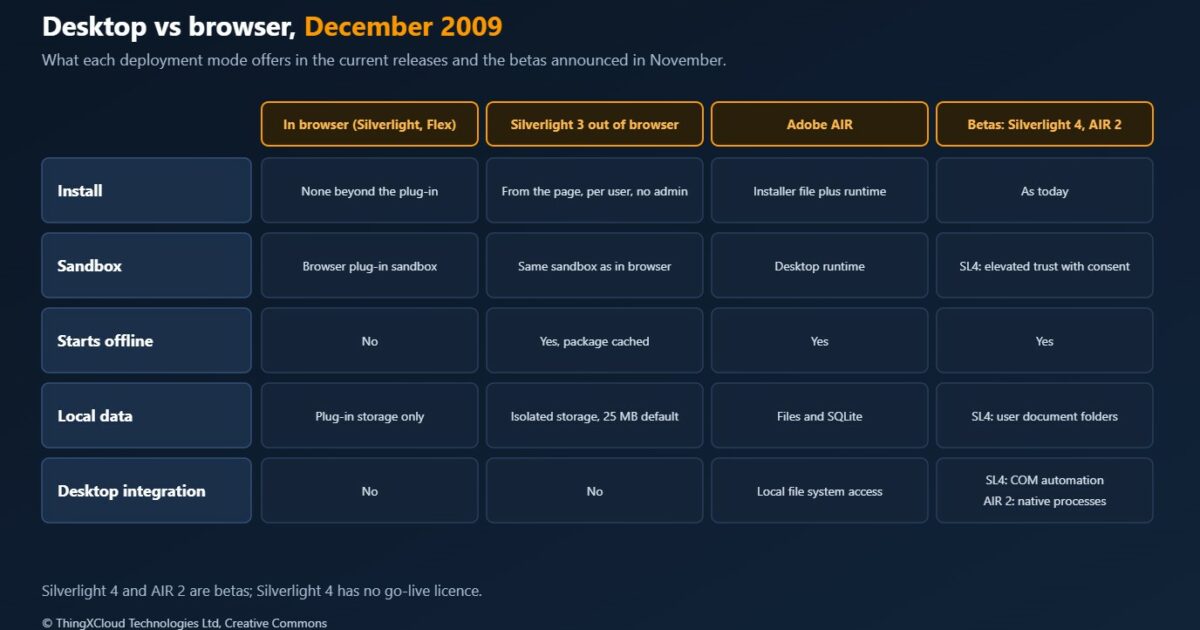
Silverlight 3 lets an application that is configured for it be installed from the page. The user right-clicks and chooses to install it onto the computer, or the application calls Application.Install from a button handler; the call is only honoured inside a user-initiated event. Installation needs no administrator rights and is per user. The application then gets desktop or Start menu shortcuts, runs in its own window, and works on both Windows and the Mac.
The important design point is what does not change. An out-of-browser Silverlight 3 application runs in the same security sandbox as it does in the page. It cannot browse the file system or call other applications. What it gains is a lifecycle: it starts offline because the package is cached locally, and it has more room to keep data, since the documentation gives out-of-browser applications 25 MB of isolated storage by default.
Working offline is therefore the application’s job, not the platform’s. The pattern Microsoft documents is to cache data in isolated storage and synchronise when the connection returns, using NetworkInterface.GetIsNetworkAvailable to check and NetworkChange.NetworkAddressChanged to be told about changes. Knowing the network is up is not the same as knowing the server is reachable, and a sync design has to test the second. Updates are pulled by the application: CheckAndDownloadUpdateAsync looks for a newer version, downloads it if there is one, and reports the result, and Microsoft advises checking only with the user’s consent.
Silverlight 4 beta
The Silverlight 4 beta announced at PDC on 18 November moves the line. An out-of-browser application can now ask the user for elevated trust. A trusted application can read and write files in the user’s document folders, use COM automation to drive desktop applications such as Office, host HTML through a WebBrowser control, show notification windows and control its own window chrome. It still never runs as administrator. The same beta adds printing, webcam and microphone input and clipboard access for applications in the browser as well.
It is a beta, without a go-live licence, so nothing in production should depend on it yet. But it changes the planning question. Silverlight out of browser has been a sandboxed web application with a shortcut; from version 4 it can also be a desktop application with user consent.
Flex and Adobe AIR
On the Adobe side the split is between a framework and a runtime. Flex is the SDK: MXML for layout, ActionScript for behaviour. A Flex application runs either in Flash Player in the browser or in Adobe AIR on the desktop, which makes the in-browser and desktop builds of one code base a realistic plan. Flex Builder is being renamed Flash Builder for Flex 4, which is still in development.
AIR has been released since February 2008 and is a full desktop runtime rather than an install mode for a web plug-in. Applications are built with Flash and ActionScript, with Flex, or with HTML and JavaScript on the WebKit engine that AIR includes. They are installed from an installer file, need the runtime on the machine, and get capabilities a browser application does not: access to the local file system and a built-in SQLite database.
The AIR 2 beta, released on Adobe Labs in the middle of November, pushes further toward native: a native process API for starting and talking to other programs, detection of mass storage devices such as USB drives, UDP and socket support, and microphone access.
What about plain HTML
The browser is not standing still either. Google has said it expects developers to use HTML5, rather than its Gears plug-in, for offline features from now on, and that Gears will be maintained but not extended. For applications whose main need is to keep working through a dropped connection, that is worth watching. For anything that needs rich media, local files or deep desktop integration today, the plug-in runtimes are still the practical route.
Decision framework
| Your situation | Mode | Why |
|---|---|---|
| Public site, occasional users, no install acceptable | In browser | A URL is the lowest barrier; nothing to install beyond the plug-in |
| Internal users who live in the application all day | Out of browser | A shortcut and its own window, and it starts without the portal |
| Field or travelling users with patchy connections | Out of browser, with an explicit sync design | Offline start is provided; offline data handling is yours to build |
| Needs local files, a local database or other desktop programs | Adobe AIR now; Silverlight 4 elevated trust once released | Silverlight 3 out of browser keeps the browser sandbox |
| Team is .NET throughout | Silverlight, in browser first, with out of browser as an option | One code base, same sandbox, mode chosen by configuration |
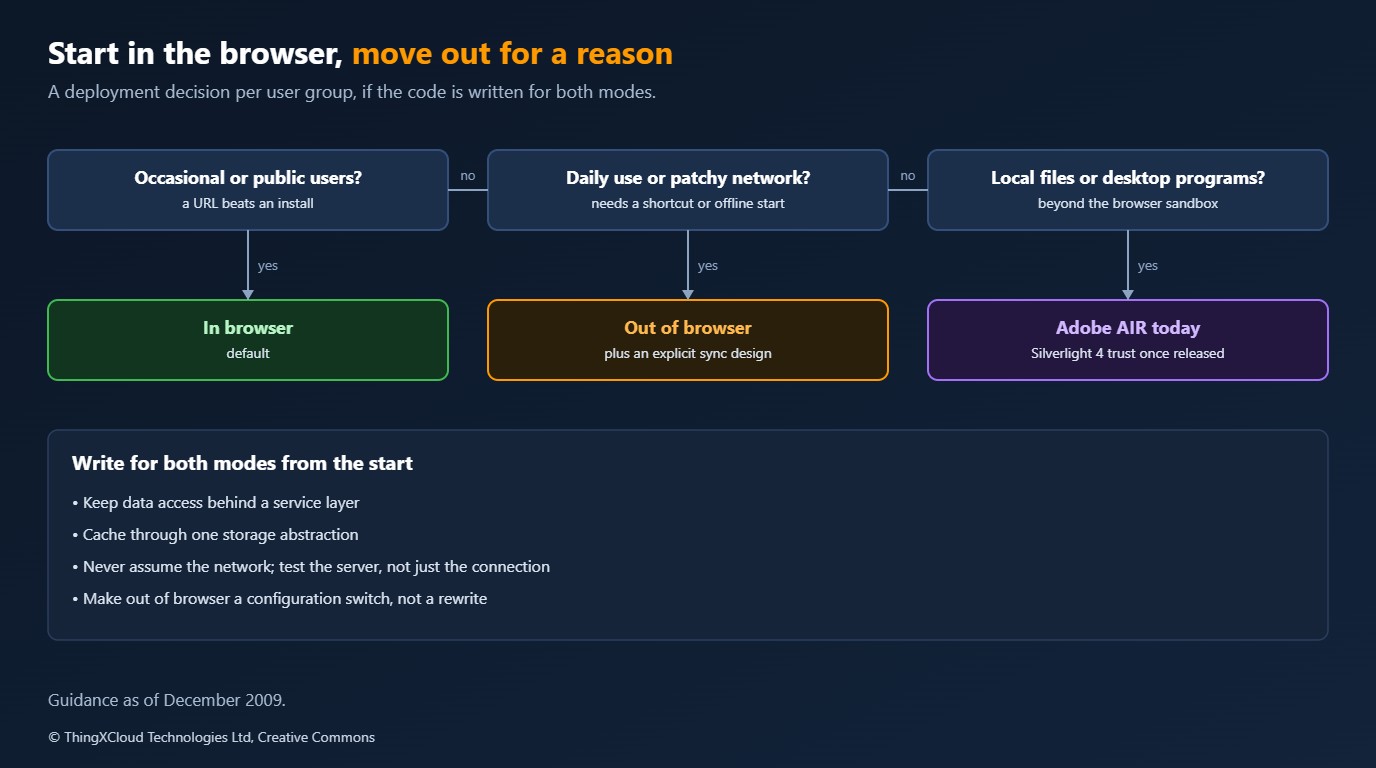
My default is in browser, with the application written so that out of browser is a configuration switch rather than a rewrite. That means keeping data access behind a service layer, caching through one storage abstraction, and never assuming the network. Moving to the desktop then becomes a product decision for each user group, not an architectural one.
Key takeaways
- In browser and out of browser are now deployment modes of the same application on both the Silverlight and Flex platforms.
- Silverlight 3 out of browser keeps the browser sandbox. It adds a shortcut, a window, offline start and more isolated storage, not desktop access.
- Adobe AIR is a desktop runtime with local files and SQLite. The AIR 2 beta adds native processes and device detection.
- The Silverlight 4 beta adds elevated trust for out-of-browser applications, but it has no go-live licence yet.
- Offline is a data design problem. The platforms tell you whether a network is present, not whether your server is reachable or your data is current.
This post replaces an earlier version that consisted of an embedded slide presentation, which no longer displays. The platform facts are taken from the sources below: Microsoft’s Silverlight out-of-browser documentation and blog posts from April and November 2009, InfoQ’s reports of the AIR 2 beta and of Google’s statement on Gears, and the Adobe AIR and Flex reference articles. Nothing was built or measured for this post.
Glossary
- RIA— Rich internet application: a web-delivered application with a desktop-like interface, usually running in a browser plug-in.
- Out of browser— A Silverlight application installed from a web page that runs in its own window and can start offline.
- Sandbox— The restrictions a plug-in places on an application, such as no access to the local file system.
- Isolated storage— Silverlight’s per-application private storage area on the user’s machine.
- Elevated trust— A Silverlight 4 beta option that lets an installed application, with the user’s consent, work outside parts of the sandbox.
- Adobe AIR— Adobe’s desktop runtime for applications built with Flash, Flex or HTML and JavaScript.
- Flex— Adobe’s SDK for building applications in MXML and ActionScript that run in Flash Player or AIR.
References & Further Reading
- → Microsoft: Silverlight Out-of-Browser Support— Install, sandbox, isolated storage quota, network detection and updates
- → Silverlight 3: What’s New with Out of Browser— April 2009: shortcuts, offline start, network detection, Mac and PC
- → Silverlight 4 Beta: Overview of the New Features— November 2009: trusted applications, COM automation, printing, webcam
- → InfoQ: Flash Player 10.1 and AIR 2.0 betas— November 2009: native process API, mass storage detection, sockets
- → Adobe AIR— Runtime, supported technologies, local SQLite and file system access
- → Flex— MXML and ActionScript, Flash Player and AIR targets, Flash Builder renaming
- → InfoQ: Google Stops Gears— Google’s statement that developers should use HTML5 for offline features
Discover more from C4: Container, Code, Cloud & Context
Subscribe to get the latest posts sent to your email.
