
On this page
Containers on a Kubernetes node share one Linux kernel. A container escape or a kernel bug in one pod can reach every other pod on the node, so teams that run untrusted code, such as AI agents executing generated code, CI jobs from forks or customer plug-ins, have usually given each workload its own node and paid for the idle capacity. On 9 November AWS launched Nitro Sandboxes for Amazon EKS, Amazon ECS and EC2: an opted-in pod or task runs in its own lightweight virtual machine with its own kernel, carved out of a running EC2 instance and isolated by the Nitro hypervisor.
The launch post shows the one-line change and leaves out what an architect needs to size and secure it: start-up cost, memory overhead, what changes for credentials, and how scheduling behaves. I ran the isolated mode on an EKS Auto Mode cluster, put the same pods on the shared kernel and in a sandbox, and compared them. This article covers what changed, what it costs in capacity, and the traps I hit.
How it works
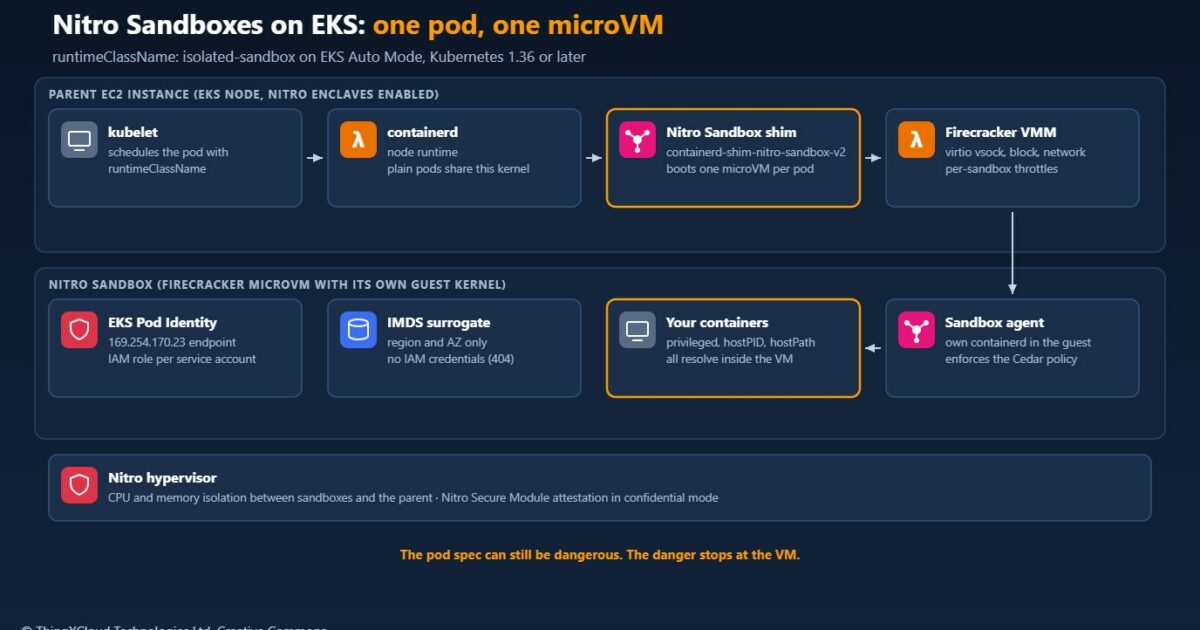
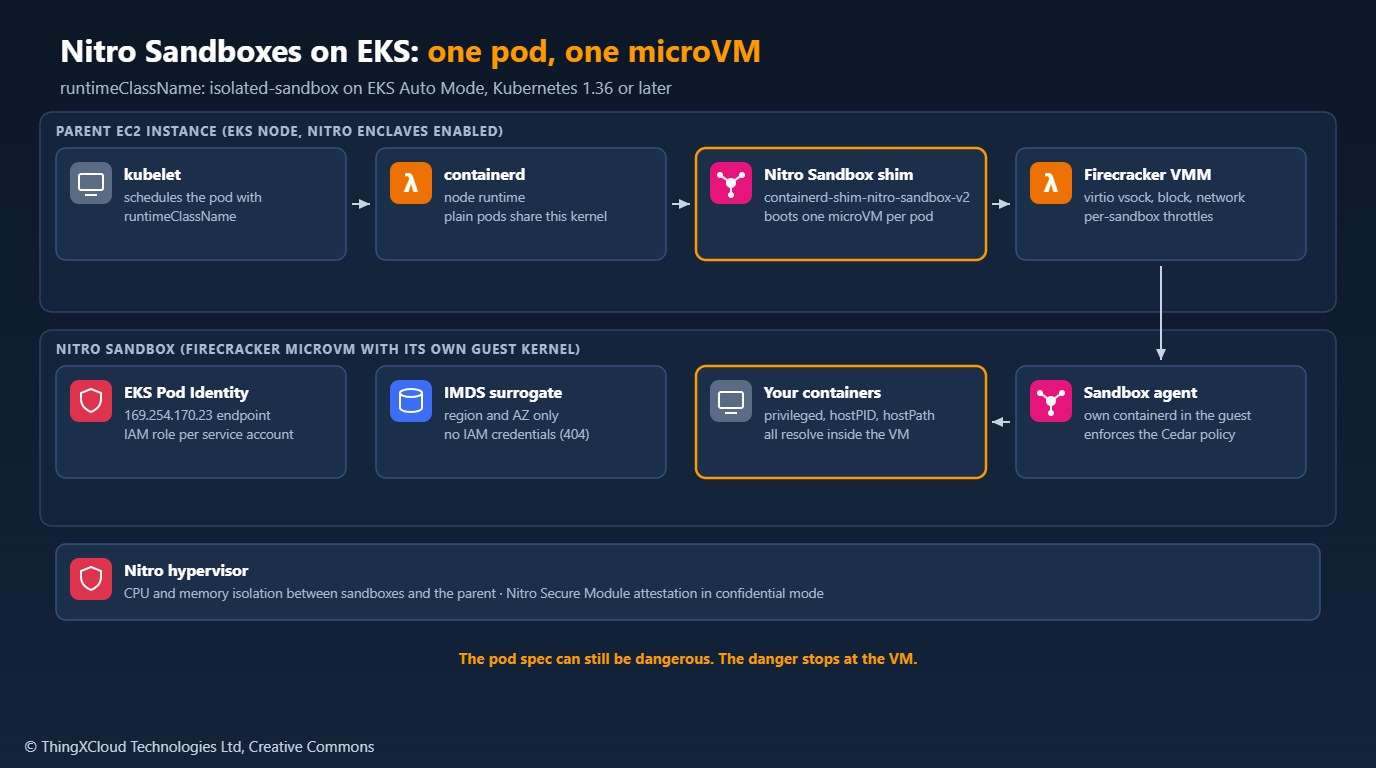
A Nitro Sandbox is a Firecracker microVM that runs on the vCPUs and memory of its parent EC2 instance. The parent must be launched with Nitro Enclaves enabled, and the Nitro hypervisor, not the parent’s kernel, enforces the CPU and memory boundary between sandboxes. On EKS, kubelet hands a sandboxed pod to containerd-shim-nitro-sandbox-v2, which boots the microVM; inside it an agent runs the containers with its own containerd, evaluates the pod’s Cedar policy and talks to the host over virtio-vsock.
%%{init: {'theme':'base','themeVariables':{'signalColor':'#0073BB','signalTextColor':'#0F172A','actorBkg':'#FFF3E0','actorBorder':'#FF9900','actorTextColor':'#232F3E','noteBkgColor':'#FFF8E7','noteBorderColor':'#FF9900','noteTextColor':'#232F3E'}}}%%
sequenceDiagram
    participant K as kubelet and containerd
    participant S as nitro-sandbox shim
    participant G as Sandbox agent (guest)
    K->>S: Create pod sandbox (runtimeClassName isolated-sandbox)
    S->>S: Boot Firecracker microVM on the Nitro hypervisor
    S->>G: Pod spec and Cedar policy over vsock
    G->>G: Check policy, load images, start containers
    G-->>K: Container status, logs and exec over vsock
Two modes are available, selected by the runtime class. The runtime class is the authority: the mode is derived from runtimeClassName and any mode annotation on the pod is ignored.
| isolated-sandbox | confidential-sandbox | |
|---|---|---|
| Trusted party | Parent instance (node) | Only the guest |
| Protects | Node and other pods from a compromised container | Workload data from cluster and node administrators |
| exec, logs, process listing | Allowed | exec, stdin and process listing denied |
| Cedar policy | Any valid container spec accepted | Pins image digests, args, env, mounts and security settings |
| Attestation | Not required | Nitro Secure Module PCRs, checked by AWS KMS key policy |
Turning it on
Nitro Sandboxes need Kubernetes 1.36 or later and run on most Nitro-based Intel, AMD and Graviton instance families. EKS Auto Mode installs both runtime classes in every cluster, so nothing else is needed there; with managed or self-managed node groups you build an AMI with the sandbox runtime and launch the nodes with Nitro Enclaves enabled (EnclaveOptions.Enabled=true). There is no extra charge: you pay for the EC2 capacity the sandboxes use. The test cluster was created with eksctl, which needs an explicit version because its default is older than 1.36:
eksctl create cluster --name nitro-sbx-blogtest --region eu-west-1 --version 1.37 --enable-auto-modeThe runtime class Auto Mode created says more about capacity planning than the launch post does. Every sandboxed pod is charged a fixed 256 MiB of memory and one eks.amazonaws.com/nitro-sandbox slot on top of its own requests, and it can only land on nodes labelled for sandboxes:
apiVersion: node.k8s.io/v1
handler: isolated-sandbox
kind: RuntimeClass
metadata:
  name: isolated-sandbox
overhead:
  podFixed:
    eks.amazonaws.com/nitro-sandbox: "1"
    memory: 256Mi
scheduling:
  nodeSelector:
    eks.amazonaws.com/nitro-sandbox: "true"
For a pod, the change is one field. The sample runs the same pod twice, with and without it:
# The same pod twice: once on the node's shared kernel, once in a Nitro Sandbox.
# The only difference is runtimeClassName.
apiVersion: v1
kind: Pod
metadata:
  name: plain
  namespace: sbx
spec:
  containers:
  - name: main
    image: public.ecr.aws/amazonlinux/amazonlinux:2023
    command: ["sleep", "infinity"]
    resources:
      requests: {cpu: 250m, memory: 256Mi}
      limits: {cpu: "1", memory: 512Mi}
---
apiVersion: v1
kind: Pod
metadata:
  name: sandboxed
  namespace: sbx
spec:
  runtimeClassName: isolated-sandbox
  containers:
  - name: main
    image: public.ecr.aws/amazonlinux/amazonlinux:2023
    command: ["sleep", "infinity"]
    resources:
      requests: {cpu: 250m, memory: 256Mi}
      limits: {cpu: "1", memory: 512Mi}
What changed inside the pod
| Check | Plain pod (shared kernel) | Sandboxed pod |
|---|---|---|
| Node | c6a.large, 2 threads per core | c8a.large, 1 thread per core, label nitro-sandbox=true |
uname -r | 6.18.62 | 6.18.62 (same version, different kernel instance) |
| CPUs and memory seen | 2 CPUs, 3.7 GiB (the node) | 1 CPU, 396 MiB (the microVM) |
| Privileged + hostPID: processes visible | 184, including kubelet | 133, no kubelet |
hostPath / resolves to | Node: Bottlerocket aws-k8s-1.37-standard | Guest: Bottlerocket aws-k8s-1_37-guest |
| IMDS | 401 on every path (Auto Mode blocks pods) | Region and AZ 200; instance-id and IAM credentials 404 |
| AWS credentials | Not tested | EKS Pod Identity: STS returned the associated role |
| Start time, warm node, cached image | 1 to 2 s | 4 s |
Inside the sandbox uname -r printed the same kernel version as the node, because the guest image is built from the same Bottlerocket release. Use what the pod can see instead: CPU count and memory match the pod’s limits, not the node, and /proc has no kubelet.
A privileged pod in a sandbox
The most useful test is the pod you hope never to deploy: privileged, sharing the host PID namespace, with the node’s root filesystem mounted.
# A deliberately over-privileged pod: privileged, hostPID and the node's root
# filesystem mounted at /host. Run it plain and sandboxed and compare what it can see.
apiVersion: v1
kind: Pod
metadata:
  name: escape-plain
  namespace: sbx
spec:
  hostPID: true
  containers:
  - name: main
    image: public.ecr.aws/amazonlinux/amazonlinux:2023
    command: ["sleep", "infinity"]
    securityContext: {privileged: true}
    volumeMounts: [{name: host, mountPath: /host, readOnly: true}]
    resources:
      requests: {cpu: 250m, memory: 256Mi}
      limits: {cpu: "1", memory: 512Mi}
  volumes:
  - name: host
    hostPath: {path: /, type: Directory}
---
apiVersion: v1
kind: Pod
metadata:
  name: escape-sandboxed
  namespace: sbx
spec:
  runtimeClassName: isolated-sandbox
  hostPID: true
  containers:
  - name: main
    image: public.ecr.aws/amazonlinux/amazonlinux:2023
    command: ["sleep", "infinity"]
    securityContext: {privileged: true}
    volumeMounts: [{name: host, mountPath: /host, readOnly: true}]
    resources:
      requests: {cpu: 250m, memory: 256Mi}
      limits: {cpu: "1", memory: 512Mi}
  volumes:
  - name: host
    hostPath: {path: /, type: Directory}
On the shared kernel it saw 184 processes including kubelet, the node’s Bottlerocket root filesystem and the kubelet pod directories. In the sandbox the same spec started, but privileged, hostPID and hostPath all resolved inside the microVM: 133 processes of the guest, no kubelet, and a root filesystem that identifies itself as the guest image. That is the point of the feature: the pod spec can still be dangerous, but the danger stops at the VM. It is also why device plug-ins and node agents cannot run in a sandbox.
Credentials
The sandbox has no route to the node’s metadata service. It runs its own IMDSv2-only surrogate that answers region, Availability Zone, AZ ID, service domain and partition, and returns 404 for everything else, including iam/security-credentials/. AWS credentials come from EKS Pod Identity, whose endpoint is available inside the sandbox; the test pod called STS and got the role associated with its service account. IRSA also works for the workload’s own calls, but encrypted-image decryption and signature verification use Pod Identity only.
# AWS credentials inside a sandbox come from EKS Pod Identity, not from IMDS.
# setup.sh associates the podid-test service account with an IAM role.
apiVersion: v1
kind: Pod
metadata:
  name: podid-sandboxed
  namespace: sbx
spec:
  runtimeClassName: isolated-sandbox
  serviceAccountName: podid-test
  restartPolicy: Never
  containers:
  - name: main
    image: public.ecr.aws/aws-cli/aws-cli:latest
    command: ["sleep", "infinity"]
    resources:
      requests: {cpu: 250m, memory: 256Mi}
limits: {cpu: "1", memory: 512Mi}If you attach a generated Cedar policy, generate it with --with-pod-identity (or --with-irsa). The Pod Identity webhook injects the token volume after the policy generator has read the manifest, so without the flag the pod starts, the token file is missing, and every SDK call fails.
No network at all
For generated code that must not talk to anything, the annotation sandbox.amazonaws.com/network-isolated: "true" boots the microVM with no network device. There is no DNS, IMDS or Pod Identity either, and HTTP or TCP probes cannot succeed, so use exec probes. Logs and exec still work over vsock, which AWS points out also means the isolation is not absolute.
# For untrusted or generated code: the sandbox boots with no network device at all.
# No DNS, IMDS or Pod Identity either, and HTTP/TCP probes cannot work.
apiVersion: v1
kind: Pod
metadata:
  name: no-network
  namespace: sbx
  annotations:
    sandbox.amazonaws.com/network-isolated: "true"
spec:
  runtimeClassName: isolated-sandbox
  containers:
  - name: main
    image: public.ecr.aws/amazonlinux/amazonlinux:2023
    command: ["sleep", "infinity"]
    resources:
      requests: {cpu: 250m, memory: 256Mi}
      limits: {cpu: "1", memory: 512Mi}
The annotation has to be on the pod. On a Deployment, the obvious place is wrong:
# Same annotation, two places. Only the pod template annotation reaches the pods;
# the one on the Deployment's own metadata is accepted and silently ignored.
apiVersion: apps/v1
kind: Deployment
metadata:
  name: wrong-place
  namespace: sbx
  annotations:
    sandbox.amazonaws.com/network-isolated: "true"   # ignored
spec:
  replicas: 1
  selector: {matchLabels: {app: wrong-place}}
  template:
    metadata:
      labels: {app: wrong-place}
    spec:
      runtimeClassName: isolated-sandbox
      containers:
      - name: main
        image: public.ecr.aws/amazonlinux/amazonlinux:2023
        command: ["sleep", "infinity"]
        resources:
          requests: {cpu: 250m, memory: 256Mi}
          limits: {cpu: "1", memory: 512Mi}
---
apiVersion: apps/v1
kind: Deployment
metadata:
  name: right-place
  namespace: sbx
spec:
  replicas: 1
  selector: {matchLabels: {app: right-place}}
  template:
    metadata:
      labels: {app: right-place}
      annotations:
        sandbox.amazonaws.com/network-isolated: "true"   # applied
    spec:
      runtimeClassName: isolated-sandbox
      containers:
      - name: main
        image: public.ecr.aws/amazonlinux/amazonlinux:2023
        command: ["sleep", "infinity"]
        resources:
          requests: {cpu: 250m, memory: 256Mi}
limits: {cpu: "1", memory: 512Mi}--- wrong-place
interfaces: dummy0 eth0 lo
https to aws.amazon.com: 200
--- right-place
interfaces: dummy0 lo
https to aws.amazon.com: 000failedKubernetes accepts a sandbox.amazonaws.com/ annotation on a Deployment’s own metadata and then ignores it, because it is not copied to the pods. A policy, throttle or network-isolation annotation in the wrong place fails open, with no error. Add a policy check (Kyverno, Gatekeeper or a CI test) that rejects these annotations outside spec.template.metadata.
Capacity and scheduling
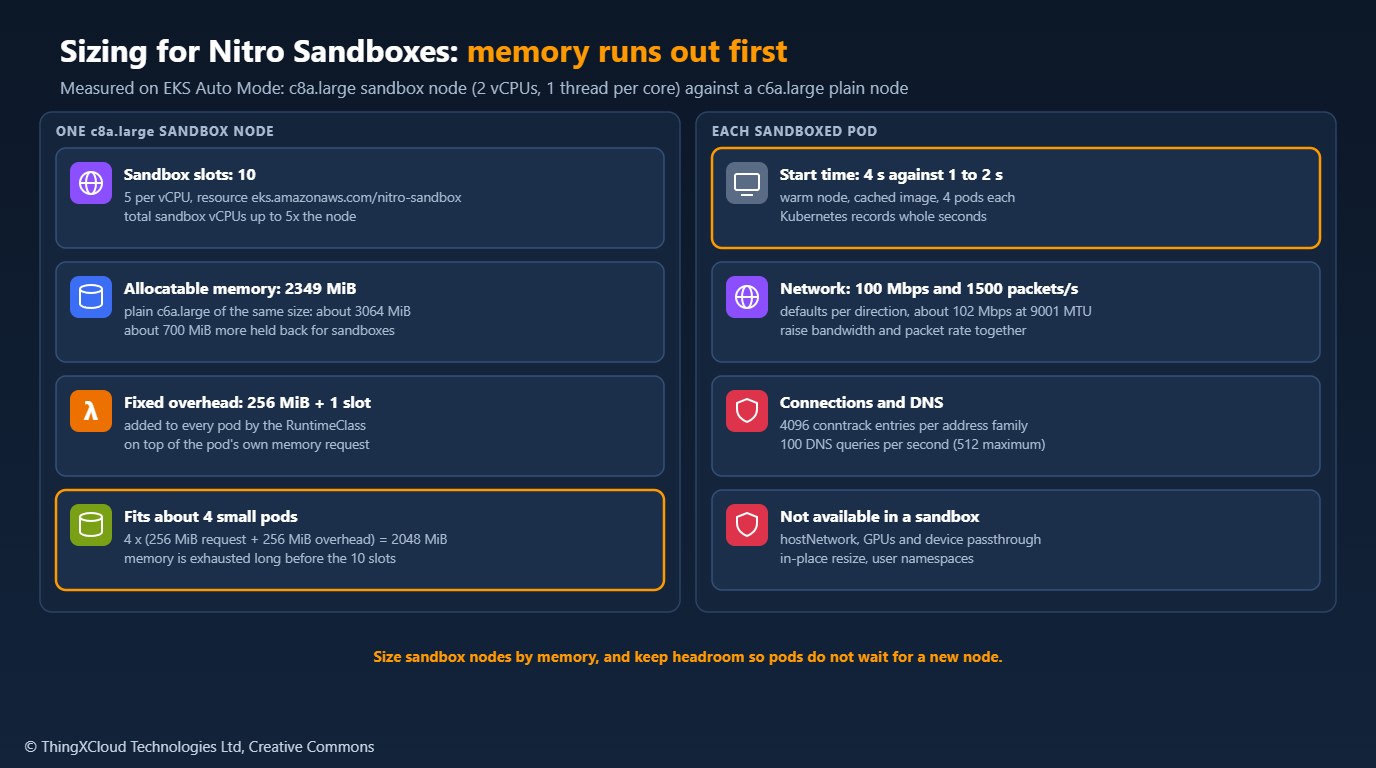
Three numbers decide how many sandboxes fit on a node:
- Slots. A node can hold at most five sandboxes per vCPU, and total sandbox vCPUs cannot exceed five times the node’s vCPUs. The 2-vCPU c8a.large nodes advertised 10 slots.
- Memory. Each sandboxed pod costs its request plus the fixed 256 MiB. The c8a.large sandbox nodes reported 2349 MiB allocatable memory, against about 3064 MiB on the plain c6a.large of the same size, so roughly 700 MiB more of the node is held back. In practice memory, not slots, ran out first: four or five small pods per node.
- Threads. On instances with two threads per core, two different sandboxes never share sibling threads, so usable compute is roughly half the advertised vCPUs. Auto Mode picked a c8a.large, one thread per core, for the sandboxes and a c6a.large, two threads per core, for plain pods. Graviton instances also have one thread per core.
Two scheduling behaviours were worth knowing before production:
- Plain pods use sandbox nodes. The sandbox nodes carry a label, not a taint. In a four-pod batch, two of the four plain pods landed on sandbox nodes and took memory that sandboxes would need. If sandbox capacity should be reserved, give it its own NodePool with a taint and tolerate that taint in the sandboxed pods’ templates. I did not test this configuration.
- Pods can wait for minutes when a sandbox node is nearly full. Twice, a pod stayed
Pendingwhile Auto Mode kept nominating the existing sandbox node and the scheduler reported insufficient memory. Once a second sandbox node joined after about ten minutes; once two plain pods waited ten minutes and no node was added before I stopped the batch. I did not capture the scheduler’s full reasoning, so treat this as an observation from one cluster, not a diagnosis. Leave memory headroom on sandbox nodes and alert on pods pending for more than a minute or two.
Start-up cost was small once a node existed. With the image cached, four plain pods were ready in 1 to 2 seconds and four sandboxed pods in 4 seconds (Kubernetes records these times to the second). For long-running services that is noise; for a job that runs for five seconds it doubles the time. AWS’s warm-pool pattern, using the Kubernetes SIG agent-sandbox project, keeps pre-booted VMs that it says can be claimed in about two seconds.
Default throttles
Every sandbox is throttled by default so that one pod cannot exhaust the node’s shared resources. The defaults are low enough to matter for request-heavy services:
Annotation (prefix sandbox.amazonaws.com/) | Default |
|---|---|
ingress-bandwidth, egress-bandwidth | 100 Mbps each |
ingress-packets-per-second, egress-packets-per-second | 1500 |
dns-packets-per-second | 100 (maximum 512, or disabled) |
conntrack-limit | 4096 connections per address family (64 to 65536, cannot be disabled) |
overlay-disk-bandwidth, overlay-disk-iops | 400 Mbps (50 MBps), 1500 IOPS |
log-bandwidth | 2 Mbps |
Bandwidth and packet rate are separate token buckets, so raising one alone changes nothing: at 1500 packets per second and a 9001-byte MTU the ceiling is about 102 Mbps whatever the bandwidth setting. Annotations are read once at pod creation. A value of 0 fails the pod; use disabled where that is allowed. The sample includes an iperf3 check with default and raised limits, but it did not complete on the test run, so this article has no measured throughput figures.
metadata:
  annotations:
    sandbox.amazonaws.com/ingress-bandwidth: "1G"
    sandbox.amazonaws.com/egress-bandwidth: "1G"
    sandbox.amazonaws.com/ingress-packets-per-second: "15000"
    sandbox.amazonaws.com/egress-packets-per-second: "15000"
What does not work in a sandbox
| Feature | Behaviour |
|---|---|
hostNetwork: true | Pod fails to start |
User namespaces (hostUsers: false) | Pod does not start |
| GPUs and device passthrough | Not supported at launch (Firecracker cannot pass host devices) |
| Huge pages | Not supported from the node pool; configure inside the sandbox |
| In-place resize | Not supported; CPU and memory are fixed at boot |
| Shared EBS volume, online expansion | Not supported; use EFS for shared storage |
CPU Manager static policy | No effect |
emptyDir and writable-layer usage | Reported as zero; set ephemeral-storage limits or use memory-backed emptyDir |
| Auto Mode with FIPS, GPU or Neuron AMIs, multi-NUMA types | Sandbox pods stay Pending |
Confidential mode
I did not test confidential mode, so this is from the documentation only. In confidential mode the parent instance is untrusted: the Cedar policy pins every admission field, exec and process listing are denied, and image layers can be encrypted and decrypted inside the sandbox with AWS KMS. The Nitro Secure Module measures the system image and the policy into PCRs, and AWS recommends KMS key policy conditions on kms:RecipientAttestation:PCR17 (policy hash) and kms:RecipientAttestation:PCR8:ServiceName (system image signer). Without such a key policy the measurements are recorded but nothing checks them. Note also that the parent can read every block device it presents, including encrypted EBS volumes, so data at rest must be encrypted inside the sandbox with a key released only to an attested sandbox.
Confidential mode limits what your cluster and node administrators can do to a pod. AWS states that it does not change the AWS operator access properties of the Nitro System, which apply to every EKS worker node. Describe it to auditors in those terms.
When to use it
| Situation | Fit |
|---|---|
| AI agents or users running generated code, CI for untrusted pull requests, customer plug-ins | Good fit: isolated mode, with network-isolated where the code needs no network |
| Multi-tenant SaaS on shared nodes | Good fit; reserve sandbox nodes and size by memory |
| Tenant data that administrators must not read | Confidential mode with attestation-gated KMS keys |
GPU inference, device plug-ins, node agents, hostNetwork | Not supported; keep on the shared kernel or separate nodes |
| Short jobs where seconds matter | Measure first: 2 to 3 extra seconds per pod in this test, or use a warm pool |
| Small, tightly scoped jobs on very sensitive data | AWS points to Nitro Enclaves |
Key takeaways
- Nitro Sandboxes give a pod its own kernel with one field,
runtimeClassName: isolated-sandbox, on EKS 1.36 or later, at no extra charge beyond the capacity used. - A privileged, hostPID, hostPath pod in a sandbox only reached the guest VM: no kubelet, no node filesystem.
- Plan capacity by memory: each sandboxed pod costs 256 MiB on top of its request, and sandbox nodes hold back more memory than plain ones.
- Credentials come from Pod Identity or IRSA, not IMDS. Generate Cedar policies with
--with-pod-identityor--with-irsa. - Put every
sandbox.amazonaws.com/annotation on the pod template; on the Deployment it is silently ignored. - Raise bandwidth and packet rate together before load-testing, and alert on long-pending sandbox pods.
What would you run in a sandbox first: agent tool calls, CI jobs or tenant workloads? Let me know in the comments.
The sample created an EKS Auto Mode cluster in eu-west-1 with eksctl 0.232.0 (Kubernetes 1.37.1, Bottlerocket 2026.11.18 nodes) and ran the checks once from AWS CloudShell. The kernel, host-access, metadata, Pod Identity, network-isolation, Deployment-annotation and start-time results above are copied from that run; the raw output is in the repository. The throughput check did not complete, so throttle figures are AWS’s documented defaults. The scheduling delays were observed on this one cluster and their cause was not diagnosed. Confidential mode and attestation were not tested. The cluster, its VPC and NAT gateway, and the IAM role were deleted afterwards.
Glossary
- Nitro Sandbox
- A Firecracker microVM with its own kernel, carved out of an EC2 instance’s vCPUs and memory and isolated by the Nitro hypervisor.
- Parent instance
- The EC2 instance, here the EKS node, whose resources the sandboxes use. It must be launched with Nitro Enclaves enabled.
- RuntimeClass
- A Kubernetes object that tells kubelet which container runtime to use; here
isolated-sandboxorconfidential-sandbox. - Pod overhead
- Resources a RuntimeClass adds to every pod’s requests for scheduling; 256 MiB and one sandbox slot here.
- Cedar policy
- A declarative policy, stored in a pod annotation, that the sandbox enforces for container admission, exec, logs and mounts.
- Attestation
- A signed document from the Nitro Secure Module describing what booted; AWS KMS can release keys only when it matches.
- PCR
- Platform configuration register: a measurement slot in the Nitro Secure Module, such as PCR17 for the pod policy.
- EKS Pod Identity
- The EKS mechanism that gives a service account temporary IAM credentials through a node-local endpoint.
- IMDS surrogate
- The sandbox’s own metadata service, which answers only region, Availability Zone and partition paths.
- EKS Auto Mode
- EKS with AWS-managed nodes, provisioned by Karpenter-based NodePools, that ships the sandbox runtime classes.
The complete sample for this article is on GitHub: nithinmohantk/blog-samples-working-repo/nitro-sandboxes-eks. Clone it with git clone https://github.com/nithinmohantk/blog-samples-working-repo.git and open the nitro-sandboxes-eks folder. Its README says how to run it and what has been verified.
References & Further Reading
- → AWS Nitro Sandboxes: hardware-enforced workload isolation on Amazon EKS— Launch post, 9 November 2026
- → Sandboxing on Amazon EKS with isolated and confidential pods— EKS User Guide: how it works, modes, shared responsibility
- → Run a pod in isolated mode— Auto Mode and node group setup, workload controllers
- → Nitro Sandbox limitations on Amazon EKS— Unsupported features, density and Auto Mode constraints
- → Resource isolation and throttling— Throttle annotations and defaults
- → Pod Identity and credentials— IMDS surrogate, Pod Identity and IRSA
- → Nitro Sandboxes in the Amazon EC2 User Guide— Instance types, sizing limits, security considerations, pricing
- → Amazon EKS pricing— Control plane and Auto Mode charges
- → aws-samples/sample-eks-nitro-sandbox— AWS blueprints: coding agents, warm pools, CI, confidential pods
- → Sample code for this article— Manifests, test script and results
Discover more from C4: Container, Code, Cloud & Context
Subscribe to get the latest posts sent to your email.
