
On this page
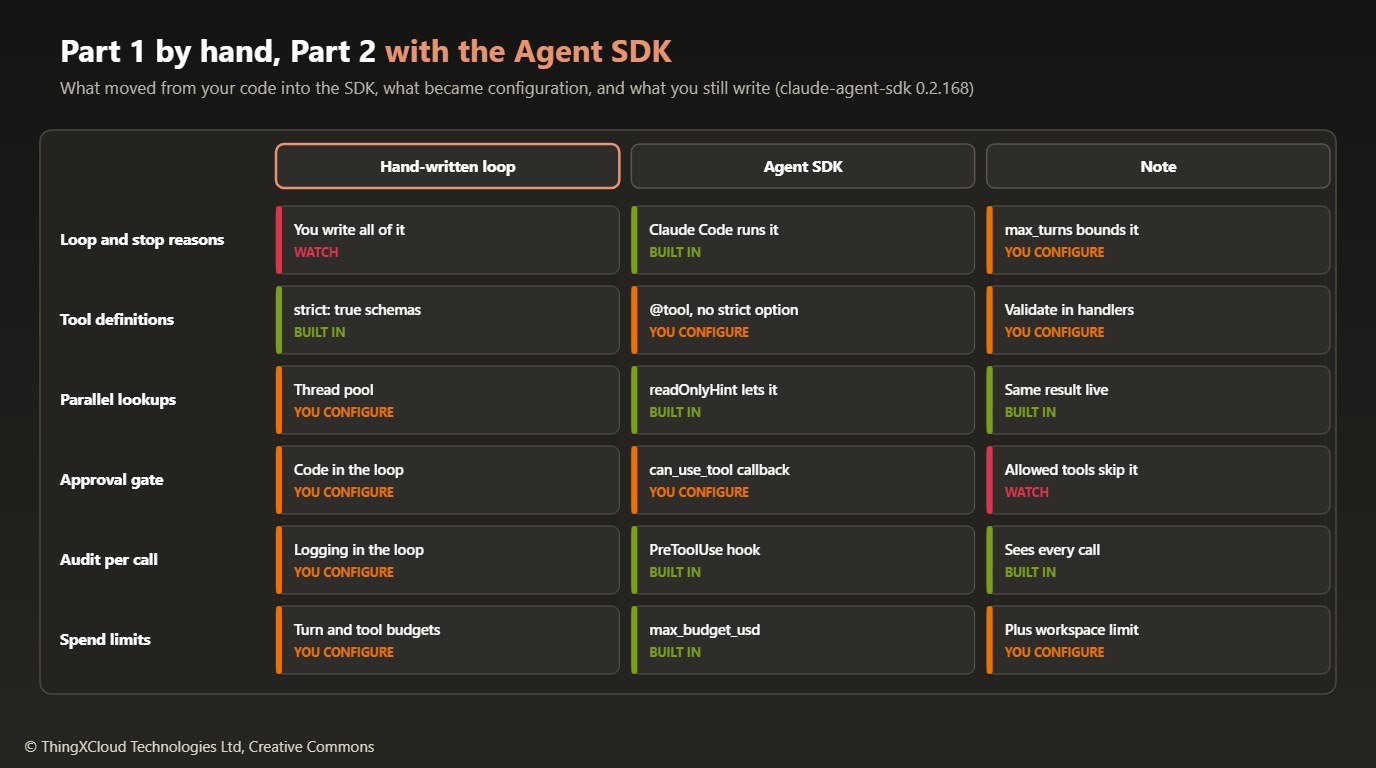
In Part 1 the prescription status assistant ran on a tool-use loop we wrote ourselves (245 lines in loop.py): stop reasons, parallel lookups, an approval gate in front of cancel_prescription, error results the model could act on, caching and budgets. This part rebuilds the same agent on the Claude Agent SDK for Python (claude-agent-sdk 0.2.168) and asks a narrower question than “is the SDK better”: which of those responsibilities move into the SDK, which become configuration, and which you still own.
The short answer is that the loop moves, the approval gate and the audit trail become configuration with sharp edges, and a few guarantees from Part 1, strict schemas in particular, do not come with you. The same synthetic e-prescription back end and the same four tools are used throughout, and every run shown here is a live run against Claude Opus 5.5.
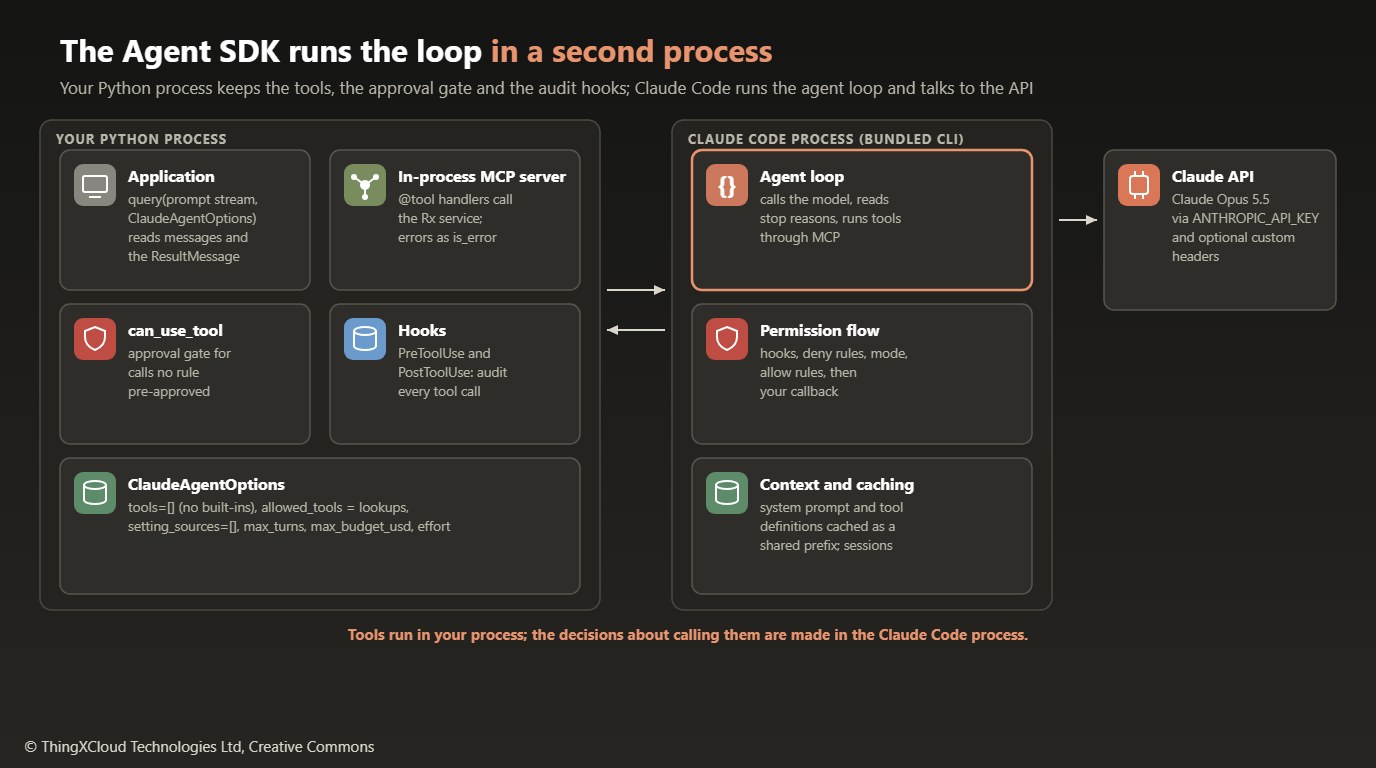
Two processes, one agent
The Agent SDK is not a thinner wrapper over the Messages API. When you call query(), the SDK starts the Claude Code command-line program that ships inside the wheel (version 2.1.301 for SDK 0.2.168) and talks to it over standard input and output. Claude Code runs the agent loop: it calls the model, reads the stop reasons, decides when a tool call needs permission and keeps the context. Your Python process keeps what is specific to your domain: the tool handlers, the permission callback and the hooks. Claude Code calls back into your process for each of those.
That split explains most of what follows. Tools defined with @tool are served from an MCP server that runs inside your process, so they can use your connection pools and your service objects. Permission decisions and hook calls cross the process boundary as control messages. And because Claude Code is a general coding agent, its defaults assume one: built-in tools for files and shells, settings read from the host, a working directory. Most of the configuration in this sample exists to switch those defaults off.
%%{init: {'theme':'base','themeVariables':{'primaryColor':'#FBF1EB','primaryTextColor':'#3D3929','primaryBorderColor':'#CC785C','lineColor':'#3D3929','actorBkg':'#FBF1EB','actorBorder':'#CC785C','actorTextColor':'#3D3929','signalColor':'#CC785C','signalTextColor':'#1F1E1D','noteBkgColor':'#FFF8F3','noteBorderColor':'#CC785C','noteTextColor':'#3D3929'}}}%%
sequenceDiagram
    participant App as Your Python process
    participant CC as Claude Code process
    participant API as Claude API
    App->>CC: query(prompt stream, options)
    CC->>API: Messages request with tools
    API-->>CC: tool_use cancel_prescription
    CC->>App: PreToolUse hook (audit)
    CC->>App: can_use_tool (approval)
    App-->>CC: deny with message
    CC->>API: tool_result is_error
    API-->>CC: end_turn with answer
    CC-->>App: ResultMessage (cost, usage, denials)
Tools as an in-process MCP server
The four tools from Part 1 become SDK tools. Each one takes a name, a description, a JSON Schema and an annotations object, and its handler returns MCP content blocks. A small wrapper turns domain errors into is_error results with the same instructive messages as Part 1, and turns anything unexpected into a reference number:
def build_tools(svc: RxService) -> list[Any]:
    def guarded(fn):
        async def handler(args: dict[str, Any]) -> dict[str, Any]:
            try:
                return _ok(fn(args))
            except RxError as e:
                return _error(str(e))            # instructive, written for the model
            except Exception:
                ref = uuid.uuid4().hex[:8]
                log.exception(json.dumps({"event": "tool_crashed", "ref": ref}))
                return _error(f"Internal error (reference {ref}). Do not retry this call; tell the user it failed.")
        return handler

    return [
        tool("get_prescription",
             "Get one prescription by its identifier: medication, dose, status, prescriber, repeats.",
             _schema(rx_id="Prescription identifier, for example RX-1002"), annotations=READ_ONLY)(
            guarded(lambda a: svc.get(a["rx_id"]))),
        tool("cancel_prescription",
             "Cancel an active prescription. This changes the record and needs a person's approval; "
             "the result says whether it was approved. Give the clinical or administrative reason.",
             _schema(rx_id="Prescription identifier, for example RX-1003",
                     reason="Why the prescription is being cancelled, in one sentence"), annotations=CHANGES_STATE)(
            guarded(lambda a: svc.cancel(a["rx_id"], a["reason"]))),
        # find_prescriptions and get_dispense_events follow the same pattern
    ]
The wrapper matters more here than it did in Part 1. Anthropic documents that an uncaught exception in an SDK tool handler does not stop the agent: the in-process MCP server converts it into an error result that carries the raw exception message, and Claude reads that message. A stack trace from a database driver can include table names, host names or, in a clinical system, a fragment of the record that failed to load. Catch everything in the handler and decide what the model sees.
The annotations are not decoration either. readOnlyHint=True is what allows Claude Code to run the three lookups in parallel with each other; Part 1 needed a thread pool for the same result. The other hints are informational, and none of them is enforced: a handler marked read-only can still write.
READ_ONLY = ToolAnnotations(readOnlyHint=True, destructiveHint=False, idempotentHint=True, openWorldHint=False)
CHANGES_STATE = ToolAnnotations(readOnlyHint=False, destructiveHint=True, idempotentHint=False, openWorldHint=False)Part 1 set strict: true on every tool, so the API guaranteed that tool inputs matched the schema. The @tool decorator in claude-agent-sdk 0.2.168 has no equivalent option. The schema still guides the model, but a missing or malformed argument can reach your handler. Validate inputs in the handler and return an is_error result that says what was wrong.
Locking the agent down
A prescription assistant should not be able to run shell commands, read files on the host or pick up a developer’s personal settings. All of that is available by default, because Claude Code is a coding agent. The options below remove it:
def build_options(svc, approver, audit, *, model="claude-opus-5-5", effort="medium",
                  max_turns=8, max_budget_usd=0.50, tool_search=True) -> ClaudeAgentOptions:
    env: dict[str, str] = {}
    workspace = os.environ.get("ANTHROPIC_WORKSPACE_ID")
    if workspace:  # only for keys that can act on more than one workspace
        env["ANTHROPIC_CUSTOM_HEADERS"] = f"anthropic-workspace-id: {workspace}"
    if not tool_search:
        env["ENABLE_TOOL_SEARCH"] = "false"

    return ClaudeAgentOptions(
        model=model,
        effort=effort,
        system_prompt=SYSTEM_PROMPT,     # the default is an empty prompt, not Claude Code's own
        tools=[],                        # no built-in tools: no Bash, Read, Write, WebFetch
        mcp_servers={SERVER: create_sdk_mcp_server(SERVER, "1.0.0", build_tools(svc))},
        allowed_tools=READ_TOOLS,        # the three lookups run without asking
        permission_mode="default",       # everything else goes to can_use_tool
        can_use_tool=make_can_use_tool(approver, audit),
        hooks={"PreToolUse": [HookMatcher(matcher=None, hooks=[audit.pre_tool_use])],
               "PostToolUse": [HookMatcher(matcher=None, hooks=[audit.post_tool_use])]},
        setting_sources=[],              # ignore ~/.claude and .claude settings on the host
        max_turns=max_turns,
        max_budget_usd=max_budget_usd,
        env=env,
)tools=[]removes every built-in tool from Claude’s context, so Claude can only call the four MCP tools. The live runs confirm it: the session’s init message lists exactlymcp__rx__cancel_prescription,mcp__rx__find_prescriptions,mcp__rx__get_dispense_eventsandmcp__rx__get_prescription. It also removes the ToolSearch tool, so with four small tools the definitions are simply sent up front.setting_sources=[]stops Claude Code from loading settings files, including permission rules and hooks, from the user’s home directory or the project directory. Without it, what the agent may do depends on the machine it runs on.system_promptis your prompt alone. In the Python SDK, leaving it out sends an empty system prompt rather than Claude Code’s coding prompt, so a domain agent should always set it.max_turnsandmax_budget_usdreplace Part 1’s turn and tool-call budgets. They apply to one session, so keep a spend limit on the API workspace as well.envis how settings reach the Claude Code process. A key that can act on more than one workspace needs theanthropic-workspace-idheader; Part 1 set it on the client, and here it travels asANTHROPIC_CUSTOM_HEADERS.
In a clinical deployment, the permission rules that govern an agent must come from reviewed code, not from whatever .claude/settings.json exists on the server. Set setting_sources=[], list the tools explicitly with tools=[] plus your MCP server, and run the process under an account that has no access to patient data beyond what the tool handlers need. The API key and workspace ID come from the environment and are never printed or logged by the sample.
The approval gate: allowed_tools, can_use_tool and a warning
In Part 1 the approval gate was an if statement in the loop. In the SDK it is a position in Claude Code’s permission flow, and the order of that flow decides who sees each call:
%%{init: {'theme':'base','themeVariables':{'primaryColor':'#FBF1EB','primaryTextColor':'#3D3929','primaryBorderColor':'#CC785C','lineColor':'#3D3929','clusterBkg':'#FFF8F3','clusterBorder':'#E8C4B0','edgeLabelBackground':'#FFFFFF','nodeTextColor':'#3D3929'}}}%%
flowchart TD
    A["Claude requests a tool call"] --> B["Hooks: PreToolUse runs first"]
    B --> C["Deny rules"]
    C --> D["Ask rules"]
    D --> E["Permission mode"]
    E --> F["Allow rules from allowed_tools"]
    F -->|"matched: runs without asking"| G["Tool runs in your process"]
    F -->|"not matched"| H["can_use_tool callback"]
    H -->|"PermissionResultAllow"| G
    H -->|"PermissionResultDeny"| I["Error result sent to Claude"]
    style B fill:#FBF1EB,stroke:#CC785C,stroke-width:2px,color:#3D3929
    style H fill:#FBF1EB,stroke:#CC785C,stroke-width:2px,color:#3D3929
    style G fill:#F0FFF4,stroke:#1D8102,stroke-width:2px,color:#145202
    style I fill:#FEF2F2,stroke:#D13212,stroke-width:2px,color:#991B1B
The three lookups are in allowed_tools, so they are approved at the allow-rule step and never reach the callback. cancel_prescription is not, so with permission_mode="default" it falls through to can_use_tool, which asks a person:
def make_can_use_tool(approver: Approver, audit: AuditLog):
    async def can_use_tool(tool_name: str, input_data: dict[str, Any], _context: Any):
        if tool_name == qualified("cancel_prescription"):
            approved = await approver(tool_name, input_data)
            audit.events.append({"event": "approval", "tool": tool_name, "approved": approved})
            if approved:
                return PermissionResultAllow(updated_input=input_data)
            return PermissionResultDeny(
                message="Not approved by the reviewer. The prescription was not changed. Do not retry.")
        # Anything else that was not pre-approved is outside this agent's job.
        return PermissionResultDeny(message=f"{tool_name} is not available to this agent.")
    return can_use_tool
Two details are easy to miss. First, in Python the callback only works with streaming input, so the prompt is passed as an async generator that yields one user message rather than as a string. Second, the SDK warns you about this configuration. The first live run printed a CanUseToolShadowedWarning naming the three lookup tools: because they are pre-approved, can_use_tool will never be invoked for them.
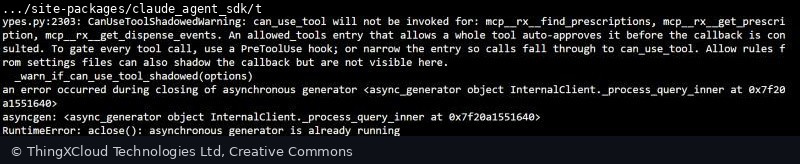
Here the shadowing is the intent, and the sample filters that one warning with a comment saying so. The warning is still worth reading, because it describes a real failure mode: if you put your only check in can_use_tool and later add a tool to allowed_tools to stop a prompt, that check silently stops running. A check that must apply to every call belongs in a PreToolUse hook, which runs before every other step.
Use allowed_tools for calls that need no decision, can_use_tool for calls a person or a policy must approve, and a PreToolUse hook for anything that must see every call, such as an audit record or a hard block. A hook that returns a deny applies even in bypassPermissions mode.
Auditing every call with hooks
The audit trail moves from logging statements in the loop to two hook callbacks. A HookMatcher with no matcher runs for every tool, and returning an empty dictionary from PreToolUse makes no decision, so the call carries on through the permission flow. The cancellation reason is free text that can contain clinical detail, so the log records its length, not its content:
@dataclass
class AuditLog:
    events: list[dict[str, Any]] = field(default_factory=list)

    @staticmethod
    def _redacted(args: dict[str, Any]) -> dict[str, Any]:
        return {k: (f"<{len(v)} chars>" if k == "reason" and isinstance(v, str) else v) for k, v in args.items()}

    async def pre_tool_use(self, input_data, tool_use_id, _ctx) -> dict[str, Any]:
        event = {"event": "tool_requested", "tool": input_data.get("tool_name"),
                 "args": self._redacted(input_data.get("tool_input", {})), "tool_use_id": tool_use_id}
        self.events.append(event)
        log.info(json.dumps(event))
        return {}  # no decision: let the permission flow continue

    async def post_tool_use(self, input_data, tool_use_id, _ctx) -> dict[str, Any]:
        response = input_data.get("tool_response")
        is_error = isinstance(response, dict) and bool(response.get("is_error") or response.get("isError"))
        event = {"event": "tool_completed", "tool": input_data.get("tool_name"),
                 "tool_use_id": tool_use_id, "is_error": is_error}
        self.events.append(event)
        log.info(json.dumps(event))
        return {}
The tool use ID ties the two events for one call together. A call that is denied produces a tool_requested event and no tool_completed event, because the tool never ran, which is exactly the record a reviewer of a cancellation trail wants.
Reading the message stream
query() returns an async iterator of messages: a system message when the session starts, assistant messages as Claude works, and a ResultMessage at the end with the answer, the number of turns, the token usage, the cost Claude Code computed and the list of permission denials. Two things in that stream caught the first version of this sample out:
- Read it to the end. The first version returned from inside
async for message in query(...)as soon as the result arrived. The run printedRuntimeError: aclose(): asynchronous generator is already runningwhile the SDK shut down (see the first screenshot). Let the loop finish and return afterwards. - One assistant message per content block. The SDK yielded a separate
AssistantMessagefor each block, so counting messages counted two parallel tool calls as two turns. Grouping bymessage_idgives the real turns.
turns: dict[str, int] = {}
exit_code = 1
async for message in query(prompt=prompt_stream(prompt), options=options):  # read to the end
    if isinstance(message, AssistantMessage):
        turn = turns.setdefault(message.message_id or str(len(turns)), len(turns) + 1)
        for block in message.content:
            if isinstance(block, ToolUseBlock):
                print(f"turn {turn}  tool: {block.name}({json.dumps(block.input)[:80]})")
    elif isinstance(message, ResultMessage):
        u = message.usage or {}
        print(f"turns={message.num_turns}  cost=${(message.total_cost_usd or 0):.4f}  "
              f"cache_read={u.get('cache_read_input_tokens')}  denials={len(message.permission_denials or [])}")
        print(message.result or f"[no answer: {message.errors}]")
        exit_code = 0 if message.subtype == "success" and not message.is_error else 1
return exit_code
Live runs
The sample was run against the Claude API with Claude Opus 5.5 at medium effort, from Azure Cloud Shell. The first question asks for the status and dispensing history of RX-1002. Claude called both lookups in the same turn, as it did in Part 1, without any thread pool in our code:
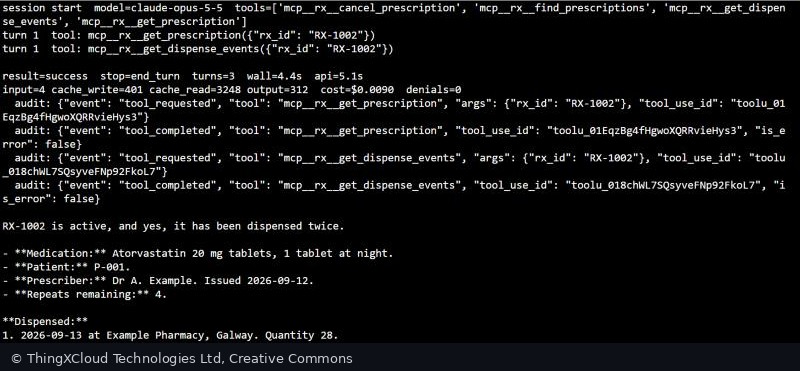
The second run asks the agent to cancel RX-1003 and the reviewer declines. Unlike the approved cancellation in Part 1, where Claude went straight to cancel_prescription, this time it looked the prescription up first. That is one run each, so treat it as an observation rather than a difference between the two approaches.
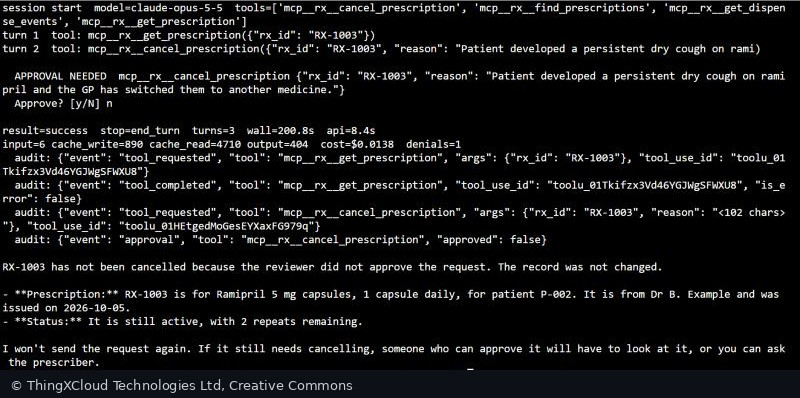
The denial message reached Claude as an error result, and Claude did what it said: it reported that the record was not changed, restated the prescription’s current status from the lookup and did not retry. The wall-clock time of 200.8 seconds is mostly the wait for the reviewer; the API time was 8.4 seconds.
| Run | Part 1: hand-written loop | Part 2: Agent SDK |
|---|---|---|
| Status and dispensing lookup | $0.0125; cache read 1,126 tokens | $0.0090 on a warm run (cache read 3,248, write 401); $0.0165 on the first, cold run |
| Cancellation behind approval | $0.0128, approved | $0.0138, declined; cache read 4,710 |
| Turns reported for the lookup | 2 (counted by our loop) | 3 (num_turns from the ResultMessage) |
Two things stand out. The SDK’s requests carried roughly three times as much cached prefix as Part 1’s, and almost all of it was read from the cache, which Claude Opus 5.5 bills at 5% of the input price. And the cache survived across separate runs of the program: the second invocation read the prefix that the first one wrote, because the system prompt and tool definitions were identical. The costs are small either way; at scale, the difference between a cold and a warm prefix matters more than the difference between the two approaches.
What you still own
The SDK version of the agent is 184 lines in agent.py, against 328 for Part 1’s loop and tool definitions, and none of those lines handle stop reasons. What did not move is the part that makes the agent safe to run: catching errors in handlers, validating inputs without strict schemas, choosing which tools skip the approval gate, writing the audit record, and switching off the defaults of a coding agent. You also take on a second process to package and monitor, with its own version (Claude Code 2.1.301 here) that changes when you upgrade the SDK.
What comes next
Part 3, on 27 October, looks at tools that Anthropic runs on the server side, such as web search and code execution, and how they change the loop when part of the tool work no longer happens in your process. Part 4, on 3 November, puts the hand-written loop and the Agent SDK side by side on the same integration with the versions current then.
The sample was tested with Python 3.12, claude-agent-sdk 0.2.168 (bundling Claude Code 2.1.301) and pytest 8.3.3: 8 offline tests cover the tool handlers, the approval callback, the hooks and the options. The live runs used Claude Opus 5.5 on the Claude API from Azure Cloud Shell; the outputs and screenshots are from those runs, with the home directory path redacted. Costs and token counts are the values the SDK reported in the ResultMessage. Line counts are from the sample repository. Behaviour is from Anthropic’s Agent SDK documentation on custom tools, permissions and hooks, and from the SDK 0.2.168 source. All data is synthetic.
Key takeaways
- The Agent SDK runs the agent loop in a Claude Code process; your process keeps the tool handlers, the approval callback and the hooks.
- Switch off the coding-agent defaults:
tools=[],setting_sources=[]and your own system prompt. - Tools in
allowed_toolsnever reachcan_use_tool; put checks that must see every call in aPreToolUsehook. - There is no strict tool use, and uncaught handler exceptions reach Claude raw: validate and catch errors in every handler.
- Read the message stream to the end and take turns, cost and denials from the
ResultMessage.
Would you put a clinical approval gate in can_use_tool or in a hook? Tell me in the comments.
The complete sample for this article is on GitHub: nithinmohantk/blog-samples-working-repo/claude-agent-series/part2-agent-sdk. Clone it with git clone https://github.com/nithinmohantk/blog-samples-working-repo.git and open the claude-agent-series/part2-agent-sdk folder. Its README says how to run it and what has been verified.
Glossary
- Claude Agent SDK
- A Python and TypeScript library that runs Claude Code’s agent loop for your application.
- Claude Code
- Anthropic’s agentic coding program. The Agent SDK bundles its command-line version and runs it as a separate process.
- Agent loop
- The cycle of calling the model, running the tools it asks for and sending back the results until it stops.
- In-process MCP server
- A Model Context Protocol server created with
create_sdk_mcp_serverthat runs inside your Python process and serves your@toolfunctions. - Tool annotations
- Hints on a tool, such as
readOnlyHint. Read-only tools may run in parallel; the hints are not enforced. - allowed_tools
- Allow rules: tools listed here are approved without asking.
- can_use_tool
- A callback that decides calls no earlier step in the permission flow has resolved.
- Permission mode
- A session-wide setting, such as
defaultordontAsk, that decides what happens to calls no rule matched. - PreToolUse hook
- A callback that runs before every other permission step for each tool call; it can log, modify or deny the call.
- setting_sources
- Which settings files Claude Code loads. An empty list loads none.
- ResultMessage
- The last message of a query: the answer, turns, usage, cost and permission denials.
- Streaming input
- Passing the prompt as an async iterator of messages; required for
can_use_toolin Python. - Prompt caching
- Reusing a stored prefix of a request, such as the system prompt and tools, at a fraction of the input price.
References & Further Reading
- → Agent SDK overview— What the SDK is and how it differs from the client SDK
- → Give Claude custom tools— @tool, in-process MCP servers, annotations and error handling
- → Configure permissions— The permission evaluation order and allowed_tools
- → Intercept and control agent behavior with hooks— PreToolUse and PostToolUse callbacks
- → Prompt caching— How cached prefixes are priced
- → Part 1: Writing the tool-use loop yourself— The hand-written version of this agent
- → Sample code for this article— Tests, live-run transcripts and screenshots
Discover more from C4: Container, Code, Cloud & Context
Subscribe to get the latest posts sent to your email.
