A local MCP server inherits the trust of the laptop it runs on. A remote one does not. The moment a tool server gets a URL, it becomes an API that a language model can drive, reachable by anything that can route to it, and the questions change from “does the tool work” to “who is calling, what may they do, and what can reach this endpoint at all”.
This article is confined to those three questions: where to host a remote MCP server on AWS and Azure, how OAuth works for MCP and what the server must check itself, and where the endpoint should sit on the network. It does not cover tool design or the protocol basics, which earlier posts on this blog already do.
The position reflects 14 July 2026: MCP specification revision 2025-11-25, the Python SDK at 1.28.1 and the C# SDK at 1.4.0. The Python server below was run against thirteen positive and negative checks and the results are shown. The C# version and the cloud deployments are flagged where I could not verify them.
What the specification asks of a server
Authorization is optional in MCP. When an HTTP server does implement it, the 2025-11-25 revision is specific about the roles. The MCP server is an OAuth 2.1 resource server. It does not issue tokens, host login pages or store passwords. A separate authorization server does that: Microsoft Entra ID, Amazon Cognito, Okta, Auth0 or whichever one your organisation already runs.
- Publish protected resource metadata (RFC 9728). A JSON document, served by the MCP server, that names the authorization servers it trusts. This is how a client that has never seen your server finds out where to sign in.
- Challenge properly. A request without a valid token gets HTTP 401 with a
WWW-Authenticateheader pointing at that metadata. A valid token without enough scope gets 403 withinsufficient_scope. - Validate the audience. The server must accept only tokens issued for itself. A valid token from the right issuer, minted for a different API, must be refused.
- Do not pass tokens through. The token a client presents is for the MCP server. If a tool calls another API, it uses a separate token obtained for that API.
- Expect the
resourceparameter. Clients must send the server’s canonical URL as a resource indicator (RFC 8707) when requesting a token, so that the authorization server can bind the token to it.
%%{init: {'theme':'base','themeVariables':{'actorBkg':'#FFF3E0','actorBorder':'#FF9900','actorTextColor':'#232F3E','signalColor':'#0073BB','signalTextColor':'#0F172A','noteBkgColor':'#FFF8E7','noteBorderColor':'#FF9900','noteTextColor':'#232F3E','labelBoxBkgColor':'#FFF3E0','labelBoxBorderColor':'#FF9900','labelTextColor':'#232F3E','loopTextColor':'#232F3E','activationBkgColor':'#EBF8FF','activationBorderColor':'#0073BB','lineColor':'#232F3E','textColor':'#232F3E'}}}%%
sequenceDiagram
    participant C as MCP client
    participant S as MCP server
    participant A as Authorization server
    C->>S: POST /mcp, no token
    S-->>C: 401 + resource_metadata URL
    C->>S: GET protected resource metadata
    S-->>C: Trusted authorization servers, scopes
    C->>A: Discover endpoints, authorise with PKCE + resource
    A-->>C: Access token, audience = this server
    C->>S: POST /mcp + Bearer token
    S-->>C: 200 MCP response
Client registration is the part that changed most in this revision. Pre-registered clients come first, then Client ID Metadata Documents, where the client identifier is an HTTPS URL the authorization server can fetch. Dynamic Client Registration is kept for backward compatibility. That ordering matters on Azure, as a later section shows.
Four layers, four different checks
The common failure is not an absence of security. It is one layer of it, with the assumption that it covers the rest. A gateway that validates a signature does not know which tool is being called. A private subnet does not know who the caller is.
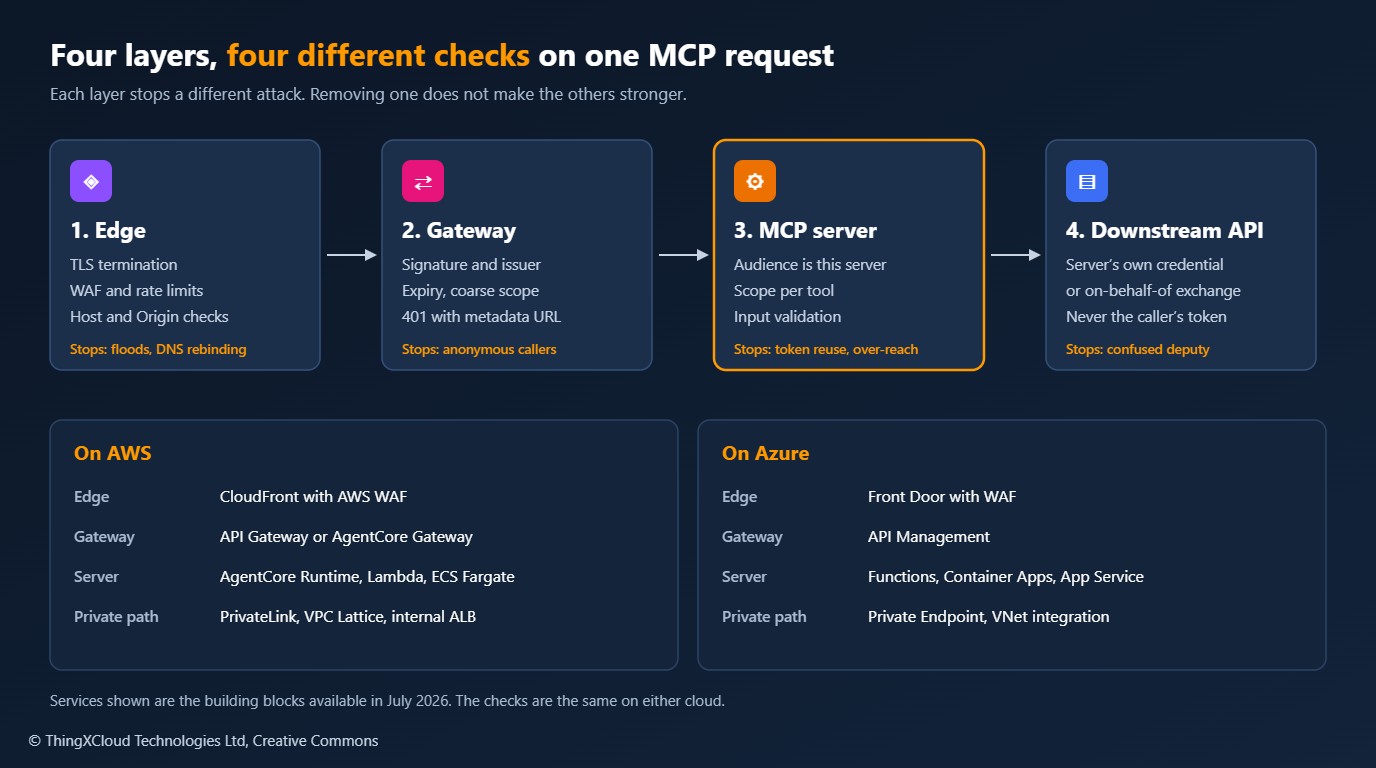
The rest of the article works from the inside out: first the checks that only the server can make, then the hosting options and what each one takes off your hands, then the network.
A server that validates its own tokens
Token validation is a small amount of code with a large number of ways to get it wrong. This verifier pins the signing algorithm, checks issuer and audience, requires the claims it depends on, and fetches signing keys from the issuer’s JWKS endpoint with caching.
"""token_verifier.py - validates JWT access tokens for an MCP resource server."""
import asyncio
import logging

import jwt
from jwt import PyJWKClient
from mcp.server.auth.provider import AccessToken, TokenVerifier

log = logging.getLogger("mcp.auth")


class JwksTokenVerifier(TokenVerifier):
    """Accepts a token only if it was signed by the expected issuer AND minted for this server."""

    def __init__(self, issuer: str, audiences: list[str], jwks_uri: str) -> None:
        self._issuer = issuer
        self._audiences = audiences
        # Signing keys are cached and re-fetched on an unknown key id, which covers key rotation.
        self._jwks = PyJWKClient(jwks_uri, cache_keys=True, lifespan=3600, timeout=5)

    async def verify_token(self, token: str) -> AccessToken | None:
        try:
            # PyJWKClient does blocking I/O on a cache miss; keep it off the event loop.
            claims = await asyncio.to_thread(self._decode, token)
        except jwt.PyJWTError as exc:
            # Log the reason, never the token.
            log.warning("token rejected: %s", type(exc).__name__)
            return None

        # Authorization servers disagree on the claim name: 'scope' (RFC 9068) or 'scp' (Entra ID).
        scopes = str(claims.get("scope") or claims.get("scp") or "").split()
        client_id = claims.get("client_id") or claims.get("azp") or claims.get("appid") or "unknown"
        return AccessToken(
            token=token,
            client_id=str(client_id),
            scopes=scopes,
            expires_at=int(claims["exp"]),
            subject=str(claims["sub"]),
            claims={"iss": claims["iss"], "aud": claims["aud"]},
        )

    def _decode(self, token: str) -> dict:
        key = self._jwks.get_signing_key_from_jwt(token).key
        return jwt.decode(
            token,
            key,
            algorithms=["RS256"],            # pinned: never read the algorithm from the token
            issuer=self._issuer,
            audience=self._audiences,        # the audience check is what stops token reuse
            options={"require": ["exp", "iss", "aud", "sub"]},
            leeway=30,
        )
The server wires that verifier into the SDK, declares the scope every request needs, and adds a second, finer check inside each tool. It is stateless streamable HTTP on port 8000 at /mcp, which is the layout AgentCore Runtime expects and which also runs unchanged in a container on either cloud.
"""server.py - a remote MCP server acting as an OAuth 2.1 resource server."""
import os
import re

from mcp.server.auth.middleware.auth_context import get_access_token
from mcp.server.auth.settings import AuthSettings
from mcp.server.fastmcp import FastMCP
from mcp.server.transport_security import TransportSecuritySettings

from token_verifier import JwksTokenVerifier

ISSUER = os.environ["MCP_ISSUER"]                    # e.g. https://login.microsoftonline.com/<tenant>/v2.0
JWKS_URI = os.environ["MCP_JWKS_URI"]
RESOURCE_URL = os.environ["MCP_RESOURCE_URL"]        # the public URL clients use, e.g. https://mcp.example.com/mcp
AUDIENCES = os.environ.get("MCP_AUDIENCES", RESOURCE_URL).split(",")
ALLOWED_HOSTS = os.environ["MCP_ALLOWED_HOSTS"].split(",")           # e.g. mcp.example.com
ALLOWED_ORIGINS = [o for o in os.environ.get("MCP_ALLOWED_ORIGINS", "").split(",") if o]

READ, WRITE = "orders.read", "orders.write"
ORDER_ID = re.compile(r"ORD-\d{3,10}")

mcp = FastMCP(
    "orders",
    host="0.0.0.0",
    port=8000,
    stateless_http=True,          # no session affinity: any instance can serve any request
    json_response=True,           # plain JSON replies; friendlier to gateways that buffer
    token_verifier=JwksTokenVerifier(ISSUER, AUDIENCES, JWKS_URI),
    auth=AuthSettings(
        issuer_url=ISSUER,                    # advertised in the protected resource metadata
        resource_server_url=RESOURCE_URL,
        required_scopes=[READ],               # enforced on every HTTP request, before any MCP code runs
    ),
    transport_security=TransportSecuritySettings(
        enable_dns_rebinding_protection=True,
        allowed_hosts=ALLOWED_HOSTS,
        allowed_origins=ALLOWED_ORIGINS,
    ),
)


def _require(scope: str) -> str:
    """Per-tool authorization. Returns the caller's subject for the audit trail."""
    token = get_access_token()
    if token is None or scope not in token.scopes:
        raise PermissionError(f"This tool requires the '{scope}' scope.")
    return token.subject or token.client_id


def _order_id(value: str) -> str:
    if not ORDER_ID.fullmatch(value):
        raise ValueError("order_id must look like ORD-10042")
    return value


@mcp.tool()
def get_order_status(order_id: str) -> dict:
    """Return the fulfilment status of one order. order_id looks like ORD-10042."""
    _require(READ)
    return {"order_id": _order_id(order_id), "status": "SHIPPED"}


@mcp.tool()
def cancel_order(order_id: str) -> dict:
    """Cancel one order. Irreversible. order_id looks like ORD-10042."""
    subject = _require(WRITE)
    # Downstream calls use this server's own credential, never the caller's token.
    return {"order_id": _order_id(order_id), "status": "CANCELLED", "cancelled_by": subject}


app = mcp.streamable_http_app()

if __name__ == "__main__":
    mcp.run(transport="streamable-http")
What the tests showed
The test starts a throwaway issuer, an RSA key with a JWKS endpoint, and sends the real server a series of requests over HTTP.
| Request | Result | Why it matters |
|---|---|---|
| No token | 401 with resource_metadata in WWW-Authenticate | A client can discover where to sign in |
| Metadata document | Lists the resource URL, the issuer and orders.read | Served by the SDK at /.well-known/oauth-protected-resource/mcp |
| Valid signature, wrong audience | 401 | A token for another API is useless here |
| Expired token | 401 | Lifetime is enforced, with 30 seconds of leeway |
| Wrong issuer, or signed by an unknown key | 401 | Only the configured issuer’s keys count |
Unsigned token (alg: none) | 401 | The algorithm is pinned, not read from the token |
Valid token without orders.read | 403 with insufficient_scope | Coarse scope is enforced before any MCP code runs |
Valid token, foreign Host header | 421 | DNS rebinding protection is on |
Read token calling get_order_status | Tool result | The normal path |
Read token calling cancel_order | HTTP 200, tool result with isError: true | Per-tool scope is enforced inside the tool |
Read and write token calling cancel_order | Tool result, with the caller’s subject recorded | The audit trail has a real identity |
Two results deserve attention. First, the SDK’s challenge carries the metadata URL but no scope parameter, which the specification recommends. Clients then fall back to requesting everything in scopes_supported, so keep that list minimal. Second, a per-tool denial is not an HTTP 403. The request already passed the transport check, so the refusal comes back as a tool error inside a 200 response, and a client cannot use it to trigger a step-up sign-in. If you need step-up behaviour, split read and write tools across two servers, each with its own required scope.
Python 3.13, mcp 1.28.1 and PyJWT 2.15.1. The server ran under Uvicorn on a local port and every row in the table above is an assertion in test_server.py. Nothing was deployed to AWS or Azure for this article, so the platform behaviour described below comes from vendor documentation.
The same rules in ASP.NET Core with Entra ID
The C# SDK expresses the same design with ASP.NET Core’s own authentication stack. JWT bearer validation does the cryptography, the SDK’s MCP scheme writes the challenge and serves the metadata document, and ordinary authorization policies carry the scopes. AddAuthorizationFilters() makes [Authorize] work on individual tools.
// dotnet add package ModelContextProtocol.AspNetCore --version 1.4.0
// dotnet add package Microsoft.AspNetCore.Authentication.JwtBearer
using System.ComponentModel;
using Microsoft.AspNetCore.Authentication.JwtBearer;
using Microsoft.AspNetCore.Authorization;
using Microsoft.IdentityModel.Tokens;
using ModelContextProtocol.AspNetCore.Authentication;
using ModelContextProtocol.Server;

var builder = WebApplication.CreateBuilder(args);

string Required(string key) =>
    builder.Configuration[key] ?? throw new InvalidOperationException($"{key} is not configured");

string tenantId = Required("Mcp:TenantId");
string clientId = Required("Mcp:ClientId");          // the app registration that represents THIS server
string resourceUrl = Required("Mcp:ResourceUrl");    // the public URL clients use
string authority = $"https://login.microsoftonline.com/{tenantId}/v2.0";

builder.Services
    .AddAuthentication(options =>
    {
        options.DefaultAuthenticateScheme = JwtBearerDefaults.AuthenticationScheme;
        // The MCP scheme writes the 401 challenge and serves the protected resource metadata.
        options.DefaultChallengeScheme = McpAuthenticationDefaults.AuthenticationScheme;
    })
    .AddJwtBearer(options =>
    {
        options.Authority = authority;
        options.MapInboundClaims = false;            // keep the claim name "scp" as issued
        options.TokenValidationParameters = new TokenValidationParameters
        {
            ValidateIssuer = true,
            ValidIssuer = authority,
            ValidateAudience = true,
            ValidAudiences = [clientId, $"api://{clientId}"],   // v2 and v1 token formats
            ValidateLifetime = true,
            ValidateIssuerSigningKey = true,
            ValidAlgorithms = [SecurityAlgorithms.RsaSha256],
            ClockSkew = TimeSpan.FromSeconds(30),
        };
    })
    .AddMcp(options =>
    {
        options.ResourceMetadata = new()
        {
            Resource = resourceUrl,
            AuthorizationServers = { authority },
            ScopesSupported = [$"api://{clientId}/orders.read"],
        };
    });

builder.Services.AddAuthorizationBuilder()
    .AddPolicy("orders.read", p => p.RequireAuthenticatedUser().RequireAssertion(c => HasScope(c, "orders.read")))
    .AddPolicy("orders.write", p => p.RequireAuthenticatedUser().RequireAssertion(c => HasScope(c, "orders.write")));

builder.Services.AddMcpServer()
    .WithHttpTransport(options => options.Stateless = true)   // no session affinity
    .AddAuthorizationFilters()                                 // honours [Authorize] on individual tools
    .WithTools<OrderTools>();

var app = builder.Build();

app.UseAuthentication();
app.UseAuthorization();

app.MapGet("/healthz", () => Results.Ok()).AllowAnonymous();
app.MapMcp("/mcp").RequireAuthorization("orders.read");       // coarse scope on every request

app.Run();

static bool HasScope(AuthorizationHandlerContext context, string scope) =>
    (context.User.FindFirst("scp")?.Value ?? string.Empty)
        .Split(' ', StringSplitOptions.RemoveEmptyEntries)
        .Contains(scope);

[McpServerToolType]
public sealed class OrderTools
{
    [McpServerTool, Description("Return the fulfilment status of one order. orderId looks like ORD-10042.")]
    public static object GetOrderStatus(string orderId) =>
        new { orderId = Validate(orderId), status = "SHIPPED" };

    [McpServerTool, Description("Cancel one order. Irreversible. orderId looks like ORD-10042.")]
    [Authorize(Policy = "orders.write")]                       // per-tool scope
    public static object CancelOrder(string orderId) =>
        new { orderId = Validate(orderId), status = "CANCELLED" };

    private static string Validate(string orderId) =>
        System.Text.RegularExpressions.Regex.IsMatch(orderId, @"^ORD-\d{3,10}$")
            ? orderId
            : throw new ArgumentException("orderId must look like ORD-10042");
}I had no .NET SDK or NuGet access while writing this. The listing follows the ProtectedMcpServer sample at tag v1.4.0 of the MCP C# SDK, and I checked the extension methods and the metadata type against that tag’s source. Build it before you rely on it, and test it with the same negative cases as the Python server: wrong audience, expired token, missing scope.
Entra ID brings three behaviours that surprise teams coming from the specification text.
- No Dynamic Client Registration. Microsoft’s documentation states that Entra ID does not support it. Every MCP client needs an app registration, and the practical route is to pre-authorise the known clients on the server’s registration. Clients that cannot show a consent prompt will not work any other way.
- Scopes identify the resource. Entra ID works out the target API from the scope, for example
api://<client-id>/orders.read. MCP clients also send theresourceparameter, and when the two do not resolve to the same application the sign-in fails withAADSTS9010010. Reports of exactly that appeared in the week before this article. The fix discussed there is to add the server’s URL as an additional Application ID URI on the registration. - Two audience formats. Depending on the token version configured on the registration,
audis either the client id or theapi://URI. Accept both explicitly. Do not turn audience validation off to make an error go away.
Where to host it
Every option below can run the server above. They differ in who validates the token before your code runs, how they scale, and what they cost when nobody is calling.
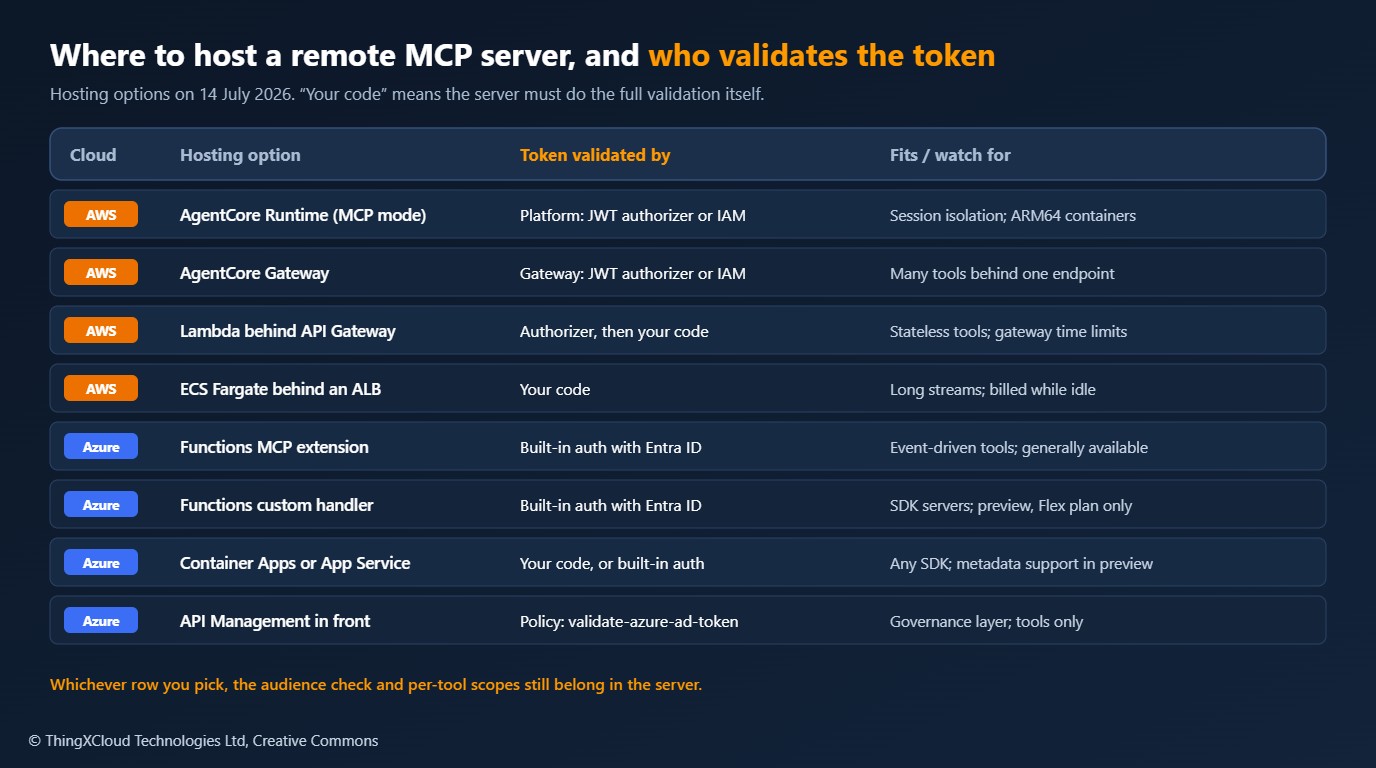
On AWS, the choice is mainly between the managed agent platform and general-purpose compute.
- AgentCore Runtime in MCP mode runs your container with per-session isolation and validates inbound identity for you. A runtime is configured for IAM SigV4 or for JWT bearer tokens, not both at once. The JWT authorizer takes a discovery URL plus allowed audiences, clients and scopes. The billing model is covered in the AgentCore Runtime vs. Lambda article.
- AgentCore Gateway puts one MCP endpoint in front of many targets, including Lambda functions, OpenAPI services and other MCP servers, with a JWT authorizer or IAM on the way in. Choose it when the problem is a sprawl of tools more than a single server.
- Lambda behind API Gateway suits stateless servers with short tool calls. An authorizer can reject anonymous traffic at the edge. Remember the integration time limit, 29 seconds by default on REST APIs. A Lambda function URL on its own offers only IAM or no authentication, so OAuth validation falls entirely to your code.
- ECS on Fargate behind a load balancer is the option for long-running streams and servers that need sessions. You pay for running tasks whether or not they are called, and your code does all the validation.
On Azure, the split is between Functions, containers and a gateway in front of either.
- Azure Functions MCP extension, generally available since January 2026, exposes functions as tools through triggers and includes built-in authorization with Entra ID, including the 401 challenge and the metadata document.
- Azure Functions custom handlers host a server built with an official MCP SDK, such as either listing in this article. In July 2026 this was a public preview, limited to stateless streamable HTTP on the Flex Consumption plan.
- Container Apps or App Service run any container. App Service authentication can take over the OAuth challenge and metadata for an MCP server, a capability still marked preview. It authorises the server as a whole, not individual tools.
- API Management in front of an existing MCP server adds token validation with the
validate-azure-ad-tokenpolicy, rate limits and logging. It handles MCP tools only, not resources or prompts, and policies apply to the whole server, not to single tools.
When a platform or gateway validates the token, find out what reaches your code. AgentCore Runtime forwards the Authorization header to the container only if you allowlist it. Without the token, the server cannot enforce per-tool scopes or record who made a call. With it, validate again inside the server: the signature check is cheap, and the audience check is the one control that survives a misconfigured gateway.
Network placement
OAuth answers who is calling. Network placement decides who can try. The right placement follows from who the callers are.
%%{init: {'theme':'base','themeVariables':{'primaryColor':'#FFF3E0','primaryTextColor':'#232F3E','primaryBorderColor':'#FF9900','lineColor':'#232F3E','clusterBkg':'#F8FAFC','clusterBorder':'#CBD5E1','edgeLabelBackground':'#FFFFFF','nodeTextColor':'#232F3E'}}}%%
flowchart TD
    Q1{Who calls this server?}
    Q1 -- "Agents in the same
network or account" --> P1[Private endpoint only
no public DNS record]
    Q1 -- "Agents in another cloud
or a partner" --> P2[Public endpoint behind
gateway and WAF]
    Q1 -- "People using IDEs
and desktop clients" --> P3[Public endpoint with
interactive sign-in]
    P1 --> A1[OAuth still required
client credentials flow]
    P2 --> A2[Client credentials flow
IP allowlist as a second factor]
    P3 --> A3[Authorization code + PKCE
pre-registered clients]
    class Q1 edge
    class P1 store
    class P2,P3 compute
    class A1,A2,A3 mesh
classDef compute fill:#FFF3E0,stroke:#FF9900,stroke-width:2px,color:#232F3E
classDef edge fill:#EBF8FF,stroke:#0073BB,stroke-width:2px,color:#004C74
classDef store fill:#F0FFF4,stroke:#1D8102,stroke-width:2px,color:#145202
classDef alert fill:#FEF2F2,stroke:#D13212,stroke-width:2px,color:#991B1B
classDef mesh fill:#F3E8FF,stroke:#7C3AED,stroke-width:2px,color:#4C1D95- Private by default. If every caller is inside your estate, the server needs no public address. On AWS that means interface endpoints through PrivateLink, an internal load balancer or VPC Lattice. On Azure, a private endpoint on the Functions or Container Apps environment with VNet integration for outbound calls.
- Keep OAuth on private endpoints. A private network narrows who can connect. It says nothing about which agent is calling or on whose behalf, and a prompt-injected agent inside the network is still inside the network.
- One public door. When the server must be reachable from another cloud, publish it once, through the gateway, behind a web application firewall. The compute behind it accepts traffic only from the gateway.
- Leave the metadata reachable. The protected resource metadata and the 401 challenge must be served without a token, or clients cannot begin the flow. Exempt those paths from gateway authentication and nothing else.
- Control egress too. A tool server that can reach the whole internet is a data exfiltration path. Restrict outbound traffic to the APIs the tools call and the issuer’s JWKS endpoint.
Running it in production
- Short-lived tokens, cached keys. Keep access tokens to minutes, not days. Cache the issuer’s signing keys and refresh on an unknown key id so that key rotation needs no deployment.
- Log identity, never tokens. Record subject, client id, tool name, outcome and a request id for every call. Bearer tokens must not appear in application logs, gateway logs or traces.
- Rate limit per client. A model in a loop can call a tool thousands of times. Apply limits per client id at the gateway, and a lower ceiling on write tools.
- Separate read from write. Distinct scopes at minimum. For irreversible tools, a separate server with its own audience makes an over-broad token far less dangerous.
- Use the server’s own identity downstream. A managed identity on Azure or an execution role on AWS for calls the server makes in its own right. Where the downstream API needs the user’s identity, use an on-behalf-of token exchange. The same rule applies between agents, as the A2A and MCP article describes.
- Treat tool descriptions as a release artefact. A changed description changes model behaviour. Review and version it like code.
- Test the refusals. Put the negative cases from the table above in your pipeline. A resource server that accepts a wrong-audience token still passes every functional test.
A subject claim identifies a person, so the audit trail that security needs is also personal data under GDPR. Set a retention period and restrict access to it. AWS documents that JWT-based inbound authorization on AgentCore records some token claims, including the subject, in CloudTrail, so include that trail in your records of processing. For tools that read or change health records, a shared service identity is not enough: the audit entry must name the individual on whose behalf the agent acted, and write tools need a human confirmation step where the clinical hazard log calls for one.
Key takeaways
- An MCP server is an OAuth resource server. It validates tokens. It does not issue them.
- The audience check belongs in the server, whatever sits in front of it. It is the control that stops a valid token for another API from working here.
- Transport-level scopes return HTTP 403. Per-tool scopes return a tool error. Design scopes and server boundaries with that difference in mind.
- Hosting choice decides who validates first, not whether you validate. Check what a managed platform forwards to your code.
- Private placement reduces who can connect. It does not replace identity.
If you run remote MCP servers behind AgentCore, API Management or App Service authentication, I would like to hear how the platform’s token handling behaved in practice. Leave a comment below.
A later MCP specification revision, dated 2026-07-28, was published two weeks after this article, and the MCP C# SDK reached 2.0 on the same day. Hosting SDK-based servers on Azure Functions was still documented as a public preview in August 2026. The code here was tested against revision 2025-11-25 and the versions named above. Read the current authorization section and check package versions before starting new work.
Glossary
- Resource server
- The API that accepts access tokens. In MCP authorization, the MCP server.
- Authorization server
- The service that authenticates users and clients and issues tokens, such as Microsoft Entra ID or Amazon Cognito.
- Protected resource metadata (RFC 9728)
- A JSON document published by a resource server that names the authorization servers it trusts and the scopes it supports.
- Resource indicator (RFC 8707)
- The
resourceparameter a client sends so that the token is bound to one specific server. - Audience (
aud) - The claim stating which API a token was issued for. A server must reject tokens whose audience is not itself.
- Scope
- A named permission carried in a token, such as
orders.read. - JWKS
- JSON Web Key Set. The public keys an issuer publishes so that others can verify its token signatures.
- PKCE
- Proof Key for Code Exchange. Protects the authorization code flow against interception. Required for MCP clients.
- Client ID Metadata Document
- A client registration method in which the client id is an HTTPS URL pointing to the client’s metadata.
- Dynamic Client Registration
- A protocol for clients to register themselves with an authorization server at run time. Optional in MCP and not supported by Entra ID.
- Token passthrough
- Forwarding a caller’s token to another API. Forbidden by the MCP specification.
- Confused deputy
- A service that is tricked into using its authority on behalf of a caller who lacks it.
- Streamable HTTP
- The MCP transport for remote servers. In stateless mode any instance can serve any request.
- DNS rebinding
- An attack in which a web page makes a browser send requests to a server on a private network. Host and Origin checks defeat it.
References & Further Reading
- → MCP specification 2025-11-25: Authorization — The normative requirements for clients, servers and authorization servers
- → MCP specification: Security Best Practices — Token passthrough, confused deputy and scope minimisation
- → RFC 9728: OAuth 2.0 Protected Resource Metadata — The metadata document and the WWW-Authenticate parameter
- → RFC 8707: Resource Indicators for OAuth 2.0 — Binding a token to its intended resource
- → MCP Python SDK on GitHub — TokenVerifier, AuthSettings and transport security settings used here
- → MCP C# SDK on GitHub — Includes the ProtectedMcpServer sample the C# listing follows
- → AgentCore Runtime: inbound JWT authorization — Authorizer fields and the SigV4-or-JWT rule
- → AgentCore Gateway: inbound authorization — JWT and IAM options, and the CloudTrail logging caution
- → AgentCore Runtime: MCP protocol contract — Port, path and statelessness requirements
- → App Service: built-in MCP server authorization (preview) — Protected resource metadata, pre-authorised clients and Entra ID limits
- → Azure Functions: self-hosted MCP servers (preview) — Hosting SDK-based servers as custom handlers on Flex Consumption
- → API Management: secure access to MCP servers — Inbound token validation and outbound credential management
Discover more from C4: Container, Code, Cloud & Context
Subscribe to get the latest posts sent to your email.