
On this page
Reporting on an operational database has traditionally meant a pipeline: AWS DMS or a batch job copies tables from Amazon Aurora into Amazon Redshift, somebody owns its schedule, its failures and its schema mappings, and the dashboards are as fresh as the last successful run. Zero-ETL integrations replace that pipeline with a managed replication that AWS runs. You point an Aurora cluster at a Redshift namespace, and committed changes appear in Redshift within seconds, in AWS’s words.
The integration went generally available for Aurora MySQL in November 2023 and for Aurora PostgreSQL 16.4 and later on 15 October 2024. Since then it has gained history mode, data filtering, up to five integrations per source cluster, and an Amazon SageMaker lakehouse target. This article covers what you set up on each side as of April 2026, what the integration does not do, how it compares with DMS and batch ETL, and what to check before you switch dashboards to it. The sample runs the pre-flight checks.
What you set up
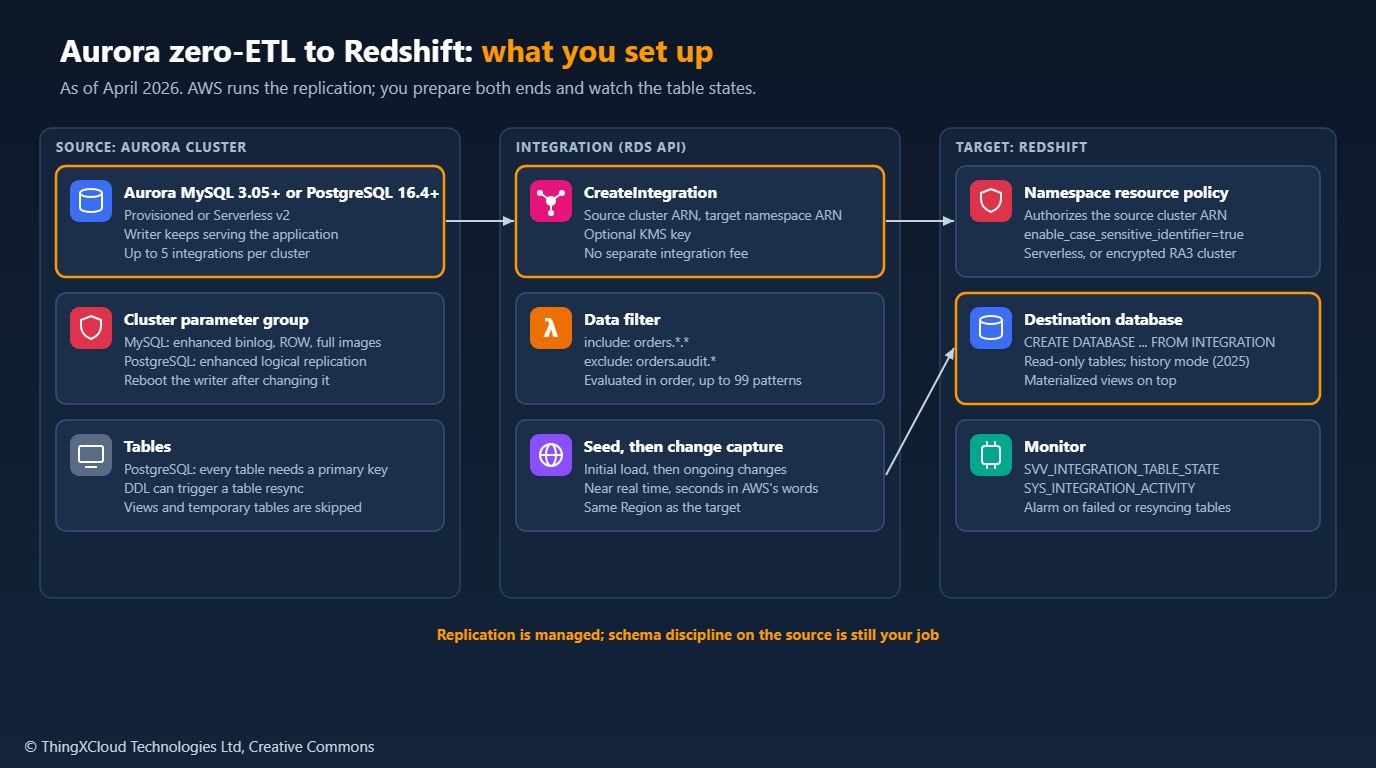
On the Aurora side, the cluster needs a custom DB cluster parameter group. Aurora MySQL needs enhanced binlog with row-based logging and full row images and metadata (aurora_enhanced_binlog=1, binlog_format=ROW, binlog_row_image=full, binlog_row_metadata=full, with binlog backup and global database replication of the binlog turned off). Aurora PostgreSQL needs rds.logical_replication=1 and aurora.enhanced_logical_replication=1, with the logical replication backup and global database settings turned off. If you attach the group to an existing cluster, reboot the writer before creating the integration.
On the Redshift side, the target is a Redshift Serverless namespace or an encrypted RA3 cluster with at least two nodes. It must have enable_case_sensitive_identifier turned on, because source table and column names are case-sensitive, and its resource policy must authorize the source cluster’s ARN as an inbound integration. Once the integration is active, you create a database from it with CREATE DATABASE ... FROM INTEGRATION; the replicated tables in it are read-only.
The sample checks a parameter group against the required values, builds the resource policy and data filter, and creates the integration idempotently:
"""Pre-flight checks and setup for an Aurora zero-ETL integration with Amazon Redshift.

check_parameters()  compares an Aurora DB cluster parameter group with the values
                    zero-ETL requires, so a missing setting is found before the
                    integration fails.
data_filter()       builds a data filter expression in the documented syntax.
target_policy()     builds the Redshift resource policy that authorizes the
                    source cluster and lets the account create the integration.
create()            authorizes the source on the Redshift namespace and creates
                    the integration, treating an existing one as success.
NO_PK_SQL           lists Aurora PostgreSQL tables without a primary key, which
                    zero-ETL puts in a failed state.
"""

from __future__ import annotations

import json
import re
from typing import Any

REQUIRED = {
    "aurora-mysql": {
        "aurora_enhanced_binlog": "1",
        "binlog_backup": "0",
        "binlog_format": "ROW",
        "binlog_replication_globaldb": "0",
        "binlog_row_image": "full",
        "binlog_row_metadata": "full",
    },
    "aurora-postgresql": {
        "rds.logical_replication": "1",
        "aurora.enhanced_logical_replication": "1",
        "aurora.logical_replication_backup": "0",
        "aurora.logical_replication_globaldb": "0",
    },
}
FORBIDDEN = {  # aurora-mysql settings that must not have these values
    "binlog_transaction_compression": "ON",
    "binlog_row_value_options": "PARTIAL_JSON",
}
MAX_PATTERNS = 99
MAX_PATTERN_LENGTH = 256

NO_PK_SQL = """
SELECT n.nspname AS table_schema, c.relname AS table_name
FROM pg_class c
JOIN pg_namespace n ON n.oid = c.relnamespace
WHERE c.relkind IN ('r', 'p')
  AND NOT c.relispartition
  AND n.nspname NOT IN ('pg_catalog', 'information_schema')
  AND n.nspname NOT LIKE 'pg_toast%'
  AND NOT EXISTS (
        SELECT 1 FROM pg_constraint k
        WHERE k.conrelid = c.oid AND k.contype = 'p')
ORDER BY 1, 2;
"""


def cluster_parameters(rds: Any, group: str) -> dict[str, str | None]:
    """Name to value for every parameter in a DB cluster parameter group."""
    values: dict[str, str | None] = {}
    for page in rds.get_paginator("describe_db_cluster_parameters").paginate(
            DBClusterParameterGroupName=group):
        for p in page["Parameters"]:
            values[p["ParameterName"]] = p.get("ParameterValue")
    return values


def check_parameters(engine: str, values: dict[str, str | None]) -> list[str]:
    if engine not in REQUIRED:
        raise ValueError(f"engine must be one of {sorted(REQUIRED)}")
    problems = [f"{name} is {values.get(name)!r}, must be {want!r}"
                for name, want in REQUIRED[engine].items()
                if str(values.get(name) or "").lower() != want.lower()]
    if engine == "aurora-mysql":
        problems += [f"{name} must not be {bad!r}" for name, bad in FORBIDDEN.items()
                     if str(values.get(name) or "").upper() == bad]
    return problems


def data_filter(engine: str, include: list[str], exclude: list[str] = ()) -> str:
    """Filter expression, broadest includes first and excludes after, as AWS recommends."""
    parts = 3 if engine == "aurora-postgresql" else 2
    patterns = [("include", p) for p in include] + [("exclude", p) for p in exclude]
    if engine == "aurora-postgresql" and not include:
        raise ValueError("Aurora PostgreSQL needs at least one include pattern, such as mydb.*.*")
    if len(patterns) > MAX_PATTERNS:
        raise ValueError(f"{len(patterns)} patterns; the limit is {MAX_PATTERNS}")
    for _, p in patterns:
        if len(p) > MAX_PATTERN_LENGTH:
            raise ValueError(f"pattern longer than {MAX_PATTERN_LENGTH} characters: {p[:40]}...")
        # Split on dots outside /regex/ sections to count name parts.
        names = re.findall(r"/[^/]*/|[^.]+", p)
        if len(names) != parts:
            raise ValueError(f"{p!r}: expected {'database.schema.table' if parts == 3 else 'database.table'}")
        if engine == "aurora-postgresql" and names[0].startswith("/"):
            raise ValueError(f"{p!r}: Aurora PostgreSQL does not allow a regular expression for the database")
    return ", ".join(f"{kind}: {p}" for kind, p in patterns)


def target_policy(source_arn: str, account_id: str, namespace_arn: str) -> dict[str, Any]:
    return {
        "Version": "2012-10-17",
        "Statement": [
            {"Effect": "Allow", "Principal": {"Service": "redshift.amazonaws.com"},
             "Action": "redshift:AuthorizeInboundIntegration", "Resource": namespace_arn,
             "Condition": {"StringEquals": {"aws:SourceArn": source_arn}}},
            {"Effect": "Allow", "Principal": {"AWS": f"arn:aws:iam::{account_id}:root"},
             "Action": "redshift:CreateInboundIntegration", "Resource": namespace_arn},
        ],
    }


def create(rds: Any, redshift: Any, *, name: str, source_arn: str, namespace_arn: str,
           account_id: str, kms_key_id: str | None = None, data_filter_expr: str | None = None) -> str:
    redshift.put_resource_policy(ResourceArn=namespace_arn,
                                 Policy=json.dumps(target_policy(source_arn, account_id, namespace_arn)))
    kwargs: dict[str, Any] = {"SourceArn": source_arn, "TargetArn": namespace_arn, "IntegrationName": name}
    if kms_key_id:
        kwargs["KMSKeyId"] = kms_key_id
    if data_filter_expr:
        kwargs["DataFilter"] = data_filter_expr
    try:
        return rds.create_integration(**kwargs)["IntegrationArn"]
    except rds.exceptions.IntegrationAlreadyExistsFault:
        for page in rds.get_paginator("describe_integrations").paginate():
            for i in page["Integrations"]:
                if i["IntegrationName"] == name:
                    return i["IntegrationArn"]
raiseFor Aurora PostgreSQL, a table in the data filter that has no primary key goes into a failed state. Run the sample’s NO_PK_SQL query on each source database first; it lists ordinary and partitioned tables without a key and ignores partitions, which inherit the parent’s. Add keys before you create the integration, because adding them later is DDL, and DDL on a replicated table can trigger a resynchronization during which the table cannot be queried in Redshift.
What changes, and what does not
The integration seeds the target with an initial copy, which AWS notes can take 20 to 25 minutes or more depending on size, then applies changes continuously. Several things that a pipeline used to handle are now either automatic or impossible:
- Schema changes flow through, but an
ALTER TABLEcan trigger a resynchronization of that table. Schedule DDL on replicated tables as you would a deployment, and watch table states afterwards. - Filtering is by table, not by column. A data filter such as
include: orders.*.*, exclude: orders.audit.*is evaluated in order, up to 99 patterns. Columns you must not copy, such as personal data, have to live in tables you exclude. - Transformation does not happen in flight. Model the data in Redshift with views and materialized views over the replicated tables.
- History is available through history mode, added in January 2025, which keeps every version of a row as a type 2 slowly changing dimension instead of only the current state.
- Not replicated: views, temporary tables and system tables. Some data types are not supported, and renaming the source cluster or a blue/green switchover requires removing the integration first.
%%{init: {'theme': 'base', 'themeVariables': {'primaryColor': '#FFF3E0', 'primaryTextColor': '#232F3E', 'primaryBorderColor': '#FF9900', 'lineColor': '#232F3E', 'clusterBkg': '#F8FAFC', 'clusterBorder': '#CBD5E1', 'edgeLabelBackground': '#FFFFFF', 'nodeTextColor': '#232F3E'}}}%%
flowchart TD
    A["Check parameters, keys<br/>and data types"] --> B["Authorize the source<br/>on the Redshift namespace"]
    B --> C["Create the integration<br/>with a data filter"]
    C --> D["Create the destination<br/>database from it"]
    D --> E{"All tables Synced?"}
    E -- "No" --> F["Fix failed tables,<br/>such as missing keys"]
    F --> E
    E -- "Yes" --> G["Compare counts and totals<br/>with the old pipeline"]
    G --> H["Switch dashboards,<br/>then retire the pipeline"]
    classDef aws fill:#FFF3E0,stroke:#FF9900,stroke-width:2px,color:#232F3E
    classDef warn fill:#FEF2F2,stroke:#D13212,stroke-width:2px,color:#991B1B
    classDef ok fill:#F0FFF4,stroke:#1D8102,stroke-width:2px,color:#145202
    class A,B,C,D,E,G aws
    class F warn
    class H ok
Zero-ETL, DMS or batch ETL
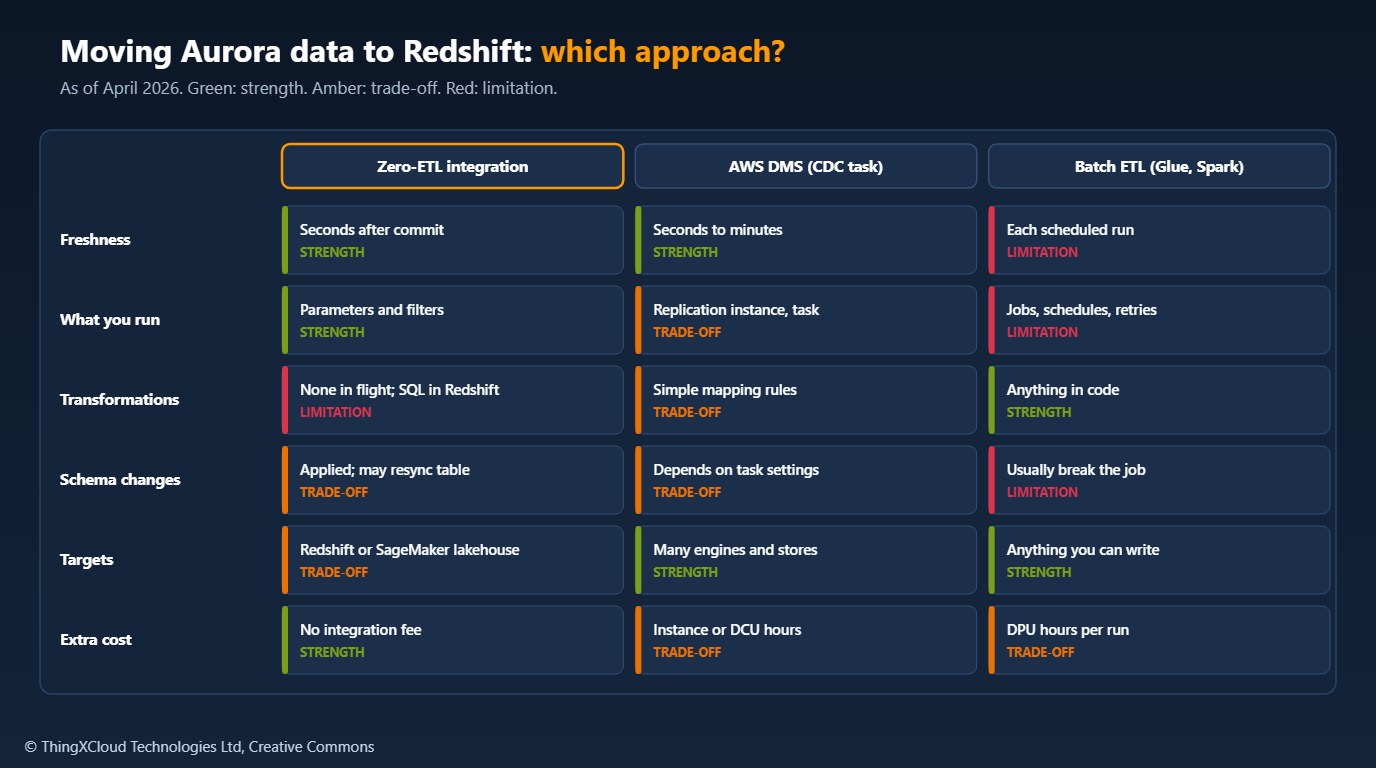
Choose zero-ETL when Redshift or a SageMaker lakehouse is the destination, the source is Aurora (or RDS for MySQL or PostgreSQL), and you can model the data after it lands. Keep DMS when you need a target zero-ETL does not support, column-level selection or simple in-flight mapping. Keep a batch job when the data needs heavy transformation, joins across systems before loading, or masking that must happen before the data leaves the source account.
Cost
There is no separate charge for the integration. You pay for what it uses: the Aurora cluster, which also stores the enhanced binlog or logical replication data; the Redshift compute that applies changes and serves queries; Redshift storage for the replicated data and any history; and data transfer. The compute part is the one to watch. A Redshift Serverless workgroup bills RPU-hours while it applies changes, so a busy source keeps the workgroup working even when nobody queries it. Size the base capacity for the apply load as well as the query load, and compare the total with what the DMS instance or Glue jobs cost before you retire them.
Zero-ETL copies whole tables. If an operational database holds personal or health data that the analytics platform should not see, keep those columns in separate tables and exclude them in the data filter, or keep a transforming pipeline for them. Encrypt the integration with a customer-managed KMS key, restrict who can query the destination database, and record the integration in your data-flow inventory, because it is a continuous copy of production data into another service.
Run zero-ETL alongside the existing pipeline for a few cycles. Check SVV_INTEGRATION_TABLE_STATE until every table is synced, compare row counts and key totals per table between the two, and alarm on any table that fails or starts resynchronizing. Only then point the dashboards at the new database and retire the old jobs.
preflight.py was tested with Python 3.13, boto3==1.42.95, psycopg[binary]==3.3.2 and pytest==9.0.2: six tests cover the parameter checks, data filter validation, the resource policy and the integration call, with the RDS and Redshift calls validated by botocore’s Stubber against the API models in that release. The primary-key query was run against PostgreSQL 16. Nothing was run against Aurora or Redshift. Required parameters, quotas and limits are from the Aurora user guide.
Key takeaways
- Zero-ETL replaces the copy pipeline from Aurora to Redshift with a managed, near real-time replication; it is not a transformation tool.
- Prepare both ends: the Aurora parameter group, primary keys on PostgreSQL tables, and a case-sensitive, authorized Redshift target.
- Filter by table, model in Redshift, and use history mode when you need past versions of rows.
- Treat DDL on replicated tables as a change that can trigger a resync, and monitor table states.
- The integration has no fee, but Redshift compute applies the changes; size and budget for it.
Have you retired a DMS task or Glue job in favour of zero-ETL, and what did you have to keep? Share it in the comments.
The complete sample for this article is on GitHub: nithinmohantk/blog-samples-working-repo/zero-etl-preflight. Clone it with git clone https://github.com/nithinmohantk/blog-samples-working-repo.git and open the zero-etl-preflight folder. Its README says how to run it and what has been verified.
Glossary
- Zero-ETL integration
- A managed replication from a source database to an analytics target, created through the RDS or Redshift API.
- Enhanced binlog
- An Aurora MySQL feature that stores binary log data more efficiently; required for zero-ETL.
- Enhanced logical replication
- The Aurora PostgreSQL setting that zero-ETL requires for change capture.
- Data filter
- Include and exclude patterns that choose which databases, schemas and tables are replicated.
- Resynchronization
- A full reload of one replicated table, during which it cannot be queried.
- History mode
- A Redshift option that keeps every version of replicated rows as a type 2 slowly changing dimension.
- Redshift namespace
- The storage side of Redshift Serverless; the target of the integration.
- Change data capture (CDC)
- Reading committed changes from a database log and applying them elsewhere.
References & Further Reading
- → Aurora zero-ETL integrations— How it works, limitations and quotas
- → Getting started with Aurora zero-ETL integrations— Required parameters and Redshift prerequisites
- → Data filtering for Aurora zero-ETL integrations— Filter syntax and evaluation order
- → Aurora PostgreSQL zero-ETL integration with Amazon Redshift now generally available— 15 October 2024, version 16.4 and later
- → Aurora PostgreSQL zero-ETL now supports multiple integrations— Up to five per cluster, March 2025
- → Amazon Redshift history mode for zero-ETL integrations— January 2025
- → Transition from AWS DMS to zero-ETL— Monitoring views and migration approach
- → Aurora PostgreSQL zero-ETL integration with Amazon SageMaker— Lakehouse target, October 2025
- → Sample code for this article— Parameter checks, data filters, resource policy, primary-key query
Discover more from C4: Container, Code, Cloud & Context
Subscribe to get the latest posts sent to your email.
