
On this page
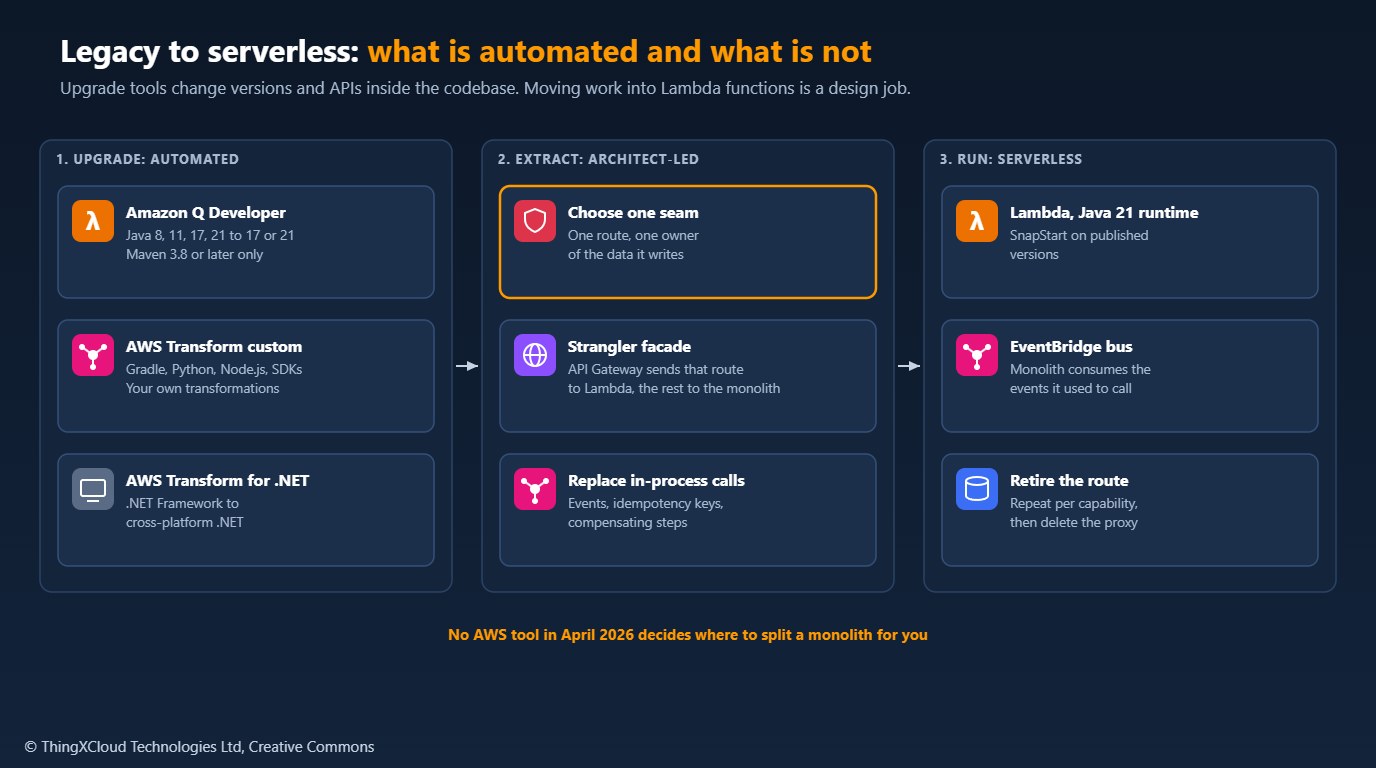
Moving a Java or .NET monolith onto AWS Lambda has two very different parts. The first is bringing the code up to a runtime Lambda supports: Java 8 to Java 21, or .NET Framework to cross-platform .NET, with the library and API changes that come with it. That work is repetitive and well understood, and in April 2026 AWS has three tools that automate much of it. The second part is deciding which capabilities leave the monolith, in what order, and how they keep their data consistent once they run as separate functions. None of the tools does that for you.
This article covers what Amazon Q Developer’s Java transformation actually does and what it needs from your project, where AWS Transform custom and AWS Transform for .NET take over, how to move the first capability into Lambda behind a strangler-fig facade, and what each step costs. The sample repository has a readiness scanner that checks a repository against the documented prerequisites, and a tested SAM template for the facade.
What is automated
| Tool | What it transforms | Build and environment | Availability |
|---|---|---|---|
| Amazon Q Developer Java transformation | Java 8, 11, 17 or 21 source to Java 17 or 21; deprecated APIs and common frameworks such as Spring Boot, Hibernate, Log4j and JUnit; a separate run upgrades only third-party dependencies | Maven 3.8 or later; runs from the JetBrains or VS Code plugin, or the Q Developer CLI on Linux and macOS | Java 21 target since 14 February 2025 |
| AWS Transform custom | AWS-managed transformations such as AWS/java-version-upgrade, AWS/python-version-upgrade, AWS/nodejs-version-upgrade and AWS/python-boto2-to-boto3-migration, plus transformations you define in natural language | Any build system, including Gradle; atx CLI and a web console for campaigns across many repositories | Generally available since 1 December 2025; US East (N. Virginia) and Europe (Frankfurt) |
| AWS Transform for .NET | .NET Framework applications (MVC, WCF, Web API, class libraries, console and test projects) to cross-platform .NET that runs on Linux | Repositories on GitHub, GitLab or Bitbucket; web console, with the Visual Studio extension for finishing work | Generally available since 15 May 2025, after a preview as Amazon Q Developer transformation for .NET |
The upgrade matters for Lambda because the runtime list is short. Lambda supports Java 21 and, since 14 November 2025, Java 25, both with SnapStart. Amazon Q Developer targets Java 17 or 21, so a Java 8 monolith upgraded by Q lands on a version that runs on the java21 runtime without a second migration.
How a Q Developer Java transformation runs
A transformation is a job, not an autocomplete. It runs in four steps, and your machine does part of the work:
- Build. Q builds the project locally with your Maven and JDK, and uploads a build artifact containing the source, the project’s dependencies and the build logs.
- Plan. Q builds the code again in a secure build environment and writes a transformation plan: new dependency versions, major code changes and replacements for deprecated code. The plan can change during the job.
- Transform. Q upgrades the code step by step. After each step the code comes back to your machine, where it is built and your existing unit tests run, and Q fixes the errors it finds.
- Summary and diff. You get the final build status, a summary of differences from the plan and any unplanned changes, and a file diff. Nothing changes in your project until you accept it, and the transformed code stays available for 30 days.
Two documented limits shape the plan. A JDK upgrade makes only the changes needed for the target version; upgrading third-party libraries is a second transformation, either for all dependencies or for the ones you list in a dependency upgrade file. And a job can succeed partially, leaving some files for you to finish before the project builds.
Q Developer’s documented prerequisites are strict. The project must build with Maven 3.8 or later in your IDE within 55 minutes, with the source JDK installed locally. Tests that connect to a database or service on your private network make the job fail, and so do plugins that package non-Java code, such as frontend-maven-plugin. Your network must allow uploads to the Amazon S3 buckets Q uses. Check these before you start; the sample’s scanner checks the ones a file read can detect.
Checking a repository first
The sample’s readiness.py reads a repository without building it and reports blockers and warnings against those prerequisites, then recommends a tool. Run against a small Java 8 monolith with a frontend build and a test database on the corporate network, it reports:
$ python readiness.py /tmp/orders-monolith --deps-file dependency-upgrade.yaml
Repository:     /tmp/orders-monolith
Build systems:  maven
Java versions:  8
Recommendation: aws-transform-custom
  BLOCKER  NON_JAVA_PLUGIN: frontend-maven-plugin packages non-Java code and causes the transformation to fail (pom.xml)
  WARNING  TEST_NEEDS_PRIVATE_NETWORK: test resource points at a non-local database; tests that need private networks fail the transformation (src/test/resources/application.properties)
Moving the frontend build into its own module, or out of Maven, and pointing tests at an in-memory or containerised database would make the same repository a candidate for Q Developer. Gradle projects go straight to AWS Transform custom, and .NET Framework solutions to AWS Transform for .NET.
Library upgrades
After the JDK upgrade, a second job can move libraries to versions you choose. The dependency upgrade file is YAML with a name, and lists of dependencies and plugins, each with an identifier, a target version and an origin type of FIRST_PARTY or THIRD_PARTY:
name: dependency-upgrade
description: "Library versions to apply after the JDK 21 upgrade of the orders monolith"

dependencyManagement:
  dependencies:
    - identifier: "org.springframework.boot:spring-boot-starter-web"
      targetVersion: "3.4.4"
      versionProperty: "spring-boot.version"
      originType: "THIRD_PARTY"
    - identifier: "com.example.shared:orders-domain"
      targetVersion: "5.0.0"
      originType: "FIRST_PARTY"
  plugins:
    - identifier: "org.apache.maven.plugins:maven-surefire-plugin"
      targetVersion: "3.5.2"
      originType: "THIRD_PARTY"
Listing your own shared libraries as first-party lets you move a family of internal modules in step instead of leaving Q to guess.
Moving the first capability to Lambda
With the monolith on Java 21, the next step is to move one capability out, not the whole application. The strangler-fig pattern puts a facade in front of the monolith; routes move to Lambda one at a time, and everything else passes through unchanged. On AWS the facade can be an API Gateway HTTP API: a more specific route such as POST /orders goes to a Lambda function, and a greedy ANY /{proxy+} route proxies the rest to the existing application.
%%{init: {'theme': 'base', 'themeVariables': {'primaryColor': '#FFF3E0', 'primaryTextColor': '#232F3E', 'primaryBorderColor': '#FF9900', 'lineColor': '#232F3E', 'clusterBkg': '#F8FAFC', 'clusterBorder': '#CBD5E1', 'edgeLabelBackground': '#FFFFFF', 'nodeTextColor': '#232F3E'}}}%%
flowchart TD
    C[Clients] --> API[HTTP API facade]
    API -->|POST /orders| L[Order intake Lambda function<br/>Java 21, SnapStart]
    API -->|ANY /proxy+| M[Existing monolith<br/>Java 21 after upgrade]
    L --> EB[EventBridge bus<br/>OrderReceived events]
    EB --> Q[SQS queue]
    Q --> M
    classDef lambda fill:#FFF3E0,stroke:#FF9900,stroke-width:2px,color:#232F3E
    classDef mesh fill:#F3E8FF,stroke:#7C3AED,stroke-width:2px,color:#4C1D95
    classDef store fill:#F0FFF4,stroke:#1D8102,stroke-width:2px,color:#145202
    classDef legacy fill:#EBF8FF,stroke:#0073BB,stroke-width:2px,color:#004C74
    class L lambda
    class API,EB mesh
    class Q store
    class M,C legacy
The template below is the facade, tested with cfn-lint. The Lambda function publishes to its own event bus, and the monolith keeps doing the work it used to do in-process by consuming those events from a queue.
AWSTemplateFormatVersion: "2010-09-09"
Transform: AWS::Serverless-2016-10-31
Description: >
  Strangler-fig facade for a Java monolith. An HTTP API sends POST /orders to
  a Java 21 Lambda function extracted from the monolith and proxies every
  other request, unchanged, to the existing application. Move more routes to
  Lambda one at a time; delete the proxy route when nothing is left behind it.

Parameters:
  MonolithBaseUrl:
    Type: String
    Description: HTTPS base URL of the existing application, without a trailing slash
    AllowedPattern: "^https://[^/]+(/.*[^/])?$"

Resources:
  FacadeApi:
    Type: AWS::Serverless::HttpApi
    Properties:
      AccessLogSettings:
        DestinationArn: !GetAtt ApiAccessLogs.Arn
        Format: '{"requestId":"$context.requestId","routeKey":"$context.routeKey","status":"$context.status","integrationLatency":"$context.integrationLatency"}'

  ApiAccessLogs:
    Type: AWS::Logs::LogGroup
    Properties:
      RetentionInDays: 90

  # Everything not yet extracted goes to the monolith.
  MonolithIntegration:
    Type: AWS::ApiGatewayV2::Integration
    Properties:
      ApiId: !Ref FacadeApi
      IntegrationType: HTTP_PROXY
      IntegrationMethod: ANY
      IntegrationUri: !Sub "${MonolithBaseUrl}/{proxy}"
      PayloadFormatVersion: "1.0"
      TimeoutInMillis: 29000

  MonolithRoute:
    Type: AWS::ApiGatewayV2::Route
    Properties:
      ApiId: !Ref FacadeApi
      RouteKey: "ANY /{proxy+}"
      Target: !Sub "integrations/${MonolithIntegration}"

  OrderEvents:
    Type: AWS::Events::EventBus
    Properties:
      Name: !Sub "${AWS::StackName}-orders"

  # The first capability moved out of the monolith. The more specific route
  # POST /orders wins over ANY /{proxy+}.
  OrderIntakeFunction:
    Type: AWS::Serverless::Function
    Properties:
      CodeUri: order-intake/
      Handler: com.example.orders.OrderIntakeHandler::handleRequest
      Runtime: java21
      Architectures: [arm64]
      MemorySize: 1024
      Timeout: 10
      AutoPublishAlias: live
      SnapStart:
        ApplyOn: PublishedVersions
      Environment:
        Variables:
          EVENT_BUS_NAME: !Ref OrderEvents
      Policies:
        - EventBridgePutEventsPolicy:
            EventBusName: !Ref OrderEvents
      Events:
        CreateOrder:
          Type: HttpApi
          Properties:
            ApiId: !Ref FacadeApi
            Path: /orders
            Method: POST

Outputs:
  ApiUrl:
    Value: !Sub "https://${FacadeApi}.execute-api.${AWS::Region}.${AWS::URLSuffix}"
  OrderEventBus:
    Value: !Ref OrderEvents
Three settings in it are deliberate. AutoPublishAlias with SnapStart on published versions cuts Java cold starts, because Lambda restores a snapshot of the initialised function instead of starting the JVM; code that opens network connections or seeds random numbers during initialisation has to refresh them after a restore. The HTTP proxy integration uses payload format 1.0 and a 29-second timeout, inside the HTTP API’s 30-second limit. And the proxy route means nothing changes for clients when a route moves.
What the tools do not do
The upgrade tools work inside one codebase. Splitting it raises questions that are about the business and its data, and an architect has to answer each one before a route moves:
- Data ownership. The extracted function needs its own data, or a clear contract with the monolith’s. Two services writing the same tables is a distributed monolith.
- Transactions. A
@Transactionalmethod that writes an order and charges a payment in one database transaction has no equivalent across two services. Use a transactional outbox, or an AWS Step Functions workflow with compensating steps, and accept that the steps commit separately. - In-memory state. Session state, local caches and singletons that assume one long-lived JVM break when each request may land on a different execution environment.
- Files and long requests. Lambda has only
/tmpstorage (512 MB by default, up to 10,240 MB) and a 15-minute maximum duration. Batch jobs and report generation that run for hours stay on containers or move to Step Functions. - Connections. Many concurrent functions each opening a database connection can exhaust a relational database. Put Amazon RDS Proxy in front of it, or keep that capability in a container.
- Infrastructure and permissions. Least-privilege IAM, VPC placement and deployment pipelines are decisions for your platform team, whatever generates the first draft.
AWS Transform custom can run a transformation you define, for example “replace this internal HTTP client with that one across 200 repositories”, but you still decide what the change is. An agent in the IDE can draft the extracted function and its tests; reviewing those against the list above is the work that does not compress.
Both Q Developer and AWS Transform upload source code, dependencies and build logs to AWS for planning and transformation. For regulated code, such as health records systems, confirm which Region your Q Developer profile and AWS Transform workspace use, that this is covered by your data processing agreement, and that secrets are out of the repository before the first job. AWS Transform custom runs in US East (N. Virginia) and Europe (Frankfurt) as of March 2026.
Cost
Amazon Q Developer Pro costs $19 per user per month and includes 4,000 lines of transformed code per user per month, pooled across the AWS payer account. Lines beyond the pool cost $0.003 each. AWS Transform custom charges $0.035 per agent minute, counted only while the agent plans, reasons or changes code; local builds and tests are not billed, and the --limit option caps the agent minutes for a session.
| Example | Calculation | Cost |
|---|---|---|
| Q Developer, 250,000-line monolith in one month, 10 Pro users | 10 × $19 subscriptions, plus (250,000 − 40,000) × $0.003 overage | $190 + $630 = $820 |
| AWS Transform custom, Java version upgrade of about 17,000 lines (AWS’s example) | About 72 agent minutes × $0.035 | About $2.52 |
| AWS Transform for .NET | No charge for the agent | $0 |
Worked cell: 10 users × 4,000 lines = 40,000 pooled lines; 250,000 − 40,000 = 210,000 lines over; 210,000 × $0.003 = $630. The transformation itself is the smallest cost in a migration; the engineering time to review diffs, fix partial results and extract services is far larger.
Production considerations
- Upgrade in place first. Run the monolith on Java 21 in production before extracting anything, so a regression has one cause.
- Treat the diff as a pull request. Review it, run the full test suite in CI and deploy it like any other change; Q’s own build is not your release gate.
- Fix test isolation early. Tests that reach shared databases block the transformation and slow every later step. Replace them with containers or in-memory databases.
- Move one route at a time. Watch error rates and latency on the facade’s access logs for the moved route before moving the next.
- Plan the end state. Some capabilities belong in containers, not Lambda. The facade works the same with an Amazon ECS service behind a route.
Decision framework
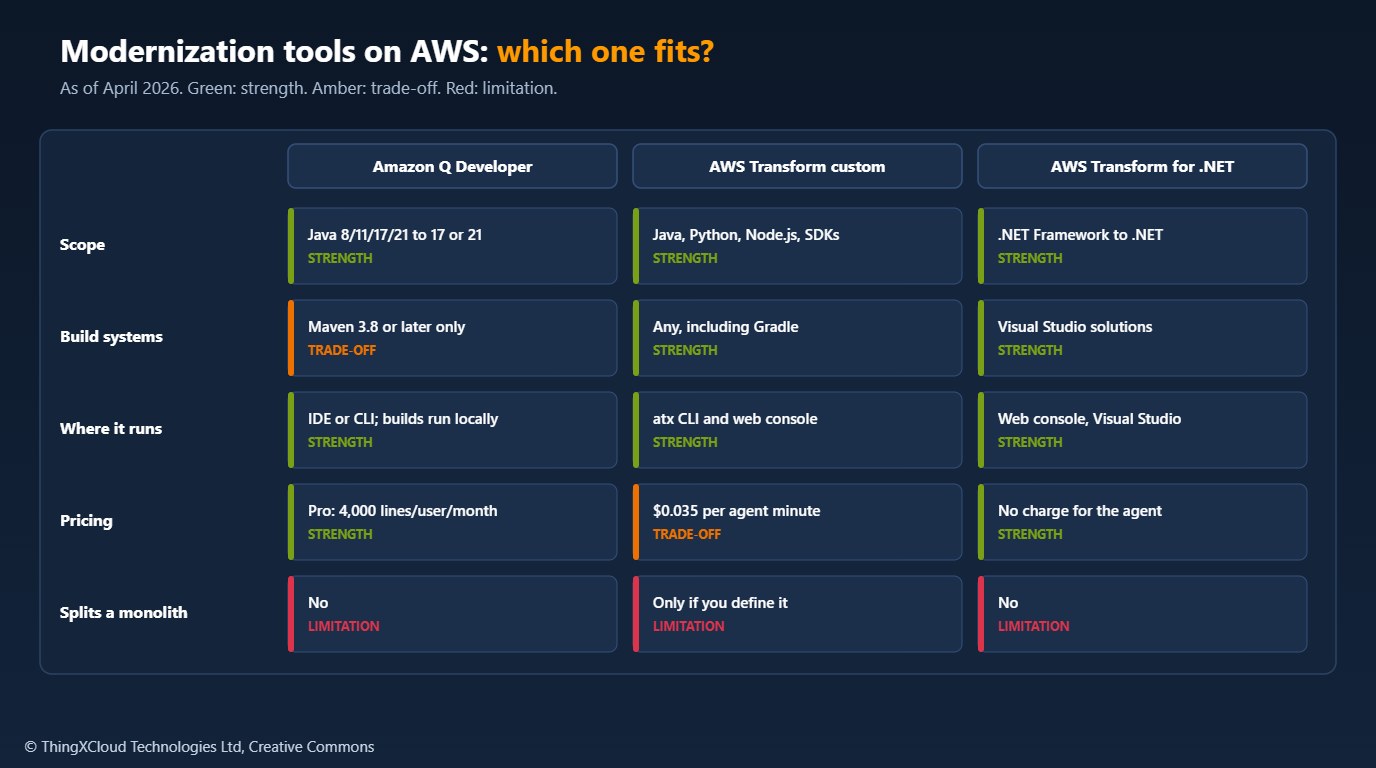
Use Amazon Q Developer for a Maven-built Java application that meets the prerequisites; it runs from the IDE and its pooled allowance covers small and medium codebases. Use AWS Transform custom for Gradle builds, Python and Node.js runtime upgrades, SDK migrations, or the same change across many repositories. Use AWS Transform for .NET for .NET Framework applications headed for Linux. Then extract capabilities one route at a time behind a facade, starting with one that owns its data and has no long-running work.
The choice changes if the application has no automated tests. Every tool here relies on a build and tests to know when it has succeeded, so writing characterisation tests for the code you plan to move comes before any of them.
The readiness scanner was tested with Python 3.13, pyyaml==6.0.3 and pytest==9.0.2: fourteen tests cover Java version detection from properties and the compiler plugin, the frontend plugin and Maven version blockers, Gradle and .NET routing, test database and encoding warnings, and the dependency upgrade file schema. The sample output above is from a run against a test repository. The SAM template passes cfn-lint 1.48.1, which rejects misspelled properties; it was not deployed. No Q Developer or AWS Transform job was run for this article. Prices were read from the AWS pricing pages in November 2026.
Key takeaways
- Amazon Q Developer upgrades Maven-built Java 8, 11, 17 or 21 code to Java 17 or 21, building and testing locally after each step; it does not decompose applications.
- AWS Transform custom (since December 2025) covers Gradle, Python, Node.js, SDK upgrades and transformations you define; AWS Transform for .NET ports .NET Framework to cross-platform .NET.
- Check the prerequisites first: tests on private networks and plugins that package non-Java code make Q Developer jobs fail.
- Move capabilities to Lambda one route at a time behind an HTTP API facade that proxies everything else to the monolith.
- Data ownership, transactions, in-memory state and long-running work decide what can move; those are architecture decisions, not transformation output.
Which capability did you move out of your monolith first, and what made it a good candidate? Share it in the comments.
The complete sample for this article is on GitHub: nithinmohantk/blog-samples-working-repo/q-transform-readiness. Clone it with git clone https://github.com/nithinmohantk/blog-samples-working-repo.git and open the q-transform-readiness folder. Its README says how to run it and what has been verified.
Glossary
- Code transformation
- An Amazon Q Developer job that upgrades a project’s language version or dependencies and returns a diff.
- Transformation plan
- The list of dependency upgrades and code changes Q Developer intends to make, produced before it changes code.
- Dependency upgrade file
- A YAML file listing the dependencies and plugins, and their target versions, for a library-only transformation.
- AWS Transform custom
- An AWS agent that runs AWS-managed or user-defined code transformations across one or many repositories.
- Agent minute
- The billing unit for AWS Transform custom: a minute in which the agent is planning, reasoning or changing code.
- Strangler-fig pattern
- Replacing a system gradually by routing one capability at a time to new code behind a facade.
- Facade
- The single entry point, here an API Gateway HTTP API, that decides whether a request goes to new code or the old system.
- Greedy path variable
- A route parameter such as
{proxy+}that matches the rest of the path. - SnapStart
- A Lambda feature that restores a snapshot of an initialised function version to reduce cold-start time.
- Transactional outbox
- Writing an event to the same database transaction as the business change, then publishing it, so neither is lost.
References & Further Reading
- → Upgrading Java versions with Amazon Q Developer— Supported versions, prerequisites and the dependency upgrade file
- → How Amazon Q Developer transforms code for Java language upgrades— Build, plan, transform and diff steps, and limitations
- → Amazon Q Developer now supports upgrade to Java 21— Announcement, 14 February 2025
- → AWS launches AWS Transform custom— Announcement, 1 December 2025
- → Introducing AWS Transform custom— The atx CLI, AWS-managed and custom transformations
- → AWS Transform custom introduces new AWS-managed transformations— Announcement, 31 March 2026, with Regions
- → AWS Transform for .NET is now generally available— Announcement, 15 May 2025
- → Amazon Q Developer pricing— Pro tier and transformation allowance
- → AWS Transform pricing— Agent minute pricing and examples
- → AWS Lambda adds support for Java 25— Announcement, 14 November 2025
- → HTTP proxy integrations for HTTP APIs— Greedy path variables and proxy integration URIs
- → Sample code for this article— Readiness scanner, dependency upgrade file, strangler facade template, tests
Discover more from C4: Container, Code, Cloud & Context
Subscribe to get the latest posts sent to your email.
