
On this page
Amazon Aurora DSQL was previewed at re:Invent on 3 December 2024 and became generally available on 27 May 2025. It is a serverless, PostgreSQL-compatible distributed SQL database: there are no instances to size, a single-Region cluster is active-active across three Availability Zones, and a multi-Region cluster accepts strongly consistent reads and writes in two Regions at once. AWS quotes 99.99% availability for single-Region clusters and 99.999% for multi-Region ones.
Eight months after general availability, the questions architects ask are practical ones. Which PostgreSQL features are missing? What does optimistic concurrency mean for application code? How do connections and authentication work, what does it cost, and when is Aurora PostgreSQL still the better choice? This article answers those as of February 2026, with a tested Python client that handles DSQL’s retry and connection rules and a query that lists migration blockers in an existing PostgreSQL schema.
Architecture
A DSQL cluster exposes a PostgreSQL wire-protocol endpoint. Behind it, compute, transaction processing and storage scale independently, so there is no instance class or read replica to choose. Each transaction reads from a consistent snapshot taken when it starts, and its writes are checked for conflicts only when it commits. Durability comes from writing every commit to multiple Availability Zones, and in a multi-Region cluster to more than one Region, before the commit returns.
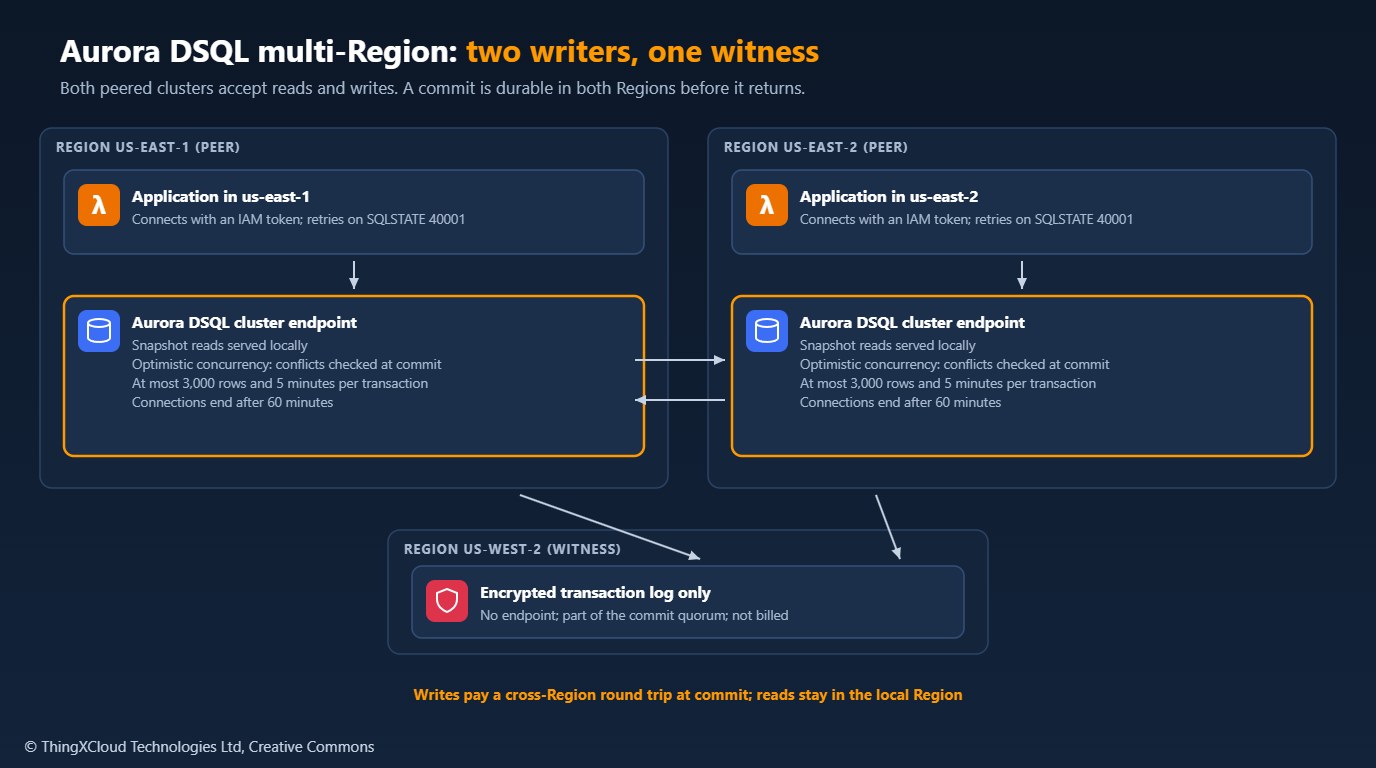
A multi-Region cluster is two peered clusters, each with its own endpoint, plus a witness Region that holds an encrypted copy of the transaction log and votes in the commit quorum but serves no traffic. Both endpoints accept writes and both return the latest committed data. The price of that is latency on commit: a write transaction waits for a cross-Region round trip, while reads are served from the local Region. At general availability, multi-Region clusters were offered in the US East (N. Virginia), US East (Ohio) and US West (Oregon) Regions, with the peers and the witness chosen from that set.
Optimistic concurrency
Aurora PostgreSQL takes row locks, so a second writer waits for the first. Aurora DSQL takes no locks. Transactions run against their snapshot, and at commit the service checks whether another transaction has already committed a conflicting change. If it has, the later commit fails with SQLSTATE 40001 and a code in the message: OC000 for a data conflict, OC001 when the schema changed under the session. The service does not retry for you. The application has to roll back and run the whole transaction again, so the transaction must be safe to repeat.
%%{init: {'theme': 'base', 'themeVariables': {'actorBkg': '#FFF3E0', 'actorBorder': '#FF9900', 'actorTextColor': '#232F3E', 'signalColor': '#0073BB', 'signalTextColor': '#0F172A', 'noteBkgColor': '#FFF8E7', 'noteBorderColor': '#FF9900', 'noteTextColor': '#232F3E'}}}%%
sequenceDiagram
    participant A as App in us-east-1
    participant D as Aurora DSQL
    participant B as App in us-east-2
    A->>D: BEGIN, UPDATE account 42
    B->>D: BEGIN, UPDATE account 42
    A->>D: COMMIT
    D-->>A: committed
    B->>D: COMMIT
    D-->>B: SQLSTATE 40001 (OC000)
    Note over B: Roll back, wait with jitter, run the transaction again
    B->>D: BEGIN, UPDATE account 42, COMMIT
    D-->>B: committed
Two consequences matter for design. Contention becomes retries instead of waits, so a hot row, such as a single counter or an account updated by every request, turns into a stream of failed commits; spread writes across keys and use random primary keys. And SELECT ... FOR UPDATE does not lock: it marks the selected rows as if the transaction wrote them, so a concurrent change to those rows makes this transaction fail at commit. Code that relies on FOR UPDATE to make others wait must be rewritten around retries.
Retrying in the client
The sample’s dsql_client.py wraps those rules for Python and psycopg 3. TokenProvider generates IAM authentication tokens locally with boto3 and refreshes them before they expire. Session.run() runs a function inside one transaction, retries the whole function on SQLSTATE 40001 with full-jitter backoff, and reopens the connection when it has closed. write_in_batches() splits a load into transactions under the row limit.
"""Connection and transaction helpers for Amazon Aurora DSQL with psycopg 3.

Aurora DSQL differs from PostgreSQL in three ways that application code has to
handle:

1. Authentication uses short-lived IAM tokens instead of passwords. The token
   is generated locally with SigV4 by boto3; no network call is made.
2. Concurrency control is optimistic. Conflicts are detected at COMMIT and
   returned as SQLSTATE 40001 (OC000 for data, OC001 for schema). The service
   does not retry for you, so the client must retry the whole transaction.
3. A transaction may modify at most 3,000 rows and 10 MiB, may run for at most
   5 minutes, and a connection lasts at most 60 minutes.
"""

from __future__ import annotations

import logging
import random
import time
from collections.abc import Callable, Iterable, Iterator, Sequence
from typing import Any, TypeVar

import boto3
import psycopg

log = logging.getLogger("dsql")
T = TypeVar("T")

MAX_ROWS_PER_TRANSACTION = 3000
SERIALIZATION_FAILURE = "40001"


class TokenProvider:
    """Generates and caches IAM authentication tokens for one cluster endpoint."""

    def __init__(self, endpoint: str, region: str, *, admin: bool = False, ttl_seconds: int = 900,
                 refresh_margin_seconds: int = 60, session: boto3.session.Session | None = None,
                 clock: Callable[[], float] = time.monotonic):
        if ttl_seconds <= refresh_margin_seconds:
            raise ValueError("ttl_seconds must be larger than refresh_margin_seconds")
        self.endpoint, self.region, self.admin = endpoint, region, admin
        self.ttl, self.margin, self.clock = ttl_seconds, refresh_margin_seconds, clock
        self._client = (session or boto3.session.Session()).client("dsql", region_name=region)
        self._token: str | None = None
        self._expires_at = 0.0

    def token(self) -> str:
        now = self.clock()
        if self._token is None or now >= self._expires_at - self.margin:
            generate = (self._client.generate_db_connect_admin_auth_token if self.admin
                        else self._client.generate_db_connect_auth_token)
            self._token = generate(self.endpoint, self.region, self.ttl)
            self._expires_at = now + self.ttl
        return self._token


def connect(provider: TokenProvider, user: str | None = None, *, connect_timeout: int = 5) -> psycopg.Connection:
    """Open a TLS connection to the cluster's single database, 'postgres'."""
    return psycopg.connect(
        host=provider.endpoint,
        port=5432,
        dbname="postgres",
        user=user or ("admin" if provider.admin else "app_user"),
        password=provider.token(),
        sslmode="require",
        connect_timeout=connect_timeout,
        application_name="dsql-occ-client",
    )


def _is_retryable(exc: BaseException) -> bool:
    return getattr(exc, "sqlstate", None) == SERIALIZATION_FAILURE


class Session:
    """Holds one connection, reopening it when it has closed (DSQL ends connections after 60 minutes)."""

    def __init__(self, connect_fn: Callable[[], Any]):
        self._connect_fn = connect_fn
        self._conn: Any = None

    @property
    def conn(self) -> Any:
        if self._conn is None or self._conn.closed:
            self._conn = self._connect_fn()
        return self._conn

    def discard(self) -> None:
        if self._conn is not None and not self._conn.closed:
            self._conn.close()
        self._conn = None

    def run(self, work: Callable[[Any], T], *, max_attempts: int = 6, base_delay: float = 0.02,
            max_delay: float = 1.0, sleep: Callable[[float], None] = time.sleep,
            rand: Callable[[], float] = random.random) -> T:
        """Run work(cursor) in one transaction, retrying the whole transaction on OCC conflicts.

        work must be safe to run more than once: it is re-executed from the start
        after a conflict. Delays use full jitter: rand() * min(max_delay, base * 2**attempt).
        """
        for attempt in range(1, max_attempts + 1):
            try:
                with self.conn.transaction():
                    with self.conn.cursor() as cur:
                        return work(cur)
            except psycopg.OperationalError as exc:
                if _is_retryable(exc) and attempt < max_attempts:
                    delay = rand() * min(max_delay, base_delay * 2 ** attempt)
                    log.warning("OCC conflict, attempt %d of %d, retrying in %.3fs: %s",
                                attempt, max_attempts, delay, str(exc).strip())
                    sleep(delay)
                    continue
                if getattr(self._conn, "closed", False) and attempt < max_attempts:
                    log.warning("connection closed, reconnecting: %s", str(exc).strip())
                    self.discard()
                    continue
                raise
        raise AssertionError("unreachable")


def chunked(rows: Iterable[Sequence[Any]], size: int) -> Iterator[list[Sequence[Any]]]:
    if not 1 <= size <= MAX_ROWS_PER_TRANSACTION:
        raise ValueError(f"size must be between 1 and {MAX_ROWS_PER_TRANSACTION}")
    batch: list[Sequence[Any]] = []
    for row in rows:
        batch.append(row)
        if len(batch) == size:
            yield batch
            batch = []
    if batch:
        yield batch


def write_in_batches(session: Session, sql: str, rows: Iterable[Sequence[Any]], *, batch_size: int = 500,
                     **run_kwargs: Any) -> int:
    """Insert or upsert rows in transactions of at most batch_size rows each.

    Each batch commits on its own, so a failure part-way leaves earlier batches
    committed. Make sql idempotent (for example INSERT ... ON CONFLICT DO NOTHING)
    so the whole load can be re-run.
    """
    written = 0
    for batch in chunked(rows, batch_size):
        session.run(lambda cur, b=batch: cur.executemany(sql, b), **run_kwargs)
        written += len(batch)
    return written
Using it is a matter of passing the transaction body as a function, so the retry can run it again:
provider = TokenProvider("<cluster-id>.dsql.us-east-1.on.aws", "us-east-1", admin=True)
session = Session(lambda: connect(provider))
session.run(lambda cur: cur.execute(
"UPDATE accounts SET balance = balance - %s WHERE id = %s", (25, account_id)))DSQL has no passwords. Clients connect with a token generated locally from IAM credentials, which the AWS SDK makes valid for 15 minutes by default, over TLS. The admin role needs the dsql:DbConnectAdmin permission and is for administration; applications should connect as a custom database role mapped to an IAM role with AWS IAM GRANT and the dsql:DbConnect permission, so access is granted and revoked in IAM. Generate a fresh token for each new connection, not once at start-up.
PostgreSQL compatibility
DSQL speaks the PostgreSQL protocol and supports most queries, joins, SQL functions and common data types, but in February 2026 it is a subset. These differences decide whether an existing schema can move:
| Area | Aurora DSQL in February 2026 | What to do instead |
|---|---|---|
| Triggers | Not supported | Move the logic into the application or an event consumer |
| Functions | SQL functions only; no PL/pgSQL or other procedural languages | Rewrite as SQL functions or application code |
| Sequences, SERIAL, identity columns | Not supported | UUID primary keys, which also spread writes |
| Foreign keys | Not supported | Enforce references in the application |
| Extensions | Not supported | Remove the dependency |
| Temporary tables, TRUNCATE | Not supported | CTEs or regular tables; DELETE or drop and recreate |
| Databases per cluster | One, named postgres | Schemas, or one cluster per database |
| Isolation | Snapshot (Repeatable Read) only | Design for commit-time conflicts |
| DDL | Separate from DML; one DDL statement per transaction | Run migrations statement by statement |
The documented limits matter as much as the features. A transaction can modify at most 3,000 rows and 10 MiB of data and run for at most five minutes; a connection lasts at most 60 minutes; a table can have at most 24 indexes and 255 columns. Bulk loads and back-fills must be split into batches, and connection pools must recycle connections before the hour is up.
Run the sample’s dsql_blockers.sql against the source database before estimating a migration. It reads the system catalogs and lists triggers, procedural functions, sequences and identity columns, foreign keys, extensions, and tables over the index or column limits. Each row is work to do before the schema can move; a schema built around triggers and stored procedures is usually a rewrite, not a migration.
-- Run against the SOURCE PostgreSQL database (12 or later) before planning a
-- move to Aurora DSQL. Lists objects that Aurora DSQL did not support in
-- February 2026, plus tables that exceed its documented per-table limits.
-- Read-only: it queries the system catalogs and changes nothing.
WITH user_ns AS (
    SELECT oid, nspname FROM pg_namespace
    WHERE nspname NOT IN ('pg_catalog', 'information_schema', 'pg_toast')
      AND nspname NOT LIKE 'pg_temp_%' AND nspname NOT LIKE 'pg_toast_temp_%'
),
ext_objects AS (
    SELECT objid FROM pg_depend WHERE deptype = 'e'
)
SELECT 'trigger' AS category,
       n.nspname || '.' || c.relname || ': ' || t.tgname AS object,
       'move the logic into the application or an event consumer' AS action
FROM pg_trigger t
JOIN pg_class c ON c.oid = t.tgrelid
JOIN user_ns n ON n.oid = c.relnamespace
WHERE NOT t.tgisinternal

UNION ALL
SELECT 'procedural function',
       n.nspname || '.' || p.proname || ' (' || l.lanname || ')',
       'rewrite as a SQL function or move into the application'
FROM pg_proc p
JOIN pg_language l ON l.oid = p.prolang
JOIN user_ns n ON n.oid = p.pronamespace
WHERE l.lanname NOT IN ('sql', 'internal')
  AND p.oid NOT IN (SELECT objid FROM ext_objects)

UNION ALL
SELECT 'sequence or identity',
       n.nspname || '.' || c.relname,
       'use UUID keys or application-generated IDs'
FROM pg_class c
JOIN user_ns n ON n.oid = c.relnamespace
WHERE c.relkind = 'S'
  AND c.oid NOT IN (SELECT objid FROM ext_objects)

UNION ALL
SELECT 'foreign key',
       n.nspname || '.' || c.relname || ': ' || k.conname,
       'enforce the reference in the application'
FROM pg_constraint k
JOIN pg_class c ON c.oid = k.conrelid
JOIN user_ns n ON n.oid = c.relnamespace
WHERE k.contype = 'f'

UNION ALL
SELECT 'extension', e.extname || ' ' || e.extversion, 'remove the dependency'
FROM pg_extension e
WHERE e.extname <> 'plpgsql'

UNION ALL
SELECT 'too many indexes',
       n.nspname || '.' || c.relname || ' (' || count(*) || ' indexes)',
       'Aurora DSQL allows at most 24 indexes per table'
FROM pg_index i
JOIN pg_class c ON c.oid = i.indrelid
JOIN user_ns n ON n.oid = c.relnamespace
GROUP BY n.nspname, c.relname
HAVING count(*) > 24

UNION ALL
SELECT 'too many columns',
       n.nspname || '.' || c.relname || ' (' || count(*) || ' columns)',
       'Aurora DSQL allows at most 255 columns per table'
FROM pg_attribute a
JOIN pg_class c ON c.oid = a.attrelid AND c.relkind IN ('r', 'p')
JOIN user_ns n ON n.oid = c.relnamespace
WHERE a.attnum > 0 AND NOT a.attisdropped
GROUP BY n.nspname, c.relname
HAVING count(*) > 255

ORDER BY 1, 2;
Cost
DSQL bills two things. Distributed Processing Units (DPUs) measure all request activity, reads, writes and query processing, and cost $8 per million in US East (N. Virginia). Storage costs $0.33 per GB-month. The free tier covers the first 100,000 DPUs and 1 GB-month each month. In a multi-Region cluster, writes replicated to the peer are charged again as DPUs equal to the originating writes, storage is charged in both peer Regions, the witness is free, and there is no separate data transfer charge for replication.
| Example, US East (N. Virginia) | Calculation | Monthly cost |
|---|---|---|
| Single-Region: 40 million DPUs, 100 GB | (40 − 0.1) × $8 + (100 − 1) × $0.33 | $319.20 + $32.67 = $351.87 |
| Same workload in a two-Region cluster, 15 million of the DPUs from writes, all traffic in one Region | Add 15 × $8 replicated writes and 100 × $0.33 storage in the second Region | $351.87 + $120.00 + $33.00 = $504.87 |
Worked cell: 40 million DPUs less the 0.1 million free is 39.9 million, and 39.9 × $8 = $319.20. DPUs per transaction depend on rows touched and query shape, so measure them on a representative workload before relying on any estimate. Scaling to zero helps development and spiky workloads; a steadily busy database can cost more than a right-sized Aurora instance.
Production considerations
- Make every transaction repeatable. Retries re-run the body, so side effects such as sending email or calling another service belong after the commit, or behind an idempotency key.
- Avoid hot keys. Counters, sequence tables and “last updated” rows shared by every request turn into OC000 retries; use random keys and per-entity rows.
- Batch large writes. Keep transactions well under 3,000 rows and 10 MiB, and make loads restartable with idempotent statements.
- Recycle connections. Set the pool’s maximum connection lifetime below 60 minutes and open each new connection with a fresh token.
- Watch retries. Log and count OC000 and OC001 errors; a rising rate is the first sign of contention or a schema change during deployment.
- Plan schema changes. DDL invalidates cached catalogs in other sessions, which surfaces as OC001; deploy schema changes when traffic is low and let the retries absorb them.
Decision framework
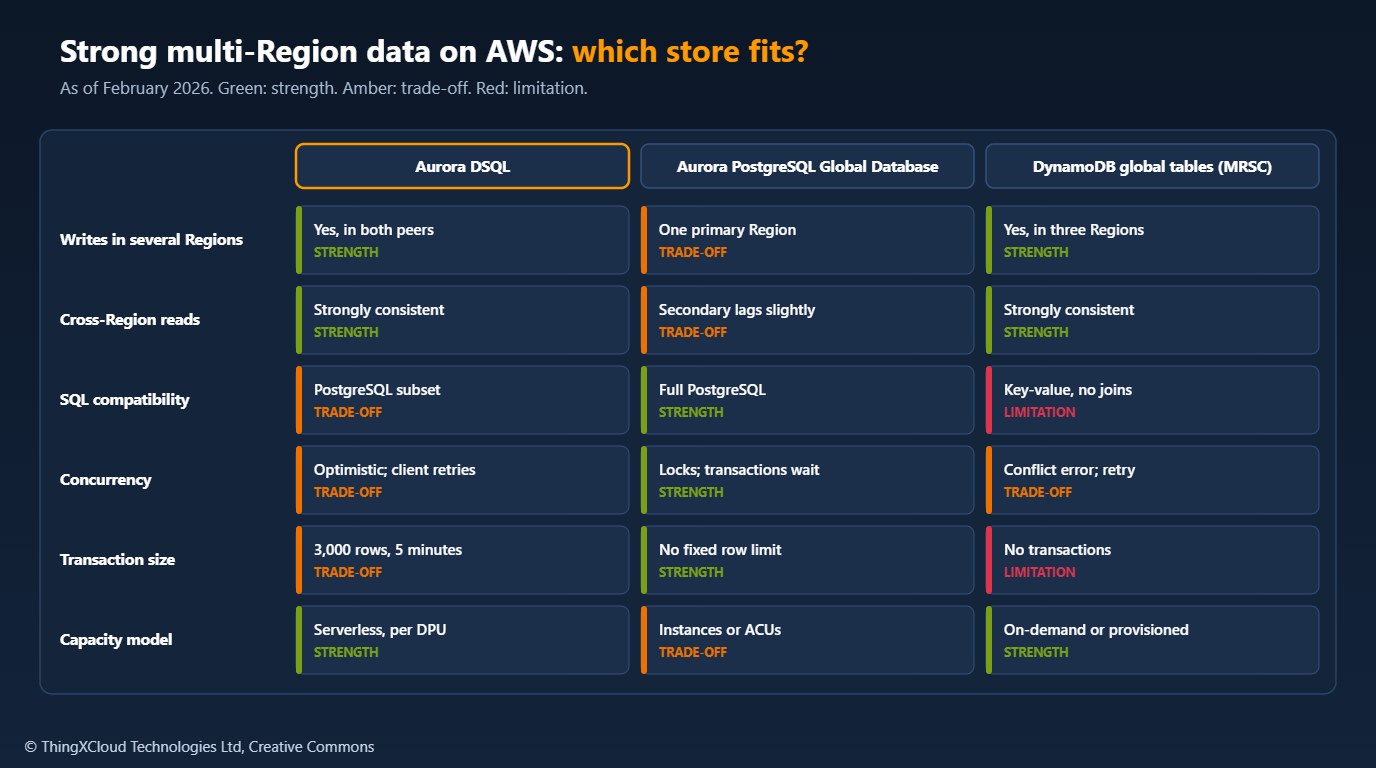
Choose Aurora DSQL for new services that need SQL and strongly consistent writes in more than one Region, or a serverless relational store with no instances to manage, and that can live with UUID keys, application-enforced references and retries. Stay on Aurora PostgreSQL, with Global Database for disaster recovery, when the schema depends on triggers, stored procedures, foreign keys or extensions, or when large transactions are routine. Use DynamoDB when the access patterns are key-based and the data model does not need joins.
The choice changes if writes must happen in more than one Region at once with a relational model: then DSQL is the only managed option on AWS, and its feature gaps become work to plan rather than reasons to wait.
dsql_client.py was tested with Python 3.13, boto3==1.42.39 (30 January 2026), psycopg[binary]==3.3.2 and pytest==9.0.2: ten tests cover token format and refresh, retries with backoff on OC000 and OC001, no retries on other errors, reconnecting after a closed connection, and batching. dsql_blockers.sql was run against PostgreSQL 16 with a schema containing a trigger, a PL/pgSQL function, a bigserial column, a foreign key and a 26-index table, and reported each one. Neither was run against a live DSQL cluster. Prices were read from the Aurora DSQL pricing page in November 2026.
Key takeaways
- Aurora DSQL has been generally available since 27 May 2025: serverless, PostgreSQL-compatible, with strongly consistent writes in two Regions plus a witness.
- It uses optimistic concurrency: conflicts fail at commit with SQLSTATE 40001 (OC000 or OC001), and the application must retry the whole transaction.
- In February 2026 it lacks triggers, procedural functions, sequences, foreign keys, extensions and temporary tables; check a schema with a catalog query before planning a move.
- Transactions are limited to 3,000 rows, 10 MiB and five minutes, and connections to 60 minutes, so loads must be batched and pools recycled.
- Pricing is $8 per million DPUs and $0.33 per GB-month in US East (N. Virginia), with replicated writes charged again in multi-Region clusters.
Have you moved a workload to Aurora DSQL, and which PostgreSQL feature was hardest to work around? Share it in the comments.
The complete sample for this article is on GitHub: nithinmohantk/blog-samples-working-repo/dsql-occ-client. Clone it with git clone https://github.com/nithinmohantk/blog-samples-working-repo.git and open the dsql-occ-client folder. Its README says how to run it and what has been verified.
Glossary
- Aurora DSQL
- A serverless, distributed, PostgreSQL-compatible SQL database from AWS with active-active writes.
- Optimistic concurrency control (OCC)
- Running transactions without locks and checking for conflicts when they commit.
- Snapshot isolation
- Each transaction reads a consistent view of the data as of when it started.
- OC000 / OC001
- Aurora DSQL conflict codes for a data conflict and a schema conflict, returned with SQLSTATE 40001.
- Peered cluster
- One of the two Regional clusters in a multi-Region Aurora DSQL cluster, each with its own endpoint.
- Witness Region
- The third Region in a multi-Region cluster, which stores the encrypted transaction log and serves no traffic.
- DPU
- Distributed Processing Unit, Aurora DSQL’s billing unit for request activity.
- IAM authentication token
- A short-lived, signed credential used instead of a database password.
- Full jitter
- A retry delay chosen at random between zero and an exponentially growing cap.
References & Further Reading
- → Amazon Aurora DSQL is now generally available— Announcement, 27 May 2025
- → Amazon Aurora DSQL, the fastest serverless distributed SQL database, is now generally available— AWS News Blog: Regions, availability, peering and free tier
- → Concurrency control in Aurora DSQL— OCC, OC000 and OC001, retries and SELECT FOR UPDATE
- → Unsupported PostgreSQL features in Aurora DSQL— Compatibility differences and workarounds
- → Cluster quotas and database limits— Transaction, connection, index and column limits
- → Amazon Aurora DSQL pricing— DPUs, storage, free tier and multi-Region writes
- → Authentication and authorization for Aurora DSQL— IAM tokens, the admin role and AWS IAM GRANT
- → Sample code for this article— Retry-aware Python client, schema blocker query, tests
Discover more from C4: Container, Code, Cloud & Context
Subscribe to get the latest posts sent to your email.
