
On this page
On 12 January 2026 Anthropic released Cowork, a research preview that it describes as Claude Code for the rest of your work. Instead of answering one question at a time, Claude takes a goal, works on files in a folder you give it, and comes back with finished output: a sorted folder, a spreadsheet built from a pile of receipts, a first draft of a report from scattered notes. Access widened quickly: Pro subscribers on 16 January, and Team and Enterprise plans on 23 January.
For an enterprise architect the interesting questions are not about the demo. They are about where the agent runs, what it can reach, what an administrator can see afterwards, and which work it is ready for while it is still a preview. This article answers those as of late January 2026, corrects some common misunderstandings (there is no Cowork SDK, and Claude’s new constitution is not a runtime policy engine), and includes a tested script for checking a folder before you grant Cowork access to it.
What Cowork is
Cowork is a tab in the Claude Desktop app for macOS, next to Chat and Code. You describe a task, optionally choose a folder, and Claude plans the work, carries it out and reports back. It can read, edit, create and delete files in that folder. You can queue several tasks and let them run in parallel, and steer or stop a task while it works.
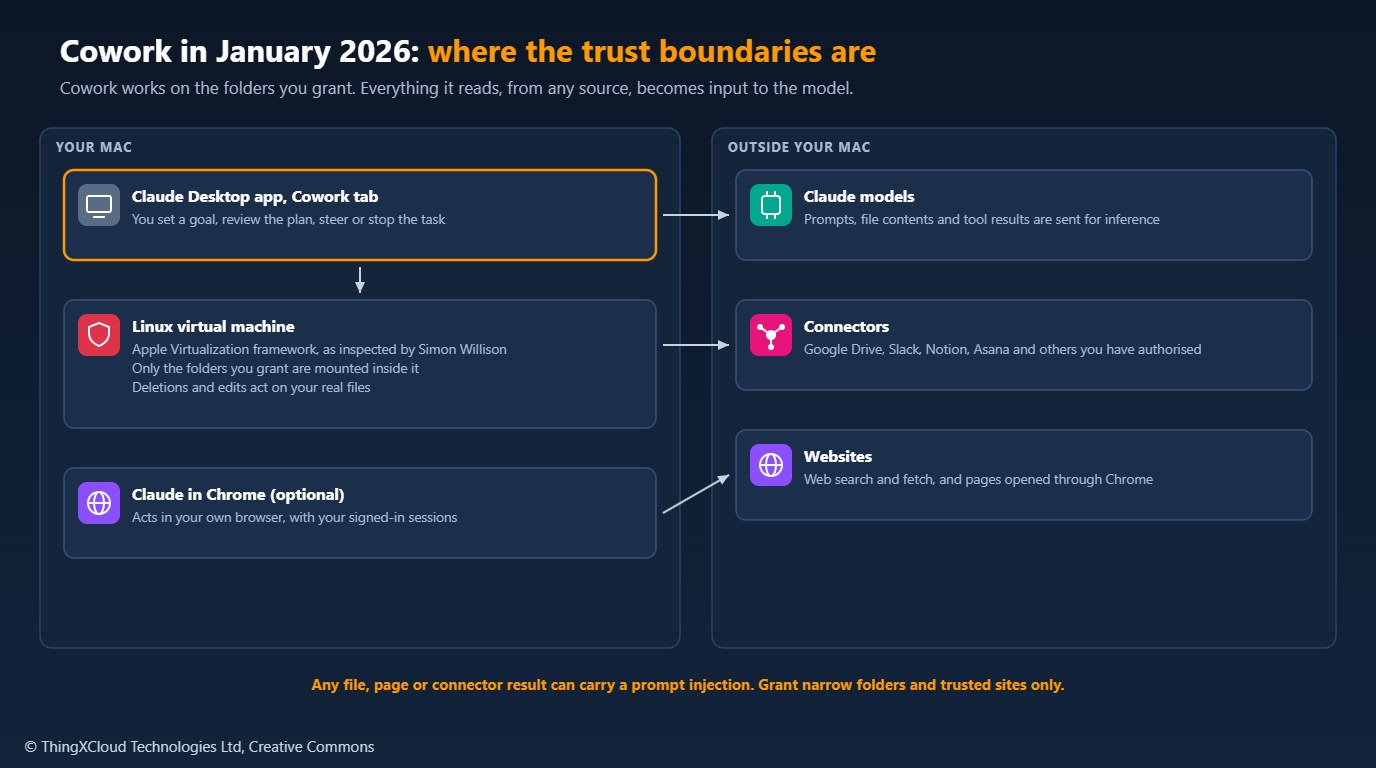
Three existing pieces extend it. Connectors you have already authorised in Claude, such as Google Drive, Slack, Notion or Asana, work in Cowork. Anthropic added an initial set of skills that improve how Claude creates documents, presentations and other files. And if you install Claude in Chrome, Cowork can complete tasks that need a browser, using your own signed-in sessions.
Underneath, it is the same agent approach as Claude Code. Simon Willison, inspecting the app on launch day, found that it runs work inside a Linux virtual machine started with Apple’s Virtualization framework, with the granted folders mounted into it. That isolates the rest of your disk, but not the folder itself: edits and deletions inside it are real. Tasks run on the Mac that started them and are not synced to other devices.
Cowork, Claude Code and the Agent SDK
| Cowork | Claude Code | Claude Agent SDK | |
|---|---|---|---|
| Who drives it | A person, through the desktop app | A developer, in a terminal or IDE | Your application, in code |
| What it works on | Folders you grant, connectors, Chrome | Repositories, the shell, MCP servers | Whatever tools and files you give it |
| Where it runs | A virtual machine on the user’s Mac | The developer’s machine or CI | Your own servers or containers |
| Programmable | No API or SDK | CLI and headless mode | Python and TypeScript libraries |
Cowork has no SDK. Code that imports an anthropic.cowork module, or builds a CoworkSession, does not exist. If you want a Cowork-like agent inside your own systems, with your own logging and permissions, the supported route is the Claude Agent SDK, which Anthropic released on 29 September 2025 as the renamed Claude Code SDK. It provides the same harness that runs Claude Code: file and shell tools, subagents, context management, custom tools and MCP.
Security model
Cowork’s controls are the folder you grant, the sites it may reach, and you watching it. Anthropic is unusually direct about the risks in the announcement and help pages. Claude can take destructive actions, including deleting files, if instructed to, and unclear instructions can produce unintended results. And because Cowork reads content from files, connectors and the web, it is exposed to prompt injection: text written to change Claude’s plan.
Anthropic says it has built defences against prompt injection but that agent safety is still being developed. Its guidance for the preview is to avoid granting access to folders with sensitive information, to limit Claude in Chrome to trusted sites, to extend internet access only to sites you trust, and to watch for unexpected actions. A malicious instruction hidden in a supplier’s PDF or a shared document reaches the model with the same standing as your own files.
In practice that means granting a working copy, not the source of truth. Copy the documents a task needs into a dedicated folder, keep a backup, check that folder for credentials and personal data, grant it, and copy the results back after review.
%%{init: {'theme': 'base', 'themeVariables': {'primaryColor': '#FFF3E0', 'primaryTextColor': '#232F3E', 'primaryBorderColor': '#FF9900', 'lineColor': '#232F3E', 'clusterBkg': '#F8FAFC', 'clusterBorder': '#CBD5E1', 'edgeLabelBackground': '#FFFFFF', 'nodeTextColor': '#232F3E'}}}%%
flowchart TD
    A[Choose a task with low-risk inputs] --> B[Copy the inputs into a working folder]
    B --> C[Run folder_check.py on the working folder]
    C -->|HIGH findings| D[Remove credentials or personal data]
    D --> C
    C -->|No HIGH findings| E[Grant the folder to Cowork]
    E --> F[Review the plan and the output]
    F --> G[Copy approved results back to the source system]
    classDef step fill:#FFF3E0,stroke:#FF9900,stroke-width:2px,color:#232F3E
    classDef check fill:#F0FFF4,stroke:#1D8102,stroke-width:2px,color:#145202
    classDef stop fill:#FEF2F2,stroke:#D13212,stroke-width:2px,color:#991B1B
    class A,B,E,F,G step
    class C check
    class D stop
Checking a folder before granting it
The sample’s folder_check.py is a pre-flight check for that working folder. It flags key and credential files, private keys and cloud or SaaS tokens, and symbolic links that point outside the folder, as HIGH. Payment card numbers, IBANs and Irish PPS numbers are reported only when they pass their checksums, which keeps order numbers and other long digit strings out of the report. Run against a board-pack folder that someone had filled with a payroll export and an .env file, it reports:
$ python folder_check.py /tmp/q1-board-pack
Folder: /tmp/q1-board-pack
Files:  5 (0.0 MB)
HIGH 1  MEDIUM 2  LOW 1
  HIGH   KEY_OR_CREDENTIAL_FILE: .env
  MEDIUM IBAN: data/payroll-export.csv (1 found, e.g. IE29****************78)
  MEDIUM IE_PPSN: data/payroll-export.csv (1 found, e.g. 1234**7T)
  LOW    EMAIL_ADDRESSES: drafts/contacts.txt (2 found)
The script reads text files only and never changes anything. It is not a data loss prevention system: it cannot see inside PDFs or Office documents and reports them as not scanned, so a clean result means “nothing obvious”, not “safe”. The full script:
"""Check a folder before granting an AI agent (such as Claude Cowork) access to it.

Anthropic's guidance for the Cowork research preview is to avoid giving the
agent access to local files with sensitive information. This script reads a
folder and reports what should not be in it:

- HIGH: credentials and keys (key files, private key blocks, cloud and SaaS
  tokens) and symbolic links that point outside the folder.
- MEDIUM: personal data that passes a checksum: payment card numbers (Luhn),
  IBANs (ISO 13616 mod 97) and Irish PPS numbers (mod 23 check character).
- LOW: email addresses, very large files, and binary files that were skipped.

Matched values are masked in the output. The script only reads files; it
never changes, moves or uploads anything.
Exit code: 0 when there are no HIGH findings, 1 when there are, 2 on usage errors.
"""

from __future__ import annotations

import argparse
import json
import os
import re
import sys
from dataclasses import asdict, dataclass, field
from pathlib import Path

MAX_SCAN_BYTES = 5 * 1024 * 1024
LARGE_FILE_BYTES = 100 * 1024 * 1024
TEXT_SUFFIXES = {".txt", ".md", ".csv", ".tsv", ".json", ".yaml", ".yml", ".xml", ".html",
                 ".ini", ".cfg", ".conf", ".env", ".properties", ".py", ".js", ".ts", ".sql",
                 ".log", ".sh", ".ps1", ".pem", ".key", ""}
KEY_FILE_NAMES = {".env", "id_rsa", "id_ecdsa", "id_ed25519", "credentials", ".npmrc", ".pypirc",
                  ".netrc", "kubeconfig", ".git-credentials"}
KEY_FILE_SUFFIXES = {".pem", ".key", ".p12", ".pfx", ".jks", ".keystore", ".kdbx", ".ovpn"}

SECRET_PATTERNS = {
    "PRIVATE_KEY_BLOCK": re.compile(r"-----BEGIN (?:RSA |EC |DSA |OPENSSH |ENCRYPTED )?PRIVATE KEY-----"),
    "AWS_ACCESS_KEY_ID": re.compile(r"\b(?:AKIA|ASIA)[0-9A-Z]{16}\b"),
    "GITHUB_TOKEN": re.compile(r"\b(?:ghp|gho|ghu|ghs|ghr)_[A-Za-z0-9]{36}\b|\bgithub_pat_[A-Za-z0-9_]{60,}\b"),
    "SLACK_TOKEN": re.compile(r"\bxox[abprs]-[A-Za-z0-9-]{10,}\b"),
    "ANTHROPIC_API_KEY": re.compile(r"\bsk-ant-[A-Za-z0-9_-]{20,}\b"),
}
CARD = re.compile(r"\b(?:\d[ -]?){13,19}\b")
IBAN = re.compile(r"\b[A-Z]{2}\d{2}(?: ?[A-Z0-9]{4}){2,7}(?: ?[A-Z0-9]{1,4})?\b")
PPSN = re.compile(r"\b\d{7}[A-W][A-IW]?\b")
EMAIL = re.compile(r"\b[A-Za-z0-9._%+-]+@[A-Za-z0-9.-]+\.[A-Za-z]{2,}\b")


@dataclass
class Finding:
    severity: str  # HIGH, MEDIUM or LOW
    code: str
    path: str
    detail: str = ""


@dataclass
class Report:
    folder: str
    files_scanned: int = 0
    bytes_total: int = 0
    findings: list[Finding] = field(default_factory=list)

    def count(self, severity: str) -> int:
        return sum(1 for f in self.findings if f.severity == severity)


def mask(value: str) -> str:
    compact = re.sub(r"[ -]", "", value)
    return compact[:4] + "*" * max(len(compact) - 6, 0) + compact[-2:]


def luhn_ok(digits: str) -> bool:
    total = 0
    for i, ch in enumerate(reversed(digits)):
        d = int(ch)
        if i % 2:
            d = d * 2 - 9 if d > 4 else d * 2
        total += d
    return total % 10 == 0


def iban_ok(value: str) -> bool:
    s = value.replace(" ", "")
    if not 15 <= len(s) <= 34:
        return False
    rearranged = s[4:] + s[:4]
    number = "".join(str(int(c, 36)) for c in rearranged)
    return int(number) % 97 == 1


def ppsn_ok(value: str) -> bool:
    """Irish Personal Public Service Number: 7 digits, a check letter and an optional second letter."""
    digits, check, extra = value[:7], value[7], value[8:]
    total = sum(int(d) * w for d, w in zip(digits, range(8, 1, -1)))
    if extra:
        total += 9 * (0 if extra == "W" else ord(extra) - 64)
    remainder = total % 23
    return check == ("W" if remainder == 0 else chr(64 + remainder))


def _is_text(path: Path, head: bytes) -> bool:
    return path.suffix.lower() in TEXT_SUFFIXES and b"\x00" not in head


def scan_text(rel: str, text: str) -> list[Finding]:
    out: list[Finding] = []
    for code, pattern in SECRET_PATTERNS.items():
        m = pattern.search(text)
        if m:
            out.append(Finding("HIGH", code, rel, mask(m.group())))
    cards = [m.group() for m in CARD.finditer(text)
             if 13 <= len(re.sub(r"[ -]", "", m.group())) <= 19 and luhn_ok(re.sub(r"[ -]", "", m.group()))]
    if cards:
        out.append(Finding("MEDIUM", "PAYMENT_CARD", rel, f"{len(cards)} found, e.g. {mask(cards[0])}"))
    ibans = [m.group() for m in IBAN.finditer(text) if iban_ok(m.group())]
    if ibans:
        out.append(Finding("MEDIUM", "IBAN", rel, f"{len(ibans)} found, e.g. {mask(ibans[0])}"))
    ppsns = [m.group() for m in PPSN.finditer(text) if ppsn_ok(m.group())]
    if ppsns:
        out.append(Finding("MEDIUM", "IE_PPSN", rel, f"{len(ppsns)} found, e.g. {mask(ppsns[0])}"))
    emails = EMAIL.findall(text)
    if emails:
        out.append(Finding("LOW", "EMAIL_ADDRESSES", rel, f"{len(emails)} found"))
    return out


def scan(folder: Path) -> Report:
    root = folder.resolve()
    report = Report(folder=str(root))
    for dirpath, dirnames, filenames in os.walk(root, followlinks=False):
        current = Path(dirpath)
        for name in list(dirnames):
            link = current / name
            if link.is_symlink():
                dirnames.remove(name)
                _check_link(root, link, report)
        for name in filenames:
            path = current / name
            rel = str(path.relative_to(root))
            if path.is_symlink():
                _check_link(root, path, report)
                continue
            size = path.stat().st_size
            report.files_scanned += 1
            report.bytes_total += size
            if name.lower() in KEY_FILE_NAMES or path.suffix.lower() in KEY_FILE_SUFFIXES:
                report.findings.append(Finding("HIGH", "KEY_OR_CREDENTIAL_FILE", rel))
            if size > LARGE_FILE_BYTES:
                report.findings.append(Finding("LOW", "LARGE_FILE", rel, f"{size // (1024 * 1024)} MB"))
            with path.open("rb") as fh:
                head = fh.read(MAX_SCAN_BYTES)
            if not _is_text(path, head[:8192]):
                if path.suffix.lower() not in KEY_FILE_SUFFIXES:
                    report.findings.append(Finding("LOW", "NOT_SCANNED", rel, "binary or unsupported format"))
                continue
            report.findings.extend(scan_text(rel, head.decode("utf-8", errors="replace")))
    return report


def _check_link(root: Path, link: Path, report: Report) -> None:
    target = link.resolve()
    if target != root and root not in target.parents:
        report.findings.append(Finding("HIGH", "LINK_OUTSIDE_FOLDER", str(link.relative_to(root)), str(target)))


def main(argv: list[str] | None = None) -> int:
    parser = argparse.ArgumentParser(description=__doc__.splitlines()[0])
    parser.add_argument("folder", type=Path)
    parser.add_argument("--json", action="store_true")
    args = parser.parse_args(argv)
    if not args.folder.is_dir():
        parser.error(f"{args.folder} is not a directory")
    report = scan(args.folder)
    if args.json:
        print(json.dumps(asdict(report), indent=2))
    else:
        print(f"Folder: {report.folder}")
        print(f"Files:  {report.files_scanned} ({report.bytes_total / 1024 / 1024:.1f} MB)")
        print(f"HIGH {report.count('HIGH')}  MEDIUM {report.count('MEDIUM')}  LOW {report.count('LOW')}")
        for f in sorted(report.findings, key=lambda f: ("HIGH", "MEDIUM", "LOW").index(f.severity)):
            print(f"  {f.severity:<6} {f.code}: {f.path}" + (f" ({f.detail})" if f.detail else ""))
    return 1 if report.count("HIGH") else 0


if __name__ == "__main__":
    sys.exit(main())
Team and Enterprise in the research preview
Cowork reached Team and Enterprise plans on 23 January, and Anthropic’s help article for those plans lists what administrators get during the preview. It is a short list:
- On by default. Cowork is enabled for the organisation unless an owner turns it off.
- One switch. The control is organisation-wide; there are no per-user or per-role controls in the preview.
- No central record. Cowork activity is not captured in audit logs, the Compliance API or data exports.
- Local history. Conversation history is stored on each user’s computer, outside Anthropic’s standard retention settings, and administrators cannot export it.
Anthropic’s own guidance is not to enable Cowork for regulated workloads that need audit trails. For health, financial or public-sector data that rules it out during the preview: there is no organisation-level record of what the agent read or changed, and the history sits on individual laptops. If you need an agent over regulated data, build it with the Claude Agent SDK inside your own environment, where you control logging, retention and data residency, and record a data protection impact assessment before it handles personal data.
For most organisations the sensible first decision on 23 January is to turn Cowork off centrally and enable it for a named pilot group through Anthropic, rather than discovering it is on for everyone.
Where the constitution fits
On 22 January 2026 Anthropic published a new constitution for Claude, a long document that sets out the values and priorities Claude is trained towards, released under CC0. When those priorities conflict, Claude is meant to be broadly safe first, then broadly ethical, then compliant with Anthropic’s guidelines, then genuinely helpful. The document is used during training and to generate training data; it shapes how the model behaves, including inside agents such as Cowork.
The constitution is not a component in Cowork’s architecture and not something an organisation configures. It explains why Claude tends to ask before irreversible actions or decline harmful ones, but it does not replace folder scoping, network restrictions, approval of plans or audit logging. Treat it as context for the model’s behaviour, and design your controls as if the model could still be wrong or be manipulated.
Cost
Cowork has no separate price; it uses the Claude plan’s usage allowance. In January 2026 individual access starts with Claude Pro at $20 a month, and Max costs $100 or $200 a month for higher limits. Agent tasks read many files and take many steps, so they use far more of the allowance than a chat. Budget the pilot by seats on the plan you already have, and watch whether pilot users hit their limits before you judge the results.
Production considerations
- Start with low-risk inputs. Internal drafts, public research, expense receipts and folder clean-ups are good first tasks; contracts, personnel files and customer data are not.
- Grant copies, not sources. Work in a dedicated folder with a backup, because edits and deletions are real.
- Review the plan before long tasks. Read what Claude intends to do before it does it, especially when deletion or many files are involved.
- Restrict browsing. Keep Claude in Chrome off, or limited to trusted sites, until you understand how the agent behaves with web content.
- Write the policy down. Say which data classifications may go into a Cowork folder, who may use it, and what must be reviewed before results are shared.
Decision framework
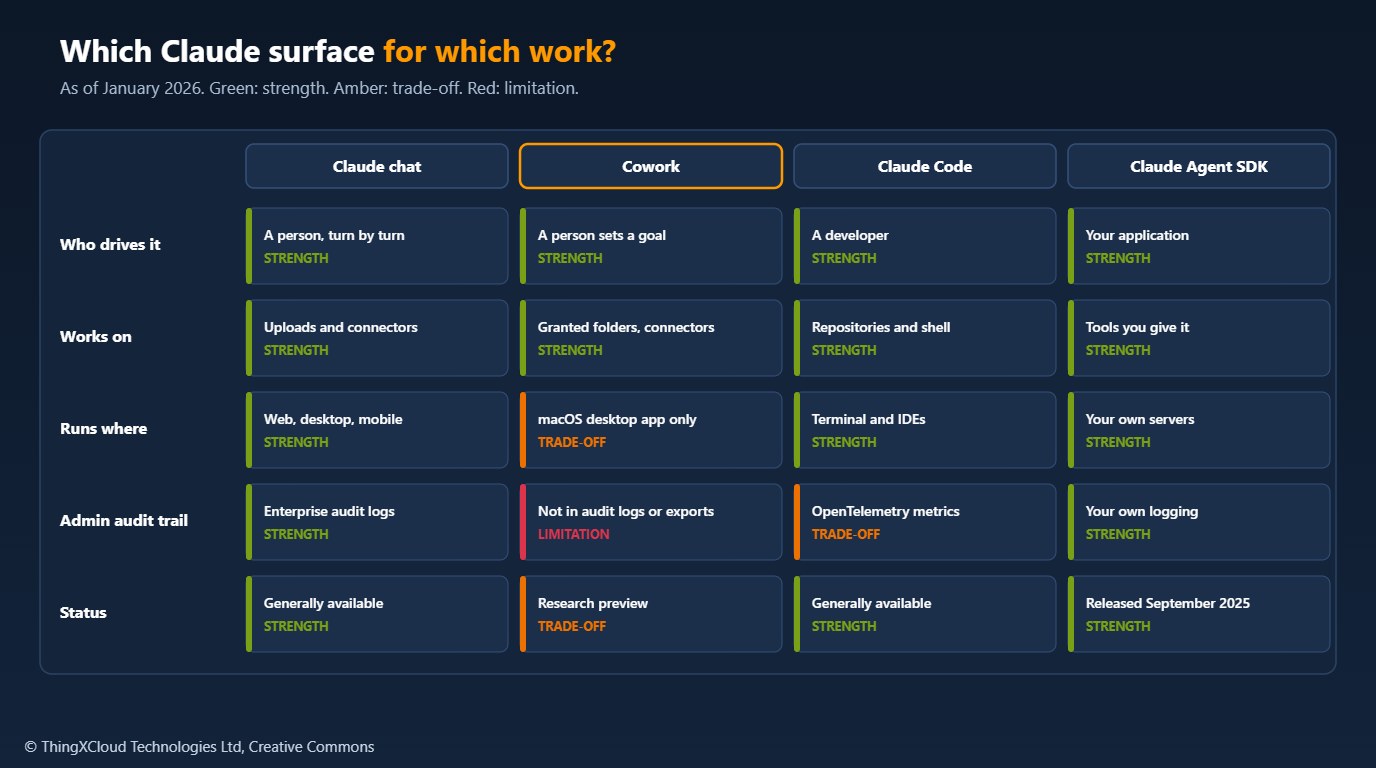
Pilot Cowork with a small group on internal, non-regulated work where the output is a file a person reviews before it goes anywhere. Keep regulated and personal data out until there is an organisation-level audit trail. Use the Claude Agent SDK when an agent must touch regulated systems or run without a person in the loop, so that logging, retention and permissions are yours. Use Claude Code for software work, where repositories, tests and review already give you a record.
The choice changes when Cowork activity appears in audit logs and the Compliance API, and per-group controls arrive. Until then, its research-preview label is a real constraint, not a formality.
folder_check.py was tested with Python 3.13 and pytest==9.0.2: fourteen tests cover the card, IBAN and PPS number checksums, credential and private key detection, masking of matched values, symbolic links that escape the folder, and binary files. The sample output above is from a run against a test folder. The script was not run with Cowork itself. Product facts come from Anthropic’s announcement and help pages and from Simon Willison’s launch-day inspection of the app, credited where used.
Key takeaways
- Cowork, released on 12 January 2026, is a research preview in the Claude Desktop app for macOS: Claude works on folders you grant, with connectors, document skills and optional Claude in Chrome.
- It runs tasks in a local virtual machine with only granted folders mounted, but edits and deletions in those folders are real.
- Prompt injection through files, connectors and web pages is an acknowledged, unsolved risk; grant narrow working copies and trusted sites only.
- For Team and Enterprise in January 2026, Cowork is on by default, has one organisation-wide switch, and is not captured in audit logs, the Compliance API or exports.
- There is no Cowork SDK; build programmatic agents with the Claude Agent SDK. The constitution shapes model behaviour but is not a control you configure.
What task would you trust an agent with first in your organisation, and what would you need to see in the logs before widening it? Share your view in the comments.
The complete sample for this article is on GitHub: nithinmohantk/blog-samples-working-repo/cowork-folder-check. Clone it with git clone https://github.com/nithinmohantk/blog-samples-working-repo.git and open the cowork-folder-check folder. Its README says how to run it and what has been verified.
Glossary
- Cowork
- A research-preview agent in the Claude Desktop app that carries out multi-step tasks on folders and tools the user grants.
- Research preview
- Anthropic’s label for an early release whose features, limits and controls may change.
- Connector
- An authorised link from Claude to an external service such as Google Drive or Slack.
- Skill
- A packaged set of instructions and resources that improves how Claude does one kind of task, such as creating presentations.
- Claude in Chrome
- A browser extension that lets Claude act in the user’s own Chrome browser.
- Prompt injection
- Text in content an agent reads that tries to change the agent’s instructions or plan.
- Claude Agent SDK
- Anthropic’s Python and TypeScript libraries for building agents on the same harness as Claude Code.
- Compliance API
- An Enterprise feature that gives programmatic access to activity data for compliance tools.
- Constitution
- Anthropic’s published description of the values and priorities Claude is trained towards.
- Luhn check
- The checksum used by payment card numbers, used here to avoid flagging arbitrary digit strings.
References & Further Reading
- → Cowork: Claude Code for the rest of your work— Anthropic’s announcement, with dated access updates
- → First impressions of Claude Cowork— Simon Willison, 12 January 2026, including the virtual machine
- → Use Cowork on Team and Enterprise plans— Admin controls, audit logging and storage during the preview
- → Claude’s new constitution— Anthropic, 22 January 2026
- → Building agents with the Claude Agent SDK— The renamed Claude Code SDK, 29 September 2025
- → Sample code for this article— Folder pre-flight check and tests
Discover more from C4: Container, Code, Cloud & Context
Subscribe to get the latest posts sent to your email.
