
On this page
Context windows have grown quickly: GPT-4 Turbo and GPT-4o accept 128,000 tokens, and other models go further. The limit still matters, for three reasons. Everything in the request and the response shares it, so a long prompt leaves less room for the answer. Every input token is billed and adds latency. And models do not use all positions in a long prompt equally well, so more context is not automatically better context.
This article is about budgeting: deciding before each request how many tokens each part of the prompt may use, and which items win when there is not enough room. It covers what competes for the window, a planning order that fails clearly instead of silently truncating, how to prioritise within conversation history and retrieved passages, and what to log. Summarisation and other ways of compressing content are a separate topic and are only touched on here. The sample code is a small planner that implements the approach.
What competes for the window
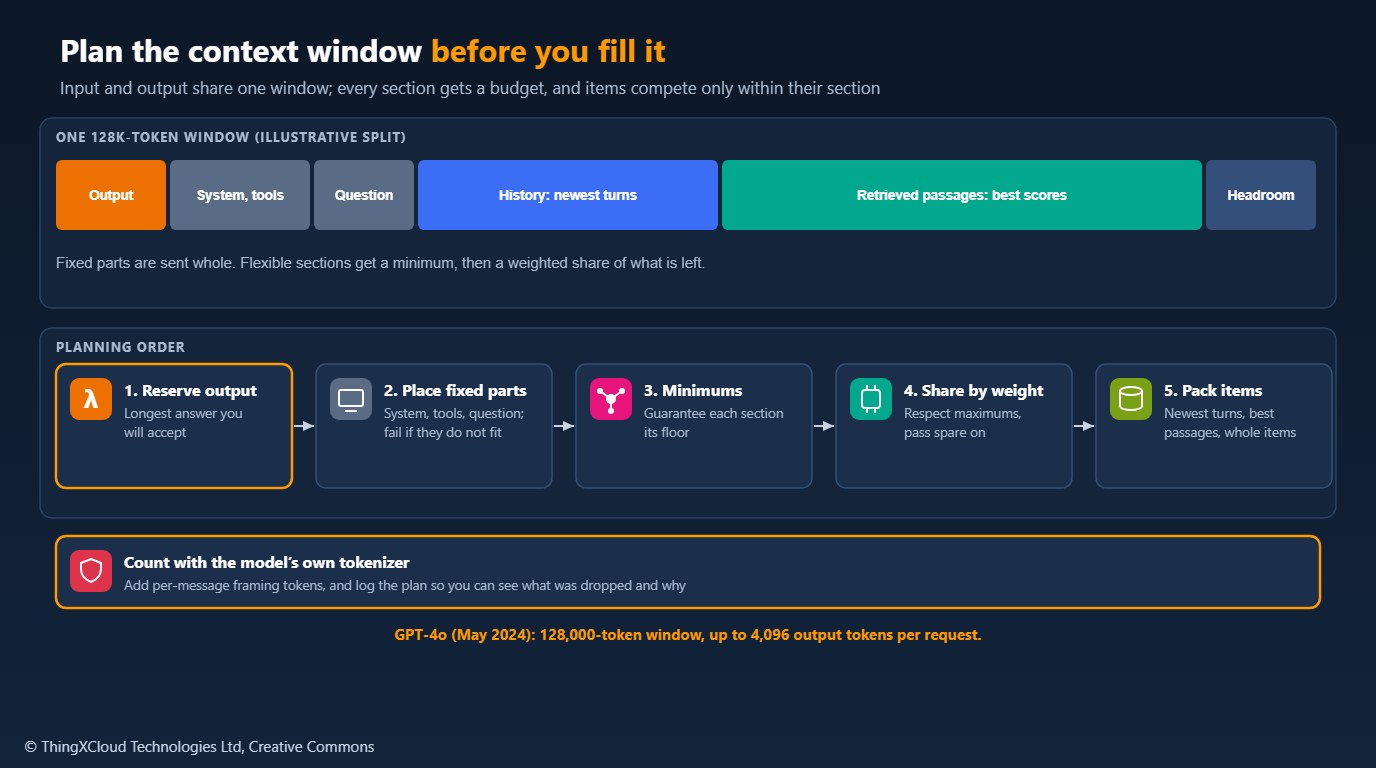
- The output. The window holds input and output together, and providers also cap output per request; GPT-4o, released in May 2024, allows up to 4,096 output tokens. Reserve what the longest acceptable answer needs.
- Fixed parts. The system prompt, tool or function definitions, output-format instructions and the user’s current question. These are sent whole or the request is wrong.
- Conversation history. Earlier turns, where recent ones usually matter most.
- Retrieved content. Passages from search or a vector store, where relevance matters most.
- Framing overhead. Chat formats wrap each message in a few tokens of structure. Small per message, noticeable over a long history.
Token counts depend on the tokenizer, and different models use different ones; GPT-4o’s tokenizer, for example, produces fewer tokens than GPT-4 Turbo’s for many non-English languages. Count with the tokenizer of the model you call. The tokenization article on this blog explains why counts vary.
Plan in a fixed order
A planner that runs before every request removes guesswork. The order matters: reserve output, place the fixed parts, give each flexible section a guaranteed minimum, share the remaining space by weight (respecting maximums and passing unused space on), and only then choose items within each section. If the fixed parts do not fit, fail with a clear error rather than cutting the system prompt or the question.
%%{init: {'theme': 'base', 'themeVariables': {'primaryColor': '#FFF3E0', 'primaryTextColor': '#232F3E', 'primaryBorderColor': '#FF9900', 'lineColor': '#232F3E', 'clusterBkg': '#F8FAFC', 'clusterBorder': '#CBD5E1', 'edgeLabelBackground': '#FFFFFF', 'nodeTextColor': '#232F3E'}}}%%
flowchart TD
    A["Window minus output reserve"] --> B{"Fixed parts fit?"}
    B -- "No" --> X["Fail clearly: shorten the<br/>system prompt or tools"]
    B -- "Yes" --> C{"Section minimums fit?"}
    C -- "No" --> X
    C -- "Yes" --> D["Share the rest by weight,<br/>respect maximums"]
    D --> E["History: newest turns first,<br/>send in time order"]
    D --> F["Passages: highest score first"]
    E --> G["Log tokens per section<br/>and items dropped"]
    F --> G
    classDef aws fill:#FFF3E0,stroke:#FF9900,stroke-width:2px,color:#232F3E
    classDef ok fill:#F0FFF4,stroke:#1D8102,stroke-width:2px,color:#145202
    classDef warn fill:#FEF2F2,stroke:#D13212,stroke-width:2px,color:#991B1B
    class A,B,C,D,E,F aws
    class G ok
    class X warn
The sample implements exactly this. Token counting is passed in, so it works with any tokenizer, and it returns what was kept, tokens per section and the number of items dropped:
"""Plan a prompt against a model's context window before you send it.

A context window is shared by everything in the request and the response:
system prompt, user input, conversation history, retrieved documents, tool
definitions, and the tokens the model will generate. This module reserves
space for the output, places the parts that must be sent whole, and then
divides what is left between flexible sections by priority, packing each
section's items in its own order (newest turns first for history, highest
score first for retrieved passages).

Token counting is injected. Use the tokenizer of the model you call (for
example tiktoken's o200k_base for GPT-4o or cl100k_base for GPT-4 Turbo);
the tests use a whitespace counter so they run anywhere.
"""
from __future__ import annotations

from dataclasses import dataclass, field
from typing import Callable

Counter = Callable[[str], int]


@dataclass
class Item:
    text: str
    score: float = 0.0          # relevance, for retrieved passages
    order: int = 0              # position in time, for conversation turns


@dataclass
class Section:
    name: str
    items: list[Item]
    weight: float = 1.0         # share of the flexible space relative to other sections
    min_tokens: int = 0         # guaranteed before weights apply
    max_tokens: int | None = None
    keep: str = "best"          # "best" = highest score first, "newest" = latest order first


@dataclass
class Plan:
    window: int
    output_reserve: int
    fixed_tokens: int
    sections: dict[str, list[Item]] = field(default_factory=dict)
    used: dict[str, int] = field(default_factory=dict)
    dropped: dict[str, int] = field(default_factory=dict)

    @property
    def prompt_tokens(self) -> int:
        return self.fixed_tokens + sum(self.used.values())

    @property
    def headroom(self) -> int:
        return self.window - self.output_reserve - self.prompt_tokens


class BudgetError(ValueError):
    pass


def _ordered(section: Section) -> list[Item]:
    if section.keep == "newest":
        return sorted(section.items, key=lambda i: i.order, reverse=True)
    if section.keep == "best":
        return sorted(section.items, key=lambda i: i.score, reverse=True)
    raise ValueError(f"{section.name}: keep must be 'best' or 'newest'")


def _allocate(space: int, sections: list[Section]) -> dict[str, int]:
    """Give each section its minimum, then share the rest by weight, respecting maximums."""
    mins = sum(s.min_tokens for s in sections)
    if mins > space:
        raise BudgetError(f"section minimums need {mins} tokens but only {space} are free")
    alloc = {s.name: s.min_tokens for s in sections}
    remaining = space - mins
    open_ = [s for s in sections if s.max_tokens is None or alloc[s.name] < s.max_tokens]
    while remaining > 0 and open_:
        total_w = sum(s.weight for s in open_)
        given = 0
        for s in open_:
            share = int(remaining * s.weight / total_w)
            cap = (s.max_tokens - alloc[s.name]) if s.max_tokens is not None else share
            add = min(share, cap)
            alloc[s.name] += add
            given += add
        remaining -= given
        open_ = [s for s in open_ if s.max_tokens is None or alloc[s.name] < s.max_tokens]
        if given == 0:
            break                                   # rounding left a few tokens; stop
    return alloc


def plan(window: int, output_reserve: int, fixed: list[str], flexible: list[Section],
         count: Counter, per_message_overhead: int = 0) -> Plan:
    """Fit `fixed` texts whole and pack `flexible` sections into the remaining space.

    `per_message_overhead` adds the provider's framing tokens per message
    (chat formats wrap each message in a few tokens); check your provider.
    """
    if output_reserve <= 0 or output_reserve >= window:
        raise BudgetError("output_reserve must be positive and smaller than the window")
    fixed_tokens = sum(count(t) + per_message_overhead for t in fixed)
    space = window - output_reserve - fixed_tokens
    if space < 0:
        raise BudgetError(f"fixed content needs {fixed_tokens} tokens; only "
                          f"{window - output_reserve} fit after reserving {output_reserve} for output")
    result = Plan(window, output_reserve, fixed_tokens)
    for name, budget in _allocate(space, flexible).items():
        section = next(s for s in flexible if s.name == name)
        kept, used = [], 0
        for item in _ordered(section):
            cost = count(item.text) + per_message_overhead
            if used + cost <= budget:
                kept.append(item)
                used += cost
        if section.keep == "newest":
            kept.sort(key=lambda i: i.order)        # send history in chronological order
        result.sections[name] = kept
        result.used[name] = used
        result.dropped[name] = len(section.items) - len(kept)
return resultA question-answering assistant over documents should give retrieved passages most of the flexible space and keep only the last few turns. A long-running conversational assistant needs the reverse. Set weights and minimums per use case, not once for the whole platform.
Prioritise within each section
Conversation history is usually trimmed from the oldest end, keeping whole turns (a user message and the reply together) so the model never sees an answer without its question. Send the kept turns in chronological order. Facts the user stated early and that must persist, such as a name, an account or a constraint, are better extracted into a short structured note in the fixed part of the prompt than left to survive trimming.
Retrieved passages are ranked by relevance score and packed until the section is full, as whole passages. Cutting a passage in half can remove the sentence that made it relevant. If many near-duplicate passages rank highly, remove duplicates before packing so the budget buys different evidence.
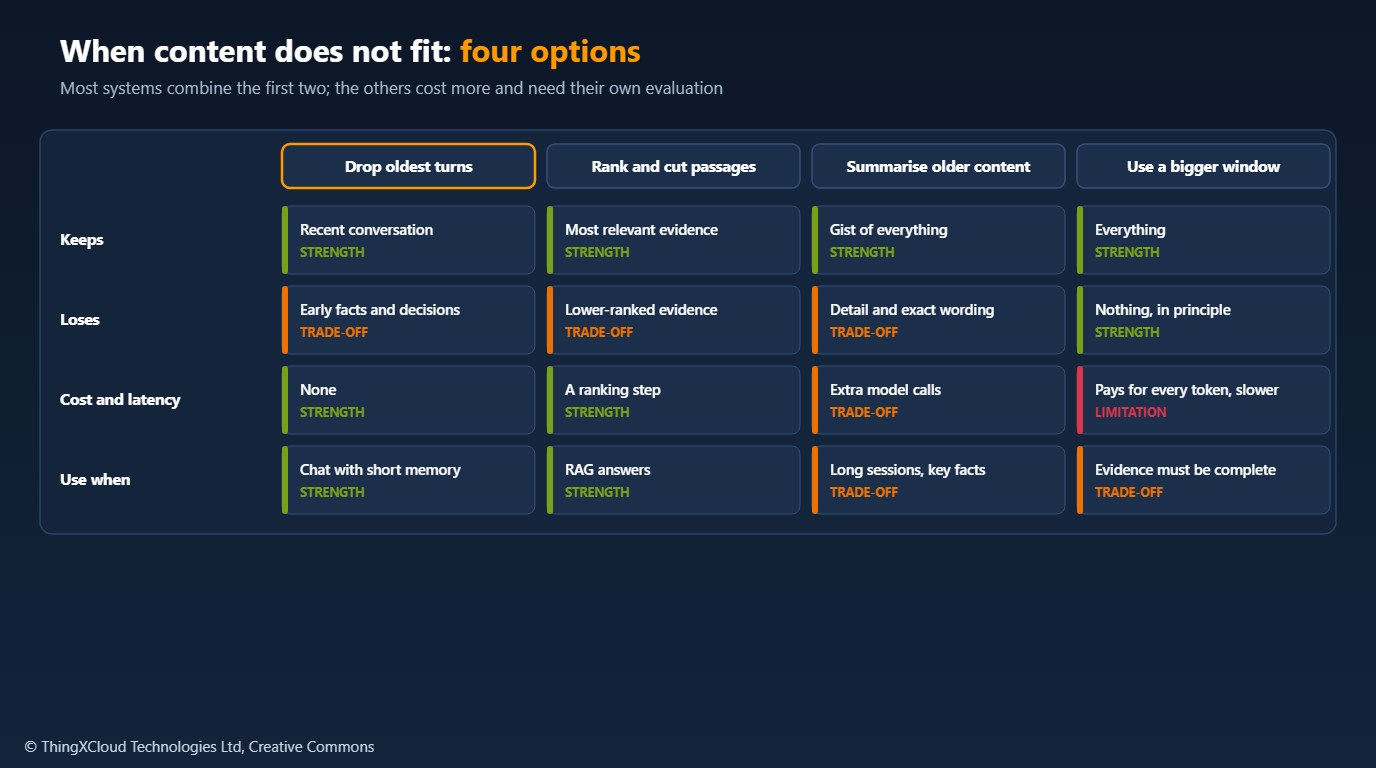
If a request exceeds the window, providers either reject it or, in some client libraries and frameworks, cut content silently. Either way you lose control of what the model sees. Plan the request yourself, and treat a planner error as a bug to fix, not a case to retry.
Log the plan
Record, for each request, the tokens used by each section, the number of items dropped and the headroom left. These figures explain otherwise puzzling answers (the passage that held the answer was ranked seventh and dropped), show whether a bigger window or a different split would help, and give cost per request by feature. Log counts and identifiers, not the prompt text, unless you have decided to store prompts and protect them accordingly.
Everything packed into a prompt is sent to the model provider. Apply the same access rules to retrieved passages as to the user who asked: do not retrieve documents the user could not open, and filter personal data that the task does not need before it enters the budget.
budget.py was tested with Python 3.12 and pytest==8.2.1, using a whitespace token counter: eight tests cover the output reserve and fixed parts, newest-turn selection returned in chronological order, best-score selection, weights and minimums, maximums with spare space passed on, per-message overhead, and clear errors when fixed content or minimums cannot fit. GPT-4o’s window and output limit are from its May 2024 release.
Key takeaways
- Input and output share the window: reserve the output first.
- Send fixed parts whole and fail clearly if they do not fit; never let the API truncate silently.
- Give flexible sections minimums and weights that match the task, then prioritise within each section.
- Keep whole turns and whole passages; move must-keep facts into a structured note.
- Count with the model’s tokenizer, include framing overhead, and log tokens per section and items dropped.
How do you split the context window between history and retrieved content in your applications? Share your weights in the comments.
The complete sample for this article is on GitHub: nithinmohantk/blog-samples-working-repo/context-budget. Clone it with git clone https://github.com/nithinmohantk/blog-samples-working-repo.git and open the context-budget folder. Its README says how to run it and what has been verified.
Glossary
- Context window
- The maximum number of tokens a model can handle in one request, input and output together.
- Token budget
- A planned allocation of the context window to each part of a prompt.
- Output reserve
- Tokens set aside for the model’s answer.
- Fixed part
- Prompt content that must be sent whole, such as the system prompt and the question.
- Framing overhead
- Tokens a chat format adds around each message.
- Retrieved passage
- A chunk of text returned by search to ground the model’s answer.
References & Further Reading
- → Tokenization for LLM Engineers (this blog)— Why token counts differ by tokenizer and language
- → GPT-4o— Release in May 2024, 128K context and 4,096-token output limit
- → Sample code for this article— Context window budget planner
Discover more from C4: Container, Code, Cloud & Context
Subscribe to get the latest posts sent to your email.
